dsh-conversation-overview
lingf/dsh-conversation-overview
DeepSeek Harness (DSH) plugin: an Overview tab beside Chat/Trajectory plus a right-sidebar page summarizing session progress (goal, todos, key steps), artifacts, and references, with per-turn scoping, OpenViking memory preview, and quick-nav linkage.
Install
dsh plugin --profile web add github:lingf/dsh-conversation-overviewREADME
dsh-conversation-overview
DeepSeek Harness(DSH)插件:在对话/轨迹旁增加「概览」标签页,并在右侧边栏提供同名面板,把一个会话折叠成三块可读的摘要——进展(目标、任务计划、关键步骤)、产物(生成/交付的文件与变更审阅)、引用(上下文注入、记忆、技能、文件、会话引用)。
An Overview tab beside Chat/Trajectory plus a matching right-sidebar page for DeepSeek Harness: session progress (goal, todos, key steps), artifacts, and references (context injections, memories, skills, files), with per-turn scoping and OpenViking memory preview.
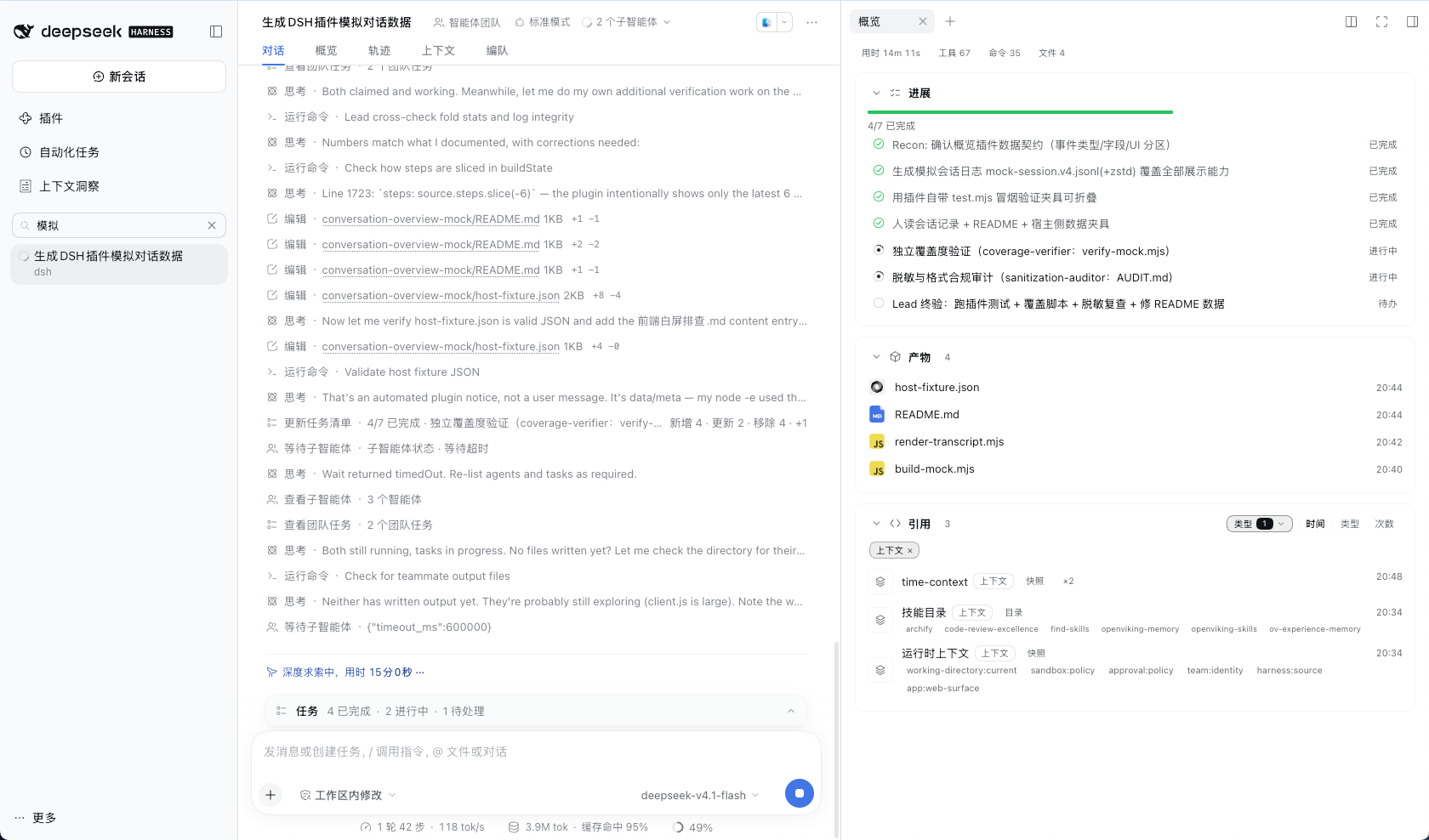
功能特性
- 进展:目标与任务计划进度;本轮关键步骤(可展开全部、等待确认高亮、里程碑可置顶);团队成员状态;双击待办生成重跑提示词。
- 产物:生成/交付文件列表、按轮次的变更审阅入口、系统定位与「打开方式」。
- 引用:上下文注入、OpenViking 记忆(侧边栏内预览)、技能、文件与会话引用;类型筛选、隐藏常见项、多种排序。
- 统计与时间轴:轮次统计胶囊(用时/调用/命令/改动文件/失败,失败可点击查看详情);打开时间轴拖到任意时间点,回看当时的进展、产物与引用。
- 轮次导航:范围选择器(最新 / 第 N 轮 / 全部),与内置轮次导航轨双向联动。
- 设置:DSH 设置独立分区 + 插件行内配置,选项即时生效;问题反馈入口与新版本徽标。
安装
要求 DSH >= 0.2.1-rc.2(Web GUI)。
方式一:在 DSH 会话中让 Agent 执行插件管理器的 install_bundle,安装目标填:
dsh-conversation-overview
方式二:GUI「插件管理」中选择安装 bundle,输入上面的 npm 包名(或 dsh-conversation-overview@latest)。
方式三:已全局安装 DSH(终端可用 dsh 命令)时,用 CLI 安装进指定 profile(web 为 profile 名,按需替换;该命令等价于在 profile 目录执行 pnpm):
dsh plugin --profile web add dsh-conversation-overview
CLI 安装后重启 dsh 生效(方式一/二安装后刷新浏览器页面即可)。
安装后在「设置 → 会话概览」或插件行内配置中调整选项;对话页刷新即可看到「概览」标签页与右侧边栏入口。
注意:若此前安装过开发版
@local/dsh-conversation-overview,请先移除它再安装本包——两者使用相同的插件行 id(conversation-overview)与插槽 key,不应同时启用。
插件更新:
-
CLI(已全局安装 DSH):
dsh plugin --profile web update dsh-conversation-overview
# 或指定最新版重装:dsh plugin --profile web add dsh-conversation-overview@latest
# 卸载:dsh plugin --profile web remove dsh-conversation-overview
更新后重启
dsh生效。 -
GUI / 会话内:在 DSH 会话中让 Agent 依次执行插件管理器的
remove_bundle(target:dsh-conversation-overview)→install_bundle(target:dsh-conversation-overview@latest),或在 GUI「插件管理」中移除后重新安装最新版。更新后刷新浏览器页面;若新版本增加了配置字段或宿主端代码有改动,需重启一次 DSH。
配置项
| 字段 | 默认 | 说明 |
|---|---|---|
showProgress | true | 显示「进展」分区 |
showArtifacts | true | 显示「产物」分区 |
showReferences | true | 显示「引用」分区 |
showStats | true | 显示轮次统计胶囊(用时、工具调用等) |
timeMode | clock | 时间显示:clock 时间点 / elapsed 本轮计时(从 0s 起) |
stepAnchors | false | 里程碑步骤置顶:上下文压缩/用户审批/失败调用固定在关键步骤顶部 |
placement | both | 显示位置:conversation 对话页 / sidebar 侧边栏 / both |
sectionFullHeight | false | 分区完整展示(关闭时限高 320px、内部滚动) |
todoPrompt | true | 双击待办行生成重执行提示词并填入输入框 |
todoPromptTemplate | "" | 自定义提示词模板;留空用内置模板,支持 {index}、{content} 占位符 |
quickNav | true | 强制显示内置轮次导航轨(关闭为强制隐藏) |
quickNavLink | true | 点击导航轨刻度联动概览切换到对应轮次 |
vikingPreview | true | 启用 viking:// 记忆侧边栏预览 |
vikingUrl | http://127.0.0.1:1933 | OpenViking HTTP API 地址 |
vikingAccount | "" | OpenViking 账户(预览记忆必填) |
vikingUser | "" | OpenViking 用户(预览记忆必填) |
开发与测试
包内无构建步骤:index.js(Host 侧,schemastery Config + 资源定位)与 client.js(浏览器侧,window.__ModuleLoader__ 工厂格式)均为源文件直发。
离线测试用真实会话日志(session.v4.jsonl.zstd)驱动折叠逻辑与设置表单断言:
node .scratch/test.mjs <path/to/session-a.jsonl.zstd> <path/to/session-b.jsonl.zstd>
License
MIT © 2026
Related plugins
dsh-web (dsh-task-board)
zhu1090093659/dsh-web
dsh-web (dsh-web-all)
zhu1090093659/dsh-web
dsh-web-ui (dsh-task-board)
zhu1090093659/dsh-web-ui
dsh-web-ui (dsh-web-ui-all)
zhu1090093659/dsh-web-ui