dsh-fulltext
literaf/dsh-fulltext
Indexed full-text excerpt search through AI4Scholar with a dedicated reading workspace, source-type filters and saved offline HTML/CSV reports; optional AI synthesis preserves original passages and source metadata.
Install
dsh plugin --profile web add github:literaf/dsh-fulltextREADME
License change in 0.2.0: AGPL-3.0-only with separate commercial licensing. Earlier MIT grants remain valid. Details.
Ai4Scholar Fulltext
Find evidence in the original paper. A DeepSeek Harness plugin for indexed full-text excerpts, interactive HTML reports, and offline HTML/CSV delivery.
Screenshots
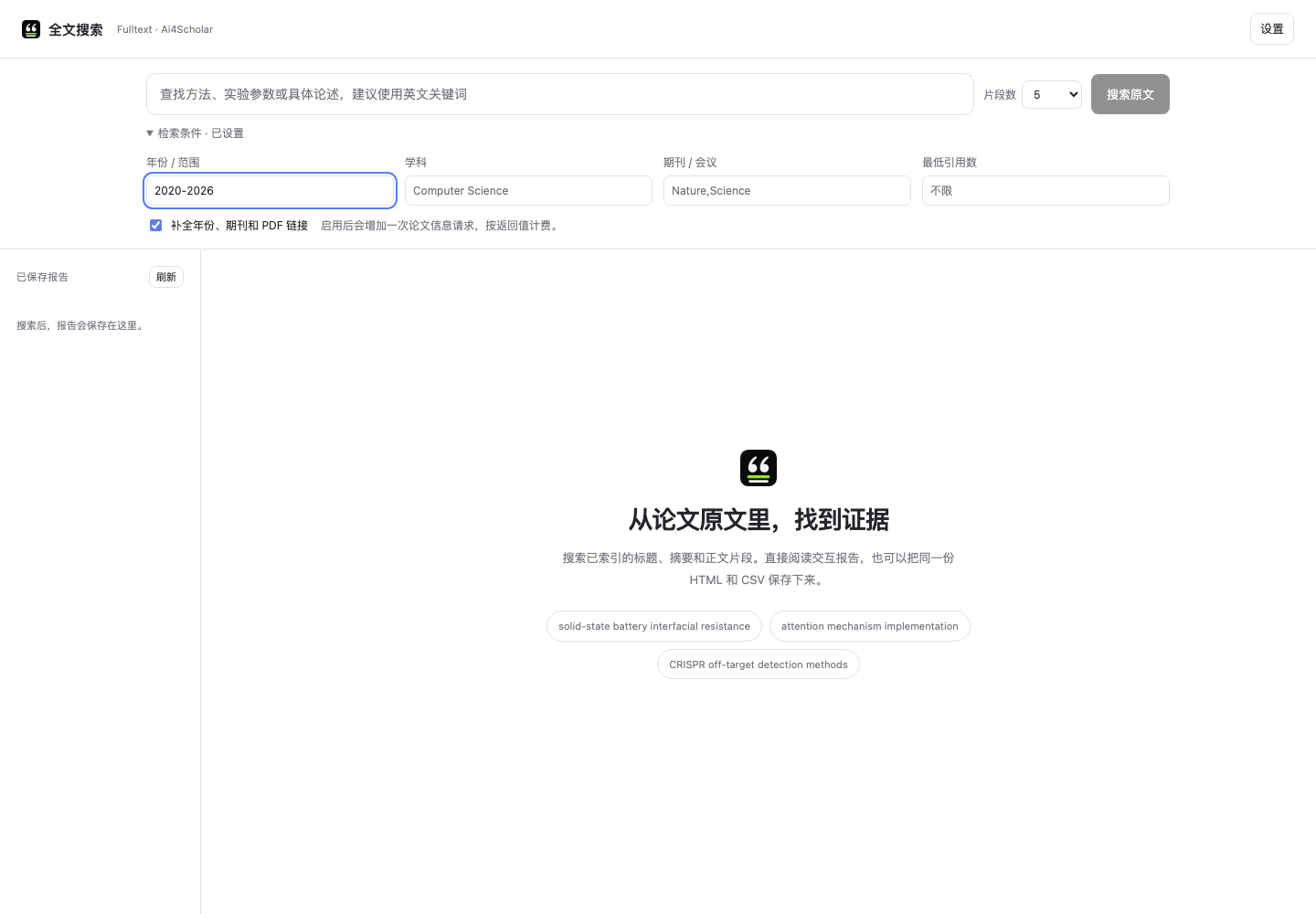
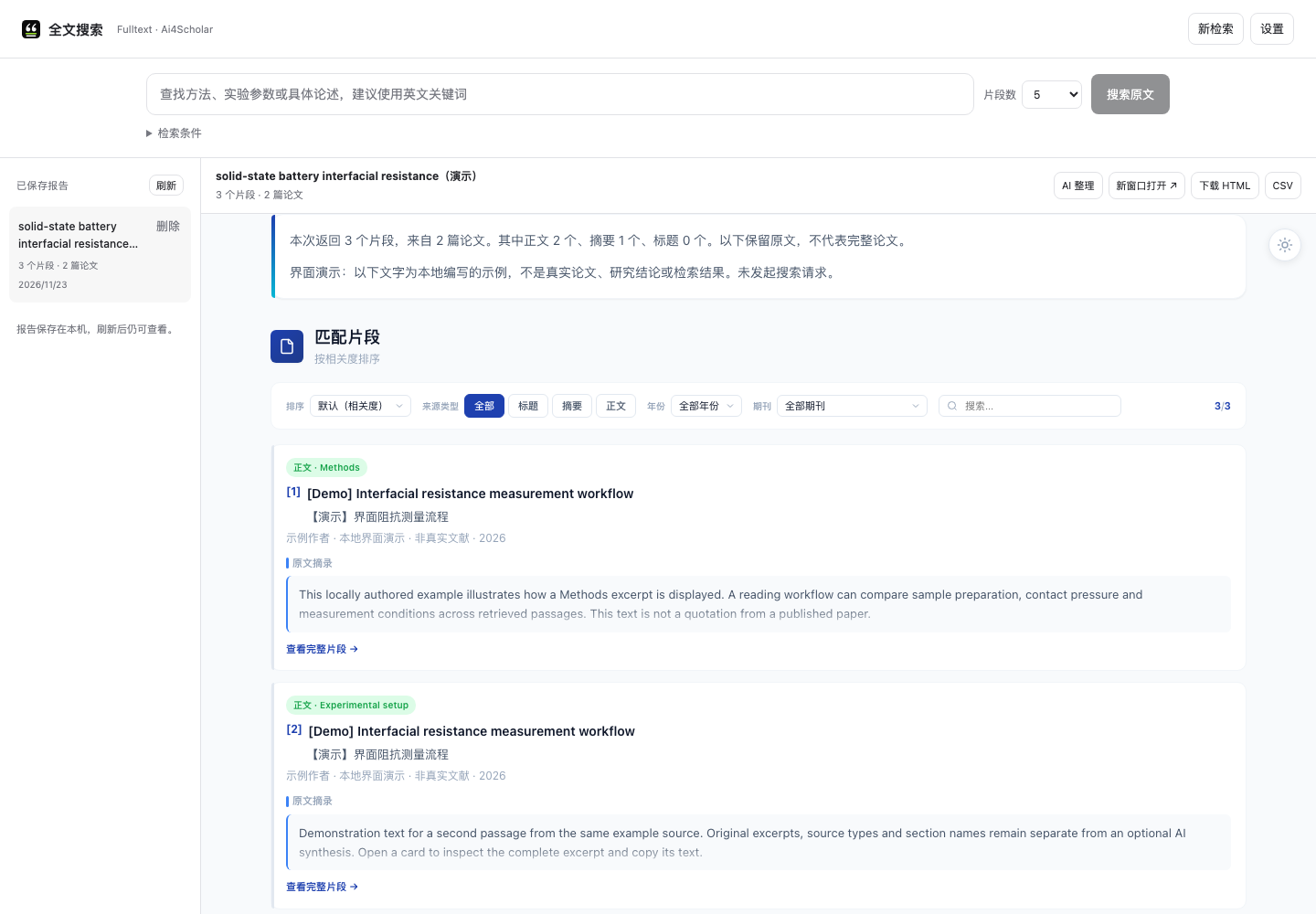
Screenshots use the actual UI components with local demonstration data. Example report content does not represent real papers or search results.
Install
In Harness, open Plugins, install dsh-fulltext by package name, then restart Harness. For a Desktop CLI installation, first open Desktop once to initialize its profile, fully quit it, and run:
dsh plugin --profile desktop add dsh-fulltext@0.2.1
For Web, replace --profile desktop with --profile web; use the actual profile name for custom setups.
The workspace interface is currently in Chinese. Native pages and authenticated report access have been checked with Harness 0.2.2-rc.1; use a current Harness release for these features.
Configure your Key
Use any of these entrances:
- Sidebar 全文搜索 → 设置 (Full-text Search → Settings).
- Plugins → Installed → dsh-fulltext.
- Settings → 全文搜索.
Save an independent AI4Scholar Key there, or reuse an existing AI4SCHOLAR_API_KEY automatically. The independent FULLTEXT_API_KEY takes precedence. Removing it restores the shared Key. Saving/removing an independent Key leaves the shared Key untouched. Keys are stored through the native Harness credentials service; environment variables with these names also work.
Click 获取密钥 (Get API key) beside the key field, sign in to ai4scholar.net, and create a key in the Open Platform. You can install this plugin without the comprehensive Ai4Scholar plugin.
Search and read
Open 全文搜索 for direct searches, or send:
/fulltext Find experimental descriptions of solid-state battery interfacial resistance. Return 5 excerpts and generate HTML and CSV reports.
- Search indexed titles, abstracts and body passages in Semantic Scholar, with year, field, venue and minimum-citation filters.
- Optionally enrich unique source papers with year, venue and available open-access PDF links in one batch request.
- Read the same interactive HTML in the workspace, a native deliverable preview, a separate window or a saved offline file. Report filters, sort, source details, copy and six reading themes work locally.
- Use AI 整理 to prepare a conversation draft for an existing report. The model can add a numbered synthesis and Chinese titles while preserving original excerpts and source metadata. Drafts are never sent automatically or overwritten.
Search coverage depends on the index; results may come from titles, abstracts or body text. This plugin retrieves excerpts. A listed PDF link is a separate source, not a promise that a complete PDF was downloaded.
Files and fees
Each search saves report.html, report.csv and report.json in $DSH_HOME/fulltext/reports/<report-id>/ (default: ~/.dsh/fulltext/reports/). The workspace lists the newest 100 reports; the sidebar can delete a report and all three local files after confirmation. HTML includes its styles/scripts and needs no remote assets. CSV is UTF-8 with a BOM and spreadsheet-formula protection.
Search and optional metadata enrichment are billed by AI4Scholar. Every report records the returned charges. Disable enrichment for a search-only request. Opening, filtering, updating and exporting saved reports make no new search requests. Model usage for synthesis/translation is separate.
| Tool | Purpose |
|---|---|
search_fulltext | Search excerpts and save HTML/CSV/JSON |
get_fulltext_report | Read an existing report without another search |
update_fulltext_report | Add synthesis/title translations and regenerate existing files |
Advanced configuration
- id: fulltext
  config:
    defaultLimit: 10
    apiKeyEnv: FULLTEXT_API_KEY
Also supports baseUrl, requestTimeoutMs and reportDirectory. Keep secrets in the credentials service or environment, rather than the patch file. Report previews/downloads use the host's authenticated owner-only channel and a sandboxed HTML view.
Development
pnpm install --frozen-lockfile
pnpm run typecheck
pnpm test
pnpm pack --pack-destination /tmp
Release checks cover Node 22/24 and the current published Harness page contracts. Real API checks covered title, abstract and body excerpts, enrichment and returned fees; simulated model checks covered report updates and native HTML/CSV delivery. See release policy.
The report design is adapted from Ai4Scholar's original ai4s-fulltext skill. Earlier MIT-licensed code retains its original terms; see LICENSING.md.
License
Starting with 0.2.0, this plugin's AI4Scholar-authored code uses AGPL-3.0-only. Commercial use is allowed under AGPL; a separate written commercial license is available for other terms covering rights AI4Scholar owns.
Earlier releases through 0.1.4 keep their original MIT grants. Third-party licenses remain applicable. See licensing details, third-party notices and corresponding source.
Related plugins
archify (deepseek-harness)
tt-a1i/archify
WeKnora (dsh-weknora)
tencent/weknora
next-ai-draw-io (dsh-plugin)
dayuanjiang/next-ai-draw-io
weknora
tencent/weknora