dsh-plugin-moss-tts
litterbit/dsh-plugin-moss-tts
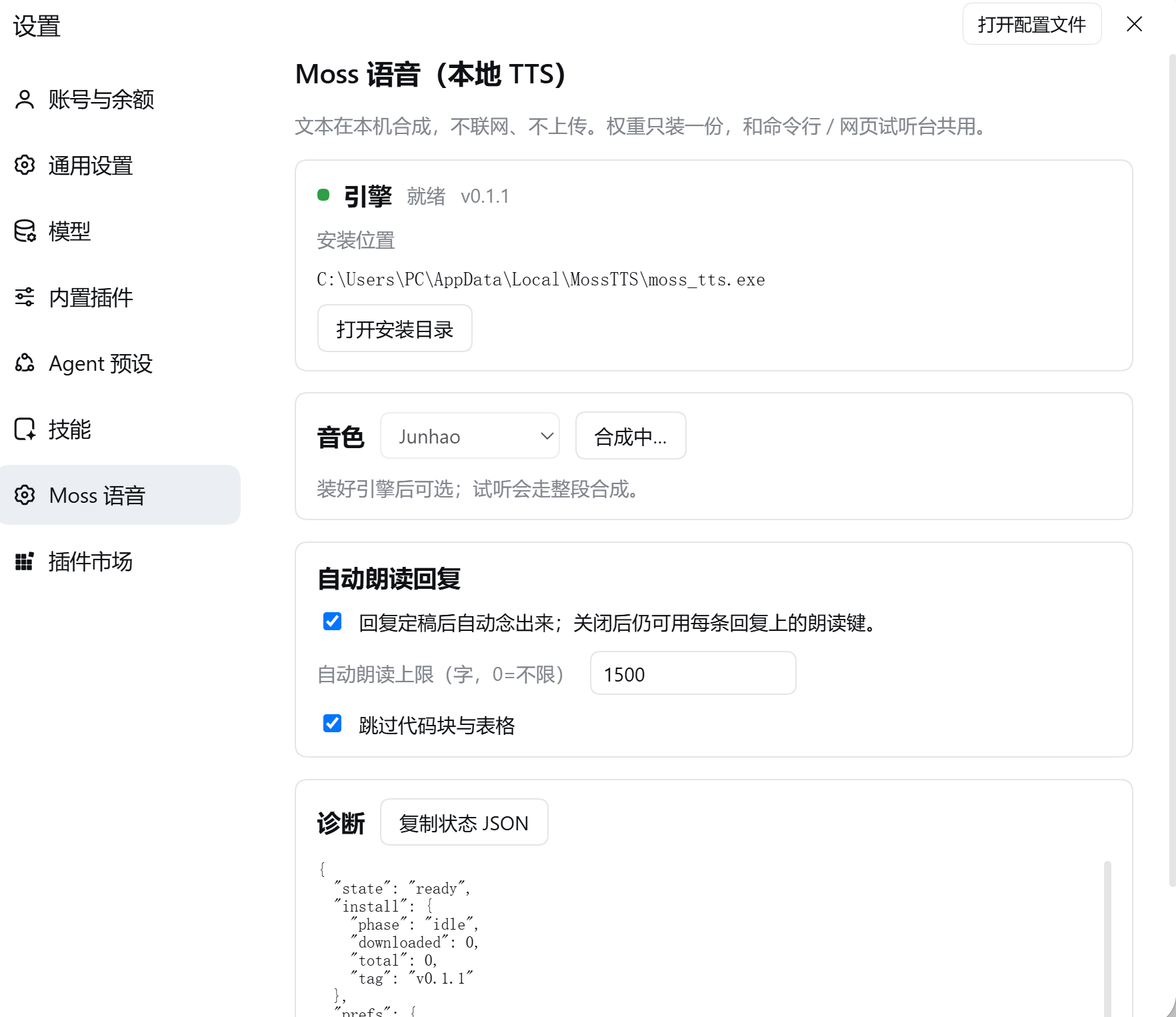
Reads Harness replies aloud with the MOSS-TTS-Nano-100M C++ CPU engine: fully offline with no API key, one-click engine download verified against the release sha256sums.txt, auto-read of settled replies plus a read button on every reply, and playback that starts while synthesis continues. The weights are installed once and shared with the companion CLI and web playground. Windows x64 only, because the engine ships for that platform only.
Install
dsh plugin --profile web add github:litterbit/dsh-plugin-moss-ttsREADME
dsh-plugin-moss-tts
简体中文 · Version 0.1.1 · Apache-2.0 · Engine repo
Local text-to-speech for DeepSeek Harness, powered by the MOSS-TTS-Nano-100M C++ CPU engine. Everything is synthesized on this machine; text never leaves it, and the weights are installed once and shared with the CLI and the web playground.
Harness assistant reply ──► auto-read / per-message read button
                                 │
                     POST /moss-tts/stream (same origin, no CORS)
                                 │
        host plugin: engine lifecycle + verified download + paced proxy
                                 │  stdin/stdout JSON
                 moss_tts.exe --stdio (resident, weights loaded once)
                                 │
            browser AudioWorklet ring buffer ──► speakers
Requirements
| Item | Requirement |
|---|---|
| DeepSeek Harness | 0.2.1-rc or newer (client slot contract) |
| OS | Windows x64 (the engine ships for that platform only) |
| Disk | ~170 MB (engine + weights), installed once |
Install
Desktop app: sidebar Plugins → Add plugin → paste
github:litterbit/dsh-plugin-moss-tts#main
CLI profile (a profile the desktop app does not own):
dsh plugin --profile <name> add github:litterbit/dsh-plugin-moss-tts#main
Restart DSH afterwards. You get a "Moss Speech" settings page, a speaker toggle at the left
of the composer, a read button on every assistant reply, and five moss_tts_* tools.
Installing from a local checkout:
dsh plugin --profile <name> add D:\path\to\dsh-plugin-moss-tts(an absolute path is required).
First run: install the engine
Open Settings → Moss Speech → Download engine. The plugin fetches
MossTTS-win-x64-full.zip (~160 MB) from the
engine releases, verifies it against the
release's sha256sums.txt, and extracts it into %LOCALAPPDATA%\MossTTS.
- Already installed via the CLI or the web playground? It is reused; nothing is downloaded twice.
- Downloads resume after an interruption; cancel removes only the partial file.
- Follows your system proxy:
HTTPS_PROXY/HTTP_PROXYfirst, then the Windows Internet settings (ProxyEnable+ProxyServer, via a CONNECT tunnel). A machine whose browser can open GitHub needs no extra configuration; setNO_PROXY=*to force direct connections. - Behind a blocked network, point
engineUrl+engineSha256at a mirror in the plugin config, or setautoDownload: falseand manage the install yourself.
Usage
| Entry point | What it does |
|---|---|
| 🔊 left of the composer | Auto-read. Reads each reply when it settles; while speaking the same button is ⏹ and stops it |
| 🔊 on a reply | Reads that reply only (whole text, ignores the auto-read limit) |
| Settings → Moss Speech | Voice, auto-read limit, skip code blocks, preview, engine state and paths |
moss_tts_say | Agent-initiated speech (plays locally, or save_to writes a WAV) |
moss_tts_voices / moss_tts_stop / moss_tts_clone / moss_tts_engine | Voices / stop / clone a voice / engine status and install |
Markdown is cleaned before speaking: fenced code and tables are skipped, links keep their text, heading and list markers are stripped, and long replies are cut on a sentence boundary at the auto-read limit (default 1500 characters, 0 = unlimited).
Privacy
- Synthesis is fully local: no network, no uploaded text, no telemetry.
- The only outbound traffic is the engine download you trigger from the settings page.
- Cloned voices live under
%LOCALAPPDATA%\MossTTS\userdata\voices\user\.
How it relates to the CLI and the web playground
All three run the same moss_tts.exe, the same weights and the same data directory:
- CLI:
moss_tts.exe --text "hello" --out hello.wav - Web playground: double-click
moss_tts.exe→http://127.0.0.1:8759/ - This plugin: no port; it spawns the resident engine over
--stdio
Engine and plugin version independently: engine.json pins a release, falls back to the latest
one when that tag is gone, and always verifies the release's sha256sums.txt.
Uninstall
In the desktop app, remove it from the sidebar Plugins page. For a CLI-managed profile:
dsh plugin --profile <name> remove dsh-plugin-moss-tts.
The weights are left in place (the CLI and the web playground still use them). Delete
%LOCALAPPDATA%\MossTTS to remove them too.
Troubleshooting
| Symptom | Fix |
|---|---|
| Settings keeps showing "not installed" | Press "Re-check"; verify %LOCALAPPDATA%\MossTTS\moss_tts.exe and models\ exist |
| Download fails / hash mismatch | Usually a proxy rewriting the body. Retry once; if it persists, set engineUrl + engineSha256 in the plugin config |
| "Ready" but silent | The tab is muted, or the output device is wrong; click anywhere in the page once so the browser allows playback |
| Long replies are cut short | The auto-read limit (1500 chars) — raise it in settings, or use the reply's own read button |
| Plugin does not appear | DSH must be restarted; dsh --profile desktop --dump-config should contain a row id: moss-tts |
Development
node tools/build-client.mjs          # regenerate lib/client.js (committed; installs run no build)
node tools/build-client.mjs --check  # what CI uses to catch a stale bundle
node --test tests/*.test.mjs         # no DSH required; engine tests skip without an engine
Host contract (verified against DSH 0.2.1-rc.2 on the development machine): dsh.bundle.patch
inserts one loader row for the host half; dsh.client.platform = "web" plus
exports["./client"] load the browser half; the host registers routes through
ctx.get('webServer').register and the client registers slots through ctx.slots.inject.
Nothing is imported from the host packages — tool definitions are plain objects with standard
JSON Schema.
License
Apache-2.0. Model weights come from MOSS-TTS-Nano-100M (Apache-2.0) and are converted to the engine's container format by the engine repo; this package ships no weights or binaries and downloads them at runtime. See NOTICE.
Related plugins
dsh-web-ui (dsh-tool-describe-image)
zhu1090093659/dsh-web-ui
modlens
liustack/modlens
ipollowork
devin-axis/ipollowork
dsh-image-gen
shanliuling/dsh-image-gen