dsh-canvas-flow
ljcoder2015/dsh-canvas-flow
Build your workflow on an infinite canvas — text, design, app, image and video cards wired together on DeepSeek Harness.
Install
dsh plugin --profile web add github:ljcoder2015/dsh-canvas-flowREADME
dsh-canvas-flow
English | 简体中文
Build your workflow on an infinite canvas. Drag cards into a flow, connect them to pass data, and watch every step happen.
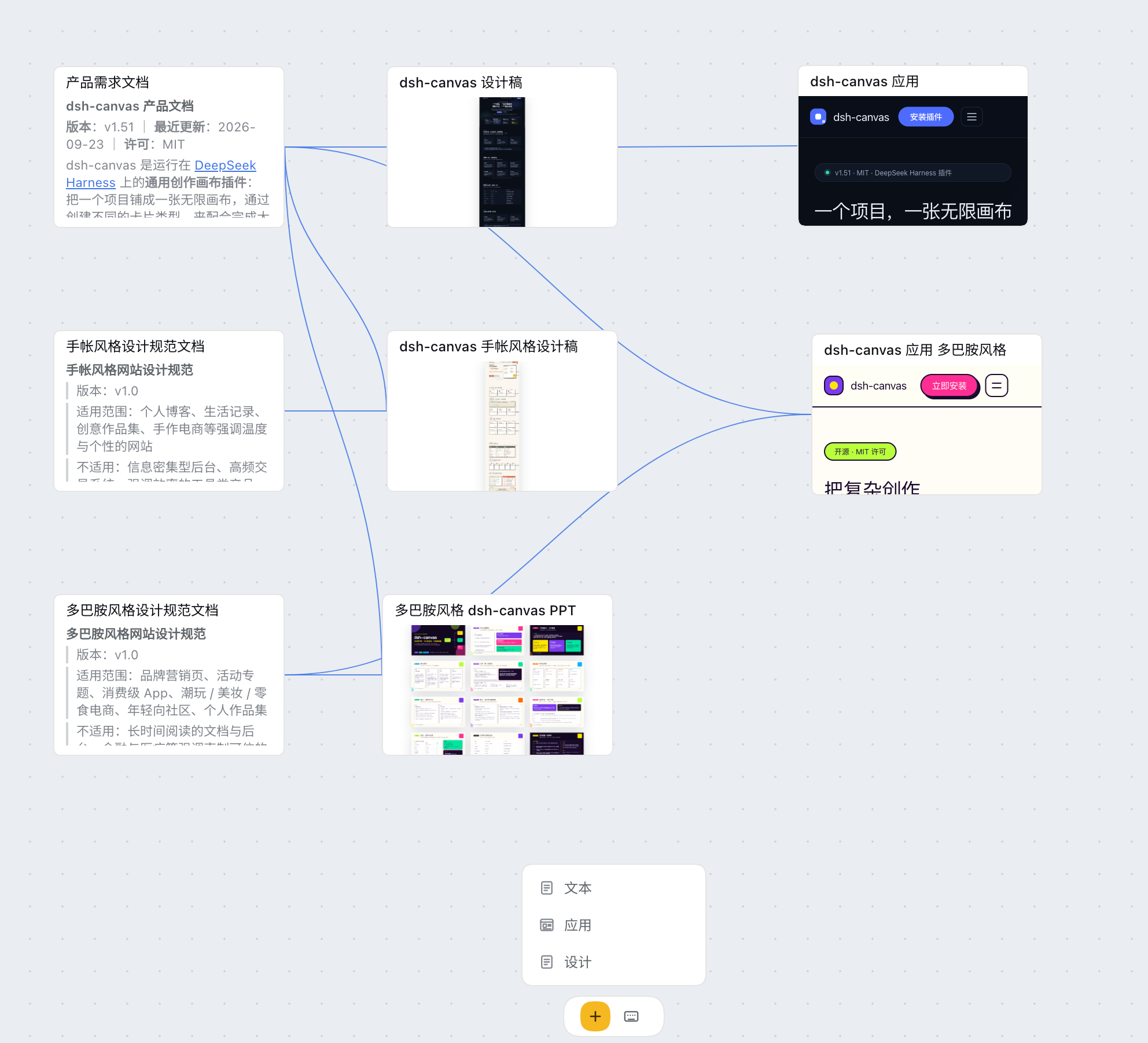
dsh-canvas-flow is an infinite canvas plugin running on DeepSeek Harness: a whole project lives on one canvas — text cards write specs, design cards produce design drafts, app cards build runnable web applications, and you can refine any element right in the preview.
Cards reference each other through connected edges: upstream artifacts feed directly into downstream cards, and a few cards working together can carry large, complex tasks.
Features
- Generate requirement documents with text cards, website designs or presentations with design cards, web applications with app cards, and images / videos with media cards.
-
The project folder is organized by card type: artifacts no longer sit flat in the canvas root — text goes to
docs/, apps toapps/, designs todesigns/, images toimages/, videos tovideos/, audio toaudio/(plusdata/,files/,folders/). Older canvases are tidied automatically the first time you open them: only items sitting flat in the root are moved, one item per entry, with a numeric suffix on name clashes; anything that cannot be moved stays where it is. The rootindex.htmland subdirectories you have already organized are left untouched. -
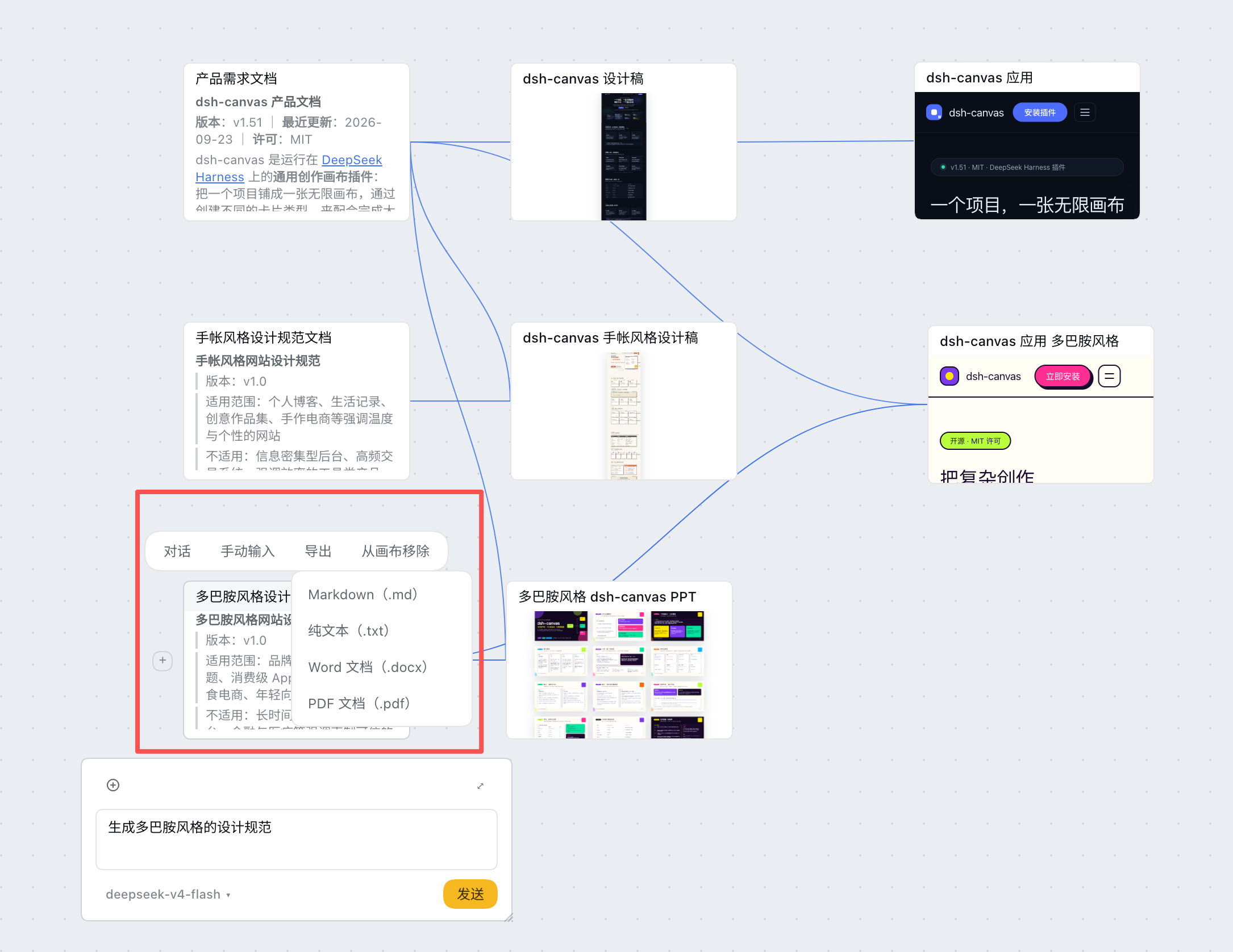
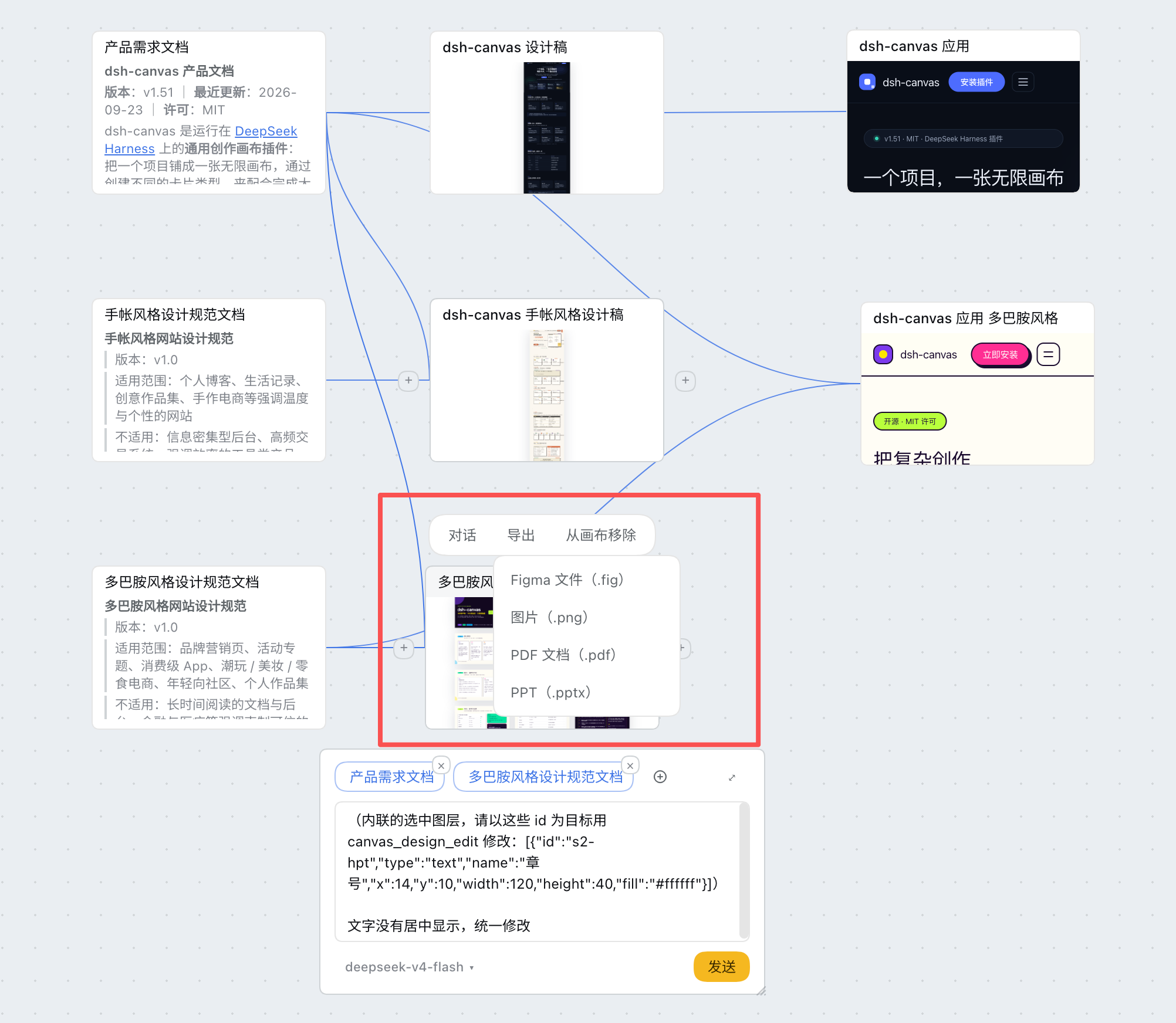
Every card type supports export.
- Text cards: export as Markdown, plain text, Word, or PDF documents.
- Design cards: export as Figma files, images, PDF, or PowerPoint.
- App cards: export the web application as a zip archive — double-click
index.htmlto run it.
Installing the plugin
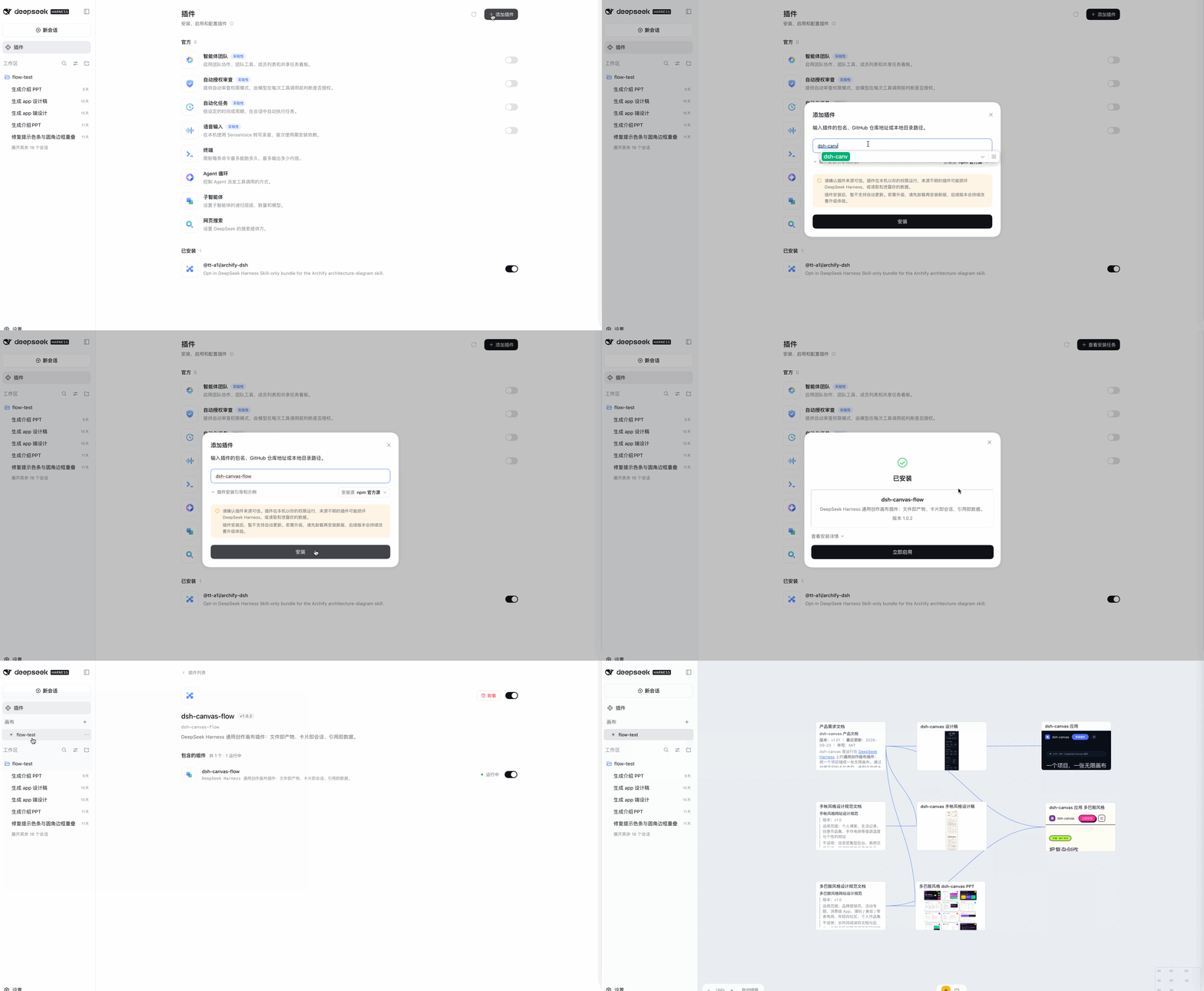
Install the plugin from the DeepSeek Harness client.
Search for dsh-canvas-flow in the plugin marketplace and click install.
Roadmap
Shipped
| Capability | Status |
|---|---|
| Text | The agent writes Markdown documents; export as Markdown, plain text, Word, or PDF |
| Design | The agent produces design drafts and makes precise second-pass edits to specific layers. Export as Figma files, images, PDF, or PPT |
| App | The agent writes web application code that runs directly in the DeepSeek Harness client. Pick any element and the agent precisely edits that element's code |
| Image | The agent generates images (Jimeng / Seedream) onto the card's artifact, with image-to-image via reference edges; keep talking in the session to keep iterating. Export the original image, or import one from your machine as the artifact |
| Video | The agent generates short videos (Jimeng / Seedance) with aspect ratio, duration, and resolution controls; a per-minute async task you wait on. Export the original clip, or import one from your machine |
| Audio | The agent generates audio (Doubao doubao-seed-audio-1-0): dialogue, sound effects, music, and ambience all go into one prompt; synchronous, up to 120 seconds per call. Export the original file |
Media generation uses the host's own model configuration: add a provider route in DeepSeek Harness's model settings that can serve Seedream / Seedance / Seed-Audio (fill in baseURL and apiKeyEnv) — no plugin-side configuration needed.
When no usable route is found, the card tells you exactly what it searched by and where to add one.
One thing to know about audio: doubao-seed-audio-1-0 is listed in Ark's model marketplace, but the API lives in Doubao Speech — its endpoint and key are not the same set as Ark's (auth is X-Api-Key, not Bearer). A dedicated route is recommended:
doubao-audio:
  apiKeyEnv: ARK_AUDIO_KEY        # the API Key from the speech console
  baseURL: https://openspeech.bytedance.com/api/v3
  models:
    - id: doubao-seed-audio-1-0
A single Ark route can also work (the plugin re-routes audio requests to the speech host), provided that key is valid on both sides; if it is not, the 401 message tells you exactly which route to add.
The card face is the artifact itself: an image card is the image; video and audio cards carry their native players — play them here, drag the progress bar. Every card on the canvas shares one size, 400×252, and the media card face is exactly 16:9: the face is the picture. In a 200-wide card a 16:9 image is a narrow strip; and if the height were doubled (280), a 16:9 image would leave a band of background above and below — so the height is derived from the panel's 16:9 (398×224 + 26 card header + 2 border). Audio cards share the same size (one rhythm across the canvas since v1.79). The card face and the double-click full-screen preview read the same artifact and say the same things (file not yet generated / file too large).
"Which model powers this conversation" and "which model generated this card" are two different things that one dropdown asks: on text / design / app cards it selects the model for the session's next request (so only conversational models are listed — picking Seedream / Seedance there would only fail the next turn); on image / video / audio cards it selects which model generates this card, listing only that family (Seedream on image cards, Seedance on video cards), stored on the card itself and never touching the session. Unset, it shows "auto", meaning pick by model family from the DSH model configuration above. When set, it is really used — if the configuration no longer has it, the card reports an error honestly (it never silently switches to another model); the choice travels with the work, and opening the same folder on another machine keeps it.
One reference image is all image-to-image / image-to-video needs: connect an edge from an image card to another image or video card, and on generation that edge becomes the reference (the image input for image-to-image, the first frame for video) — no need to publish the image as a URL first. For video you can also choose whether it is the first frame (default), the last frame, or a reference image.
Next up
| Capability | Plan |
|---|---|
| Media editing desk | Inpainting / outpainting / matting for images, first & last frame plus camera control for videos — as parameter panels on the node, not just conversation requests |
License
MIT © 2026 ljcoder2015
Related plugins
webnovel-writer
lingfengqaq/webnovel-writer
loopx (dsh-loopx-plugin)
loopx-project/loopx
ouroboros (dsh-plugin)
q00/ouroboros
loopx (dsh-loopx-plugin)
huangruiteng/loopx