dsh-effort-ultra-skin
loveirishcoffee/dsh-effort-ultra-skin
A CSS skin that restyles the reasoning-tier control drawn by hytime/dsh-thinking-effort into a blue-to-violet pill with a starfield and a sheen sweep, with matching light and dark palettes. Requires that plugin to be installed; it adds no UI of its own.
Install
dsh plugin --profile web add github:loveirishcoffee/dsh-effort-ultra-skinREADME
dsh-effort-ultra-skin
给 DeepSeek Harness 的推理档位控件换一层皮肤:把
@hytime/dsh-thinking-effort
画出来的推理等级条,重绘成一条 蓝→紫渐变胶囊,里面撒着星点、每 2.6 秒有一道柔光扫过。
A skin for the DSH reasoning-tier control: turns the plain 4px track into a blue→violet pill with a starfield and a slow sheen sweep.
它长什么样
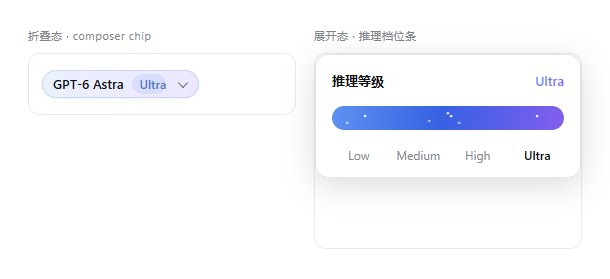
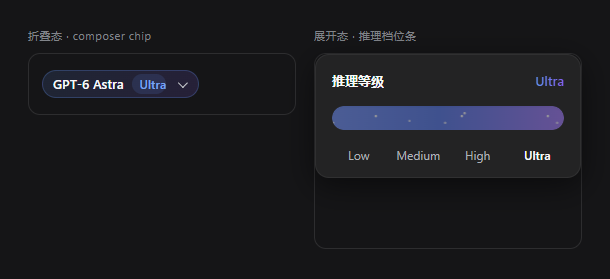
| 位置 | 换皮肤前 | 换皮肤后 |
|---|---|---|
| composer 里的折叠 chip | 灰底胶囊,模型 │ 档位 之间一条细竖线 | 淡蓝紫渐变胶囊,档位名变成独立着色小胶囊 |
| 展开后的档位条 | 4px 细线、实心蓝、每档一个大白圆点、原生滑块拇指 | 24px 渐变胶囊、白星点、流光扫过、圆点与拇指全隐 |
| 面板右上角档位名 | 品牌色纯色文字 | 蓝→紫渐变文字 |
| 最高档 | 与其它档无差别 | 星点与流光自动加速,并加一圈紫色内描边 |
浅色与深色主题各有一套配色,都会自动跟随。系统开启「减弱动效」时,星点与流光会自动停用。
依赖(重要)
这个插件不画任何 UI,它只是一层 CSS。 它去改的,是
@hytime/dsh-thinking-effort 已经渲染出来的元素。
- ✅ 想用它,必须先装并启用
@hytime/dsh-thinking-effort - ❌ 那个插件不能卸载 —— 卸了之后本插件的选择器匹配不到任何东西,档位条和 chip 会一起消失
一句话:上游是发动机,本插件是贴纸。
安装
三种方式,任选其一。
从 npm(推荐)
dsh plugin --profile <你的 profile> add dsh-effort-ultra-skin
直接从 GitHub
dsh plugin --profile <你的 profile> add github:LoveIrishCoffee/dsh-effort-ultra-skin
编译产物 dist/ 跟着仓库一起提交,所以 GitHub 安装不需要本地构建步骤。
从源码
git clone https://github.com/LoveIrishCoffee/dsh-effort-ultra-skin
cd dsh-effort-ultra-skin
npm install && npm run build
dsh plugin --profile <你的 profile> add .
三种方式都记得先装上游控件:@hytime/dsh-thinking-effort。重启 DSH 后生效。
卸载
dsh plugin --profile <你的 profile> remove dsh-effort-ultra-skin
浏览器侧只追加了一个 <style> 元素,卸载或停用时会连同它设置的
data-effort-tier 属性一起清理干净,不残留任何东西。
它是怎么实现的
- 宿主半边是惰性的:不注册路由、工具、服务或任何能力,只为了让这个包在组合树里有一行。
- 浏览器半边只做两件事:
- 往
<head>追加一个<style> - 用一个
MutationObserver监听档位输入框的value/aria-*,给最高档打上data-effort-tier="ultra",让星点和流光加速
- 往
最高档的判定读的是 range 输入框自己的 min/max(value === max 即最高档),
不解析任何语言的档位名 —— 所以中文、英文、日文等各种本地化文案都能正确识别。
已知限制
-
绑定上游内部结构。 选择器用的是上游设置的
data-seat-*属性和它们内部的结构位置 (例如「轨道的第一个子元素就是填充条」),刻意没有用它 CSS-module 生成的哈希类名 (那种类名每次构建都可能变)。即便如此,上游若改掉这些属性或 DOM 层级,本皮肤会静默失效 —— 设计上它只会「完全不生效」,不会「生效一半」留下错位的样式。 -
品牌渐变是字面量。 DSH 的
--dsw-alias-*令牌表里没有紫色,而这个设计的重点就是紫端, 所以三支渐变色以自定义属性--effort-*形式给出字面量,深浅主题的分支只发生在这几个变量上。 其它所有颜色一律走 alias 令牌并带字面量兜底。 -
只覆盖推理档位控件。 不碰模型下拉、不碰 composer 其它控件、不碰全局材质。
换配色
改 lib/client.js 顶部 --effort-* 那几行即可:
| 变量 | 作用 |
|---|---|
--effort-a | 渐变起点(蓝) |
--effort-b | 渐变中段 |
--effort-c | 渐变终点(紫),同时决定光晕与最高档描边 |
--effort-star | 星点颜色 |
--effort-glow | 光晕与投影 |
--effort-track-h | 轨道高度(默认 24px) |
不想要流光:删掉 >:first-child>:first-child::after 那条规则。
开发
npm install
npm run build      # tsc: src/index.ts -> dist/index.js(宿主半边)
npm test           # 无浏览器自检:加载皮肤、驱动 apply()、验证清理
npm run typecheck
npm run check:dist # 确认提交的 dist/ 与 src/ 一致
npm test 跑的是 scripts/smoke-client.mjs:它用一个 stub DOM(含
MutationObserver、closest、属性表)把 lib/client.js 真正加载起来,驱动
apply(),然后断言样式表已注入、CSS 花括号配平、没有引用上游的哈希类名、
观察器监听的是 value / aria-*、三档标记都正确、以及销毁后零残留。不需要浏览器。
发布是 tag 驱动的(.github/workflows/publish.yml):
npm version patch
git push --follow-tags
CI(.github/workflows/ci.yml)在每次 push 与 PR 上跑 typecheck、自检、
check:dist 与包契约校验(dsh.client.platform / exports["./client"] /
__ModuleLoader__.load 等必需字段)。
发布前的一次性动作
到 dsh-web 仓库的 issues
注册插件 id effort-ultra-skin,否则下游皮肤中枢匹配不到本插件。
授权
MIT
Related plugins
dsh-wallpaper-engine
elysia395/dsh-wallpaper-engine
dsh-deep-whale (maid-atelier)
small-tailqwq/dsh-deep-whale
dsh-deep-whale
small-tailqwq/dsh-deep-whale
dsh-claude-style
nwflower/dsh-claude-style