dsh-chat-image-lightbox
loyalchiiina/dsh-chat-image-lightbox
Full-screen lightbox for chat images with zoom, drag pan, download, and keyboard or touch navigation. Images returned by the display_image tool render inline in chat.
Install
dsh plugin --profile web add github:loyalchiiina/dsh-chat-image-lightboxREADME
DSH Chat Image Lightbox 🖼
🛠 v1.7.5 — 发图片失败已修复 / Image-sending bug fixed
如果你在 DSH 里发图片失败(报
prompt rejected+ERR_DLOPEN_FAILED+session/agent-busy,纯文字正常), 那是 1.7.4 及更早的已知问题,1.7.5 已修复。升级 + 重启 DSH 即可:pnpm add dsh-chat-image-lightbox@latest原因:本插件旧版把
sharp精确锁在0.34.4,与 DSH 内核的^0.35.3冲突,两个版本争抢同名libvips-42.dll。 详见 Release v1.7.5 · 排查见 ⑥ 发图失败 与 Troubleshooting ⑥。If sending an image fails with those errors (plain text works fine), it is a known issue in 1.7.4 and earlier, fixed in 1.7.5. Upgrade and restart DSH. Cause: the old version pinned
sharpto0.34.4, conflicting with the kernel's^0.35.3over the same-namedlibvips-42.dll.
对话里的图,值得被认真看。
Images in chat deserve a proper look.
📦 npm 包名 / npm package name:
dsh-chat-image-lightbox(无 scope / unscoped) 旧包名@loyalchiiina/dsh-chat-image-lightbox已被取代,历史版本已标记弃用。 The legacy scoped name@loyalchiiina/dsh-chat-image-lightboxis superseded; its older versions are deprecated.
dsh plugin --profile desktop add dsh-chat-image-lightbox
当前版本 / Current version:
1.7.3适用内核 / Requires:DSH 2.0.14 及以上(已在 DSH NEXT 2.0.15 上完整验证)。 DSH 2.0.14+ (fully verified on DSH NEXT 2.0.15).
⚠️ 升级到 1.7.3 前请注意 / Before upgrading to 1.7.3 1.7.2 起 移除了「跳图」功能(该功能在多次迭代中不够稳定,已整体删除,界面上不再出现 ⌖ 按钮)。 Since 1.7.2 the jump-to-image feature was removed — it proved unreliable across iterations and has been deleted outright; no ⌖ button appears anymore.
效果预览 · Screenshots
灯箱查看 · Full-screen lightbox
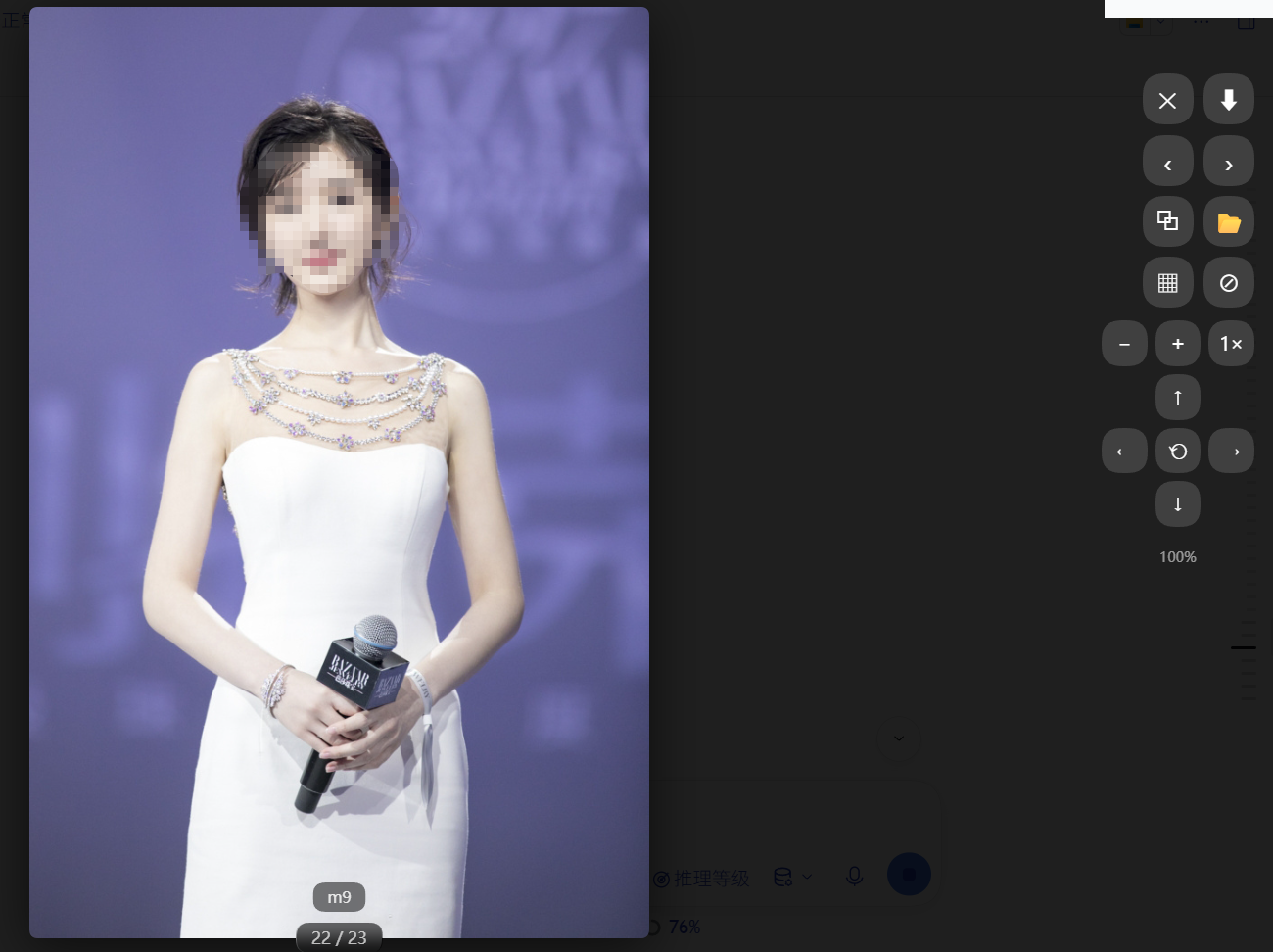
原图完整显示(自动适配屏幕高度),右上角是「⬇ 下载」与「✕ 关闭」;同一条消息里的其他图片可连续翻页浏览。 The full-resolution image auto-fits the viewport, with ⬇ download and ✕ close in the top-right; other images in the same message can be paged through.
缩略图分列 · Thumbnail grid with adjustable columns
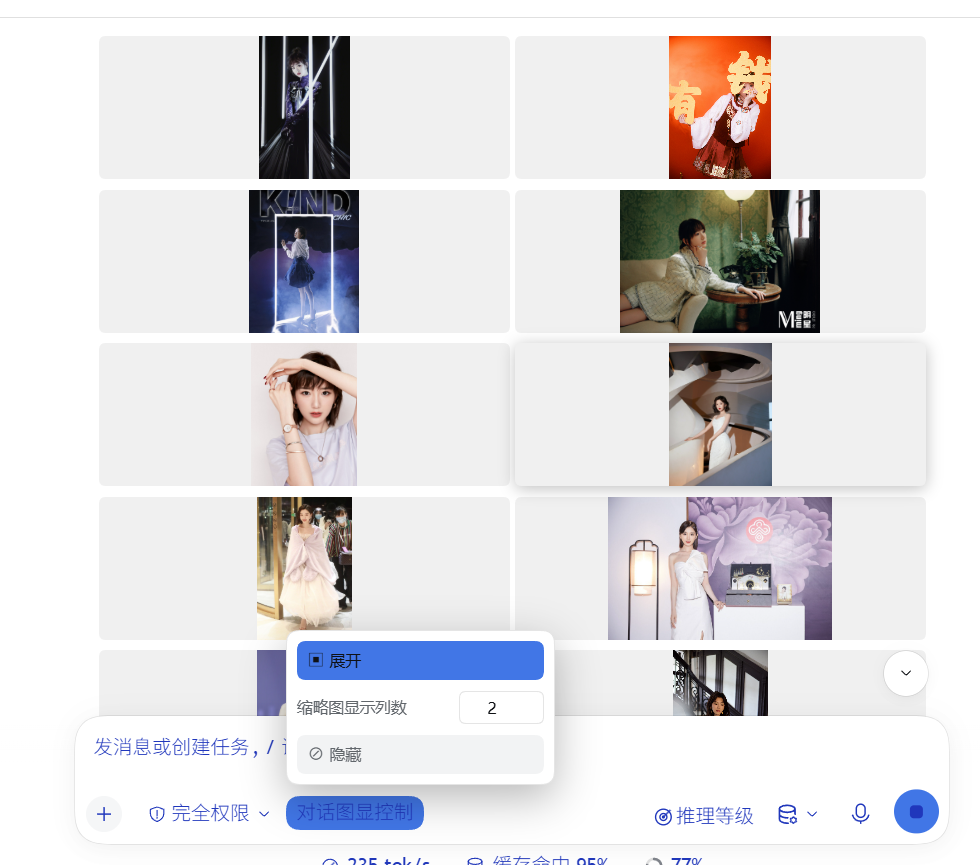
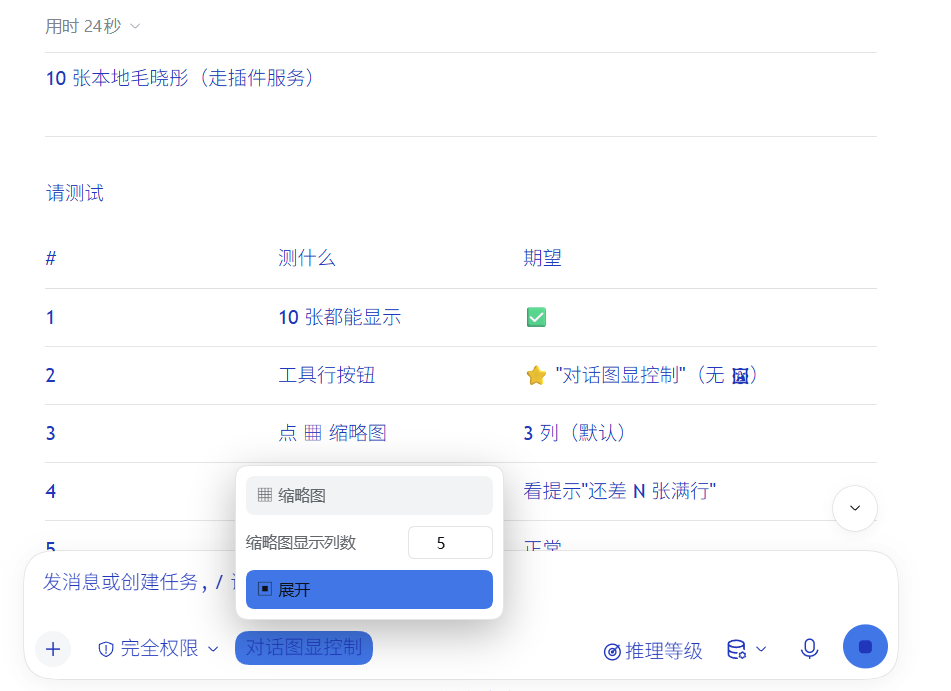
一键把整个会话的图片收成网格;面板里的「缩略图显示列数」可设 1–12 列,输入的值会保存为默认值。 One click collapses every image in the conversation into a grid; the 缩略图显示列数 field sets 1–12 columns and the value is saved as your default.
隐藏 / 展开 · Hide / restore
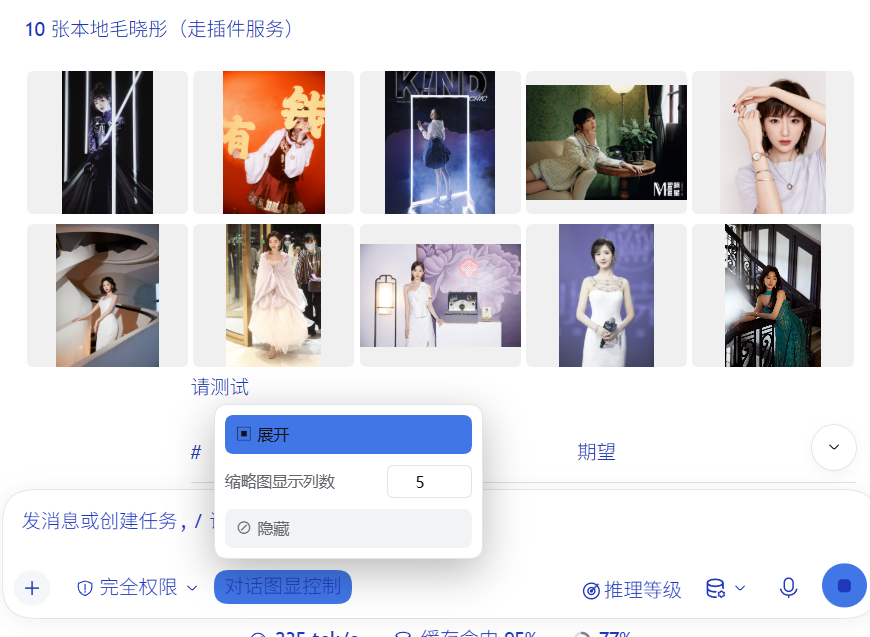
一键隐藏所有图片,并把它占的空间完全收掉(不会留下空白带);再点一下原样恢复。 One click hides every image and closes up the space it occupied (no blank band left); another click restores everything.
功能总览 · At a glance(中英对照 / Bilingual)
灯箱查看 · Lightbox viewer
| 中文 | English |
|---|---|
| 点击任意对话图片进入全屏灯箱 | Click any chat image for a full-screen lightbox |
| 滚轮缩放、拖拽平移 | Wheel zoom, drag to pan |
| 工具栏缩放按钮 ⊕ ⊖ 与 1× 复位 | Toolbar ⊕ / ⊖ zoom buttons with 1× reset |
| 方向键平移视角(按住连续移动) | D-pad moves the view (press-and-hold repeats) |
| 左右翻页:按钮 / 键盘 / 触屏滑动 | Prev/next via toolbar, keyboard or swipe |
| 下载原图(自动识别扩展名) | Download original (extension auto-detected) |
| 复制图片文件绝对路径 | Copy the image's absolute local path |
| 在文件夹中显示(资源管理器定位) | Reveal in folder (file manager locates the file) |
会话级图片控制 · Conversation-wide controls
工具行里的 「对话图显控制」 按钮打开面板,面板内含三项:
The "对话图显控制" button in the composer row opens a panel with three controls:
| 中文 | English |
|---|---|
| 缩略图:一键把整个会话的图片收成网格 | Thumbnail: collapse every image in the conversation into a grid |
| 缩略图显示列数:1–12 可调,改过即存为默认值 | Columns per row: 1–12, and your value is saved as the default |
| 隐藏:一键隐藏 / 再点恢复,不留空白 | Hide: hide / restore all images, leaving no blank space |
列数说明:默认 3 列。设置后会记住,下次启动仍用该值;改回其他值即覆盖默认。 Columns: 3 by default. The value is remembered across restarts; changing it again simply replaces the stored default.
格式与清晰度 · Formats & fidelity
| 中文 | English |
|---|---|
| TIFF/TIF、HEIC 自动转换显示 | TIFF/TIF, HEIC auto-transcode for display |
| TIFF/PNG/BMP 无损原像素(逐像素零误差) | TIFF/PNG/BMP lossless, native pixels (bit-exact) |
| 2 亿像素大图流畅显示 | 200-megapixel images display smoothly |
| 11 种格式实测支持(JPG/PNG/WebP/GIF/AVIF/SVG/BMP…) | 11 formats verified (JPG/PNG/WebP/GIF/AVIF/SVG/BMP…) |
| 网图被防盗链拦截时自动转存本地显示 | Hotlink-protected remote images are auto-saved locally |
宿主侧工具 · Host-side tool (display_image)
| 中文 | English |
|---|---|
| 关键词搜网图(花瓣/Bing/搜狗 3 源回退) | Keyword image search (Huaban / Bing / Sogou fallback) |
| 搜图自动过滤广告与他人面孔 | Auto-filters adverts & other celebrities |
| 本地文件/目录直读(TIFF/HEIC 转码) | Read local files/dirs (TIFF/HEIC transcoded) |
网图落地保存到本地目录(save_to) | Save remote images to a local folder (save_to) |
| 能直连就直连,被拦截才自动转存 | Direct CDN when it works, local copy only when blocked |
| 代理自动探活(无需手配) | Auto proxy discovery (TCP probe) |
隐私与安全 · Privacy & safety
| 中文 | English |
|---|---|
| 一切本地服务仅回环(loopback-only) | All local services are loopback-only |
| 打开文件夹用参数化调用,绝不拼接 shell 命令 | "Show in folder" spawns argv, never a shell string |
| 保存说明不回显本机路径 | No local paths echoed in confirmations |
| 只作用于对话区图片,不碰侧栏/头像 | Only touches conversation images, never the sidebar or avatar |
English
A DeepSeek Harness plugin that displays images inline in the chat with a lightbox overlay — zoom, download (save-as dialog), and prev/next navigation.
Pictures from your agent sit tiny inside a bubble — to see detail you have to save them and open elsewhere. With this plugin, one click opens any chat image full-screen: zoom, drag-pan, download, and flip through the others in the same message.
Features
- Inline display: Images in AI responses render directly in the chat (via markdown
) - Click to zoom: Click any image to open a full-screen lightbox; click again to zoom back out
- Scroll to zoom & pan: When zoomed in, use the mouse wheel to zoom further and drag to pan around the image
- Download: Click the download button ⬇ to save the image (triggers browser save-as dialog for same-origin images; filename is sanitized and the extension is derived from the image type)
- Navigation: Left/right arrow buttons, keyboard arrows, or swipe left/right on touch devices to switch between multiple images
- Caption: The viewer shows the current image's filename/caption
- Accessible: The lightbox is a proper
role="dialog"witharia-modal, buttonaria-labels, and focus management (focus returns to the trigger on close) - Smooth: Adjacent images are prefetched so navigation feels instant
- Close: Click backdrop, press Escape, or click ✕ to close
- ZCode-style rendering: chat images are styled in place — never moved, resized or reparented — so DSH's React virtual list is never fought with (no more vanished/duplicated images or console
removeChilderrors) - Capped, not cropped: every chat image renders with its aspect ratio preserved, capped at
min(460px, 64vh)height (the ZCode look); charts and diagrams stay fully readable - Responsive image row: when one message contains multiple images in one container, they lay out as a responsive CSS-grid row — via a class on the container only, without moving any nodes
- HD original on open: clicking any image opens the lightbox with the full-resolution original image — zooming in shows the real high-resolution file
- Clean UI: The lightbox toolbar (download / close), prev/next arrows, counter and caption are hidden whenever the lightbox is closed — they only appear while you are actually viewing an image, so they never clutter the chat layout
- Zoom / pan pad: the lightbox also has explicit controls for what the gestures do —
⊖⊕1×for zoom with a live percentage readout, and a d-pad for moving the view (press and hold to keep moving). Wheel, drag and+/-/Shift+arrowall still work - Conversation-wide image controls in one popover: a single compact 「对话图显控制」 trigger sits next to the access-mode control and slides out a panel with the thumbnail switch, the hide switch and the column field — no row of buttons cluttering the composer
- Thumbnail grid with configurable columns: one click collapses every image in the conversation into a grid of small tiles. The 缩略图显示列数 field sets the columns per row (1–12); the value you enter is saved and reused on the next launch
- Hide / show: one click hides every image and the space it occupied closes up completely (no blank band left behind); another click brings them back intact
- Only conversation images: the plugin deliberately ignores pictures outside the message list — the signed-in account avatar and the sidebar glyphs are ordinary
<img>elements too, and they are left untouched (fixed in 1.7.2) - Safe by construction: the thumbnail look is applied with classes and inline styles only. No node is ever moved, removed or reparented — an earlier build that did so made DSH's conversation slot throw
DOMExceptionand render the transcript empty - Auto-enhance: MutationObserver automatically enhances new images added to the chat, and re-adopts images whose class a React re-render overwrote
- Bring images into the chat (
display_imagetool, host side): one tool takes a localpath(file or directory — TIFF/HEIC transcoded, optional downscale), a remoteurl, or aquery(keyword image search: Huaban first, Bing as fallback) and returns ready-to-paste Markdown. Any file on this machine can be served in place via/images/?abs=<path>(loopback-only), no copying into the gallery root required - Hotlink fallback (1.7.2): a search result can answer
200and still fail in the browser, because some CDNs (Huaban via Tencent EdgeOne) reject any request whoseRefereris not their own domain — the picture then shows as "无法预览". The tool now probes each URL the way a browser would and only re-saves the ones that would be blocked, so working links stay direct and nothing is downloaded unnecessarily
Installation
Method 1: npm (recommended)
dsh plugin --profile desktop add dsh-chat-image-lightbox
Method 2: Manual
- Copy the
lib/folder andcordis.patch.ymlto your DSH profile'snode_modules/dsh-chat-image-lightbox/ - Add
dsh-chat-image-lightboxto your profile'spackage.json→dsh.profile.bundlesarray - Restart DSH Desktop
Usage
- Place images in
~/.dsh/uploads/(or any directory served by your DSH instance) - In your AI response, use markdown image syntax:
 - The image will display inline with lightbox enhancement
Note: For the download button to trigger a save-as dialog, the image must be served from the same origin as your DSH instance (e.g., via the /images/ route). Cross-origin images will open in a new tab instead.
Troubleshooting image display (important)
When an image shows as blank, a blob of text, or the lightbox opens empty, check in this order:
① Images must use an http(s) URL — base64/data-URI and attachments are NOT rendered
DSH renders images into <img> only from http(s) URLs. It does not render data:image/png;base64,... inline, nor "file-delivery/attachment" messages (those appear as tool-call text, not an image).
- ✅ Correct — markdown + http URL:
 - ✅ Correct — any non-hotlink-protected external image:
 - ❌ Will NOT render — base64 inline:

② Blank image / empty lightbox = hotlink protection on the image host (source limit, not this plugin)
Some hosts (e.g. Sina Weibo sinaimg, some CDNs) enforce Referer-checking: a request without the expected Referer returns 403, so the image frame renders but no pixels load (clicking still opens the lightbox, but there is no image).
- No normal webpage can hotlink these directly (including all sites except Weibo) — this is not something any plugin can fix.
- Workaround: download the image to
~/.dsh/uploads/(fetch with a properReferer, or just save it from the browser), then serve it via/images/.
Example — fetching a hotlink-protected image (Windows):
curl -e "https://weibo.com" -o image.jpg "https://wx1.sinaimg.cn/.../xxx.jpg"
③ Supported image formats
| Format | Displayed | Notes |
|---|---|---|
| jpg / jpeg / png / gif / webp / bmp / svg / ico / avif | ✅ Directly | Mainstream formats — display + lightbox work, bytes untouched |
| tiff / tif | ✅ Via server conversion | Browsers can't render TIFF; the plugin server converts it to WebP at full original resolution (bundled sharp) — HD display, and download keeps the original .tif |
| heic | ✅ Via server conversion | Same as TIFF — displayed as WebP, downloaded as the original .heic |
Files go in ~/.dsh/uploads/ and display via /images/ — no manual conversion needed.
④ Plugin not working after changes — restart fully
After installing or editing plugin files, fully quit all DSH Desktop processes (Task Manager → end every DSH Desktop.exe) and reopen. Closing just the window does not quit (background processes stay). Old/unloaded code keeps the plugin inactive otherwise.
⑤ Is it actually the plugin? Quick checklist
- Test with a
/images/-served upload — if it displays and lightboxes, the plugin is fine. - Test with a non-hotlink-host image (e.g.
https://picsum.photos/800/600) — if that works, the plugin is generic. - If neither uploads nor external images lightbox → the plugin client didn't load, usually because DSH wasn't fully restarted or the install is incomplete.
⑥ Sending an image fails with session/agent-busy / ERR_DLOPEN_FAILED (fixed in 1.7.5)
If sending an image fails with:
prompt rejected: Could not load the "sharp" module using the win32-x64 runtime
ERR_DLOPEN_FAILED: The specified procedure could not be found.
(session/agent-busy)
this is a known issue in 1.7.4 and earlier, fixed in 1.7.5. Just upgrade:
pnpm add dsh-chat-image-lightbox@latest
Why it happened: the DSH kernel ships sharp ^0.35.3, while older versions of this plugin pinned sharp to exactly 0.34.4 — putting two different sharp builds into one process. They load a DLL with the same filename (libvips-42.dll) but need different companions (libvips-cpp-8.17.2.dll for 0.34.x vs libvips-cpp-8.18.3.dll for 0.35.x). Windows resolves DLLs by filename, so whichever loads first claims the name and the other fails with "the specified procedure could not be found".
The trailing agent-busy is a generic wrapper the kernel applies to unclassified errors — it has nothing to do with actual concurrency, which is why the real cause is hard to spot from the message alone.
Note: this only ever affected sending images; plain text chat was never impacted.
Keyboard & Mouse
| Action | Input |
|---|---|
| Open lightbox | Click an image |
| Zoom in / out | Click image, or mouse wheel when zoomed |
| Pan | Drag the image while zoomed |
| Prev / next | ← / → keys, on-screen arrows, or swipe |
| Close | Esc, click backdrop, or ✕ |
HTTP API
| Endpoint | Method | Description |
|---|---|---|
/images/<path> | GET | Serve an uploaded image (loopback-only, with extension/security guards) |
/api/image-gallery/list | GET | List images under the gallery root; supports ?limit=N |
/api/image-gallery/root | GET | Return the configured gallery root path |
How It Works
| Component | Description |
|---|---|
Host (lib/index.js) | Registers /images/ file-serving route and /api/image-gallery/list + /api/image-gallery/root APIs on ctx.webServer |
Client (lib/client.js) | Uses MutationObserver to watch for <img> elements in the chat, adds a display class + click handlers that open a lightbox overlay (class-only enhancement, no DOM restructuring) |
Requirements
- DSH ≥ 2.0.14 — this release is verified end to end on DSH NEXT 2.0.15. The client half relies on
@deepseek-ai/dsh-client-ui-toolbeing injectable, which is why 2.0.14 is the floor. - Host must expose the
webServerservice (standard in DSH Desktop). - Node.js ≥ 22
sharp^0.35.3(declared as a dependency; it is what performs the lossless TIFF/HEIC transcoding). The range follows the DSH kernel's own^0.35.3— an exact pin here would put two different sharp builds into one process and break image sending (see Troubleshooting).- Windows note: "show in folder" uses
explorer /select,
License
MIT
中文
DeepSeek Harness 插件:在对话框中直接显示图片,支持放大、下载(弹出另存为)、左右切换。
功能
- 内联显示:AI 回复中的图片直接在对话框渲染(通过 markdown
) - 点击放大:点击任意图片打开全屏 lightbox,再点一次缩回
- 滚轮缩放 + 拖拽平移:放大后可用鼠标滚轮继续缩放,按住拖拽平移查看细节
- 下载:点击下载按钮 ⬇ 保存图片(同源图片弹出"另存为"对话框;文件名会清洗,扩展名按图片类型自动补全)
- 切换:左右箭头按钮、键盘方向键,或在触屏上左右滑动切换多张图片
- 文件名:查看器底部显示当前图片的文件名/标题
- 无障碍:lightbox 是标准的
role="dialog"(含aria-modal、按钮aria-label与焦点管理,关闭后焦点回到触发元素) - 预取:自动预取相邻图片,切换更顺滑
- 关闭:点击遮罩层、按 Esc 或点 ✕ 关闭
- ZCode 式渲染:聊天图片原地加样式——绝不搬移、改父级或重排 DOM 节点,不与 DSH 的 React 虚拟列表打架(不再出现图片消失/重复、控制台
removeChild报错) - 限高不裁剪:每张聊天图保持原始纵横比,高度封顶
min(460px, 64vh)(ZCode 的观感);图表、流程图不再被裁得没法看 - TIFF/HEIC 直显:浏览器原生不渲染 TIFF——插件服务端用内置 sharp 将 TIFF/HEIC 按原始分辨率即时转 WebP 显示(本地图表导出照样高清直显),下载按钮保存的仍是原始
.tif/.heic文件 - 多图九宫格:一条消息里有多张图时自动排成整齐网格(约 3 列),文字段落横跨整行排在网格上方——纯 CSS(
display:contents),不搬任何节点 - 点开即高清:点击任意图片打开 lightbox 看全分辨率大图,放大看到每个像素;下载永远保存原始文件
- 界面干净:lightbox 的工具按钮(下载/关闭)、左右切换箭头、计数、标题在 lightbox 关闭时全部隐藏,仅在实际看图时才显示,不会在对话界面留下按钮干扰布局
- 灯箱缩放/平移面板:手势能做的都给了一组显式按钮——
⊖⊕1×缩放(带实时百分比),加一组方向键移动视角(按住可连续移动);滚轮、拖拽、+/-/Shift+方向键全部保留 - 会话内图片控制收进一个弹出面板:输入框旁只留一个紧凑的 「对话图显控制」 触发器,点它滑出面板,缩略图开关、隐藏开关、列数输入框都在里面——不再让一排按钮占着输入区
- 可调列数的缩略图网格:一键把整个会话的图片收成小图网格;面板里的 「缩略图显示列数」 输入框可设每行几张(1–12),输入的值会保存为默认值,下次启动仍用它
- 隐藏 / 展开:一键隐藏所有图片,并把它占的空间完全收掉(不会留下一大块空白);再点一下原样恢复
- 只管对话区的图:插件刻意忽略消息列表以外的图片——登录账号的头像和侧栏图标同样是
<img>,但一律不动(1.7.2 修复) - 结构上安全:缩略图效果只用 class 和内联样式实现,绝不移动、删除或重挂任何节点。早期版本做过 reparent,结果让 DSH 的会话槽抛
DOMException、整段对话渲染成空白 - 自动增强:MutationObserver 自动增强新加入对话的图片;React 重渲染覆盖 class 后也会自动重新接管
- 把图带进对话(宿主侧
display_image工具):一个工具吃三种输入——本地path(文件或目录,TIFF/HEIC 自动转码、可缩放)、网络url直链、query关键词搜图(花瓣优先,Bing 回退),返回可直接粘贴的 Markdown。本机任意文件可通过/images/?abs=<路径>原地直读(仅限本机回环),无需先复制进图库目录 - 防盗链自动降级(1.7.2):搜图结果可能返回
200却在浏览器里显示不出来——部分 CDN(花瓣走腾讯云 EdgeOne)会拒绝Referer不是自家域名的请求,图片于是显示成「无法预览」。工具现在会按浏览器的方式逐张探测,只把会被拦的那几张转存到本地,能直连的保持直连,不浪费带宽
安装
方式一:npm(推荐)
dsh plugin --profile desktop add dsh-chat-image-lightbox
方式二:手动安装
- 把
lib/文件夹和cordis.patch.yml复制到 DSH profile 的node_modules/dsh-chat-image-lightbox/ - 在 profile 的
package.json→dsh.profile.bundles数组中添加dsh-chat-image-lightbox - 重启 DSH Desktop
使用方法
- 把图片放到
~/.dsh/uploads/目录(或 DSH 实例提供的任意目录) - AI 回复中使用 markdown 图片语法:
 - 图片会内联显示并自动带 lightbox 增强
注意:下载按钮要弹出"另存为"对话框,图片必须从 DSH 同源路由提供(如 /images/ 路由)。跨域图片会在新标签页打开。
图片显示常见问题排查(重要)
遇到"图片显示不出来 / 点开是空白 / 只看到一串文字"时,按以下顺序排查:
① 图片必须用 DSH 能识别的 URL 显示,不能依赖 base64 或附件
DSH 对话只对http(s) 图片 URL渲染成 <img>,不支持 data:image/png;base64,... 内嵌,也不支持以"附件/文件交付"方式直接显示(那只会显示成工具调用文字)。
- ✅ 正确:markdown 图片语法 + http URL
 - ✅ 正确:任意无防盗链的外链图片
 - ❌ 错误:base64 内嵌(DSH 渲染不出,只看到一串
iVBORw0...) ← 不会显示
② 图片空白 / 点开灯箱没图案 = 图源防盗链(图床限制,非插件问题)
部分图床(如新浪微博 sinaimg、部分 CDN)强制 Referer 校验:请求不带特定 Referer 就返回 403,导致图片加载不出(有 <img> 框但内容空白,点击能弹灯箱但没图)。
- 这类图任何普通网页都无法直接外链显示(包括微博自己以外的所有站点),不是本插件能解决的。
- 解决办法:把图下载到本地
~/.dsh/uploads/(可用带Referer的脚本抓取,或直接用浏览器保存),再通过/images/路由显示。
示例:抓取带防盗链的图(Windows 下用带 Referer 的 curl 或脚本下载后放入 uploads):
curl -e "https://weibo.com" -o 图.jpg "https://wx1.sinaimg.cn/.../xxx.jpg"
③ 支持哪些图片格式
| 格式 | 显示 | 说明 |
|---|---|---|
| jpg / jpeg / png / gif / webp / bmp / svg / ico / avif | ✅ 直接显示 | 主流格式,直接显示 + 灯箱,字节原样不动 |
| tiff / tif | ✅ 服务端转码显示 | 浏览器不能渲染 TIFF,插件服务端用内置 sharp 按原始分辨率转 WebP 显示——高清直显,下载仍是原始 .tif 文件 |
| heic | ✅ 服务端转码显示 | 同 TIFF——显示为 WebP,下载保存原始 .heic |
图片放到 ~/.dsh/uploads/,用 /images/ 显示——无需手工转码。
④ 彻底重启后插件不生效
改过插件文件或刚安装后,必须彻底退出 DSH 进程再重开(任务管理器结束所有 DSH Desktop.exe 进程),否则旧代码/未加载状态不生效。仅"关闭窗口"不算退出(后台进程残留)。
⑤ 判断是不是插件问题的清单
- 用
/images/上传图测:如果上传图正常显示 + 灯箱,说明插件正常 - 换无防盗链图床(如 picsum.photos)的图测:正常则插件通用
- 若上传图、外链图都不亮灯箱 → 插件 client 未加载,多半是没彻底重启或没装正确
⑥ 发图片时提示 session/agent-busy / ERR_DLOPEN_FAILED(1.7.5 已修复)
如果发图片时报错:
prompt rejected: Could not load the "sharp" module using the win32-x64 runtime
ERR_DLOPEN_FAILED: The specified procedure could not be found.
(session/agent-busy)
这是 1.7.4 及更早版本的已知问题,1.7.5 已修复。升级即可:
pnpm add dsh-chat-image-lightbox@latest
为什么会这样:DSH 内核自带 sharp ^0.35.3,而旧版本把本插件的 sharp 精确锁定在 0.34.4,于是同一个进程里出现了两个不同版本的 sharp。它们加载的 DLL 同名(都叫 libvips-42.dll),但各自需要不同的配套文件(0.34.x 要 libvips-cpp-8.17.2.dll,0.35.x 要 libvips-cpp-8.18.3.dll)。Windows 按文件名解析 DLL——谁先加载谁占住,后来者就报"找不到指定的过程"。
报错末尾的 agent-busy(会话忙)是 DSH 对无法分类的错误套用的通用标签,与实际是否繁忙无关,因此很难一眼看出真因。
注:此问题只影响发图片,纯文字对话始终正常。
键盘与鼠标
| 操作 | 输入 |
|---|---|
| 打开 lightbox | 点击图片 |
| 放大 / 缩小 | 点击图片,或放大后滚动滚轮 |
| 平移 | 放大后按住拖拽 |
| 上一张 / 下一张 | ← / → 方向键、屏幕箭头、或滑动 |
| 关闭 | Esc、点击遮罩层、或 ✕ |
HTTP 接口
| 接口 | 方法 | 说明 |
|---|---|---|
/images/<path> | GET | 提供上传图片(仅本机回环,带扩展名/安全校验) |
/api/image-gallery/list | GET | 列出图库根目录下图片,支持 ?limit=N |
/api/image-gallery/root | GET | 返回配置的图库根目录路径 |
工作原理
| 组件 | 说明 |
|---|---|
Host (lib/index.js) | 在 ctx.webServer 上注册 /images/ 文件服务路由和 /api/image-gallery/list + /api/image-gallery/root 接口 |
Client (lib/client.js) | 用 MutationObserver 监听对话中的 <img> 元素,添加展示样式与点击处理器打开 lightbox(只加 class,不改 DOM 结构) |
环境要求
- DSH ≥ 2.0.14 —— 本版本已在 DSH NEXT 2.0.15 上完整验证。浏览器端依赖
@deepseek-ai/dsh-client-ui-tool可被注入,这是 2.0.14 作为下限的原因。 - 宿主需提供
webServer服务(DSH 桌面端标准配置)。 - Node.js ≥ 22
sharp^0.35.3(已声明为依赖,TIFF/HEIC 的无损转码由它完成)。采用区间跟随 DSH 内核自身的^0.35.3——若在此精确锁版,会让两个不同 sharp 版本共存于同一进程,导致发图失败(见「图片显示常见问题排查」)。- Windows 说明:「在文件夹中显示」使用
explorer /select,
许可证
MIT
Related plugins
dsh-web (dsh-task-board)
zhu1090093659/dsh-web
dsh-web (dsh-web-all)
zhu1090093659/dsh-web
dsh-web-ui (dsh-task-board)
zhu1090093659/dsh-web-ui
dsh-web-ui (dsh-web-ui-all)
zhu1090093659/dsh-web-ui