L
dsh-plugin-tcm-learning
lsh-lenvast/dsh-plugin-tcm-learning
deepseek 插件,用于学习中医文档,书架插件
Install
dsh plugin --profile web add github:lsh-lenvast/dsh-plugin-tcm-learningREADME
中医学习 · DSH 插件
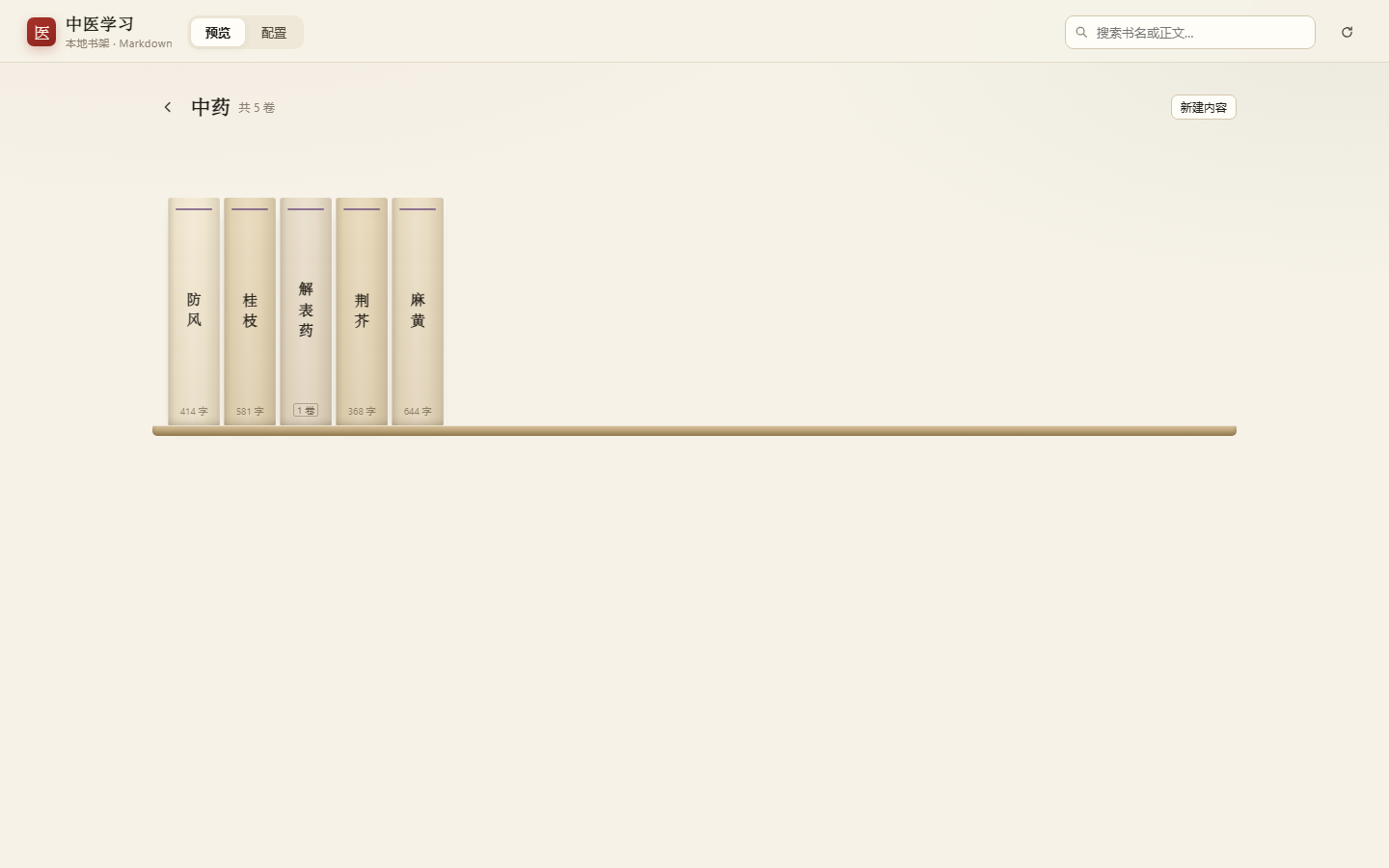
在 DeepSeek Harness 的 Web GUI 里,用工作区的 Markdown 搭一座中医书架:板块 → 书脊 → 阅读,另有一页配置后台。
功能
- 侧栏入口:导航栏(工作区列表上方)一行「中医学习」,点开占据整页,和官方「插件」页同级。
- 板块 = 文件夹:工作区里每个文件夹自动成为一个板块,文件夹名即板块名,无需登记。
- 书架:书脊站立、等高,悬停 Dock 式放大(纯
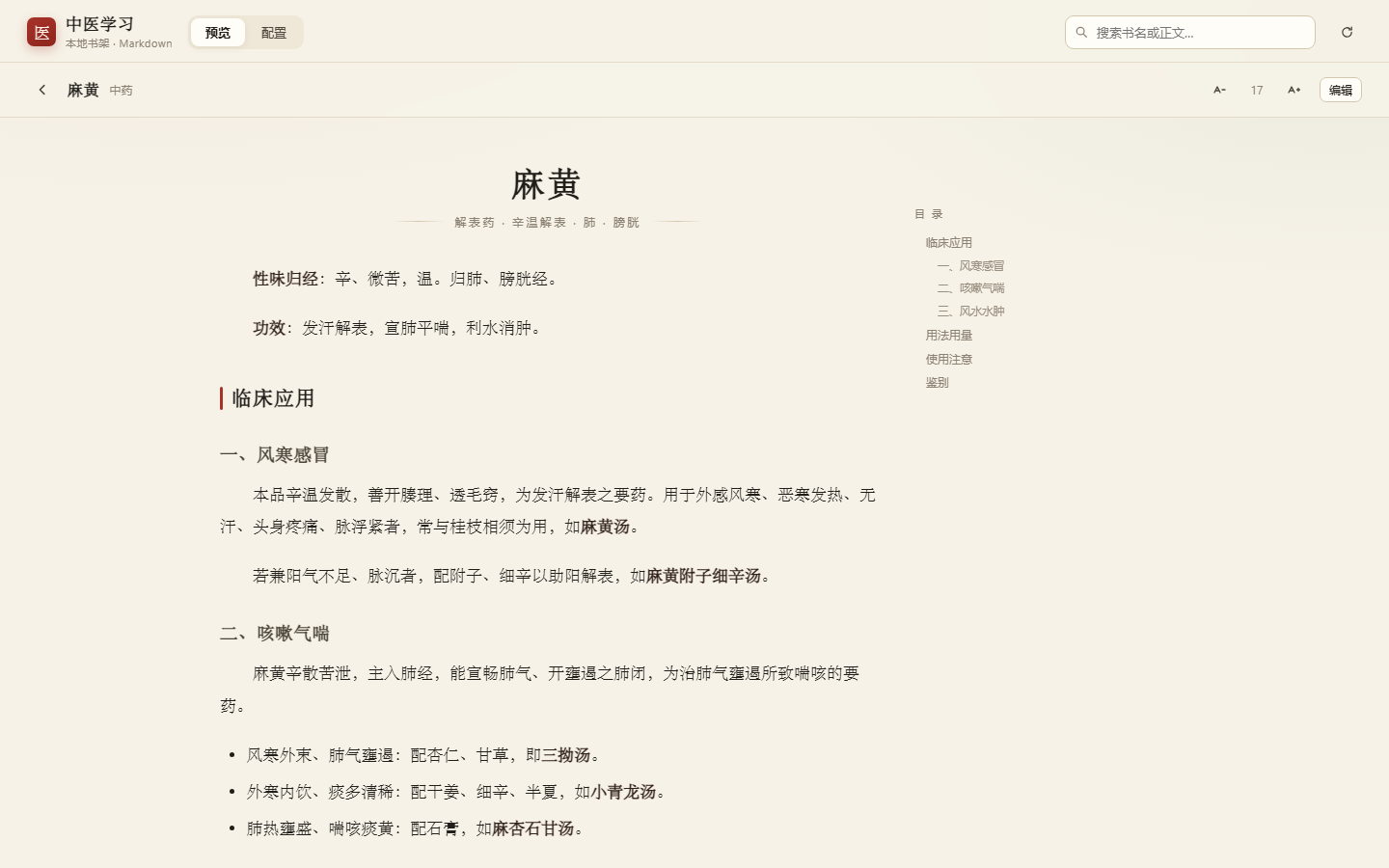
transform,不重排);每层按可用宽度放满,层板固定最长宽度。 - 阅读:衬线排版、右侧目录与滚动高亮、字号调节、上一卷/下一卷、阅读进度。
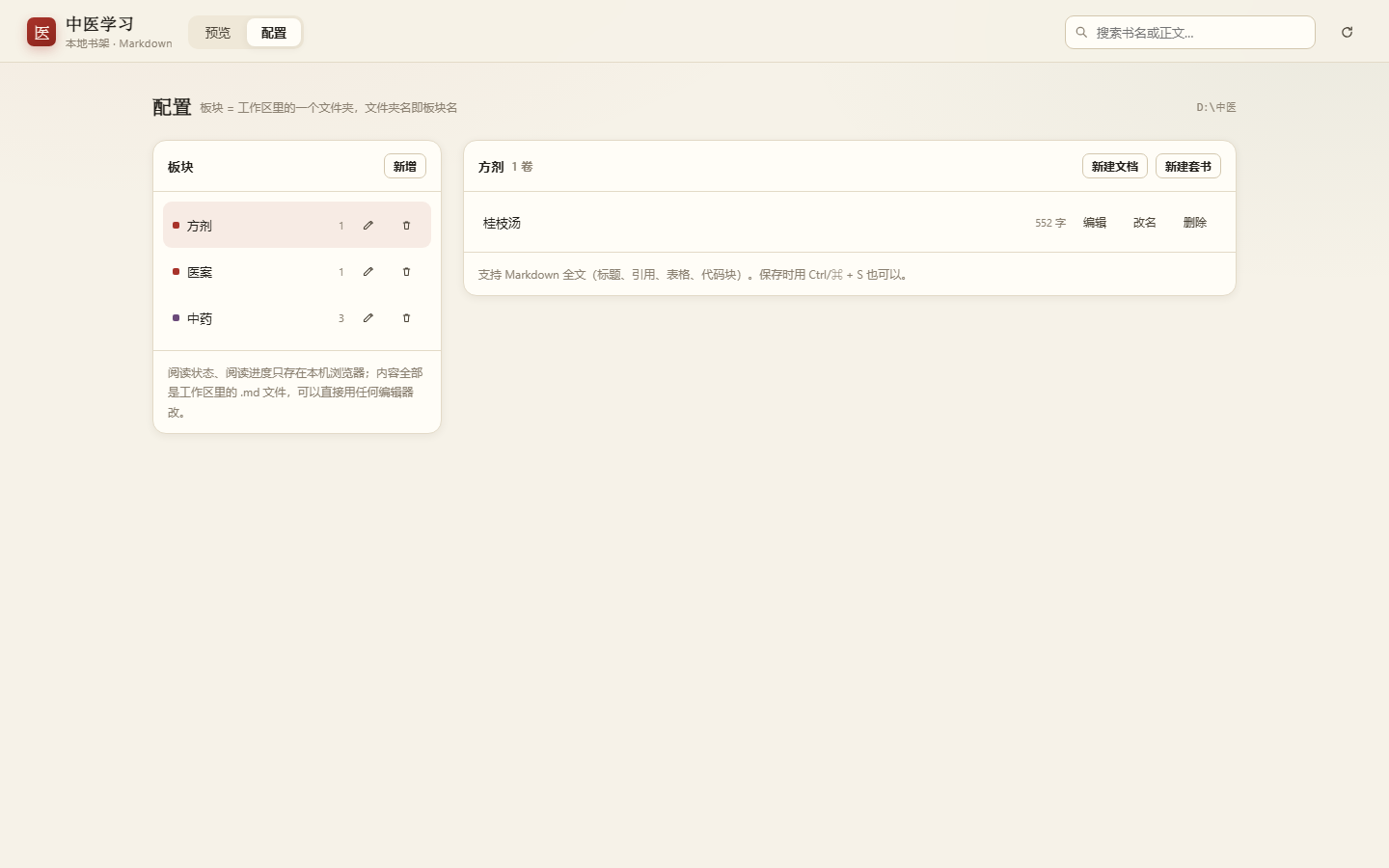
- 配置:板块/文档增删改、Markdown 源码 + 实时预览、
Ctrl/⌘+S保存、删除进回收站。 - 全文搜索:标题 + 正文,最多 40 条。
- 纯本地:所有内容都是工作区里的
.md,不联网、无遥测,模型也看不到。
| 阅读 | 配置 |
|---|---|
 |  |
安装
要求 DSH 0.2.x(Web GUI 带 sidebar.panellist / main slot 的版本)。
从 GitHub 安装(推荐)
dsh plugin add https://github.com/lsh-lenvast/dsh-plugin-tcm-learning
插件在 package.json 里声明了 dsh.bundle.patch,安装时会自动挂载,不必手改配置。装完刷新页面即可看到侧栏入口。
手动安装(本地开发 / 没有 CLI 时)
-
让 profile 能找到这个包(软链或目录联接):
# Windows
New-Item -ItemType Junction `
  -Path "$env:USERPROFILE\.dsh\profiles\desktop\node_modules\dsh-plugin-tcm-learning" `
  -Target "D:\path\to\dsh-plugin-tcm-learning"
# macOS / Linux ln -s /path/to/dsh-plugin-tcm-learning ~/.dsh/profiles/desktop/node_modules/dsh-plugin-tcm-learning -
在 profile 的
cordis.patch.yml末尾追加:- insert: - id: tcm-learning name: dsh-plugin-tcm-learning -
开着 HMR 会自动热载;否则重启 DSH。
使用
- 在 DSH 里打开一个工作区(这个工作区就是数据根,插件只读写它)。
- 点侧栏「中医学习」。
- 首次进入会自动扫描根目录下的文件夹作为板块;没有板块就在「配置」里新建一个。
- 想加内容:在配置页新建,或者直接把
.md丢进对应文件夹再点右上角刷新。
数据布局
<工作区>\
├── .tcm\
│   ├── config.json        # 板块显示信息(标题/颜色/排序/隐藏)
│   └── trash\             # 删除的内容,可手动找回
├── 中药\
│   ├── 麻黄.md            # 一个 .md = 一卷
│   └── 解表药\            # 文件夹 = 套书(内含多卷)
│       └── 01-辛温解表药.md
├── 医案\太阳中风案.md
└── 方剂\桂枝汤.md
Markdown 支持 frontmatter:title、tags、summary;没有 title 时用文件名。
开发
pnpm install
pnpm build      # -> lib/index.js (Host) + lib/client.js (浏览器半)

# 离线冒烟:客户端 slot 注册 + 全部 HTTP API + 路径安全
node test/smoke.mjs "D:\path\to\workspace"

# 用真实数据生成预览夹具,再直接打开 test/preview.html 看三种视图
node test/preview.mjs "D:\path\to\workspace"
lib/ 是构建产物,也提交进仓库:这样从 GitHub 直接安装时不需要现场编译。
实现要点
- 双半结构:Node 半只提供
/tcm/api/*(读写工作区 Markdown、路径收口、回收站、mtime乐观锁);浏览器半只做界面。客户端 bundle 由 esbuild 打成 DSH 的模块外壳,react走外壳自带的静态模块表,不新增运行时依赖。 - 两处 slot:
sidebar.panellist(侧栏入口)+mainkeyed slot(整页面板),与官方「插件」页同一个机制。 - 动画只动
transform/opacity:书脊布局尺寸固定,放大靠scale,邻居位移用translateX补偿,文字反向scale抵消;悬停投影用::after的透明度过渡。改样式时别退回width/height动画,否则每帧都会重排。
已知限制
- 数据根是「已登记工作区列表的第一个」,可在顶栏下拉切换;不跟随当前会话的工作目录。
- 书脊还没有拖拽排序;板块「隐藏」字段已在数据模型里,UI 未暴露。
- 没有做 Agent 工具(让模型直接写入某个板块)。
许可
Related plugins
T
archify (deepseek-harness)
tt-a1i/archify
97.4k9 hours agoTools & CapabilitiesApache-2.0
T
WeKnora (dsh-weknora)
tencent/weknora
37.7kyesterdayTools & Capabilities
D
next-ai-draw-io (dsh-plugin)
dayuanjiang/next-ai-draw-io
37k17 hours agoTools & CapabilitiesApache-2.0
T
weknora
tencent/weknora
20.2k3 months agoTools & Capabilities