dsh-pet
ltmroberthk915/dsh-pet
DSH 多会话桌宠:鲸鱼娘、MIKU 与商务小蓝鲸,模型配色、tok/s 调速及共享亲密度。
Install
dsh plugin --profile web add github:ltmroberthk915/dsh-petREADME
DSH Session Pet · dsh-pet-copilot
See what your AI is doing at a glance.
A whale-girl, MIKU or business blue whale accompanies each active conversation. Model colors help distinguish sessions, running speed follows generation speed, and finished companions wait for you to check their results.
The npm package is dsh-pet-copilot; the repository is ltmroberthk915/dsh-pet. Get the matching precompiled archive from Releases. dsh-session-pet.tgz remains an identical compatibility filename.
This independent fork of zhu1090093659/dsh-pet is maintained by ltmroberthk915 under Apache-2.0, with artwork attribution preserved. 中文说明
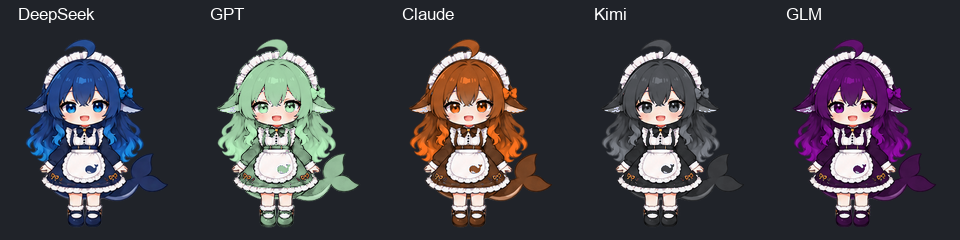
Choose the whale-girl, MIKU or business blue whale. Each active top-level conversation has a companion, with 52.7% background companions. The business whale's artwork, base and hit area receive an additional 0.75 scale. Palettes remain stable within a session. Completed companions wait until viewed. Feeding, affinity, naming, dragging and size controls are shared.
Left/right running uses fixed FPS, original timings, or FPS = max(1, k × footer tok/s + b), without an automatic upper cap. Users may enable a running cap and separately set other-action FPS. Disabling that second control retains original action timings. Hover expansion is off by default; a settings switch and manual right-click panel are available.
The 1.4.0 downloadable release adds a draggable status-only bubble with persistent “Ready when you are” text while idle. Click a pet to open DSH; right-click to pet it and open its care panel. Built-in pets use measured alpha envelopes for each pose so transparent corners pass clicks through. See the release notes.
Installation
Waiting for another agent uses the waiting pose. Opening a subagent gives the main pet that session's own generation state and footer token rate; returning to the parent restores its independent state.
In Settings → Plugins → Add plugin, enter dsh-pet-copilot. npm's default version is 1.4.0. Fresh installs, upgrades from 1.3.3 and same-version reinstalls passed against official npm through the Desktop plugin-manager pipeline under a strict 24-hour release-age policy and no exclusions; see the verification receipt. Enter the package name instead of the GitHub repository URL to use the precompiled npm package and avoid downloading the source archive from GitHub.
The market submission is awaiting maintainer review. Once merged and synchronized, search dsh-pet-copilot in dsh-market, select the entry from ltmroberthk915, and use its Install / Update buttons. A passing submission check does not itself make a plugin visible in the catalog. Installation remains subject to the host's release-age policy described below.
Use the Desktop installation's exact CLI, rather than an older global dsh:
$dsh = "$env:LOCALAPPDATA/Programs/DeepSeek Harness/resources/runtime/cli/bin/dsh.cmd"
& $dsh plugin --profile desktop why dsh-pet-copilot
For a custom installation, point $dsh to its resources/runtime/cli/bin/dsh.cmd. Do not add resources/runtime/bin to the global PATH. Download dsh-pet-copilot-1.4.0.tgz, verify SHA256SUMS.txt, then install a named local target, replacing the example path:
& $dsh plugin --profile desktop add 'dsh-pet-copilot@file:C:/Downloads/dsh-pet-copilot-1.4.0.tgz'
Users need not pack the repository or install pnpm. Use web for a web host. First-time bundle additions can hot-load. Fully quit and reopen DSH for a loaded-version replacement, restart-required receipt or stale client UI; successful hot-loading does not itself need a restart. Native companions use the existing Desktop runtime without patching app.asar or installing another Node/Electron/PowerShell runtime.
Rename migration
Back up DSH, remove the old @ltmroberthk915/dsh-pet or @linxin666/dsh-pet bundle from the selected profile, and install the new name. Run the launcher from the Release's dsh-pet-profile-migration-1.4.0.zip or the installed scripts directory. DSH matches overrides by both row ID and package name.
The tool validates real Host composition, backs up the patch, and changes only matching name scalars in one profile. Config, disabled state, comments and other plugins survive. The shared home patch is never rewritten. Conflicts with newer settings, aliases or concurrent edits stop the operation. Care data remains in the original pet.json. See the migration guide.
Release age and registry source
Default non-strict pnpm 11.7.0 can install a fresh release and automatically add a version-specific exclusion. Explicit minimumReleaseAge: 1440 without disabling strict behavior rejects immature releases. With minimumReleaseAgeStrict: true, exact pins and npm tarball URLs cannot bypass the threshold. Longer custom waiting periods remain effective. Default-policy success does not prove strict-policy success; not every user must wait 24 hours.
For updates, publish to next, preserve the existing stable latest, wait at least 24 hours, then require a strict registry-install receipt without exclusions before promoting latest. First publication has a separate initialization path: npm automatically creates latest and rejects removing it; staged publishing initially points it at an empty 0.0.0-stage package. After official-registry fresh installation and identical-version reinstallation pass, initialize latest to the first real release while retaining next. The initialization command rejects packages with any earlier real published version. Consumer global policies are never modified.
Identical-version reinstalls have a separate lockfile check. With real pnpm 11.7.0 and an isolated registry, upgrading 1.3.2 to 1.3.3 succeeds, but immediately adding 1.3.3 again fails with ERR_PNPM_MINIMUM_RELEASE_AGE_VIOLATION despite both version exclusions. The installed version and bundle selection survive. Do not delete user lockfiles or disable global policies to mask the failure; verify fresh installs, upgrades and reinstalls separately.
The bundled pnpm 11.7.0 evaluator uses the first matching package rule. Two separate exclusions for the same package can therefore ignore the later version. If both exact versions have already been approved, consolidate those existing entries into one exact-version union, for example dsh-pet-copilot@1.3.2 || 1.3.3, preserving unrelated rules. The equivalent CU reproduction passed after this change without adding an allowed version. Pet 1.3.3 fresh installation and immediate reinstallation with a single exclusion both pass; this does not establish a pass for every earlier upgrade history.
Maintainers run node scripts/release-channel.mjs check 1.4.0. Checks accept DSH_PET_REGISTRY, such as https://registry.npmmirror.com, and report registry and authoritative. Network errors identify the queried source instead of claiming the package is unpublished. Promotion ignores mirrors and rechecks identity, time and tags against official npm.
Development
Use pnpm 11.7.0: pnpm install --frozen-lockfile --ignore-scripts, pnpm typecheck, pnpm test, pnpm build, then node scripts/build-desktop-manifest.mjs and node scripts/package-companions.mjs.
Archives omit development source, tests and consumer lifecycle scripts, exclude retired MIKU interpolation frames, and are reopened to validate all served assets and JavaScript entries. Migration tests use actual loadProfileDirectory and composeEntries; release-age tests isolate profiles, caches and stores and use the official manager and market bridge. Fixture-registry, public-registry and catalog results are distinct. See the Windows guide.
Related plugins
dsh-web-ui (dsh-chat-recovery)
zhu1090093659/dsh-web-ui
billion-context
ranxianglei/billion-context
dsh-synapse
liangmianya/dsh-synapse
dsh-chat-import
nwflower/dsh-chat-import