dsh-plugin-voice-autosend
ma1833577561/dsh-plugin-voice-autosend
Offline voice input for the composer: records with the microphone, transcribes locally with SenseVoice, and sends the message automatically. A derivative of the official voice-input plugin that adds auto-submit; first use downloads the SenseVoice model (about 242 MB) to ~/.dsh/speech-to-text/sensevoice, and it registers the same speech provider rows as the built-in Voice Input, so disable that one first.
Install
dsh plugin --profile web add github:ma1833577561/dsh-plugin-voice-autosendREADME
dsh-plugin-voice-autosend
Voice input for the DeepSeek Harness composer. Press the microphone, speak, and the transcript is sent automatically — no extra click, no editing the draft first. Transcription runs locally on your machine with SenseVoice, so audio never leaves it.
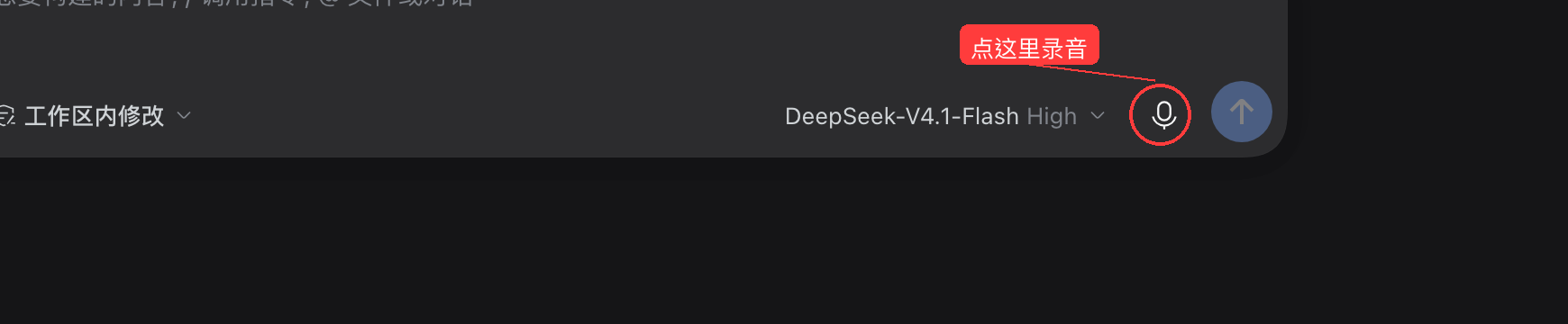
What it does
- Speak instead of typing — a microphone button sits between the model picker and the send button.
- Auto-send — when the recognizer returns text, it is inserted into the draft and submitted in the same tick, so the turn starts immediately. Empty or failed transcriptions never send anything.
- Local, offline recognition — SenseVoiceSmall INT8 via sherpa-onnx. Audio is transcribed on the host that runs DSH; nothing is uploaded.
- Languages — auto-detect, Chinese, English, Cantonese, Japanese, Korean, Spanish, French, German, Russian, Portuguese.
- Long dictation — records up to 120 s, with a live waveform and level meter; stop early with "Stop and transcribe".
- Device and engine settings — pick the input device and language on the plugin's own detail page.
Requirements
- DeepSeek Harness with the experimental speech-to-text packages (bundled with the desktop app and the
@deepseek-ai/dshdistribution; this plugin declares them as optional peers and inserts the needed rows itself). - Microphone permission for the DSH host (macOS: System Settings → Privacy & Security → Microphone).
Microphone capture needs a secure context — the desktop app and
http://127.0.0.1both qualify.
Install
From the plugin market once listed, or directly:
dsh plugin add github:ma1833577561/dsh-plugin-voice-autosend
# or, from npm
dsh plugin add dsh-plugin-voice-autosend
Then open Plugins → voice-autosend and press Download and prepare the first time; the
SenseVoice model (~242 MB) is fetched once into ~/.dsh/speech-to-text/sensevoice and reused.
If you previously enabled the built-in Voice Input plugin, turn it off first: both register the same speech provider, and two copies of the recognizer cannot coexist.
Usage
- Click the microphone next to the send button.
- Speak. Click Stop and transcribe (or let it stop at 120 s).
- The transcript is inserted and sent. Cancel any time with the ✕ button.
Language and input device live on the plugin detail page under Plugins.
How it works
The bundle patch inserts the speech service, the SenseVoice provider and the speech API, then mounts a
client bundle derived from the official @deepseek-ai/dsh-experimental-client-ui-voice-input
(MIT). The only behavioural change is in finish(): after inputActions.insertText(...) succeeds it
calls inputActions.submit(), which starts the turn exactly like pressing Enter. If insertion is
rejected because the draft changed mid-transcription, the text is kept in the pending slot instead of
being sent — so a concurrent edit never gets overwritten.
License
MIT. See LICENSE and NOTICE for the upstream attribution.
中文说明
在 DeepSeek Harness 的输入框里说话,转写完成后自动发送。语音识别在本机完成(SenseVoice), 音频不出本机,支持自动识别/中/英/粤/日/韩/西/法/德/俄/葡。
安装:dsh plugin add github:ma1833577561/dsh-plugin-voice-autosend,然后在「插件」里打开本插件,
首次使用点「下载并准备」拉取约 242 MB 模型(只需一次)。
注意:如果之前开过内置的「语音输入」插件,请先关掉它,否则两者会注册同一个识别服务。
Related plugins
dsh-web-ui (dsh-tool-describe-image)
zhu1090093659/dsh-web-ui
modlens
liustack/modlens
ipollowork
devin-axis/ipollowork
dsh-image-gen
shanliuling/dsh-image-gen