dsh-plugin-agentdeck
mantou132/dsh-plugin-agentdeck
Connects DeepSeek Harness to the AgentDeck mobile app (iOS / Android): auto-installs the ACP client and agentdeckd daemon with login autostart on startup, and adds a Settings panel with pairing QR code, keep-awake modes, and mobile default model selection over XChaCha20-Poly1305 end-to-end encryption.
Install
dsh plugin --profile web add github:mantou132/dsh-plugin-agentdeckREADME
dsh-plugin-agentdeck
Zero-config mobile remote control plugin for DeepSeek Harness (dsh), powered by AgentDeck.
Control DeepSeek Harness from your iPhone or Android over native ACP — end-to-end encrypted (XChaCha20-Poly1305), with push notifications, file & diff viewing, terminal output, and zero tunnel/VPN setup.
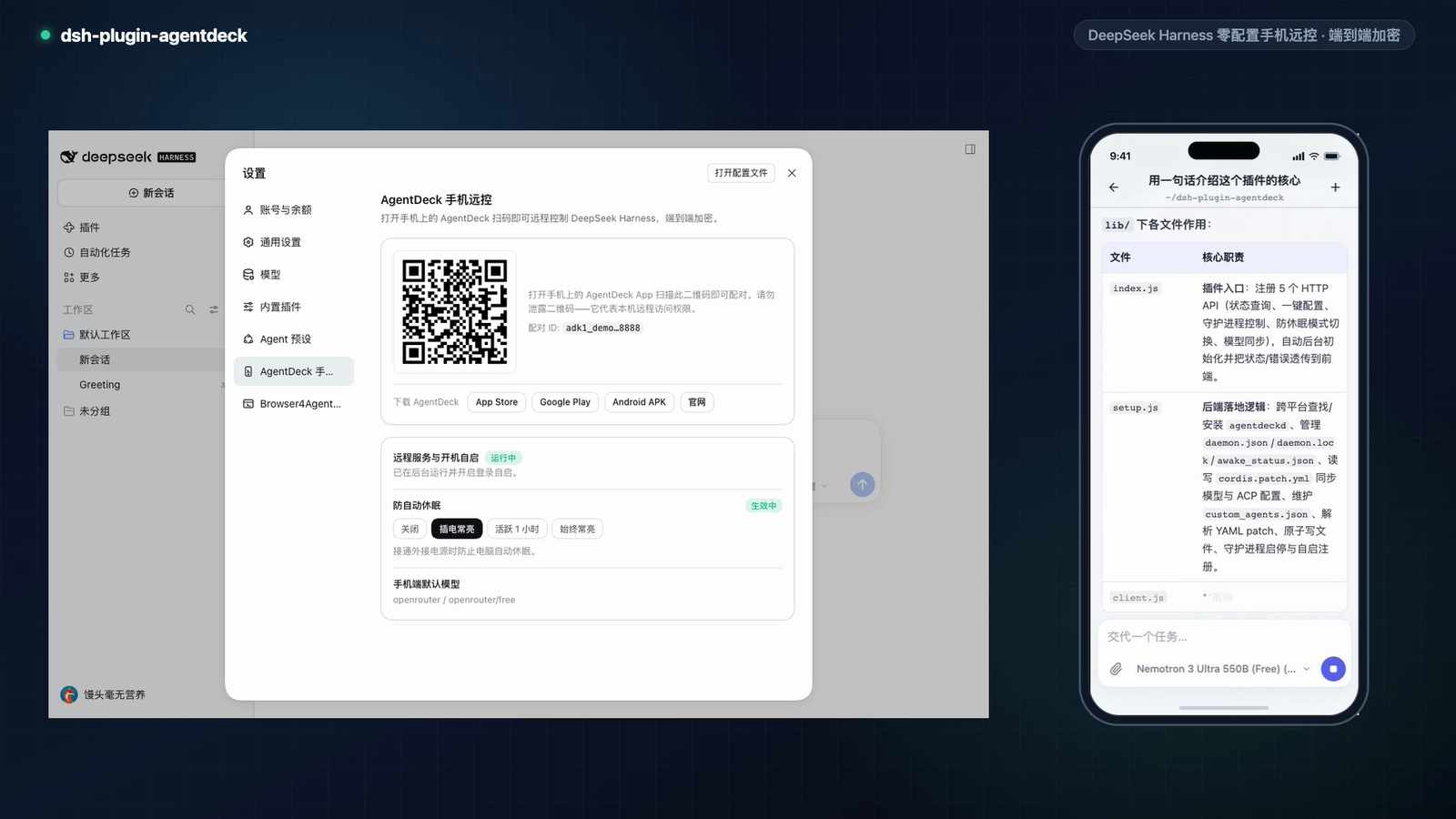
Zero-Click Setup
Install the plugin and open Settings → AgentDeck — everything is provisioned automatically in the background on startup:
- Installs
@openma/deepseek-harness-acpinto theacpprofile if missing. - Syncs model & provider config into
~/.dsh/profiles/acp/cordis.patch.yml(includingacp-plugin.config.providerfor third-party providers like OpenRouter). - Registers
dshin AgentDeck'scustom_agents.jsonwhile preserving your other agents. - Installs
agentdeckdautomatically and enables OS login autostart (launchd/systemd --user/ Windows Task Scheduler).
The Settings tab stays minimal — just your scannable pairing QR code plus the 3 controls you actually need:
- Remote Service & Autostart (
Start/Restart/Stop, plus currentagentdeckdversion and manual one-clickUpdatewhen a newer release is available) - Prevent Automatic Sleep (
Off/On Power/Active 1h/Always, hot-reloads without restarting) - Mobile Default Model (shows active model; syncs with your current profile in one click if different)
Install
DeepSeek Harness Web / CLI
dsh plugin --profile web add dsh-plugin-agentdeck
dsh web
DeepSeek Harness Desktop
Open Settings → Plugins, install dsh-plugin-agentdeck, then open Settings → AgentDeck and scan the QR code.
Get the Mobile App
- App Store (iOS) · TestFlight (iOS Public Beta) (App Store version is not available on the Mainland China App Store)
- Google Play (Android)
- Android APK (GitHub Releases)
- AgentDeck Website
Security, Privacy & Uninstall
Unofficial third-party plugin for DeepSeek Harness (
dsh), independently developed and maintained.
- End-to-End Encryption: Traffic between your phone and
agentdeckdis encrypted withXChaCha20-Poly1305. The relay only forwards ciphertext envelopes and cannot read prompts, files, or diffs; self-hosted relays are also supported. - What Auto-Setup Modifies:
- Installs
@openma/deepseek-harness-acpin theacpprofile and syncs provider/model config into~/.dsh/profiles/acp/cordis.patch.yml. - Adds/updates the
dshentry in AgentDeck'scustom_agents.json(~/Library/Application Support/agentdeckon macOS,%LOCALAPPDATA%\agentdeckon Windows,~/.local/share/agentdeckon Linux). - Installs
agentdeckd(via Homebrew / npm / Scoop / local fallback) and registers OS login autostart viaagentdeckd start.
- Installs
- Clean Uninstall:
(Optional: uninstallagentdeckd stop # Stop daemon & disable OS autostart dsh plugin --profile web remove dsh-plugin-agentdeck # Remove plugin from DSHagentdeckdvia your package manager and remove thedshentry incustom_agents.json.)
中文说明
DeepSeek Harness(
dsh)第三方非官方开源插件。
AgentDeck 的 DeepSeek Harness (dsh) 零配置手机远控插件(iOS / Android 原生 App 端到端加密远控,区别于场景 Agent 管理类插件)。
安装启用后会在后台自动完成全部初始化(无需手动点击配置按钮):自动安装 @openma/deepseek-harness-acp、同步模型与服务商配置、写入 custom_agents.json、安装 agentdeckd 并开启系统登录自启。
打开 DSH 的 设置 → AgentDeck 手机远控 即可直接扫码配对,界面仅保留最核心的 3 项开关:
- 远程服务与开机自启(开启 / 重启 / 停止,显示当前
agentdeckd版本,有新版时提供手动一键更新) - 防自动休眠(关闭 / 插电常亮 / 活跃 1 小时 / 始终常亮,热重载生效)
- 手机端默认模型(与当前界面不同时一键同步)
安装
dsh plugin --profile web add dsh-plugin-agentdeck
dsh web
打开 设置 → AgentDeck 手机远控 扫码即可使用:App Store(暂未上架国区)· TestFlight(iOS 公测版) · Google Play · Android APK。
安全、隐私与卸载
- 端到端加密:手机端与本机
agentdeckd之间全程采用XChaCha20-Poly1305端到端加密,中继服务器仅转发密文,无法读取对话、代码与 diff 内容,亦支持自建中继。 - 本机改动清单:仅在
acpprofile 安装@openma/deepseek-harness-acp并同步~/.dsh/profiles/acp/cordis.patch.yml;在 AgentDeck 数据目录写入custom_agents.json的dsh条目;安装agentdeckd并通过agentdeckd start注册系统登录自启。 - 彻底停用与卸载:
agentdeckd stop                                        # 停止守护进程并取消系统自启
dsh plugin --profile web remove dsh-plugin-agentdeck   # 卸载 DSH 插件
License
MIT
Related plugins
dsh-purge
kingcharleslzy-ai/dsh-purge
dsh-web (dsh-ssh)
zhu1090093659/dsh-web
dsh-web (dsh-remote-web-ui)
zhu1090093659/dsh-web
dsh-web-ui (dsh-ssh)
zhu1090093659/dsh-web-ui