dsh-commandcode-provider
mars-sea/dsh-commandcode-provider
Unofficial Command Code LLM provider: registers a `commandcode` route with a live model catalog and reasoning-effort support.
Install
dsh plugin --profile web add github:mars-sea/dsh-commandcode-providerREADME
dsh-commandcode-provider
English | 简体中文






Unofficial DeepSeek Harness LLM provider plugin for Command Code, ported from pi-commandcode-provider (MIT).
This is a community integration. You need your own Command Code account and API key or subscription, and Command Code's terms apply. This project is not affiliated with Command Code, Inc.
What you get
- Plugin bundle — install into any dsh profile with
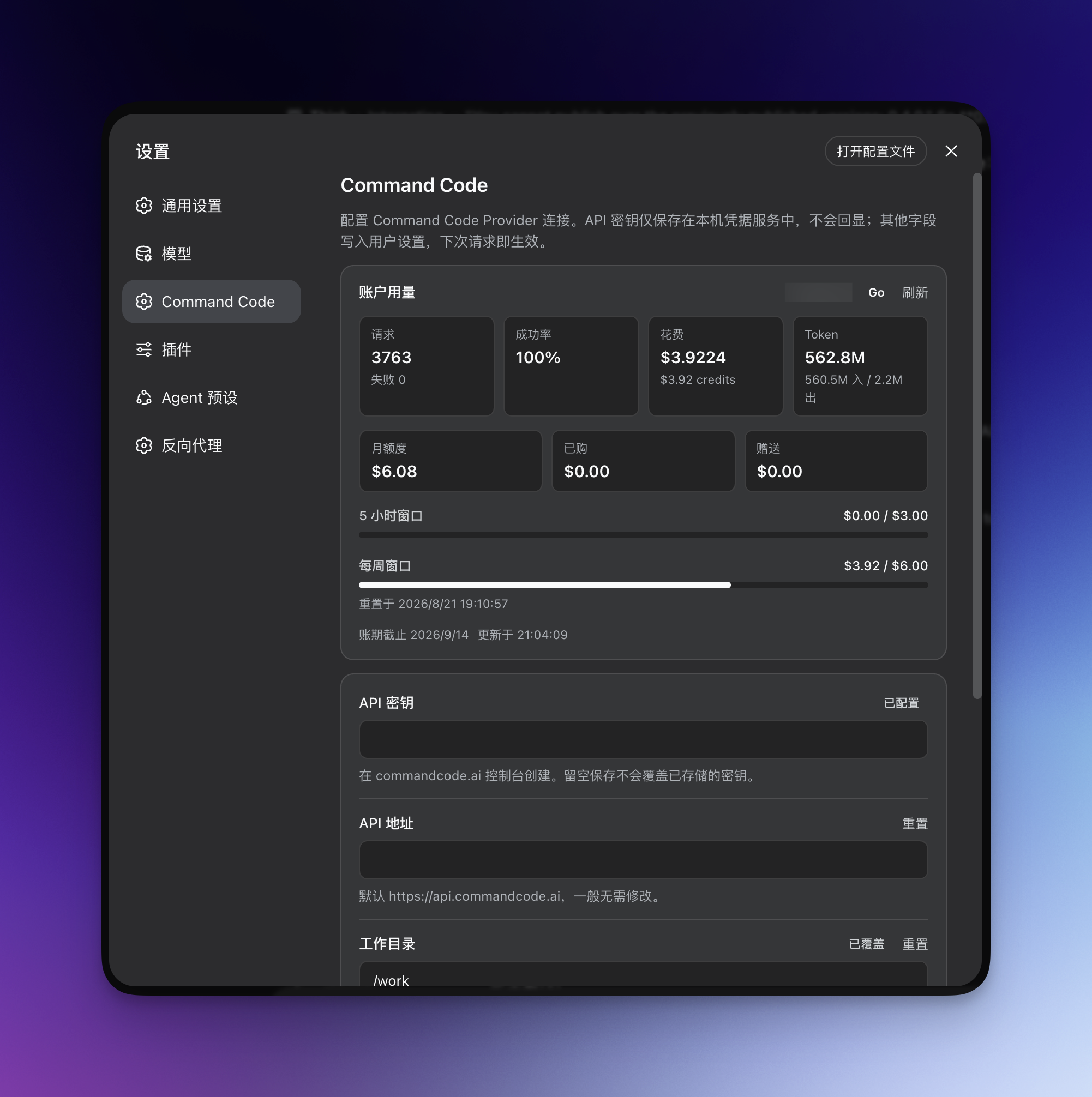
dsh plugin add; registers acommandcodeprovider route with a live model catalog. - Dedicated settings page — one account list (keys, sign-in, live quota, dedicated models), model visibility, privacy switches, and connection options.
- Works in the terminal too — the same install serves a dsh-TUI profile, with its own
/settings→ Command Code page for the API key and the model controls. - Models-page key card — the Settings → Models → Command Code card carries the key status, a paste field, and the sign-in button inline.
- In-browser sign-in for keys — start the official authorization flow (the same one
cmd loginruns) from the settings page; the approved key lands in the local credential service automatically. Manual paste remains the fallback. - Multi-account rotation — when one account hits its usage limit, requests switch to the next account automatically. See Account rotation.
- Flexible API key setup — via the settings page, an environment variable, or the official CLI login file.
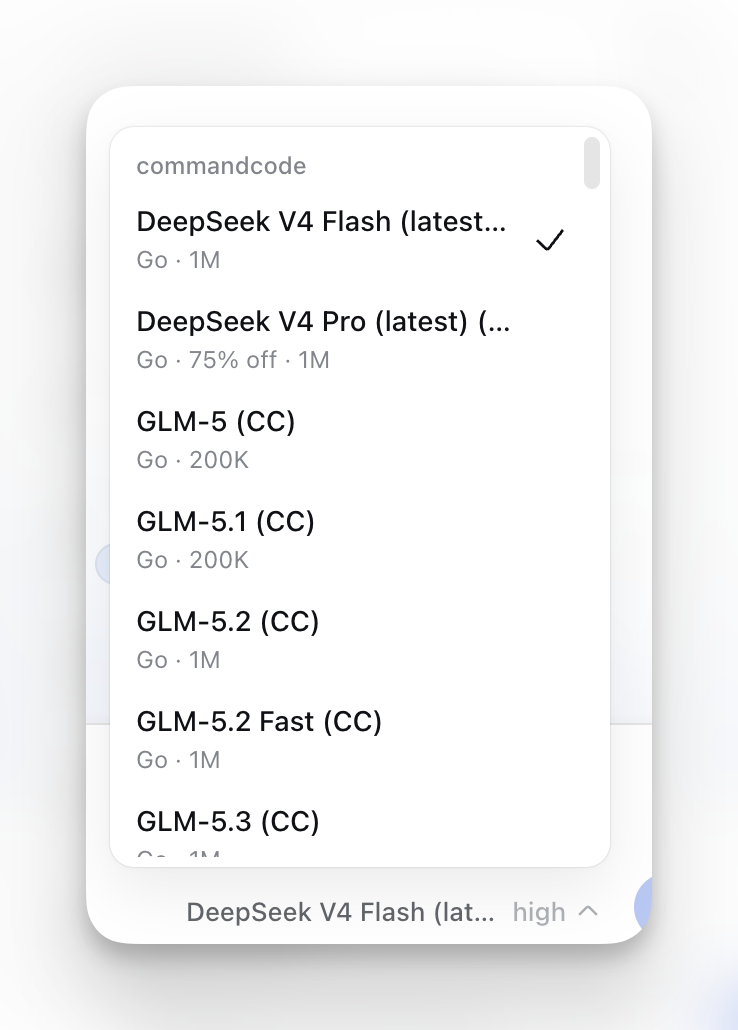
- Model-picker annotations — minimum plan, active deal or
FREEbadge, peak/off-peak state, image support, and context window; free models listed first. - Plan-aware picker — models above your subscription tier are hidden by default (toggleable); an optional Model allowlist keeps only your favorites in the picker.
- Reasoning-effort support — models with selectable reasoning effort levels expose them in the picker.
- Image input — Vision-capable models accept images.
- Plans & quota panel — an optional Command Code card at the bottom of the sidebar (directly above Settings) shows the serving account's plan and its 5-hour and weekly windows; clicking it opens a dashboard with the billing period, both windows as progress bars with reset times, monthly credit consumption, and the purchased/free balances. The dashboard's × button hands the center column back to your conversation (the current session is untouched). Off by default — turn on "Show the quota card in the sidebar" under Settings → Command Code → Integrations & display to show it, and the same switch hides it again (a hidden card draws nothing at all and runs no background usage poll); the change lands as soon as you save. The panel follows your harness language (中文 / English).
- Session cost estimate — published-rate estimates (
≈) beside the composer token counter and in its usage dialog, using each request's model, request time and context tier from durable session history. Model switches and viewing the session later do not reprice earlier requests. Mixed-provider or unpriced usage shows a labeled subtotal (≥); missing history or wholly unpriceable usage stays hidden. These are estimates from the installed price snapshot, not provider invoices. Also English on every harness language. - Web search — the dsh
web_searchtool is backed by the Command Code Provider API (/alpha/web-search) with the same key/endpoint as chat, so no separate search key or base URL is needed. See Web search.
See Screenshots below for what the UI looks like.
Install
This release supports dsh 0.2.0-rc.2 and nothing else — the plugin's peer range is that one version, and its compatibility record names it alone:
dsh plugin --profile web add @mars-sea/dsh-commandcode-provider@latest
-
Older dsh releases. The 0.1.2–0.1.7 line is no longer supported: those engines predate the 0.1.7 settings rewrite, the
RequestMessageenvelope, and the durable image-offload contract, and the compatibility code that bridged the two was removed. The last plugin release covering 0.1.7 is 0.11.17; the 0.1.2–0.1.6 line's last release is 0.11.11; the 0.5.0-era Harness line's last release is 0.9.1. All are installed by exact version and none is maintained:dsh plugin --profile web add @mars-sea/dsh-commandcode-provider@0.11.17 # dsh 0.1.7 dsh plugin --profile web add @mars-sea/dsh-commandcode-provider@0.11.11 # dsh 0.1.2–0.1.6 dsh plugin --profile web add @mars-sea/dsh-commandcode-provider@0.9.1 # dsh 0.5.0 line
pnpm 11 holds back new releases. Its minimumReleaseAge defaults to 1440 minutes, so a version published less than a day ago is skipped and @latest resolves to the previous release — silently, with a success exit code. To install a release from the last 24 hours, name it exactly:
dsh plugin --profile web add @mars-sea/dsh-commandcode-provider@0.11.15
The same applies to every profile you install into, including the terminal UI below.
Fresh pnpm 10 marketplace generations are supported directly. Do not add a separate @deepseek-ai/dsh-invariants dependency; the plugin declares it as a Host peer so the active dsh profile remains the owner of Harness packages.
Updating
Update with the same tag you installed with:
dsh plugin --profile web update @mars-sea/dsh-commandcode-provider@latest     # dsh 0.2.0-rc.2
dsh plugin --profile web update @mars-sea/dsh-commandcode-provider@0.9.1      # older dsh (0.5.0 line, unmaintained)
Each profile updates separately — the terminal UI owns its own plugin list (see below):
dsh plugin --profile dsh-tui update @mars-sea/dsh-commandcode-provider@0.11.15
To move to a version published less than 24 hours ago, name it exactly as in Install above; pnpm 11's age gate resolves @latest to the previous release instead.
Then restart the web app.
Getting an API key
The easiest path is the official CLI (Node.js 22+):
npm i -g command-code@latest
cmd login        # macOS/Linux; native Windows: cmdc login
Or skip the CLI: click Sign in to Command Code under Settings → Command Code — your browser opens the commandcode.ai authorization page (the same flow cmd login uses) and the key is stored in the local credential service when you approve. You can still create a key on the Keys settings page and paste it into Settings → Command Code, or export COMMANDCODE_API_KEY="user_...".
The sign-in flow needs the Host and your browser on the same machine (loopback callback). With a remote Host, paste the key manually; a literal composition-level
apiKey, if set, still takes precedence over a signed-in credential.
Verify it works
After restart, enter your API key in Settings → Command Code and save; Settings → Models shows a Command Code card, and the model picker lists the live catalog under commandcode. Send a message with a model your plan includes.
Terminal UI (dsh-TUI)
The plugin also works under a terminal front door. Each dsh profile owns its own plugin list, so the web install above does not reach the terminal — add the plugin to the dsh-tui profile as well:
dsh plugin --profile dsh-tui add @mars-sea/dsh-commandcode-provider@0.11.15
Pin the exact version here. For the first 24 hours after a release, a bare package name (or @latest) is silently resolved to the previous one: the install succeeds, but the profile gets the older build — which is how a fresh terminal install ends up with no /settings → Command Code page and no commandcode models at all.
Then pick the provider in the model selector, or name it directly:
/model commandcode/deepseek/deepseek-v4.1-flash
/model lists every registered provider, with Command Code's live catalog and its plan/deal/context annotations. The /commandcode usage dashboard works there too.
Entering the key. The TUI has no web Models page, so the plugin declares its own page in the TUI settings screen — /settings → Command Code — with the API key, the API base, the out-of-plan model filter, the active account, and the command language. The key field is write-only: it shows whether a key is configured and writes what you type to the credential store, never to a settings document. The same page is the only place a TUI-only user needs to visit.
Picking models. That page lists the whole catalog as checkboxes, grouped by plan tier (Go → GOAT → Pro → Provider) with the free models first, so nothing has to be typed from memory. Everything starts checked, because an unset allowlist means "show every model" — uncheck the ones you do not want in the picker. The choice is stored as per-model overrides next to the visibleModels list the web page edits, so both surfaces can be used interchangeably and a plain visibleModels written by hand still works.
Alternatively, set the key outside the TUI — any of these work, in this order of precedence:
export COMMANDCODE_API_KEY="user_..."   # launching environment
cmd login                               # writes ~/.commandcode/auth.json
Making Command Code the default. dsh-TUI pins its own agent route, and its agent-default-model setting does not override it. To start every session on Command Code, override the agent-loop row in your profile patch ($DSH_HOME/profiles/dsh-tui/cordis.patch.yml):
- id: agent-loop
  inject: [tuiStartup]
  config:
    agents:
      - id: main
        provider: commandcode
        model: deepseek/deepseek-v4.1-flash
        reasoningEffort: max
        cwd: !!js process.cwd()
Engine version. The plugin is maintained against exactly one engine: dsh 0.2.0-rc.2. Its @deepseek-ai/dsh-* peer range is ^0.2.0-rc.2 (semver resolves that to 0.2.0-rc.2 alone), and dsh.compatibility.dshReleases records that single release. On an older engine the settings page, the message envelope, or the request-image budget will not line up — install the last release that supported your engine (see Install) instead of forcing this one.
Usage dashboard
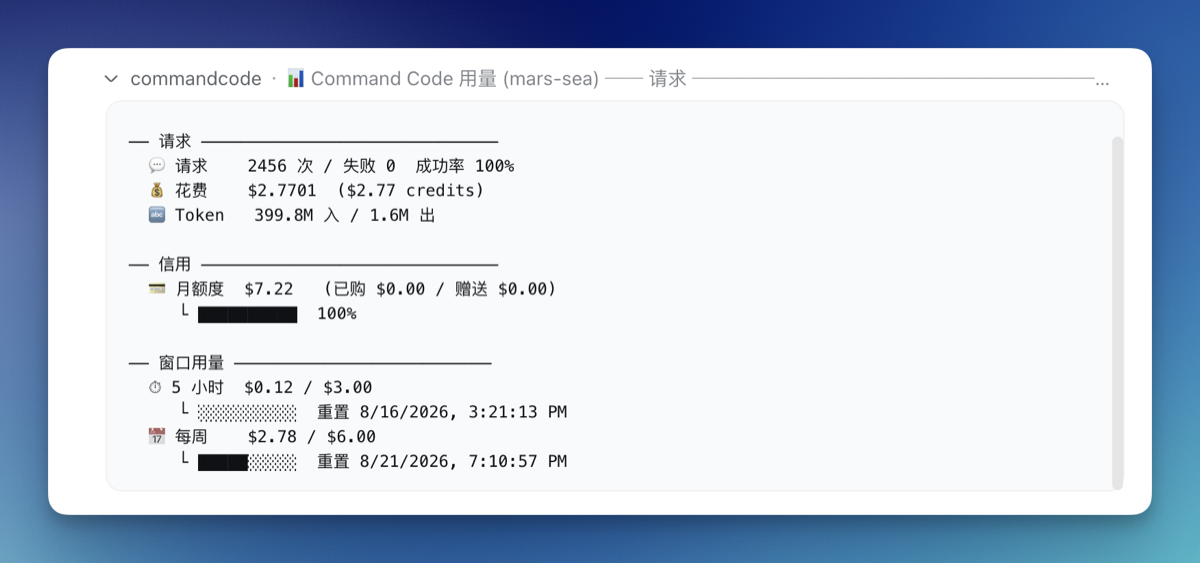
The plugin registers a /commandcode slash command showing per-account usage:
/commandcode (or /commandcode status)
The command's user-facing copy follows the shell's locale: explicit lang: 'en' | 'zh' in the llm-commandcode plugin config wins, otherwise LC_ALL/LANG is read, otherwise it falls back to zh. The web settings page is independent — it follows the browser's language preference on its own.
Account rotation
With several Command Code subscriptions, the plugin switches to the next account automatically when one hits its usage limit:
- Setup — click Add account in the Accounts card at Settings → Command Code, optionally name it, then either Sign in to Command Code (the key is stored when you approve in the browser; a sign-in that does not complete leaves no empty account behind) or paste an API key. Account actions — add, rename, replace or clear a key, remove, pin — apply immediately; only the other settings on the page wait for the Save bar. The top-level key always serves first as the
defaultaccount. - Manual switching — Pin this account in an account's ⋯ menu makes it the preferred account; if it is exhausted, requests fall back to other accounts and return once its window resets. Unpin returns to automatic rotation.
- Dedicated models — expand an account and pick its Dedicated models from the live catalog. A request for one of those models serves from that account while it is usable; an exhausted or invalid account falls back to the normal rotation. A model belongs to one account at a time — picking it for another account moves it. (Stored as
modelAccountRules.) - Show only favorite models — the Visible models picker in the Models card keeps only the checked models in the model picker; unchecked shows all (the default).
- Status — each account row shows its plan, status and 5-hour/weekly meters; expand it for the full report.
/commandcodereports the same per-account state.
The equivalent YAML ($DSH_HOME/settings.yaml or composition config):
llm-commandcode:
  apiKeyEnv: COMMANDCODE_API_KEY        # first (default) account
  activeAccount: COMMANDCODE_API_KEY_2   # optional: pin the active account (`default` or an account's credential ref)
  accounts:                              # rotation order after it
    - label: Go #2
      apiKeyEnv: COMMANDCODE_API_KEY_2
    - label: Go #3
      apiKeyEnv: COMMANDCODE_API_KEY_3
  modelAccountRules:                     # optional: route models to accounts (first match wins)
    - models:                            # catalog model ids (multi-select)
        - deepseek/deepseek-v4-pro
        - deepseek/deepseek-v4-flash-vision-exp
      account: COMMANDCODE_API_KEY_2
    - models:
        - tencent/hy4-preview
      account: default
  visibleModels:                       # optional: show only these models in pickers (catalog model ids); unset shows all
    - deepseek/deepseek-v4-pro
    - tencent/hy4-preview
Configure
Settings → Command Code is organized as Accounts (keys, sign-in, live quota, pinning, dedicated models), Models (hide out-of-plan models, visible models), Privacy & security (zero data retention, off by default, see below), Integrations & display (serve web search with Command Code, show the quota card in the sidebar, off by default), and a collapsed Advanced section (API base URL, request/stream timeouts, transport retries, cache-aware image offload). The working directory is no longer on the page; workingDir in config still works.
The same options live in $DSH_HOME/settings.yaml (changes apply immediately, no restart):
llm-commandcode:
  apiKeyEnv: COMMANDCODE_API_KEY   # credential reference
  apiBase: https://api.commandcode.ai
  workingDir: /path/to/project     # optional
  modelsCachePath: ~/.commandcode/models-cache.json
  requestTimeoutMs: 300000          # default 300s (the official CLI's own budget)
  streamIdleTimeoutMs: 300000      # default 300s
  # offloadSeenImagesForCache: true # opt in to CLI cache mitigation; later requests omit old pixels
  showSidebarQuota: true           # optional: show the plans & quota card in the sidebar (default off)
  zdr: true                        # optional: route requests only through zero-data-retention upstreams (default off)
Repeated image cache misses
On the CLI transport (/alpha/generate), a new image can make Command Code's reported prompt cache retreat to the first historical image even when every previous request message is byte-identical. The opt-in Stop replaying images already seen setting (offloadSeenImagesForCache) asks dsh's durable image/offload surface to replace an older image with a stable text placeholder after this same model has answered with it. The next request keeps its new image; later text can be cached without replaying old pixels. The default is off because the model cannot inspect an offloaded image again unless it rereads the source file or the user reattaches it. This mitigates the observed cost spike; it does not repair Command Code's underlying multimodal cache behavior. Live evidence and limits.
Web search
When your deployment's dsh shell mounts the web capability (@deepseek-ai/dsh-web + @deepseek-ai/dsh-tool-web), the model's web_search tool is served by this plugin's commandcode search provider — it calls the Command Code Provider API's /alpha/web-search endpoint with the same API key and base URL as chat. You do not configure a separate search key, endpoint, or model.
On by default. The plugin's Settings → Command Code page has a "Serve dsh web search with Command Code" toggle (webSearch, default on). When on, the plugin selects commandcode as the active search backend automatically; turn it off to hand the selection back to whichever backend was there before (a sibling search plugin such as modsearch keeps working — it is never forced back to dsh's shipped DeepSeek search). The toggle takes effect on the next search — no restart needed.
- The provider registers as
commandcodeonctx.webonly when the web service is present; without it this stays a chat-only plugin. - The toggle works by selecting
commandcodein the web seam at boot and on every settings change, remembering the backend it displaced; turning the toggle off (or unloading the plugin) restores that backend. If you'd rather pin it durably, setsearchProvider: commandcode(or$DSH_WEB_SEARCH_PROVIDER=commandcode); that remains effective even if this plugin's runtime selection is unavailable. numResultsfrom the dsh tool is clamped to the Command Code range (1–10, default 5); results map to the dshWebSearchSourceshape (url/title/snippet).
This reuses the Command Code Provider API directly (like the official CLI's built-in
web_search), so it is distinct from a DeepSeek-native search backend.
Zero data retention (ZDR)
Command Code can serve a request only through upstreams that retain no prompts or completions and never train on them — the same opt-in the official CLI exposes as CMD_ZDR=1, and the x-cmd-zdr: 1 header on the Provider API (official docs).
Off by default. Turn it on with the "Zero data retention (ZDR)" toggle (zdr) in the Privacy & security card, or in your profile config. How this plugin implements it:
- The header is sent on every chat request while ZDR is on. The plugin maintains an informational exception list (
KNOWN_NON_ZDR_MODELS, synced from the official CLI — 23 models as of 2026-09-29, e.g.xai/grok-4.5,stepfun/Step-3.7-Flash,meta/muse-spark-1.3). A model without an available ZDR upstream fails with422 cmd_zdr_no_providers; the request is never retried without the header. - If a refusal still happens (coverage churn, or no ZDR upstream with spare capacity at that moment), the error names the cause and how to turn ZDR off, instead of surfacing as a bare HTTP 422.
- ZDR usually costs more: capacity is limited and billed at each upstream's pass-through rates, and which upstream serves a request can change per request. The session-cost readout keeps quoting the ordinary catalog rates; the real per-request price shows in Command Code's Studio usage page.
- Works on every plan; plan credits meter ZDR requests at the plan's default allowance.
Notes & limitations
- Image input is model-gated — only Vision models accept images; text-only models refuse them.
- Switching to a text-only model in an image-bearing session is rejected by dsh — pick a model marked
Imageor remove the images first. - Long image-heavy sessions keep working — the provider caps the size of a single request (around 50 MB, and it is undocumented), so a session that accumulates many screenshots would otherwise start failing every request once it grew past that. The oldest images beyond the budget are replaced by a short "image omitted" note that names the attachment, the newest ones are sent as usual, and a request the provider still rejects as too large is retried once with a much smaller image budget before failing.
- No
stopsequences — requests carrying one fail. - Historical reasoning is replayed on both transports so a tool-calling loop keeps its chain of thought:
/provider/v1/chat/completionspasses it back asreasoning_content, and/alpha/generatecarries it as areasoningblock inside the rebuilt assistant turn (the shape the official CLI sends) — a DeepSeek thinking-mode tool loop is rejected without it. Only tool calls with a paired tool result are replayed on either transport. - Every tool's parameter schema is normalized to the object root the provider requires, so a tool declared without one (a third-party plugin's hand-written schema, an MCP server's own
inputSchema, a generated root$ref) no longer fails the whole turn withschema must be a JSON Schema of 'type: "object"'. - The model catalog is browsable without a key; chat requests need one.
Permissions & privacy
The plugin only communicates between your local dsh profile and your Command Code account: locally it touches only the credential store and the models cache (plus ~/.commandcode/auth.json as a last-resort fallback); on the network it calls only the Command Code API. No telemetry. With zero data retention on (also off by default), chat requests require a ZDR upstream; models without one fail instead of running without the protection.
Disabling / uninstalling
-
Disable without removing: edit your profile's
cordis.patch.ymland comment out (or remove) thellm-commandcoderow, or setdisabled: true, then restart. -
Uninstall completely:
dsh plugin --profile web remove @mars-sea/dsh-commandcode-providerYour API key in the dsh credential store and
~/.commandcode/auth.jsonare left untouched.
Development
npm install
npm run typecheck   # tsc --noEmit
npm run build       # tsdown -> lib/
To try a local build in a profile:
dsh plugin --profile web add /path/to/dsh-commandcode-provider
After changing src/, re-run npm run build and restart the app.
Community & feedback


License
MIT — see LICENSE. Portions ported from pi-commandcode-provider (MIT).
Screenshots
Model picker — plan tier, deal/FREE, peak/off-peak, Image and context annotations:
Usage dashboard — /commandcode per-account report:
Settings page — the account list with live quota, model visibility, privacy switches and connection options:
Related plugins
dsh-routing-suite
yjh051108/dsh-routing-suite
dsh-plugin-subscriptions
v1ki/dsh-plugin-subscriptions
dsh-workbuddy-connect
corrinehu/dsh-workbuddy-connect
dsh-our-free-model
zouyuxuan122/dsh-our-free-model