dsh-balance-strip
melatonin-cz/dsh-balance-strip
Balance strip in the composer dock — a green-to-red OKLCH ramp driven by your DeepSeek balance, with a dynamic toggle, texture options and a built-in settings panel.
Install
dsh plugin --profile web add github:melatonin-cz/dsh-balance-stripREADME
dsh-balance-strip




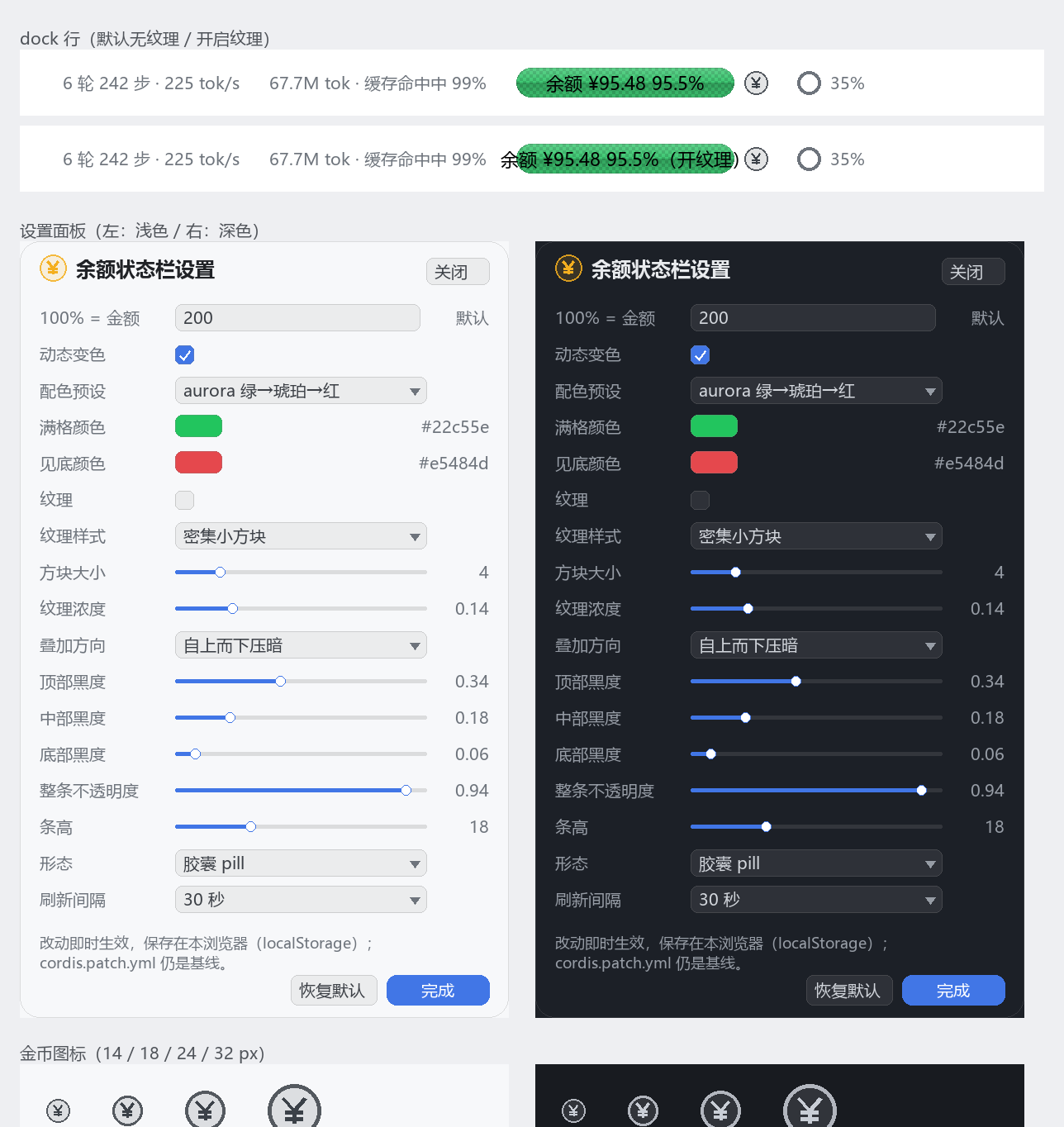
DSH 输入框下方状态行最右侧的一小截余额状态栏:金额 + 百分比 + 100%绿→0%红 连续色带; 条形后面一个金币入口打开图形化设置面板。文案跟随客户端语言(中文 / English)。
安装
dsh plugin --profile desktop add dsh-balance-strip
或在本机开发时直接链目录:
dsh plugin --profile desktop add /path/to/dsh-balance-strip
安装
本地目录(开发时最顺):
dsh plugin --profile desktop add ./dsh-balance-strip
装完在 DSH 里让它重新组合(桌面端重启应用,或等 HMR 生效)。卸载:
dsh plugin --profile desktop remove dsh-balance-strip
也可以打包成 tgz 再装:npm pack → dsh plugin --profile desktop add ./dsh-balance-strip-0.1.0.tgz。
配置
配置写在 profile 的 cordis.patch.yml 里(~/.dsh/profiles/desktop/cordis.patch.yml),本包自带的 cordis.patch.yml 只是默认值。最常改的三个:
- id: dsh-balance-strip
  config:
    anchor: 200        # 100% 对应 ¥200:余额 ¥200 满格绿,¥100 是 50%,¥400 还是满格
    dynamic: true      # false = 静态中性条
    colorHigh: '#00c06a'   # 满格颜色(palette: custom 时生效)
    colorLow: '#ff3b30'    # 见底颜色
完整键、取值范围与语义见 docs/PRD.md:
| 想做什么 | 改哪个 |
|---|---|
| 100% 对应金额 | anchor(默认 100,单位跟随余额接口返回的币种) |
| 关掉变色 | dynamic: false |
| 自定义两端颜色 | palette: custom + colorHigh / colorLow |
| 换一套预设 | palette: aurora | signal | mono |
| 更「高级」的两端压暗 | overlay.direction: vignette、overlay.bottom: 0.28、overlay.top: 0.40 |
| 更暗/更亮的叠加 | overlay.top / overlay.mid / overlay.bottom(0–1) |
| 整条更透 | opacity: 0.7 |
| 只要一根细线 | variant: rail |
| 刷新频率 | pollSeconds: 30(10–600) |
配色预设:aurora(绿→琥珀→红,默认)、signal(四站、分段感更强)、mono(不用红绿的亮度带)。
界面
- 位置:输入框下方状态行最右(官方上下文占用环之后;dock 是 flex,插件用
order: 99)。 - 条形后面一个 18px 齿轮:点开图形化设置面板(anchor / 动态开关 / 配色 / 两端颜色 / 纹理 / 叠加三段黑度 / 透明度 / 条高 / 形态 / 刷新间隔),改动即时生效,存在本浏览器 localStorage,且宿主 config 仍是基线。
- 底色默认无纹理(干净的纯色胶囊);在面板里可开启「密集小方块 / 点阵 / 网格」,方块 2–16px、浓度 0–0.6 可调。
- 刷新不闪:只有首次加载显示占位符,之后静默刷新;失败保留上一次数值。
- 100% 只在你手填 anchor 时才「封顶」;留空时按本币 100 计、数字如实显示(¥200 → 200%),颜色仍满格。
数据从哪来
两条通道,都在宿主侧完成,浏览器只读同源 JSON:
- API Key:用 DSH 凭据里的
DEEPSEEK_API_KEY(或config.apiKey)调官方GET /user/balance。 - 账号登录态(没有 API Key 也能用):读 DSH 账号 grant(
deepseek-account-platform/default),带x-dsh-auth-token调GET https://platform.deepseek.com/api/v0/users/get_user_summary,取充值钱包 + 赠送钱包(顺带读累计消费)。
先试 Key,失败自动回落账号通道;两条都没有时条体显示「未配置 · 点击重试」。密钥与 grant token 永不下发前端,响应里也不含 apiKey 字段。
改了宿主半区代码(
lib/index.js)需要重启 DSH 桌面端;只改客户端样式/组件时刷新页面即可。当前包以 pnpm link 方式装在 profile 里,重启后即用最新构建。
开发
node scripts/build.mjs         # 生成 lib/index.js + lib/client.js(ModuleLoader 形态)
node --test tests/core.test.mjs tests/host.test.mjs tests/client-bundle.test.mjs
node tools/emit-ramp.mjs aurora ../_probe/ramp.json
python tools/preview.py ../_probe/ramp.json docs/preview-aurora.png top-dark
- 纯函数层在
src/shared/core.cjs(同时被 Node 测试与浏览器 bundle 使用),UI 只拼 CSS 变量。 - 客户端 bundle 由
scripts/build.mjs拼接,不需要打包器、不打包 react。 - 设计依据(为什么是 OKLCH、数值怎么来的):docs/RESEARCH.md;需求与验收:docs/PRD.md;架构与测试矩阵:docs/TDD.md。
已知限制
- 只在
conversation.composer.dock(输入框下方状态行)出现;不做独立卡片/看板。 - 需要能取到 DeepSeek API Key;账号登录态取不到时用
config.apiKey显式填。 - 首版没有图形化设置页,全部走
cordis.patch.yml。 - 「今日花费」还没接会话统计,
mode: spent会退化为只显示金额。
Related plugins
DeepSeek-Balance-Whale-Widget
meteornox/deepseek-balance-whale-widget
dsh-context
bowenliang123/dsh-context
dsh-cost-meter
han-1413141/dsh-cost-meter
dsh-damage-pulse
wssfk12138/dsh-damage-pulse