dsh-better-setting-page
merusu/dsh-better-setting-page
Gives the 800px settings dialog the whole window, collapses its section rail to a 56px icon column on demand, and lets you hide settings pages you never open.
Install
dsh plugin --profile web add github:merusu/dsh-better-setting-pageREADME
Better Setting Page
English · 中文
Your settings page is a 800px modal. Give it the window. The dialog fills the screen, and its section rail collapses to a 56px icon column when you want the space back — including in a portrait window, where the rail and the content were fighting over the same 800px.
Why install this
Every plugin that registers a settings page adds a row to the rail, so the dialog grows into something that wants width — a page with a card per category is unreadable at 800px, and the screen around it is yours, not the dialog's. This plugin adds no settings of its own; it gives the existing page the room it should have had, and hands 132px back to the content on demand.
Screenshots
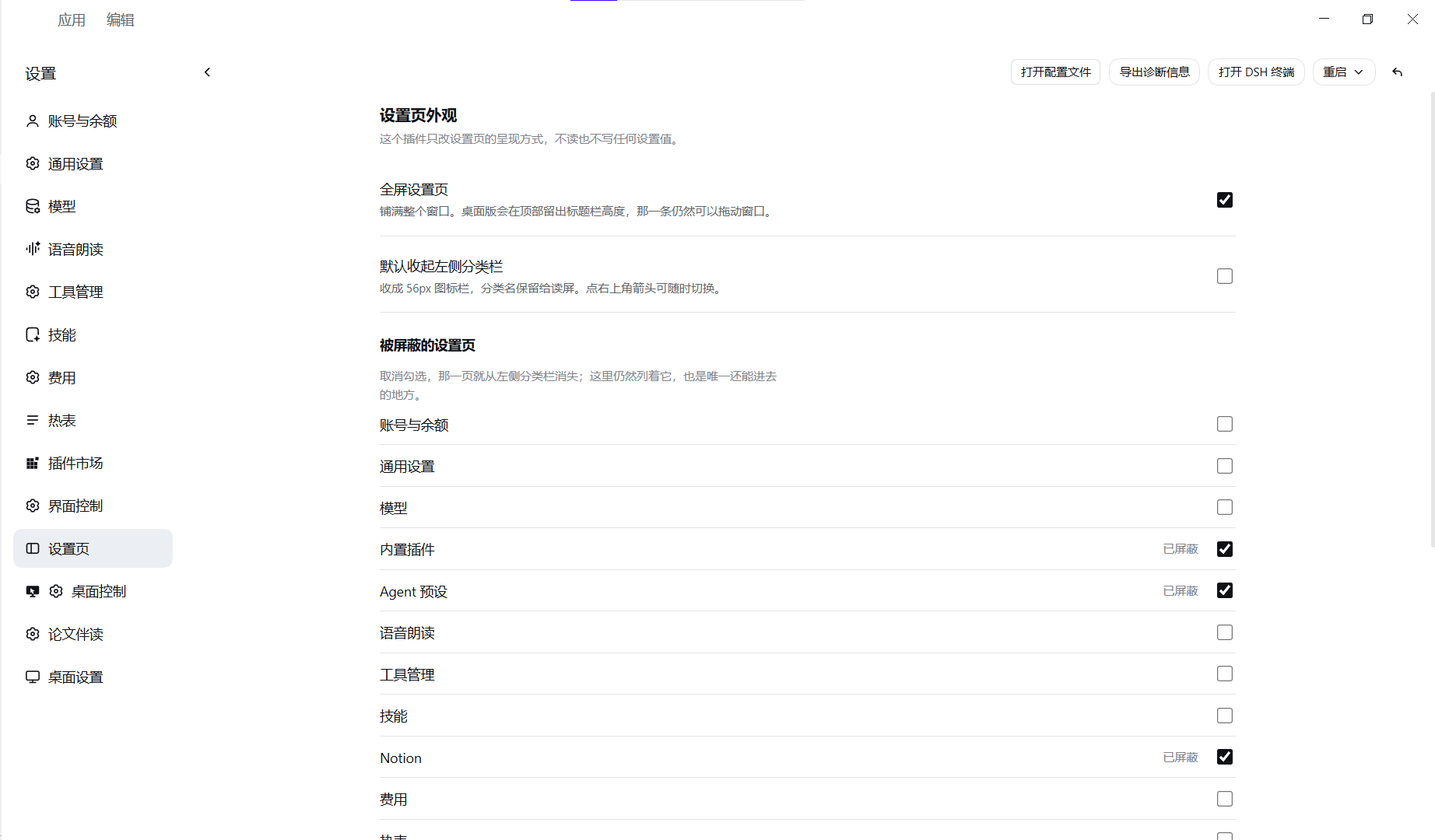
Hide the pages you never open: built-in plugins, Agent presets, Notion and bili are unticked here, so they are gone from the left rail — and this page is the only way back into them.
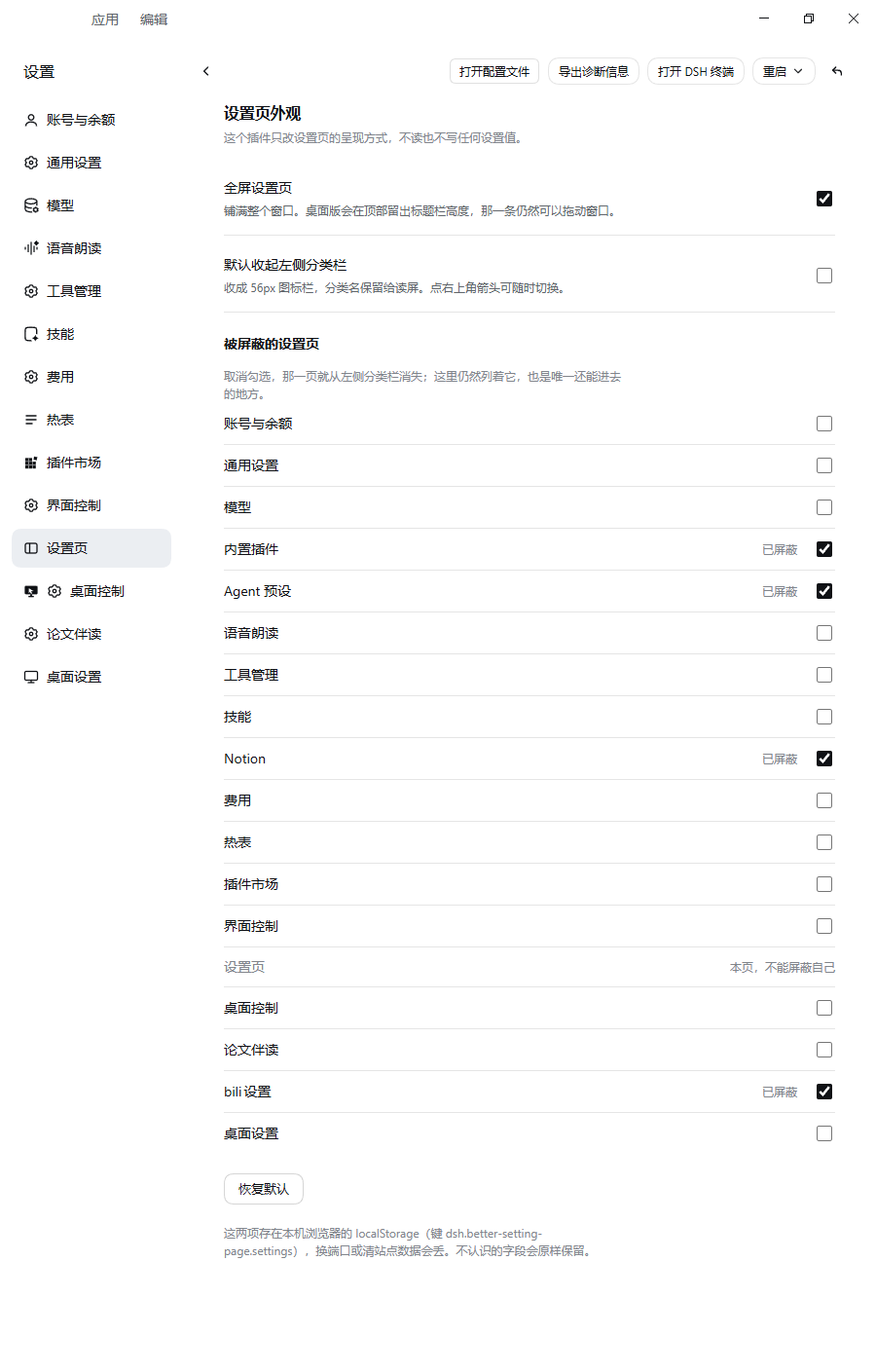
Portrait windows still fit: the rail and the content column stop fighting over the same 800px, so a tall narrow window stays readable.
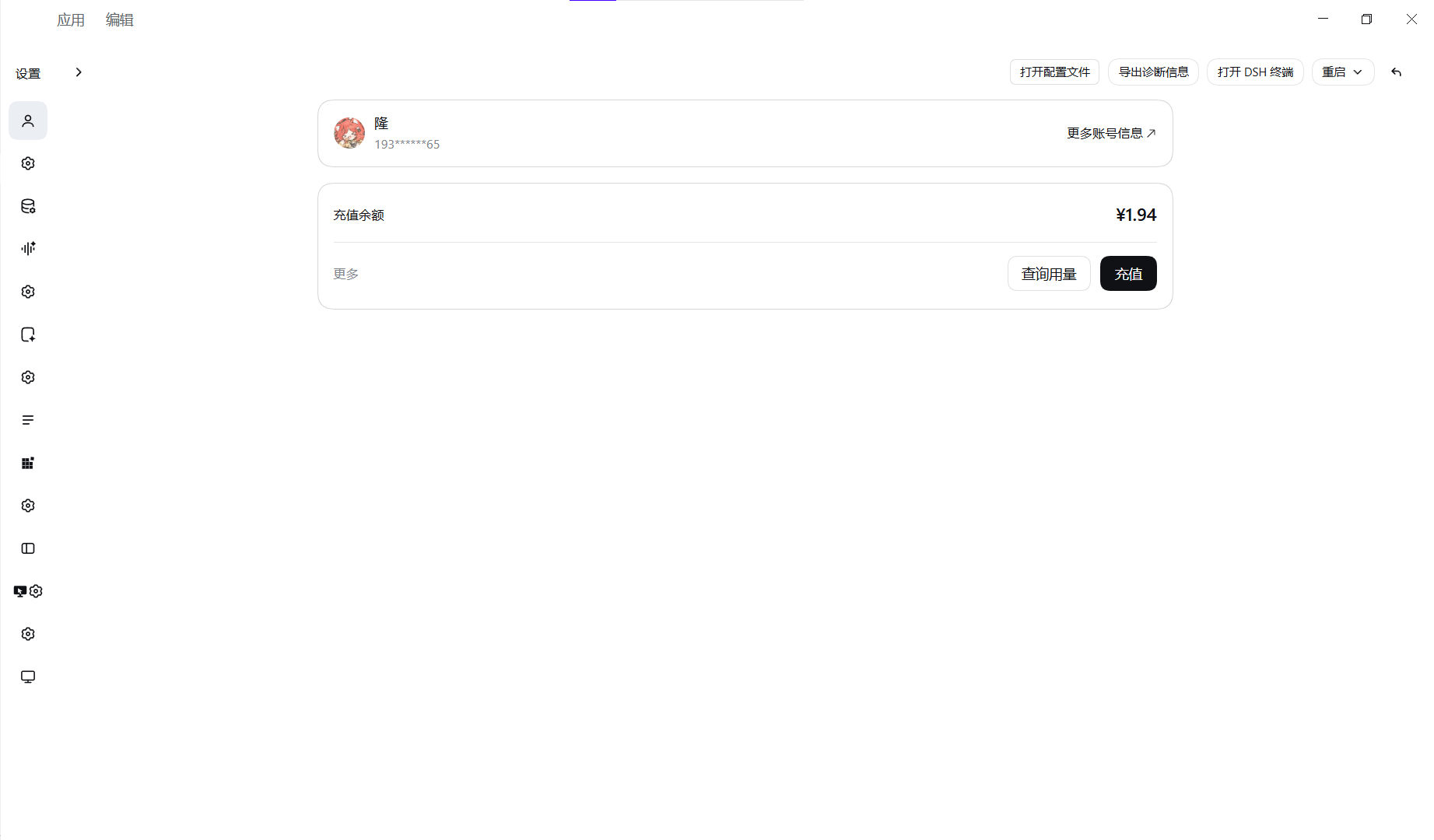
The rail collapses to icons: 56px wide, with the section names kept for screen readers; the arrow in the header brings it back.
Install
dsh plugin --profile <profile> add dsh-better-setting-page
# then restart that profile's window — the browser is still holding the old bundle
dsh --profile <profile>
Requires DSH ≥ 0.2.x — exact floor pending confirmation. Verified against
harness 0.2.2-rc.1 (@deepseek-ai/dsh-client-ui-settings-general 0.2.2-rc.1 in
the unpacked asar); if a later build moves those anchors, the switches would
simply stop matching, and For plugin developers says
what to look at.
Why a restart is required
The client bundle is loaded once per window. Nothing here is hot-swapped.
What you get
| Full-window page | The dialog fills the window; the panel radius and drop shadow go away. On desktop the title-bar height is kept as padding, and that strip still drags the window. |
| Collapsible rail | A chevron at the header's left edge collapses the section list to 56px of icons. Section names stay in the accessibility tree, so screen readers and Tab still announce them. |
| Remembered in this browser | All three switches live in this browser profile's localStorage, key dsh.better-setting-page.settings. |
| Its own settings page | Under Settings → Settings page you get three switches, a hidden pages list and Restore defaults. Without that page, a user who dislikes full screen would have to uninstall the plugin. |
Full screen is on by default, the rail is expanded by default, and the open/close animation is on by default. All three are switchable, all three take effect on the spot — no reload, no restart — and all three choices survive a restart.
The header reads the way a settings page is expected to: collapse on the left, exit on the right. The close button in that corner draws a return arrow instead of an ✕.
Closing still works the same
It is still the host's own button — same node, same handler, same accessible
name — so nothing about closing changed, only the glyph. Esc, the close button
and a click on the mask all still work. The mask is still there and still
clickable; with full screen on it is simply covered by the panel, so in practice
Esc and the close button are what you reach for.
What collapsing the rail actually buys you
Saving 132px sounds like housekeeping. It is not: the rail is where a settings page competes with itself for width, and collapsing it is the one change that helps both ways you can hold the window.
- Wide window, rail and content side by side. The section list drops from 188px to a 56px icon column and that width goes straight to the content. Long explanations stop breaking at awkward points, multi-column rows stop squeezing, and a settings line that was turning into a paragraph fits on one line again.
- Tall or narrow window — portrait, half-screen, a small laptop. Here the rail is not just unused space, it is a fight: the section names and the content both want to be legible in the same 800px, and the thing that loses is what you came to read. Collapsed, the names step aside, the content stops needing horizontal scrolling, and nothing has to wrap into a wall of text.
So the switch is not about having less chrome. It is about the same page staying readable in both orientations — in a portrait window and in a landscape one alike, the layout gets calmer and looks better than it does with the rail standing open.
The rail is collapsed by CSS only; the section names are visually hidden, not
removed, so Tab still lands on each entry and a screen reader still announces
it. There is no hover-to-expand: the arrow toggles, nothing else moves.
Panel open/close animation
The settings page plays a short entrance: the panel lands first, then the title, rail, header and content rows float up over the next half second — 458ms in total, measured rather than guessed. The window-size dialog gets a 260ms rise instead of the stagger, because a small dialog that staggers reads as broken.
That entrance also covers every plugin's settings section, including the pages the host ships itself. Foreign content gets one level and one 90ms beat: a per-row staircase there would mean guessing at markup we do not own, and a guess that misses animates nothing. Our own page keeps its four-step 90 / 126 / 162 / 198ms staircase and is excluded from the generic rule, so a row never animates twice.
Closing is faster and simpler: 150ms full-screen, 160ms window, a fade with a small upward drift. The host removes the page synchronously, so the animation is played on the very node that just left the tree and then dropped — the page never blinks back.
Turn it off with Settings page open/close animation on our page. It is also skipped outright when the system asks for reduced motion — not shortened, skipped. In that case the row says so in a small note under the switch, so "on" never looks like a control that does nothing.
Settings — what you can configure
Four fields, all on this plugin's own page:
| Field | Default | Meaning |
|---|---|---|
fullscreen | true | Fill the window instead of 800px. |
navCollapsed | false | Collapse the section rail to icons. |
motion | true | Animate the page opening and closing. |
hidden | [] | Section ids taken out of the rail. See Hidden pages. |
Stored shape:
{ "version": 1, "fullscreen": true, "navCollapsed": false, "motion": true, "hidden": [], "unknown": {} }
Keys this version does not recognise are carried in unknown and written back,
so a downgrade or a newer build does not lose data. A malformed record falls
back to defaults instead of throwing.
Hidden pages
Every plugin that registers a settings.section adds a row to the rail, and a
few of those rows you may never touch. This page can take any of them out of the
way without uninstalling anything — and the same page keeps them reachable.
The list is built from the slot registry (ctx.slots.entries("settings.section")),
not from the DOM. At cold start the rail is not mounted, so a DOM-driven list
would come back empty and overwrite your choices with nothing.
- All pages are listed, including the hidden ones. A hidden page stays clickable here and opens normally. Hiding something you can then only reach through the thing that hid it is still reachable; what would be unacceptable is a one-way door.
- This page cannot hide itself. It has no checkbox, and its own id never
survives in
hiddeneven if something writes it there. - A hidden row comes back while you are on it. The rule is
nav [data-bsp-hidden="1"]:not([aria-current="true"]), so after you open a hidden page from this list the rail still shows where you are. - Opening is verified, not fired and forgotten. The click goes through the
shell's own store (
openSection) and then pollsaria-currentfor about 320 ms; if the store call does not land, the row is clicked directly. The store only setsactiveId— it does not guarantee a render.
hidden holds section ids: strings, trimmed, emptied of duplicates, never the
empty string, never this page's own id, capped at 64 entries.
Limits
- Not a full-screen window.
html[data-fullscreen]is the window's state, not this plugin's; forcing it would also change where the host anchors its menus. This page fills the window that exists. - Desktop only for the drag strip — and not yet verified there. On the web
runtime there is no title bar (
--dsh-frame-top-clearanceis unset), so the computed padding ismax(0px, 0px): the plugin adds no strip and no drag region, which means the one thing this release cannot demonstrate is the thing the strip exists for. Until a real Desktop app run says otherwise, treat the 40px drag area as unverified. - Narrow windows keep the host layout. Below 768px the harness turns the
panel into a full-screen sheet on its own; collapsing to 56px there would
leave nothing, so the collapse rule is behind
@media (min-width: 768px). - Settings are per origin. A different port is a different profile: your two switches and the hidden list reset there.
- Hiding is a rail change, not an uninstall. A hidden page still exists, still registers, and still runs; only its row is gone. Nothing about that plugin is disabled, so do not use this to "turn off" a plugin you do not trust.
For plugin developers
Everything hangs off two attributes this plugin owns on <html>:
<html data-bsp-fullscreen="on" data-bsp-nav="collapsed">
One stylesheet reads them. No re-render on the host's React tree, and the only
MutationObserver watches document.body for the panel being portalled in — it
tags nav rows with a data attribute and never rewrites host markup. No writes to
any host store except openSection, which is how a page is opened anyway. The
host may mount, unmount and remount the panel at will: the switches are
already on the root element, and the row tags are re-applied on each mount.
Three things about the shipped DOM worth knowing
1. [data-slot="…"] is a renderer anchor, not a container. The renderer's
SlotOutlet emits it with style: { display: "contents" }, so the element
generates no box: its children take part in the grandparent's layout. It also
sits inside .actions / .options, never directly under .header. So:
/* correct: match the header row by descendant */
div[data-shortcut-modal="settings"] > div:has([data-slot="settings.action"])
/* wrong, silently matches .actions: */
div[data-shortcut-modal="settings"] > div:has(> [data-slot="settings.action"])
2. The mask owns click-outside-to-close. div.mask carries onClick={onClose}.
display: none or pointer-events: none on it does not "clean up the overlay",
it deletes a feature with no error. This plugin only strips the mask's paint
(background: transparent; backdrop-filter: none) and leaves its box alone.
3. The grid area names are CSS-Modules hashes. Override only the
grid-template-columns longhand. Rewriting the grid-template shorthand would
also reset "title header" / "nav options" and collapse the layout.
There is no !important and no host class name in the stylesheet: every rule is
anchored on div[data-shortcut-modal="settings"], which is a stable data
attribute and already more specific (0,1,1) than the shipped module classes
(0,1,0).
Files
client.js            browser half: stylesheet, rail toggle, settings page
index.js             host half: exists so the bundle resolves, injects nothing
cordis.patch.yml     bundle patch
locale/              zh + en strings for the section label and its page
screenshots/         the images the placeholders above are waiting for
test/settings-page.test.mjs   65 checks, no dependencies
Tests
node --check client.js
node --check index.js
node test/settings-page.test.mjs     # → PASS — 65 groups
The suite executes the real client.js with a stubbed window.__ModuleLoader__
and asserts on the exported strings and store. It carries four regression traps,
each verified to turn the suite red before being reverted: the header selector
being "simplified" back to a direct child, the full-screen rules no longer gated
on this plugin's own attribute, the hide rule no longer scoped to rows we marked
ourselves, and the nav sync no longer applying the stored hidden list at install
time (without it, hiding would only take effect after a manual settings change).
Whether the page really fills the window is a machine check, not a unit test: the
real client.js was also loaded in Chrome against a DOM copied from the host's
panel, with the panel absent at apply() time and portalled in afterwards — the
real cold-start order. Details and measured numbers are in CHANGELOG.md.
License
MIT
Related plugins
dsh-web (dsh-task-board)
zhu1090093659/dsh-web
dsh-web (dsh-web-all)
zhu1090093659/dsh-web
dsh-TUI
ccch1mneyyy/dsh-tui
dsh-web-ui (dsh-task-board)
zhu1090093659/dsh-web-ui