dsh-access-gateway
miiy/dsh-access-gateway
Access the DSH Web GUI from your LAN: a listener on the address you set forwards the browser to the loopback GUI with this process's launch token, and 0.0.0.0 answers on Wi-Fi, VPN and wired alike. Address, port, session lifetime and password are edited in an Access section of Settings. The password is on by default — a fresh entry starts with a generated random one — and can be switched off on a network you trust for direct access; the Host stores only its scrypt hash.
Install
dsh plugin --profile web add github:miiy/dsh-access-gatewayREADME
dsh-access-gateway
Access the DSH Web GUI from your LAN. On the same Wi-Fi, a phone, a tablet or
another computer opens http://192.168.0.10:3081 and types the password once. Set
the address to 0.0.0.0 and every interface answers — Wi-Fi, VPN, wired. A fresh
entry never starts open: the Host generates a random password, and the password
can be switched off for a network you trust.
DSH listens on loopback only and does not accept a wildcard --host, so nothing
outside this machine can reach it. This plugin adds that password-gated listener: a
passed login forwards the browser to the loopback GUI with this process's launch
token, so the phone never handles the token.

Screenshots
How it works
phone → http://192.168.0.10:3081
          │
          ├─ no gateway cookie → password form → 302 to /?token=<launch token>
          │                        └─ cookie set for 30 days
          │
          └─ gateway cookie    → bytes piped to 127.0.0.1:3080
                                  (HTTP keep-alive and WebSocket included)
Only each connection's first request head is read. Once a connection proves it holds the gateway cookie, the rest is a byte pipe, so WebSocket upgrades and keep-alive work without being understood. With the password switched off, the form is skipped: the first request is redirected with the token straight away.
Install
1. Through the Host's installBundle (installs and enables)
Ask the agent in a conversation:
install the plugin
github:miiy/dsh-access-gateway
or paste the same spec into the install field on Settings → Plugins.
Both call the Host's installBundle, which installs the package, adds it to
dsh.profile.bundles, and hot-applies it — one step.
2. From the CLI (dsh plugin, installs only)
dsh plugin --profile <profile> add github:miiy/dsh-access-gateway
dsh plugin forwards its arguments to pnpm inside the profile directory, so this
step installs the package but does not compose it. The row then shows up on
Settings → Plugins as installed and switched off; turn it on to add it to
dsh.profile.bundles. If the switch does not take effect live, restart dsh web.
A plain-JavaScript bundle has no build script, so a git install needs no
allowBuilds approval. A local checkout works too:
dsh plugin --profile <profile> add /path/to/dsh-access-gateway.
3. Start the Host
Then start the Host as usual. No launch flag is needed: the plugin registers
the address it listens on in the Host's accepted-authority list at runtime, so
/api and the WebSocket accept the browser's Host as soon as the listener is
up. A wildcard bind registers every interface address, so a phone reaches the
entry over Wi-Fi or a VPN without changing the setting. Changing the address in
Settings moves that registration with it, and stopping the plugin takes it away
again.
The Host/Origin fence accepts loopback and the listener's own bind IP by itself;
every other authority has to be named, and a TCP forward cannot rewrite Host.
A full HTTP proxy such as dsh-pocket needs no entry because it rewrites Host
(and Origin, Referer, Sec-Fetch-Site) to the upstream authority on every
request.
--trusted-host remains the manual route, and the plugin logs it if it finds no
accepted-authority list to extend:
dsh --profile web --trusted-host 192.168.0.10
Login page
The gate serves one self-contained page: the product wordmark, one password
field and one button. The prompt sits in the field as its placeholder; a line
appears under the button only to say the password was wrong. The page carries the
Web GUI theme's tokens inlined — the same colours, radii, font stack and control
sizes — so it follows the system light or dark scheme and looks like the
application it opens. Copy follows Accept-Language: Chinese for a zh browser,
English otherwise. With the password switched off the page never appears.
Settings
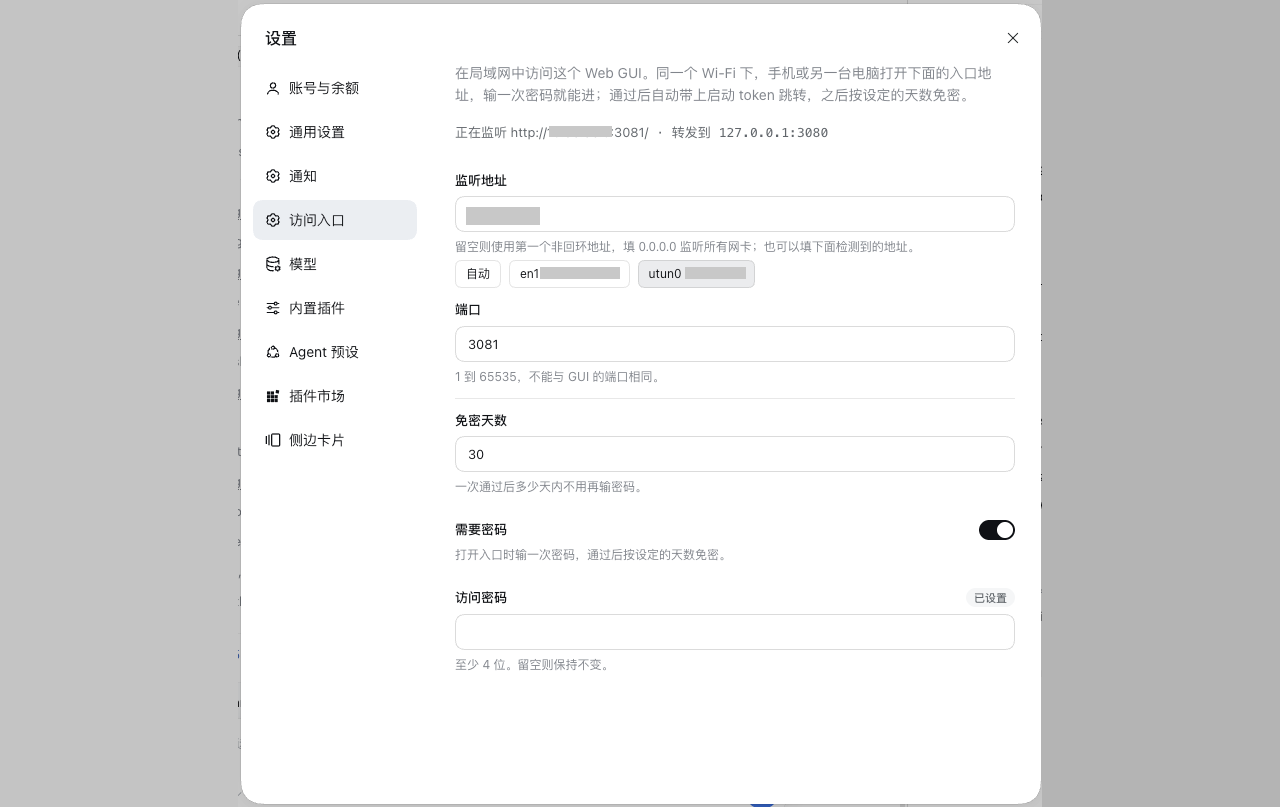
The Web GUI's Settings page carries an Access section: it shows whether the listener is up and on which URL, and edits the address, the port, the session lifetime and the password in one form with one Save button. The interfaces the machine reports are offered as buttons under the address field, so the address is one tap away and never typed from memory. Saving reopens the listener on the spot, so no Host restart is needed.
Require a password is on by default. On a fresh store the Host generates a random password, shows it in this section with a copy button and prints it to the Host log, so the entry is never open by accident. An empty password field keeps the current password; typing a new one replaces it. The Host stores a scrypt hash, never the password itself, so the generated value is shown only while the Host that made it is running.
Turned off, every request from that network reaches the GUI: no form, no cookie, no token to type. The switch is saved with the rest of the settings, so restarting the Host does not put the password back. That is convenient on a network you trust and wrong on one you do not.
Configuration
These values are the defaults a first run starts from; what the Settings page
saves lives in ~/.dsh/dsh-access-gateway/settings.json and wins over them.
| Key | Default | Meaning |
|---|---|---|
bind | '' | Address to listen on. Empty serves the first non-loopback IPv4 the machine reports; 0.0.0.0 serves every interface; a concrete address pins one, such as a VPN address. |
port | 3081 | Listening port. Keep it distinct from the GUI's. |
password | '' | Gateway password, at least 4 characters. Empty generates a random one on the first run, which the Settings page then shows and owns. |
sessionDays | 30 | How long one passed login lasts. |
The upstream address is read from the webServer service, so the GUI port never
appears in this configuration. Whether the entry requires a password is stored in
the settings file (passwordEnabled) rather than here, because only the Settings
page changes it.
Security
- The listener serves plain HTTP. Use it on a trusted network or a VPN, or put TLS in front of it.
- The password is all that stands between that network and the GUI. With the switch off, every request from the network is admitted, so the Host logs a warning and the Settings section shows the entry as open.
- A generated password is printed to the Host log, so keep that log private, or replace the password from Settings and the log line stops mattering.
- The gateway runs inside the Host process and therefore can read the launch token; it holds no other credential and stores the password as a hash.
- A rejected password waits 600 ms before answering, so guessing costs time.
- The gateway cookie is signed with a key kept in
~/.dsh/dsh-access-gateway/secret.json(mode 0600), so a passed login survives a Host restart.
Limits
- No TLS, no tunnel, no QR code: it is an entry for a network you already trust, not a way to publish the GUI to the internet.
- One address per profile. A machine that should answer on two interfaces needs
two rows with different
bindandportvalues.
Related plugins
dsh-web (dsh-ssh)
zhu1090093659/dsh-web
dsh-web (dsh-remote-web-ui)
zhu1090093659/dsh-web
dsh-web-ui (dsh-ssh)
zhu1090093659/dsh-web-ui
dsh-purge
kingcharleslzy-ai/dsh-purge