dsh-session-pruner
mrzhangkris/dsh-session-pruner
Full-type session lifecycle management: one-shot subagents archived on completion, idle continuable subagents / main sessions archived (recoverable), a capacity cap, projection-cache cleanup, and a hot-reload settings panel.
Install
dsh plugin --profile web add github:mrzhangkris/dsh-session-prunerREADME
dsh-session-pruner
DSH session lifecycle management plugin — full-type session lifecycle management: one-shot subagents archived on completion, continuable subagents and main sessions archived when idle, a capacity cap, and projection-cache cleanup. Prevents session-library accumulation stalls at the source.
Every session type has a defined destination: finished one-shot subagents are archived automatically, idle continuable subagents / main sessions are archived, and overflow is recycled by priority. Archive first (recoverable), delete after expiry — the GUI syncs within 30s, fully panel-configured with hot reload.
简体中文 · Apache-2.0 · npm ·  · Changelog
Why
DSH (DeepSeek Harness) caches a full projection of every session in session_projcache.json (token stats, context pressure, ...), and the storage backend rewrites the whole file atomically on every write. When the session library accumulates thousands of subagent sessions:
- The cache balloons past 100MB and each checkpoint fully re-serializes → main process CPU 250%+
- The single-threaded event loop is saturated → every session load stalls, even
GET /times out
Managing session lifecycle (this plugin) is the root fix: no session accumulation → no cache rows → no stalls.
Features: full-type lifecycle
| Session type | Trigger | Action | Default |
|---|---|---|---|
| one-shot subagent | subagent/end / agent/disposed event (+ grace) | archive within seconds (event-driven) | event + 3min grace |
| continuable subagent | idle over N days | archive (recoverable) | off (0 days) |
| main session | idle over N days | archive (recoverable) | off (0 days) |
| any type | total exceeds capacity cap | recycle by one-shot → continuable → main + oldest | 400 |
| archive directory | kept over N hours | physically deleted | 24 hours |
Behavior note (v0.2.3+): one-shot subagents are archived uniformly by the
oneShotMinAgeMinutesidle threshold (default 3 minutes), with or without end-seed. The earlier fallback — "one-shot sessions without end-seed must stay idle a full hour before archiving" — has been removed.
Archive mechanism (recoverable)
Cleaned sessions are moved to ~/.dsh/sessions-archive/ first (workspace/session-id structure preserved) — they disappear from the GUI immediately (the list only reads the sessions directory), but the files remain and can be restored manually:
# Restore: mv back into the sessions directory
mv ~/.dsh/sessions-archive/<workspace>/<session-id> ~/.dsh/sessions/<workspace>/

# ⚠️ After restoring, pin it (or open it) immediately — until the session is
# opened it is not live-protected, and an idle hit (e.g. one-shot over the
# threshold, main over mainIdleDays) within one scan cycle may archive it again.
# Add its session ID to the "Pin whitelist" field in the settings card.
A "delete directly" mode (no archive, irreversible) is also available.
Safety (double protection)
- Running sessions are never touched: live sessions (still held in the in-memory session store, open/loading) are skipped — and the live check is fail-closed: a store query error treats the session as live, never deleting on uncertainty
- Idle = last log write: idle is judged by the session log file mtime (last write time), not the directory mtime — DSH appends to
session.jsonl.zstd, so active sessions keep refreshing their mtime and are never misjudged idle - one-shot: finished one-shot subagents are archived uniformly by the
oneShotMinAgeMinutesidle threshold (with or without end-seed, same threshold); the capacity cap additionally skips sessions lackingsession/end-seed - Main sessions do not participate in capacity recycling by default (configurable)
- Per-action failure isolation: every action is try/catch wrapped
How it works
Dual-track triggers (events = hot path, disk = source of truth)
  ┌─ Event-driven (seconds): subagent/end + agent/disposed
  │     ├─ 500ms batch window merges storms → oneShotMinAge grace re-check
  │     └─ single-session check (memory-first, at most one zstd decompress) → archive
  └─ Scheduled reconcile (fallback, default 60min)
        ├─ pruneArchive: physically delete expired archive sessions
        ├─ iterate ~/.dsh/sessions/*/ decompress log (system zstd, multi-frame)
        │     ├─ origin: main | subagent       (session header)
        │     ├─ mode: one-shot | continuable  (subagent/descriptor event)
        │     └─ ended: contains session/end-seed
        ├─ one-shot idle over threshold ──→ archive (archiveMode)
        ├─ continuable/main idle N days ──→ archive
        ├─ total > cap ──→ recycle by priority + oldest (skip running/live)
        └─ each archive also: purge projcache row + workspace accounting
GUI sync — change-driven primary, full-refresh fallback:
- dirty-flag (primary): host keeps an in-memory monotonic archive log; the
client polls
/plugins/dsh-session-pruner/archivedevery 3s and only issuesrefreshList()+refreshSubagents()when a change is reported — sidebar and task panel stay consistent within seconds, zero RPC when nothing changed. - Full fallback: every
uiRefreshSecondsseconds the client refreshes both data sources anyway (main list viarefreshList(), each known parent's subagent catalog viarefreshSubagents()), covering dirty-flag failures (older host / route unavailable). No page reload needed.
Install
From npm (recommended)
dsh plugin --profile web add dsh-session-pruner
From source (development)
dsh plugin --profile web add /path/to/dsh-session-pruner
After installing (or upgrading), restart the dsh web daemon to load the new
version (launchctl kickstart -k gui/$(id -u)/com.deepseek.dsh-web) — config
changes alone hot-reload without restart.
Configuration (settings panel, hot reload)
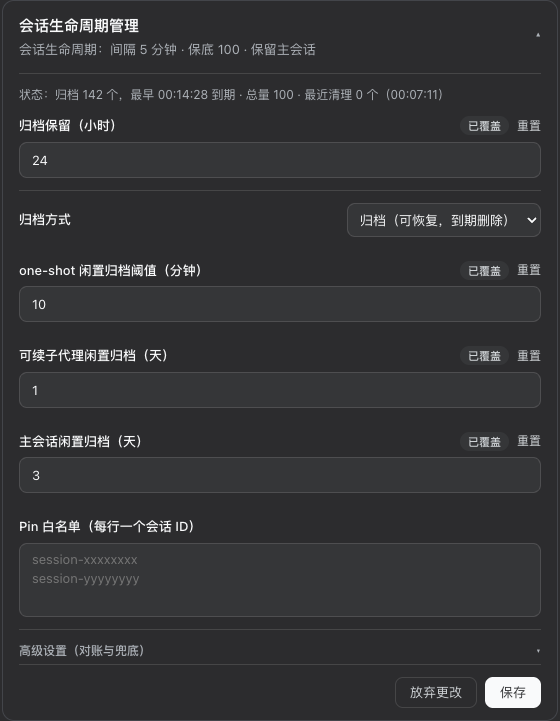
After install, open Settings → Plugins → 会话生命周期管理 card. All 10 options save with hot reload (no restart). Six everyday options are visible by default; the four low-frequency fallbacks are tucked into an "Advanced" collapsible section (its title shows an unsaved-changes badge when applicable):
| Field | Default | Description |
|---|---|---|
| Scan interval (min) | 60 | reconcile fallback (events are primary) |
| Capacity cap (sessions) | 400 | recycle by priority + oldest when exceeded |
| UI fallback refresh interval (s) | 30 | dirty-flag primary (3s change poll); full refresh fallback |
| Archive retention (hours) | 24 | physical delete after retention |
| Archive mode | archive | archive (recoverable) / delete directly (irreversible) |
| Continuable idle archive (days) | 0 | archive after N idle days, 0 = off |
| Main idle archive (days) | 0 | archive after N idle days, 0 = off |
| Clean main on overflow | off | main participates in capacity recycling |
| One-shot min survival (min) | 3 | newly finished subagents are not cleaned within N minutes (protects finishing/references) |
| Pin whitelist (session IDs, one per line) | empty | pinned sessions are never auto-cleaned (pin restored sessions immediately) |
The card also shows a live status line (30s poll): archive count + earliest expiry, session total (+ overflow), last cleanup (count + time), pinned count.
Env vars (fallback, panel wins): DSH_SESSION_PRUNER_INTERVAL_MS / _MAX / _CLEAN_MAIN / _ARCHIVE_HOURS / _ARCHIVE_MODE / _CONTINUABLE_IDLE_DAYS / _MAIN_IDLE_DAYS / _ONE_SHOT_MIN_AGE_MINUTES / _PINNED_IDS (comma-separated).
Logs
Output in guard server-*.out.log:
[dsh-session-pruner] armed: interval=60min cap=400 cleanMain=false
[dsh-session-pruner] hot-reloaded: interval=60min cap=400 ... contIdle=0d mainIdle=0d pinned=0
[dsh-session-pruner] archived a1b2c3d4 (subagent/one-shot) one-shot idle cache=true
[dsh-session-pruner] archive pruned: 2 expired
cache=true/false tells whether the projection cache row was purged along with the session.
Tests
npm test               # regression suite: audit PoC checks + full e2e (isolated tmp DSH_HOME)
node test/dry-run.js   # read-only full-library scan, verify classification (no deletion)
node test/e2e.js       # create a fake one-shot session, verify the real cleanup path
node test/poc-audit.js # audit regression: ended misjudgment / dual-source drift / archive orphans / pin
Implementation notes
- Multi-frame zstd: DSH session logs are concatenated zstd frames (append writes); Node
zlibdecodes a single frame only, so the plugin shells out to the systemzstdCLI (brew install zstdon macOS) - Cache row purge:
storageDomain.get('session_projcache').table('sessions').delete(id)— the official write chain (atomic persistence + in-memory sync) - Workspace accounting: the session id is removed from the workspace domain on archive, keeping the data source consistent with disk
- Zero bundled deps: runtime modules (
@deepseek-ai/dsh-settings,schemastery) are provided by the DSH host; the plugin ships no dependencies of its own - Panel + hot reload:
installSettingsSection+ hand-written client card (__ModuleLoader__bundle),onChangere-schedules the timer instantly
Developer guide
docs/DEVELOPMENT-GUIDE.md— DSH plugin development practice guide (architecture, Host/Client, settings panel, deployment ops, pitfalls with fixes), the foundation for future plugin workdocs/DESIGN.md— design decisions and rationale (three-tier strategy, dual-track triggers, fail-closed safety, invariants)docs/TESTING.md— test matrix, verification pyramid (V0/V2/V3), release checklistdocs/PROJECT-STATUS.md— current status snapshot and backlog, for new contributors/sessions
Known limits
- If completion events are lost (host restart mid-run), a finished one-shot subagent is only picked up by the next reconcile scan — worst case one
intervalMinutes(default 60min) - Restored (mv-back) sessions are not live-protected until opened — pin them to survive the window (see Archive mechanism)
- Requires the system
zstdCLI - The root fix lives upstream: projcache stale-session eviction / incremental storage writes, see deepseek-harness Discussion #1550
License
Related plugins
dsh-web-ui (dsh-chat-recovery)
zhu1090093659/dsh-web-ui
dsh-synapse
liangmianya/dsh-synapse
billion-context
ranxianglei/billion-context
dsh-chat-import
nwflower/dsh-chat-import