dsh-life-calendar
mujinw/dsh-life-calendar
Memento-style life calendar: one cell per year over a configured birth year and life expectancy, with year and month views, events that add, edit and delete (starred, and typed milestone / work / study / family / health / travel / invest / other), named life stages that filter the grid when clicked, a long-form strategy page and per-year summaries. Data stays in $DSH_HOME/life-calendar/life.json; writes go through a temporary file and rename, and a corrupt file is reported instead of being overwritten.
Install
dsh plugin --profile web add github:mujinw/dsh-life-calendarREADME
人生日历 · dsh-life-calendar
一个把「一生」画成格子的 DeepSeek Harness 插件。一格一年,一眼看完还剩多少。
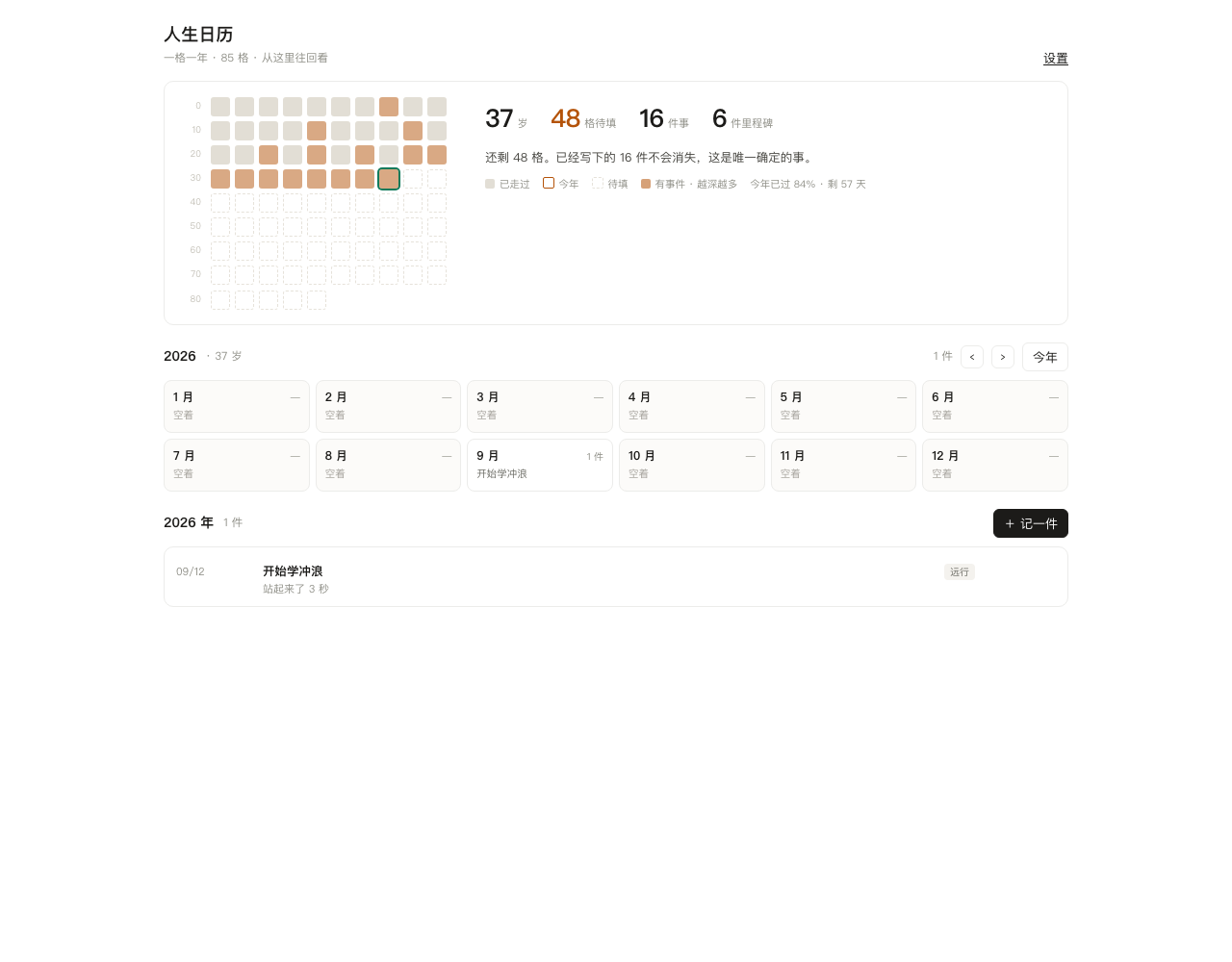
它做什么
- 一格一年:按出生年份与预期寿命画出一生的格子,走过的和没走过的用颜色分开
- 年视图 / 月视图:在具体某一年、某个月里看事件
- 事件:新增、修改、删除;可标重要(星标),可归类(里程碑 / 工作 / 学习 / 家庭 / 健康 / 旅行 / 投资 / 其他)
- 人生阶段:把自己的阶段划分写进去(比如「求学」「打拼」「转型」),点阶段能筛出属于它的年份
- 战略:给一生或某一段写一段更长的规划文字
- 总结:按年写回顾,可增删改
数据只存在本机:$DSH_HOME/life-calendar/life.json(可用 DSH_LIFE_CALENDAR_FILE 覆盖)。
不联网、不上传、不读取任何其它文件。
安装
在 DSH 里:
dsh plugin --profile <你的 profile> add github:mujinw/dsh-life-calendar
或者在 DSH Desktop 的 设置 → 插件 里搜索,或从插件市场一键安装。
装完刷新页面(宿主半改了需要重启 DSH)。侧栏会出现「人生日历」图标。
数据与隐私
life.json 的结构:
{
  "version": 4,
  "profile": { "birth": "1990-01-01", "expectancy": 80 },
  "events": [{ "id": "...", "date": "2020-05-01", "title": "...", "kind": "milestone", "star": true, "note": "" }],
  "stages": [...],
  "strategy": "...",
  "summaries": [...]
}
- 写盘走临时文件 + rename,不会写坏半个文件
- 文件损坏时报
store-corrupt并拒绝覆盖——宁可报错也不清空你的记录 - 插件本身不含任何示例数据;装上就是空的,等你填
权限
需要 connection(注册 HTTP 路由)与 slots(侧栏入口与主面板)。不申请网络、不读写其它路径。
开发
# 源码就在仓库根,lib/index.js 是宿主半,lib/client.js 是前端半
# 改完在 DSH 里重启生效
License
MIT
Related plugins
archify (deepseek-harness)
tt-a1i/archify
WeKnora (dsh-weknora)
tencent/weknora
next-ai-draw-io (dsh-plugin)
dayuanjiang/next-ai-draw-io
AiToEarn (dsh-plugin-aitoearn)
yikart/aitoearn