dsh-skill-history
nacivageer/dsh-skill-history
Skill usage history rebuilt from local session logs, with per-day counts, session drill-down and custom groups.
Install
dsh plugin --profile web add github:nacivageer/dsh-skill-historyREADME
dsh-skill-history
English | 中文
Which skills do you actually use — and which ones did you install and forget?
A sidebar panel for DeepSeek Harness that rebuilds skill usage from your own local session logs: calls per day, the sessions behind each day, and groups so you can watch the few skills you care about.
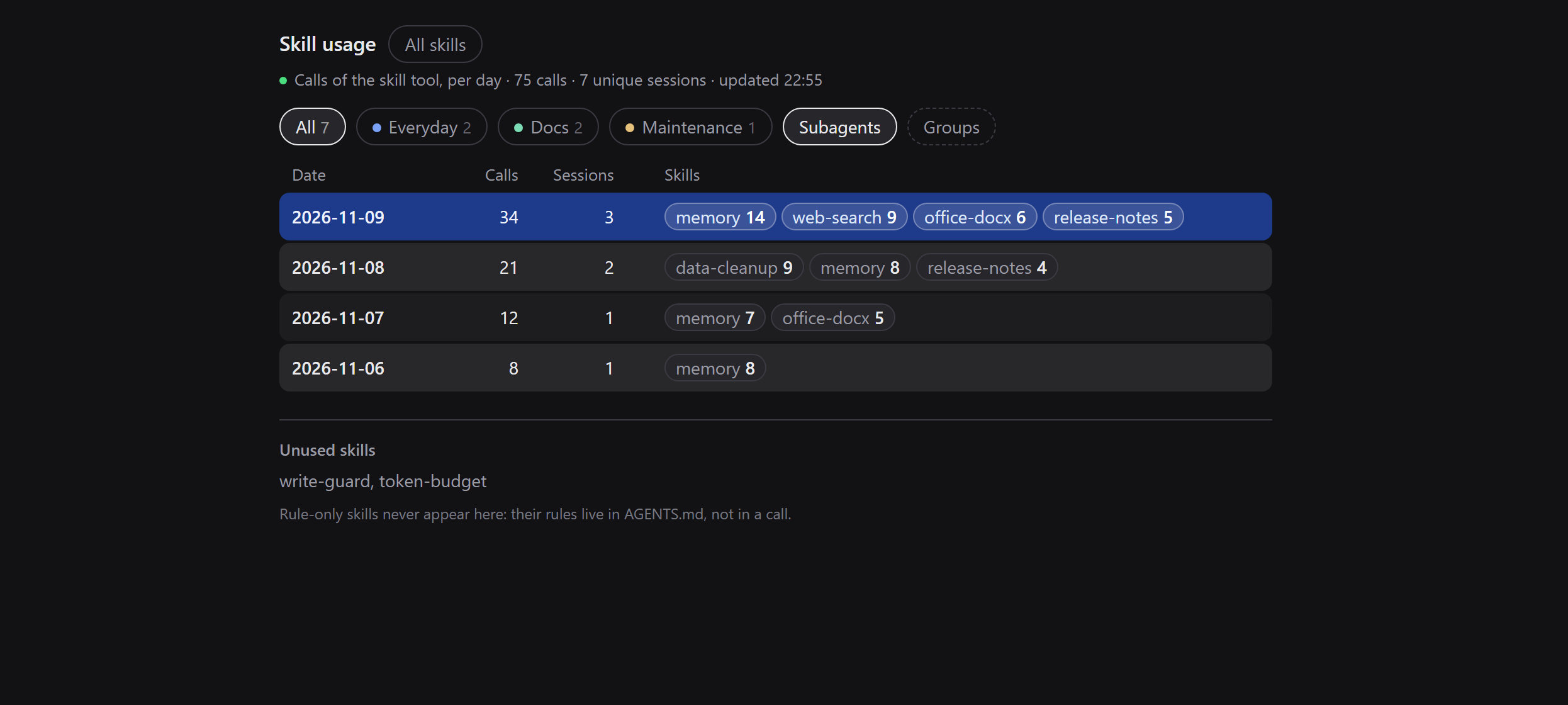
Sample data. The panel is dark-theme native; the light theme follows the host.
Why
Harness shows you which skills exist. It does not show you which ones are used. A skill installed months ago and never touched looks exactly like your most-loaded one.
This panel answers that from the one honest source: the session logs the host
already writes. It counts only calls of the skill tool, so the history is
complete from your first session — not from the moment a counter was installed.
Two things are true by design:
- A rule-only skill (rules inlined in
AGENTS.md, no tool call) has nothing to count and stays at0. That is a fact, not a bug. - The panel is read-only for sessions: it never opens one, never changes its archive state, never edits a skill. The only file it writes is its own group list.
Features
- Per-day table — calls, sessions, and the skills used that day; today's row is highlighted.
- Drill down — day → sessions → one session's skill breakdown with cwd, turns, first/last call, and copy-id / copy-path.
- Groups — create, rename, colour (8-colour palette plus neutral), and multi-select filter. One skill can sit in several groups.
- All skills — every installed skill with its creation date and description (two-line clamp, click a row to expand), grouped the same way. Built-in skills are marked; a skill with zero calls is listed at the bottom of the home view.
- Live — session logs are append-only, so a scan decodes only the bytes it has not seen; the panel polls every 5 s and keeps the last good snapshot if the host is busy.
- Archived sessions are marked and stay read-only.
- Local only — no network requests, no telemetry.
Install
Requires DSH 0.2.2-rc.1 or newer, and Node >=22.19.0 — the log decoder uses
zlib.zstdDecompressSync, and an older Node shows an error banner instead of
counts.
From a checkout
dsh plugin --profile <profile> add link:/absolute/path/to/dsh-skill-history
No dsh CLI? Point the plugin manager at the folder instead:
plugin_manager install_bundle target=/absolute/path/to/dsh-skill-history
From GitHub
dsh plugin --profile <profile> add github:nacivageer/dsh-skill-history
Desktop app
Open Settings → Plugins and install the package through the app's plugin manager, then refresh the page once. The sidebar gets a bar-chart icon.
Update / remove
dsh plugin --profile <profile> update github:nacivageer/dsh-skill-history
dsh plugin --profile <profile> remove dsh-skill-history
What counts
A call is a tool/call event whose data.name is skill; the skill name is
read from data.arguments.name (a JSON string, parsed again). Calls are
attributed to the local day of the event time, on the host clock — not the
browser's.
- Subagent sessions (
delegationDepth > 0) are included by default; turn off Subagents in the filter bar to exclude them. - A session file removed from disk stops counting on the next scan.
- A log that cannot be decoded (Node without zstd, unknown log version) shows an
error banner and
scan.failedFiles; it never renders a confident0.
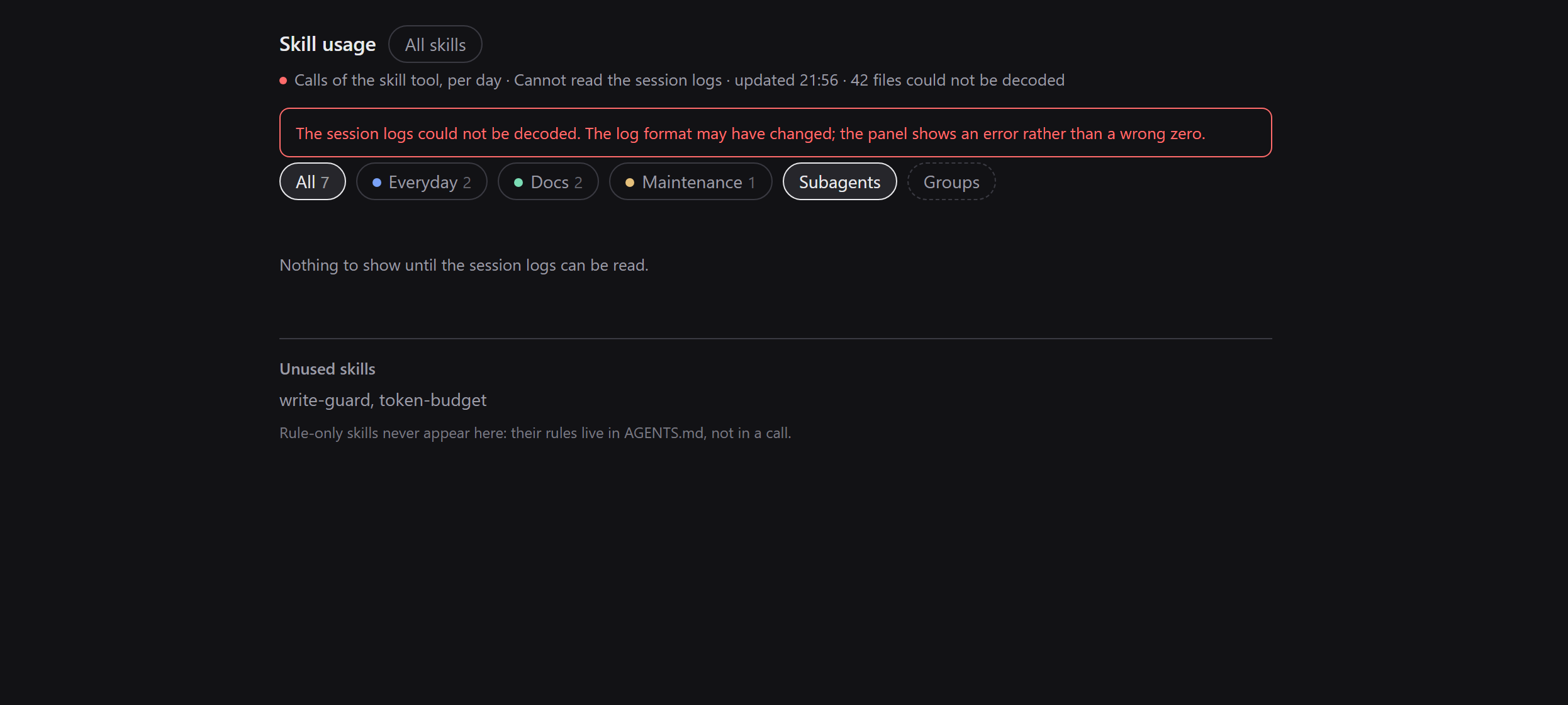
What an undecodable log looks like: the panel says so instead of showing zero.
Data comes from
$DSH_HOME/sessions/<workspace>/<session>/session.v4.jsonl.zstd. A session file
is a concatenation of zstd frames — one per flush — so the decoder walks frames
with engine.bytesWritten instead of decompressing the whole buffer (Node's
zstdDecompressSync would stop at the first frame).
Compatibility
| Surface | Status |
|---|---|
| DeepSeek Harness | 0.2.2-rc.1 Desktop, tested; engines.dsh is >=0.2.2-rc.1 |
| Node | >=22.19.0 (zlib.zstdDecompressSync is required) |
| OS | Windows, macOS, Linux; creation dates prefer birthtime, fall back to mtime |
| Session log | session.v4.jsonl.zstd; an unknown format surfaces as an error, not as zero |
Privacy
- Reads your session logs — titles, cwd, and
skillcalls — on this machine only. Nothing is uploaded; the plugin makes no network requests. - Writes exactly one file:
$DSH_HOME/skill-history/groups.json(atomic write, old file backed up, three backups kept, read back after writing). - Stores no credentials and does not touch your skill files.
Limits
- The first scan of a large history costs time (about 15 s for 200 sessions / 150 MB here). The panel opens immediately with the last snapshot and refreshes in the background.
- Only the
skilltool is counted. Skills whose rules live inAGENTS.mdstay at zero. - No date-range filter and no CSV export yet.
- No “open this session” action: most sessions behind a historical number are archived, and unarchiving them would be a write. Copy the id or path instead.
- Groups and colours are local to your install; there is no sync.
Development
npm test # node --test test/ — no dependencies, no build step
| File | Purpose |
|---|---|
index.js | Host: session scan, incremental zstd decode, aggregation, two routes |
client.js | Client: sidebar icon and the panel (React from the module loader) |
test/parse.test.mjs | Parser, scan, route, and groups tests |
cordis.patch.yml | One bundle row |
locale/*.json | Plugin-manager title and description (en, zh) |
The host half has no build step and no third-party dependencies. After editing
client.js, refresh the page; after editing index.js, restart DSH (the loader
caches host modules).
Migrating from dsh-skill-stats
This package was renamed from dsh-skill-stats. Your saved groups are still
read from $DSH_HOME/skill-stats/groups.json; the first save writes the new
$DSH_HOME/skill-history/groups.json. No other state moved.
License
MIT — see LICENSE.