dsh-inline-branches
nekoyellow/dsh-inline-branches
DeepSeek Harness plugin: nested turn folders and Finder-style show/hide for chat turns, without creating a new Session.
Install
dsh plugin --profile web add github:nekoyellow/dsh-inline-branchesREADME

dsh-inline-branches
A DeepSeek Harness plugin that turns a chat's turns into nested folders. Put a follow-up under any turn, then show or hide its children like Finder. No new Session.
中文文档 · Install · Usage · How it works



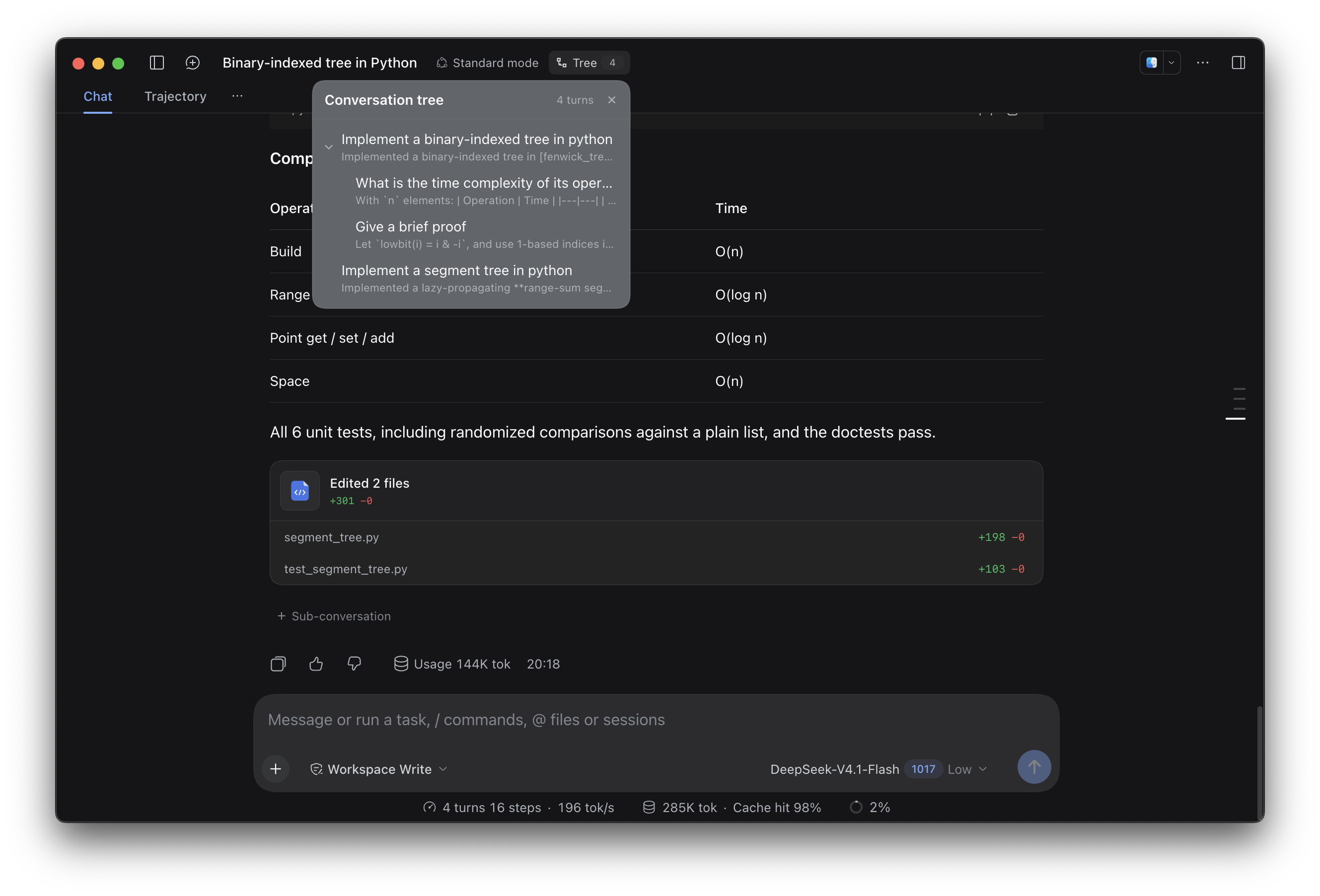
Turns nest under their parent; the header's Tree button opens the same structure as a navigator.
What it does
Normally, a DeepSeek Harness session lists its turns from top to bottom, like files sitting side by side in one folder. This plugin lets a turn act as a folder: follow-ups you put under it become its children, indented beneath it, and a chevron shows or hides them the way Finder does.
That is the whole idea. Nothing is forked and no new Session is created — they are the same turns, shown as a tree. Messages are still rendered by the native Chat, so Markdown, tool cards, approvals, and images are unchanged.
Requirements
- A plugin for DeepSeek Harness Desktop with the Web UI, developed against 0.2.1-rc.3.
- No build step, no runtime dependencies, no network access.
Install
From npm
In the Harness Web UI:
- Open Plugins in the sidebar.
- Choose Add plugin.
- Enter
dsh-inline-branchesand confirm.
The installer adds the bundle to your profile and enables it.
Or with the dsh CLI:
dsh plugin --profile desktop add dsh-inline-branches
From this repository
git clone https://github.com/NekoYellow/dsh-inline-branches.git
dsh plugin --profile desktop add "$PWD/dsh-inline-branches"
You can also pass the repository URL directly:
dsh plugin --profile desktop add https://github.com/NekoYellow/dsh-inline-branches
Replace desktop with your profile name if you use another one. If Tree does not appear in the session header, restart Harness.
Usage
- Finish a turn. A + Sub-conversation row appears under it.
- Click it to arm that folder. A chip above the composer shows where new messages will go.
- Keep typing in the normal composer: the next turn — and every turn after it while the folder stays armed — nests under it, indented by depth. Arm a sub-turn the same way to go deeper.
- Click the chevron on a folder row to show or hide its whole subtree, Finder-style.
- To return to the top level, click Back to main in the chip. The Tree button in the header opens the same structure as a navigator; click any row to jump to that turn.
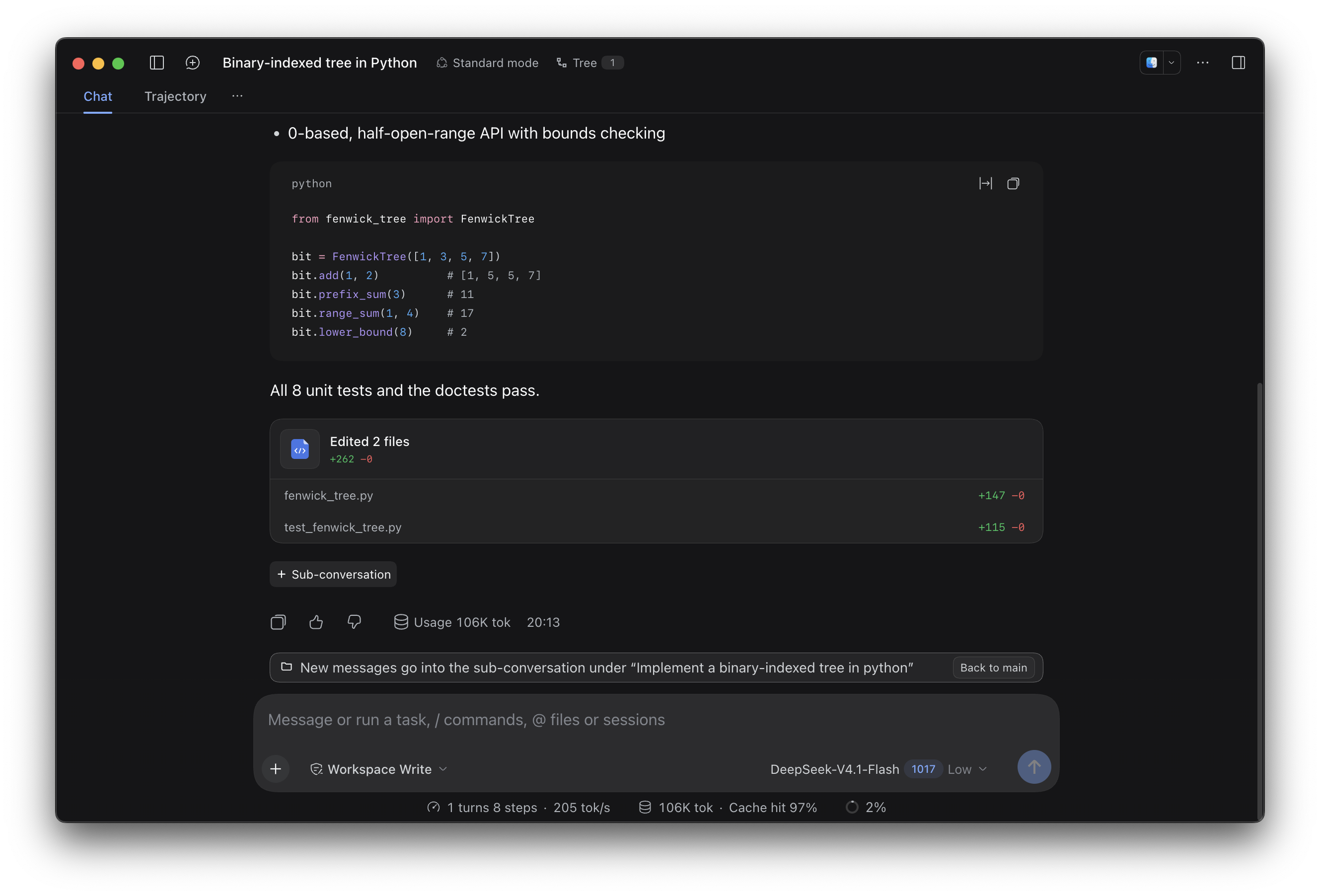
Arming a folder: the chip above the composer names the parent turn and offers “Back to main”.
How it works
Everything is a Client-side view over the existing session:
| Piece | Mechanism |
|---|---|
| Parent relation | localStorage key dsh.inline-tree.v3 — { [sessionId]: { parents: { [turn]: parentTurn } } } |
| Collapse state | localStorage key dsh.inline-tree.collapsed.v1 |
| Ordering and indentation | One injected <style> per session: every [data-chat-turn] gets a pre-order order, a margin-left from its depth, and display: none when an ancestor is collapsed |
| Rendering surface | Native Chat flow slot, which is display: contents, so turns are flex items of the transcript |
| Entry points | Client slots conversation.session.header.actions (Tree button), conversation.chat.turnTail (folder rows), conversation.input.dock (armed chip), shell.overlay (navigator panel) |
| Host half | index.js only exports an empty apply(); the bundle patch needs a Host row, but no Host logic is involved |
While a folder is armed, the header component watches the session's turn list and records a parent edge for every turn that appears. That is why no fork or new session is needed. The relation is per browser because it lives in localStorage: the session log stays linear, and another device, or cleared storage, sees the same turns without the tree.
Data and privacy
- Only turn numbers and parent ids are stored, in the Web UI origin's
localStorage. - Nothing is written to the session log, and the plugin makes no network requests.
- Clearing site data removes the tree layout; the turns themselves are unaffected.
Compatibility
The tree is pure CSS layered over the Chat DOM, so it depends on a few internals of the current DSH version:
data-chat-turnattributes on turn elements;- the Chat flow slot being
display: contents, which makes turns flex items; tnXGgG_*CSS-module class names for the running and older rows;- the slot names listed above.
If a future DSH release changes them, nesting may stop working until the plugin is updated. The plugin never modifies session data. Adapting to new internals is welcome as a pull request.
Limitations
- No context isolation. Sub-conversations are ordinary turns appended to the current session; the model sees them in chronological order, not spliced in under the parent turn. Not creating a Session is what makes this cheap, and this is its cost.
- Presentation only. The parent relation is a browser-side view; the log stays linear and the tree does not follow you to another device.
- Loaded turns only. The navigator lists the turns currently loaded in the transcript; scroll the main conversation to load older ones.
Uninstall
- Remove the plugin from Plugins, or run
dsh plugin --profile desktop remove dsh-inline-branches. - Optionally clear
dsh.inline-tree.v3anddsh.inline-tree.collapsed.v1from the Web UI origin'slocalStorage.
Development
The plugin is plain JavaScript loaded as-is by the Client module loader — no bundler, no dependencies.
client.js           all UI: stores, tree model, injected CSS, React components
index.js            Host half: empty apply()
cordis.patch.yml    bundle patch that inserts the inline-branches row
locale/en.json      Plugin Manager metadata (title/description)
locale/zh.json
icon.svg            Plugin Manager icon
figures/            screenshots used by this README
docs/README.zh-CN.md  Chinese README
Point a profile at the checkout with Add plugin → local path, and restart or reinstall after editing client.js to load a fresh Client module.
License
Related plugins
dsh-web-ui (dsh-chat-recovery)
zhu1090093659/dsh-web-ui
billion-context
ranxianglei/billion-context
dsh-synapse
liangmianya/dsh-synapse
dsh-archive-manager
michengai/dsh-archive-manager