dsh-multi-root-explorer
nethur-auro/dsh-multi-root-explorer
Workspace Explorer for DeepSeek Harness: replaces the native sidebar workspace region with a multi-root browser — a conversation tree grouped by each session's real working directory, plus a read-only resource tree that previews files in the native right
Install
dsh plugin --profile web add github:nethur-auro/dsh-multi-root-explorerREADME
dsh-multi-root-explorer
A Workspace Explorer for DeepSeek Harness: it replaces the sidebar's workspace region with a two-tab browser — Conversations grouped by each session's real working directory, and a read-only Resources tree that previews files in the native right sidebar.
中文说明 | English
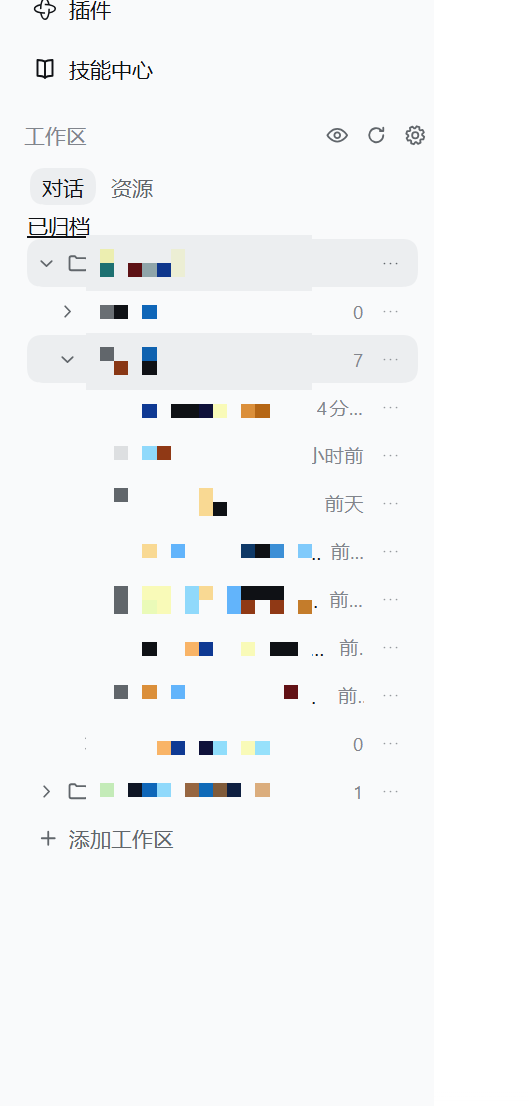
Status: preview. The automated suite passes, but live-runtime acceptance on every DSH build has not been done. See Known limitations before you install.
What it does
- Fixed, multi-root workspaces. Directories you import stay put instead of being recomputed from a common ancestor as sessions come and go.
- Conversations as a directory tree. Every session is filed under its real
cwd, with direct conversations first and child folders after them, recursively. Sessions whosecwdis outside your roots stay reachable as their own anchor; sessions with nocwdget a separate group. - Resources, read-only. Directory levels load on demand and paginate, so opening a big drive never rescans the disk. Clicking a file opens it in DSH's own right sidebar, leaving the main conversation where it was.
- Selection means one thing in both tabs. The eye button enters a selection mode where hidden entries are shown and pre-selected. A click on an unselected folder selects it, and its whole subtree reads as selected; a click on a child that a selected ancestor covers excludes just that child, expanding the ancestor into its siblings; a click on an already selected folder clears it and its subtree; a double click on a selected folder leaves the folder unselected while every child stays selected, which submits as an empty folder. Children are read from the Host per directory, so a folder that was never expanded is covered too. Clicking the eye again hides exactly the selected set — display-only and fully reversible, so no file, directory, or session record is touched.
- Per-folder actions. Right-click or the trailing
···on any folder to start a new session in that directory, open it in the system file manager, or (for resources) copy its absolute path. - Dropping a row into the composer lands a real reference. Resource rows are drag sources (
text/plain,text/uri-list, plus a format private to this plugin) with an always-copyeffect. A drop inside the conversation input is promoted into a native atomic reference — file icon, filename, business colour — which is exactly what picking a candidate from the@menu produces. When the promotion cannot run (the drop landed against a word, or no completion menu opened for that text) the readable reference text stays behind and says why; the draft is never left broken. @reaches every workspace. DSH's own file completion indexes the session working directory only, so the plugin registers its own@source covering every registered root, backed by a bounded Host index that follows the shipped exclusion rules, walks in background slices, and never blocks a query.- Honest working state. The status card and the row glyph do not look at a session's own agent alone: a subagent still working (even after the main agent stopped) and a goal still working through its rounds (the gap between two of them) both read as working.
- Native archive support. Archive and unarchive sessions through DSH's own service, with archive kept clearly distinct from permanent deletion.
- Survives uninstalling. Directories that hold ordinary sessions are also registered as native DSH workspaces while the plugin runs, so disabling or removing it does not hide your conversations.
Requirements
- DeepSeek Harness
>= 0.2.0-rc.1(declared asdsh.engines.dsh). - A browser with the Popover API (
element.showPopover). Menus and hover cards render in the top layer; without it the plugin reports the problem and closes the menu instead of misplacing it. - DSH access over loopback. The plugin's HTTP routes refuse non-loopback sockets, non-loopback
Hostheaders, and cross-site requests.
The plugin ships with no runtime dependencies — only the react that DSH's client module loader already provides.
Install
Four routes — pick whichever matches how you manage DSH. All of them end with a DSH restart (app and Host) and a page refresh: Host routes do not hot-reload, so a refresh alone is not enough.
💡 Routes 2 and 3 need a
dshcommand on your machine. Desktop-app users who get "command not found" should use route 1 or route 4 — neither needs a command line.
1. In-app plugin market (easiest, no command line)
Open Settings → Plugin market, search for dsh-multi-root-explorer, and install it. The market does the profile wiring and tells you when to restart. Before it is listed in the community catalog (nothing found), use route 2 or 4.
2. npm package (command line; always the newest published version)
dsh plugin --profile <your-profile> add dsh-multi-root-explorer
Naming the package rather than a git URL makes the package manager take the newest published version, so future releases are picked up automatically. Current version: see the npm page.
3. From GitHub (no npm involved)
3a. Prebuilt tarball (always the latest release)
dsh plugin --profile <your-profile> add https://github.com/Nethur-auro/dsh-multi-root-explorer/releases/latest/download/dsh-multi-root-explorer.tgz
latest is resolved at request time and the asset name deliberately carries no version, so this always points at the newest release and never rots. (The plugin has no build step — lib/ is committed built output and scripts holds only test — so the prebuilt tarball and a source install contain the same thing.)
3b. Source (tracks main)
dsh plugin --profile <your-profile> add git+https://github.com/Nethur-auro/dsh-multi-root-explorer.git
This installs the current commit on main. Every release here leaves main parked on its release commit, so the main head and the newest tag are always the same commit — a source install is the latest release. The trade-off is that package managers cache by commit, so upgrading means reinstalling.
4. By hand (no command line)
The plugin manager ultimately edits your profile's package.json at
$DSH_HOME/profiles/<your-profile>/package.json (default ~/.dsh). Add the
dependency and the bundle entry:
{
  "dependencies": {
    "dsh-multi-root-explorer": "^0.1.4"
  },
  "dsh": {
    "profile": {
      "bundles": ["dsh-multi-root-explorer"]
    }
  }
}
Then install the profile's dependencies with pnpm install inside that
directory and restart DSH. Doing this by hand is equivalent to what the plugin
manager does, so prefer route 1 or 2 unless you have a reason not to.
Verify it loaded
Open the sidebar. The workspace region should now show 对话 / Conversations and 资源 / Resources tabs with the panel's own header row. If the region looks unchanged, the Host has not picked the plugin up yet: restart DSH rather than only refreshing the page — host-side routes are not hot-reloaded.
Usage
- Click Add workspace and pick a directory. Repeat for every root you want.
- Conversations lists folders and sessions; Resources lists folders and files. A directory loads its level the first time you expand it.
- Click a file to preview it in the right sidebar. A usable session is required as the preview's authorization context.
- Right-click a folder, or use its
···, to start a session there, open it in the file manager, or copy a resource path. - Right-click a session to open, rename, archive, or permanently delete it. Permanent deletion is dangerous — read Security and permanent deletion.
- Use the eye button to hide entries per tab, and Settings to reveal anything you hid.
- Show hidden entries also reveals dot-prefixed names,
node_modules, anddsh-acl-recovery, which are hidden by default.
Data and privacy
Everything the plugin owns lives under $DSH_HOME/storages/workspace-explorer/:
config.json— version 3: roots, directory aliases, the two independent hidden lists, expansion state, and preferences. Version 1 and 2 files are backed up before migration; a damaged or newer-version file is protected from overwrite rather than silently replaced.native-bridge.json— the plugin's own idempotency and progress receipts. It is bookkeeping, not a copy of your sessions or native workspace state.
Writes are serialized and atomically replaced. Removing the bundle does not delete this directory; clean it up manually only after resolving any pending session-creation operation, and never delete DSH session data as part of plugin cleanup.
Resource browsing is read-only at every level: the plugin never creates,
writes, moves, or deletes files inside your workspaces. Requests are fenced by
registered root, realpath containment (including intermediate links), and a
loopback/same-origin trust check.
Security and permanent deletion
Permanent deletion is a pre-existing, deliberately separate feature and it is irreversible. The target DSH builds expose no official session-deletion API, so that one action removes the session's own persistence artifacts directly. It is version-sensitive, it is not a supported DSH surface, and it should be treated as a last resort. Prefer archive.
Disabling the plugin, uninstalling it, or clearing its configuration never invokes that code path.
Known limitations
- Automated tests are contract tests, not live acceptance. They use mocks and never touch your real sessions. Named-but-unsent sessions across a fresh Host process, native visibility right after uninstall, and popover placement at unusual zoom levels still need checking on your build. Do not force-close a running profile to test persistence.
- Promoting a drop into a reference uses an undocumented interface. The editor inserts
text/plainas plain text, and a reference chip can only be minted by the input pipeline when a completion candidate is picked, so the plugin asks that pipeline for the pick its own gesture would have made, after the text has landed. Every step is feature-detected, and a step that no longer matches leaves the readable reference text in place — the drag's original behaviour. A DSH upgrade that renames those internals silently disables the promotion;lib/client.jsmarks the exact fields it depends on with anADAPTATION POINTcomment so adapting is quick. - Selecting a folder costs one Host read. The resource tree is paginated and lazy, while selecting a parent has to cover all of its children, so a click reads that directory's own level from the Host on demand (paging to the end) rather than trusting what happens to be expanded. A very large directory makes that one click slower.
- Menus need the Popover API. On a browser without it, the plugin degrades to an explicit error notice instead of showing a misplaced menu.
- Source changes are not a running Host. Editing files in this repository does not update a live DSH process; host routes require a restart.
Tests
No dependencies and no install step:
node test/run.mjs
# or: npm test
The runner discovers every *.test.mjs plus selftest.mjs and executes them
with the same Node executable (currently 158 + 138 + 15). Coverage is directory
listing and pagination, configuration, migration and every ceiling, the route
family and its trust fence, path namespaces and cross-platform spellings, the
conversation tree model, visibility scoping and hidden-target boundaries,
reference text plus the @ candidate index and its ranking, every degrading
path of the drop promotion, working-state folding (subagents and goals), and the
native bridge's create/rename/durability contracts.
Design notes
License
MIT © 2026 Nethur-auro
Related plugins
dsh-web (dsh-task-board)
zhu1090093659/dsh-web
dsh-web (dsh-web-all)
zhu1090093659/dsh-web
dsh-web-ui (dsh-task-board)
zhu1090093659/dsh-web-ui
dsh-web-ui (dsh-web-ui-all)
zhu1090093659/dsh-web-ui