dsh-better-workspace-group
newbieqq/dsh-better-workspace-group
Fork of z-col/dsh-workspace-groups (MIT): a grouped workspace sidebar for the DSH web client, with a science icon set and a docked default workspace; cannot be installed alongside the upstream plugin (same bundle row).
Install
dsh plugin --profile web add github:newbieqq/dsh-better-workspace-groupREADME
English · 简体中文
dsh-better-workspace-group




Fork of z-col/dsh-workspace-groups. The three-level tree, drag-and-drop grouping, sidecar rules and session tab strip are the original author's work (MIT); this fork keeps them and adds a research-glyph icon set, a pinned default-workspace bar and a unified trailing row slot — see Credit & upstream.
A DeepSeek Harness (DSH) web client plugin: a complete workspace grouping manager. Turns the GUI sidebar's two-level workspace list (Projects → Sessions) into a three-level Category folder → Project folder → Session tree, backed by full group-management capabilities: manual group creation, rename/delete of any group, drag-and-drop grouping, free ordering of projects and groups, rule-based auto-classification, and tree-shaped search. Every action takes effect immediately and persists, with zero intrusion on official data.
Screenshot
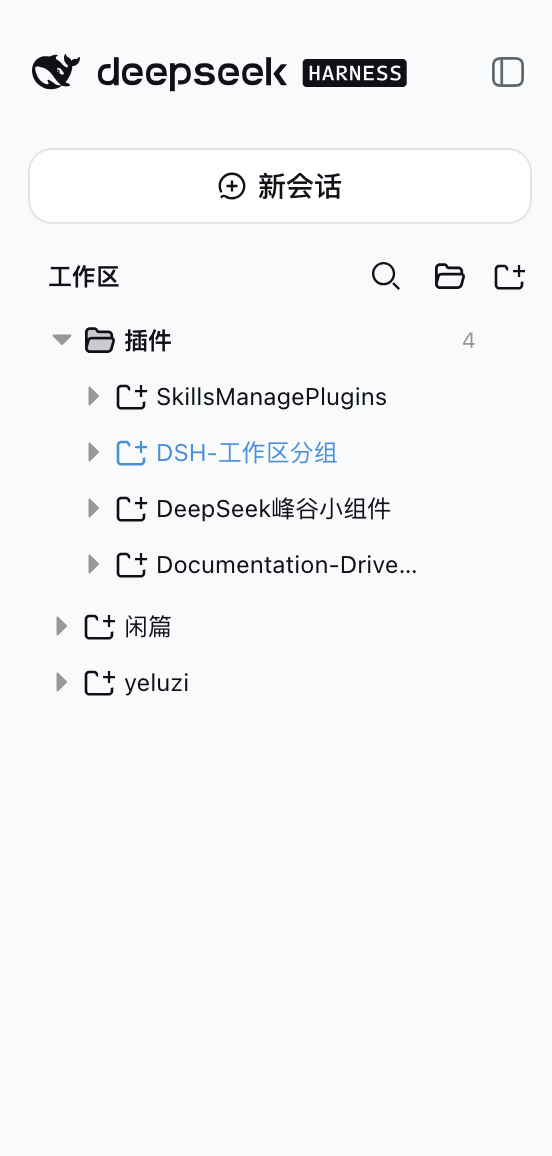
Features
Grouped tree browsing
- Group folder → project folder → session row, both levels collapsible; expansion state
persists independently (
dsh.workspace.groups.view.v1, survives refresh/restart) - Top-level project rows: ungrouped projects (matching no rule, dragged out of a group, or returned by a group delete) render as plain rows right after the group folders, at the same level — there is no "未分类" bucket
Group management (full lifecycle)
- Create groups manually: the "新建分组" button in the section header shows the group immediately (empty groups render too)
- Rename / delete any group: every group row (rule categories included) has a hover
⋯menu; deleting a group sends all of its projects back to the top level; rule-category rename/delete rides the overlay (renamed/hidden), the rule YAML stays untouched - Rule-based auto-classification: the sidecar YAML declares category rules (
pathPrefix/pathExact/nameContains/basenameContains); edit the config to adjust grouping without touching code
Drag-and-drop grouping + ordering
- Drag projects into groups: drop on any group row or on a project row inside a group (cross-group move = overrides the rule classification)
- Drag projects OUT of a group: the entire top-level area is the move-out drop target while dragging, shown with an insertion line (not a highlight box) — drop on any top-level row (reorder before/after it), on the blank space below the last row (append), or, when the top level is empty, a standalone line under the last group folder; grouped projects also have a "移出分组" menu item (rule-classified ones included)
- Reorder projects inside a group: top half of a project row = insert before it, bottom half = insert after it
- Reorder top-level projects: top-level rows are draggable too — top half = insert
before, bottom half = insert after; the top-level order persists under
workspaceOrder["__topLevel__"] - Reorder groups: group rows are draggable — top half of another group row = move before it, bottom half = move after it
- Insertion position indicator: a 2px line (above/below the row) shows the exact drop point while dragging — what you see is where it lands
- Level-aware folding, auto-restored: dragging a project folds every project row (grouped AND top-level; group rows stay expanded); dragging a group folds every group (project rows keep their expansion) — dragend restores the pre-drag expansion snapshot
- Distinct row icons: group rows use a folder glyph, project rows a project glyph (same as the official workspace browser) — groups and projects are easy to tell apart
Group appearance (color / icon / pin)
- Per-group colour: ten palette accents, painted as a 2px inset bar on the group row together with a tinted folder glyph
- Per-group icon: twenty built-in glyphs taken from the DSH icon set, or a 1–4 character custom glyph (emoji or latin) — an unknown value falls back to the folder icon instead of erroring, so data and client versions can move independently
- Pin groups: pinned groups sort to the front of the tree; dragging a group across the pin boundary re-pins it in the same write, so the drop lands where the indicator showed it
- Animated folding: expanding/collapsing a group or project animates rows and hides the
flower marker while they move, so the bloom never lags behind its row; animation is
skipped for large subtrees, during drag folding, and under
prefers-reduced-motion - Stored in the overlay's
appearancemap — never in the rule YAML (see below)
Multiple folders per workspace (multi-root)
- Attach extra folders to a project: the project row's
⋯menu opens 文件夹… (Folders…), which lists the project's own directory as the base folder (always folder #0, never removable) plus any extra folders you pick - One root folder per project: the radio column in that dialog and the folder row's
⋯ → 设为根目录choose which folder new sessions default to; the root row is hoisted to the top of the folder list and carries a ★ badge - Sessions partition by their own cwd: a project with extra folders shows a folder row above its sessions, and each session drops into the folder that contains its working directory (most specific folder wins, case-insensitive on Windows). Projects without extra folders keep the flat two-level shape — nothing changes for them
- Start a session in a specific folder: the hover
+on a folder row opens a session whose cwd is that folder; the base folder keeps the platform's own "new session" gesture so clicking it twice reuses the blank session instead of stacking empty ones - Folders start expanded, so attaching one never hides sessions that were already visible; collapse state is per-view and intentionally not persisted
- Unified Create folder: enter one child name in either workspace type. Local workspaces
call DSH
uiWorkspace.createDirectory; registered SSH mirrors call the SSH-owned/remote-ssh/api/mkdirwith the profile and mapped remote path. SSH is optional for local use. Remote mkdir is recursive/idempotent (existing remote directories are reused), unlike the native local operation. Failures do not fall back to creating local mirror directories. - SSH recognition uses
listWorkspaces, including non-default mirror locations. A missing plugin or unregistered default mirror fails closed; malformed catalogs and overlapping roots are rejected. The existing local folder picker remains available for attaching local folders. - SSH subdirectory sessions are not fully supported by remote-ssh 2.4.40. Creation is blocked with an explanation; open a session at the registered remote workspace root instead. A separate remote root should be registered through the SSH plugin. Folder creation itself does not create or change any SSH registration.
- No child
.remote-ssh.jsonis written. The old marker POST returns 410. Child markers do not establish model-tool context and can bypass parent write-back exclusions. Previously created markers are NOT automatically deleted; review them before using old subdirectory sessions. Root SSH markers remain owned by the SSH plugin. - Verification uses mocked APIs plus host route fixtures; live SSH/terminal/UI behavior still requires an integration test before publishing.
Search & operations
- Tree-shaped search: results keep the three-level structure (category → project → matched session), matched rows highlighted with a content snippet, 250ms debounce
- No regression on workspace/session actions: Add Workspace, project rename/delete, session new/open/rename/fork/archive
Persistence & zero intrusion
- Every manual action (groups, grouping, ordering, rename, hide) is written to the plugin's own
overlay (
~/.dsh/workspace-groups.manual.json), validated by the host and written atomically (a malformed write returns 400 and keeps the previous file); the tab strip gets the same treatment in its own file (~/.dsh/workspace-groups.tabs.json), and so do the extra folders / root choice of a project (~/.dsh/workspace-groups.folders.json, strict on write, tolerant on read — unknown or vanished folders are dropped instead of breaking the tree) - Zero intrusion: never touches
~/.dsh/storages/workspace.json, session on-disk structures, or the official@deepseek-ai/dsh-client-ui-workspacepackage; the rule YAML is never rewritten - Self-contained artifact:
lib/is prebuilt and shipped with the repo — installing from Git runs no dependency scripts
How it works
- The plugin is a client plugin registered into the official sidebar shell's
sidebar.workspacesslot (kind: 'single') atpriority: -1, replacing the official WorkspaceBrowser (registered at priority 0; lowest priority wins in a single slot). - All data comes from the runtime API: the
useWorkspaces/useSessionsglobal hooks andctx.workspaces.*/ctx.sessions.*— grouping is purely a presentation-layer transform. - The host half does two things: parses the sidecar YAML and merges it with the runtime
overlay, served to the client via
GET /workspace-groups/config(Cache-Control: no-cache); andPUT /workspace-groups/manualaccepts the full overlay (manual groups, per-workspace grouping overrides, group/project ordering, rule-category renames and hides), validates it and writes it atomically to$DSH_HOME/workspace-groups.manual.json. - Classification priority: manual override (written by drag/menu;
null= forced top-level, rules ignored) → YAML rule classification (hidden rule categories are inert) → top level (ungrouped projects render as top-level rows). The YAML is never rewritten.
Install (GitHub distribution)
Prerequisite: DeepSeek Harness installed (
dshavailable) with a target profile initialized (e.g. the built-inweb).
dsh plugin --profile web add github:newbieQQ/dsh-better-workspace-group
This automatically:
- Adds
"workspace-groups-local": "github:newbieQQ/dsh-better-workspace-group"(pinned to version/commit) todependenciesin~/.dsh/profiles/web/package.json - Appends
"workspace-groups-local"todsh.profile.bundles - Runs pnpm install and validates the bundle layer
Restart the web profile after installing (both the bundle and the host half only load on restart):
# Stop the running dsh web process and start it again, e.g.:
dsh web
Verify the install:
dsh --profile web --dump-config | grep -A3 workspace-groups
# expect: - id: workspace-groups / name: workspace-groups-local / config: {}
curl http://127.0.0.1:3080/workspace-groups/config
# expect: the sidecar YAML parsed as JSON
Uninstall
dsh plugin --profile web remove workspace-groups-local
This removes the dependency from dependencies and the matching line from
dsh.profile.bundles. A web profile restart is required for it to take effect.
Manual equivalent (pick one, don't repeat): edit
~/.dsh/profiles/web/package.json, remove thedsh-workspace-groupsline fromdependenciesand"dsh-workspace-groups"fromdsh.profile.bundles, then runpnpm installin that directory.
Classification config (sidecar)
Default location ~/.dsh/workspace-groups.yaml (override the home dir with the
$DSH_HOME env var). Template: workspace-groups.example.yaml at the repo root.
categories:
  - name: DSH 插件
    rules:
      - pathPrefix: /Users/zcol/Project/SkillsManagePlugins
      - nameContains: 插件
      - basenameContains: plugin
  - name: 个人项目
    rules:
      - pathPrefix: /Users/zcol/Project/yeluzi
Rule fields (each rule is an OR — any match classifies; categories are matched in order, first match wins):
| Field | Meaning |
|---|---|
pathPrefix | Project absolute path prefix |
pathExact | Project absolute path exact match |
nameContains | Project display title contains (case-insensitive) |
basenameContains | Project directory name contains (case-insensitive) |
Projects matching no category — or moved out of a group — render as top-level project rows (same level as the group folders), never hidden.
Manual groups & drag-and-drop grouping (runtime overlay)
Besides the rule YAML there is a plugin-owned runtime overlay, recording only manual
UI operations, at $DSH_HOME/workspace-groups.manual.json (e.g. ~/.dsh/workspace-groups.manual.json):
{
  "categories": ["临时", "归档"],
  "assignments": {
    "a1b2c3d4-e5f6-7890-abcd-ef1234567890": "临时",
    "a1b2c3d4-e5f6-7890-abcd-ef1234567891": null
  },
  "categoryOrder": ["临时", "DSH 插件"],
  "workspaceOrder": { "临时": ["a1b2c3d4-e5f6-7890-abcd-ef1234567890"] },
  "renamed": { "DSH 插件": "插件集" },
  "hidden": ["文档"],
  "appearance": {
    "插件集": { "color": "blue", "icon": "code", "pinned": true },
    "临时": { "color": "amber" }
  }
}
categories— manually created group names (no rules; empty groups render too).assignments— workspace → group classification overrides keyed by the stable workspace id (renames don't affect it). Takes precedence over YAML rules; a value ofnullmeans forced top-level (even when a rule would match).categoryOrder— group display order (top-level rows are not listed here; they always render after the group folders).workspaceOrder— per-group manual ordering of projects (written by drag ordering).renamed/hidden— UI rename/delete of rule categories (a hidden category's rules become inert and its matches go top-level); the rule YAML stays untouched.appearance— per-group presentation keyed by display name (same key space ascategoryOrder):color(one ofred/orange/amber/green/teal/blue/indigo/purple/pink/gray),icon(a built-in icon id or a 1–4 character glyph) andpinned(sort before unpinned groups). Every sub-field is optional and empty values are dropped on write, so un-styling a group removes the entry instead of storingfalse/''. A key whose category no longer exists is tolerated on read and on write — otherwise deleting one YAML category would make every later save fail with 400. Colours/icons live here only:parseGroupsConfigdrops unknown YAML keys, so acolor:in the sidecar is silently ignored.- Downgrade note: an older build rewrites the whole overlay and would drop the
appearancemap on its next save (same class of risk ascategoryOrder). Copyworkspace-groups.manual.jsonaside before rolling the plugin back. - The file is written in full by the browser UI (
PUT /workspace-groups/manual, atomic replace); manual edits also take effect on next load. A malformed write returns 400 and keeps the previous file — the rule YAML is never at risk.
| Action | How |
|---|---|
| Create group | "新建分组" button in the section header (folder icon), enter a name in the dialog |
| Rename/delete group | hover ⋯ menu on any group (rule categories included); deleting sends its projects back to the top level |
| Style a group | ⋯ menu → "颜色与图标…": colour palette, icon grid and a custom-glyph field; every click is written immediately (no OK button) |
| Pin a group | ⋯ menu → "置顶分组" / "取消置顶"; dragging a group across the pin boundary flips it in the same write |
| Drag project into group | drag a project row onto a target group row / any project row inside a group, release to move |
| Reorder projects | drag a project row onto another project row in the same group: top half = insert before, bottom half = insert after (indicator shows the spot); all project rows fold while dragging and restore on dragend |
| Reorder top-level projects | drag a top-level row onto another top-level row: top half = insert before, bottom half = insert after; order persists under workspaceOrder["__topLevel__"] |
| Move out of a group | drop anywhere on the top-level area (an insertion line shows the spot — reorder before/after a top-level row, or append below the last row; when the top level is empty a line shows under the last group), or the project row's "移出分组" menu (forced top-level) |
| Reorder groups | drag a group row onto another group row: top half = move before, bottom half = move after (indicator shows the spot; all groups fold while dragging, restored on dragend) |
Session tabs (tab strip)
A horizontal tab strip is seated above the tree — one chip per session you have opened, each showing its project name and tab label:
- Open / activate / close: opening a session adds a chip at the end of the strip; click a
chip to make that session the open one; the
×closes it. - Middle-click a chip to close it; drag a chip to reorder the strip. Pinned chips stay in the leading pinned block, and a drag never crosses that boundary.
- Rename a tab: double-click a chip to give the tab its own label (blank restores the session title). Renaming the session itself stays in the context menu, so a tab label never rewrites the session title.
- Context menu: pin/unpin, rename tab, rename session, close, close others and close tabs to the right. "Close others" always keeps pinned chips.
- Persisted: the strip is stored in
$DSH_HOME/workspace-groups.tabs.jsonvia the host routesGET/PUT /workspace-groups/tabs. A strip stored by an older build (no pin/label fields) upgrades transparently — absent fields simply read as "unpinned, no custom label".
Topics
This repo targets automatic discovery by the DSH plugin ecosystem (community marketplaces scan GitHub topics). Already set:
dsh-plugin(core tag; 1024Store and similar marketplaces discover by this topic periodically, validatingpackage.json+ the plugin bundle manifest (cordis.patch.yml))deepseek-harness/deepseek-harness-plugin/dshsidebar/workspace/workspace-groups
package.json also provides keywords for npm/search indexing.
Development
pnpm install
pnpm typecheck   # host + client dual-program type checking
pnpm test        # core rules, overlay, tree derivation unit tests
pnpm build       # build lib/ (node half + client bundle)
pnpm watch       # tsdown watch (client HMR)
node scripts/verify-groups.mjs   # real-browser CDP verification (host restarted; self-spawns a headless Chrome, auto-restores the scene)
Artifact contract (mirrors the official client packages):
lib/index.js— host half (ESM; reads the sidecar +/workspace-groups/configroute; js-yaml inlined, no runtime dependencies)lib/client.js— browser half (window.__ModuleLoader__.load({id, factory}); only requires platform seeds: react / react/jsx-runtime / @deepseek-ai/dsh-client-runtime/client / @deepseek-ai/dsh-client-ui-primitives; cross-plugin value imports are rejected at build time by the purity gate)lib/types/**— declaration files
Release strategy:
lib/build artifacts are committed (nopreparescript), sodsh plugin add github:...never runs third-party build scripts — install and use.
Repository layout
src/
  index.ts              # host half: config snapshot route + manual / tabs / folders write routes
  host-config.ts        # sidecar YAML reading/validation
  host-manual.ts        # runtime overlay read/write/validation (atomic publish)
  host-folders.ts       # per-workspace extra folders + root overlay (strict write, tolerant read)
  host-tabs.ts          # session tab strip persistence (atomic publish)
  context-types.ts      # host-side cordis service structure types
  core/
    types.ts            # config types (shared by both halves)
    matcher.ts          # classification + manual override priority + ordering pure functions (shared)
    folders.ts          # multi-root pure logic: effective folders / root / cwd ownership (shared)
  client/
    index.ts            # apply: registers sidebar.workspaces (priority -1)
    contract.ts         # injected surface types
    stores.ts           # expansion-state store (persist: dsh.workspace.groups.view.v1)
    tree.ts             # three-level tree derivation + folder partition + tree search derivation
    GroupsBrowser.tsx   # browser region component (group dialogs + folder dialog + drag grouping/ordering)
    rows.tsx            # category/project/folder/session/search-result rows (drag sources/targets)
    SessionTabs.tsx     # tab strip (pin / drag reorder / context menu / inline rename)
    tab-store.ts        # tab strip store (order, pin, title override)
    tab-persist.ts      # tab strip wire calls (GET/PUT /workspace-groups/tabs)
    folders-persist.ts  # folder overlay wire calls (GET/PUT /workspace-groups/folders)
    FlowerBranch.tsx    # bloom marker on the active row (geometry in branch.ts)
    branch.ts           # flower geometry pure functions (unit tested)
    locales.ts          # zh/en copy
    styles.css          # inline styles
tests/
  core.test.ts          # classification rules + override priority + moveBefore/moveAfter + config parsing
  manual.test.ts        # overlay validation + atomic file round-trip
  tree.test.ts          # tree derivation rendering contract (manual group empty render / override priority)
  store.test.ts         # expansion semantics (collapse writes false, never deletes the key)
  tabs.test.ts          # tab strip pure logic (append/remove/ordered/restore/indicator)
  folders.test.ts       # multi-root pure logic + strict/tolerant overlay parsing
tools/
  verify-folders.mjs    # plain-node verifier for the folder layer (vitest cannot spawn in the sandbox)
scripts/
  verify-groups.mjs     # real-browser CDP verification (self-spawns headless Chrome, auto-restores the scene)
Development docs (
docs/five-level framework andAGENTS.md) are engineering files for development, not shipped with the repo (excluded via.gitignore).
Verification record
- v0.1/v0.2 real-combination verification (headless Chrome + CDP): three-level tree takeover,
correct classification, expansion persistence, search keeps workspace membership;
workspace.json/ session on-disk / official store: zero intrusion. - v0.3 real-browser verification 24/24 (
scripts/verify-groups.mjs: create group / drag / order / collapse / rule-category menu / rename / delete-back-to-top-level / scene restore; zero-intrusion assertions). - v0.4 real-browser verification 30/30 (added: insertion indicator, project/group downward drag (bottom half → insert after the target), group upward drag (top half → move before the target); scene restored).
- v0.4.1 real-browser verification 34/34 (added: dragging projects OUT of a group — top-level drop zone / top-level rows = forced top-level; grouped projects get the "移出分组" menu item).
- v0.5 real-browser verification 35/35 (model change: no "未分类" bucket — top-level project rows, group delete returns members to the top level, drag/menu move-out to the top level, no uncategorized bucket anywhere in the tree; scene restored).
- v0.6 real-browser verification 40/40 (added: level-aware folding — dragging a project folds project rows only (group rows stay open), dragging a group folds group rows only; dragend restores the pre-drag expansion snapshot).
- v0.6.1 real-browser verification 42/42 (added: the whole top-level area as the move-out drop target with a visible landing highlight; distinct folder-vs-project row icons; scene restored).
- v0.7 real-browser verification 46/46 (added: top-level landing shown with an insertion
line instead of a highlight box — reorder before/after a top-level row, append below
the last row, or a standalone line when the top level is empty; top-level projects are
reorderable with their order persisted under
workspaceOrder["__topLevel__"]; also fixed a host validation bug that rejected__topLevel__and a drop-positioning bug where dropping between two top-level rows landed above the first; scene restored). - 66 unit tests green (vitest:
core/manual/tree/store). - Reproducible automated verification:
node scripts/verify-groups.mjs(host restarted).
Credit & upstream
This repository is a fork of z-col/dsh-workspace-groups, created and maintained by zcol (297114876@qq.com), and released under the MIT License. The three-level category → project → session tree, drag-and-drop grouping, the sidecar YAML rules, the runtime overlay, the top-level ordering and the session tab strip are the original author's design and implementation. This fork would not exist without that work — thank you.
Upstream stays the canonical project: please report bugs that also exist there to the upstream
issue tracker, and treat this repository's history (upstream remote) as its origin.
Changes carried by this fork (on top of upstream release: workspace-groups-local 1.0.0):
- Materials & lab icon section in the appearance picker: 28 hand-drawn 16×16 line glyphs (lab operations, material structures, characterization, functional devices) beside the existing 50 host icons and 16 emoji, with bilingual tooltips; old ids, custom short glyphs and the "restore default" behaviour are untouched
- the appearance dialog scrolls inside the host modal, so the grown icon grid can never push the "done" footer or the pin button out of reach, in either theme
- one right-aligned trailing slot on every row kind: the member count (or a session's relative
time) sits flush with the row's right edge and yields to the
+/⋯buttons on hover or keyboard focus without any reflow; every row orders them+then⋯ - the host default workspace is pinned to its own bottom bar (above it a rule, always
visible while the tree scrolls), keeps every workspace-row capability (expand, new session,
rename, delete,
⋯menu, folder management, appearance), and is deduplicated out of groups, the top level and search results — identified from host workspace data, never from a hardcoded directory name alone tools/verify-row-layout.mjs: assertions over the stylesheet and the row markup, added because vitest cannot start in the author's checkout (missing@vitest/utils,std-env)
License
MIT — original work © 2026 zcol (z-col/dsh-workspace-groups); modifications in this fork © 2026 newbieQQ. See LICENSE and NOTICE.md for the full attribution and open-source statement.
Related plugins
dsh-web (dsh-task-board)
zhu1090093659/dsh-web
dsh-web (dsh-web-all)
zhu1090093659/dsh-web
dsh-web-ui (dsh-task-board)
zhu1090093659/dsh-web-ui
dsh-TUI
ccch1mneyyy/dsh-tui