dsh-web-terminal (terminal)
nikodem5/dsh-web-terminal/packages/terminal
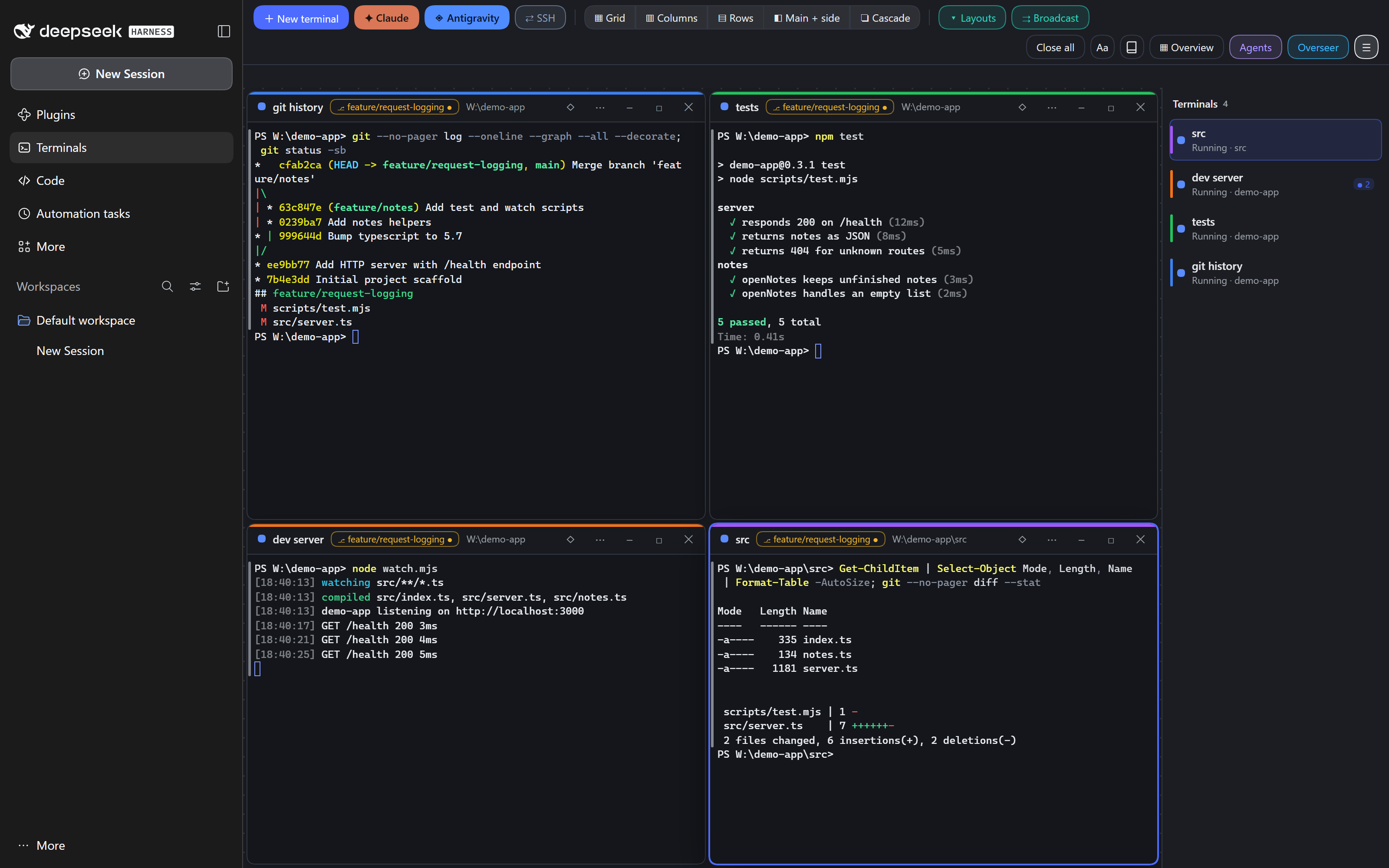
Terminals page for DeepSeek Harness: a workspace of real PTY terminals with agent status for Claude Code and Antigravity CLI.
Install
dsh plugin --profile web add github:nikodem5/dsh-web-terminalThis plugin lives in the packages/terminal subdirectory of the repository.
README
DeepSeek Harness plugins
Terminals and a code editor for the DeepSeek Harness (DSH) desktop app, built for running several coding agents side by side and reviewing what they change.


What's in here
| Plugin | What it adds | Package README | npm |
|---|---|---|---|
@nikodem5/dsh-web-terminal | Terminals page: a workspace of real terminals, with agent status for Claude Code and Antigravity CLI | packages/terminal | npm |
@nikodem5/dsh-code-editor | Code page: Monaco editor, git tools and markers for files an agent changed | packages/code-editor | npm |
Both plugins run locally; the one feature that sends data out is the terminal's optional Overseer (see How it works).
Terminals (dsh-web-terminal)
- Free-form workspace of real PTY terminals: drag, resize, snap, pin; shells survive page reloads
- Attention and notifications: see which agent is working or needs you, badges, desktop notifications, optional chime
- Pattern alerts raise a terminal's attention badge when its output matches a text or regex pattern
- Overseer panel (Ctrl+Shift+O) answers read-only questions about your open terminals, using the model set in the app
- Stats bar with Claude subscription usage (5h and 7d windows, with a forecast)
- Sub-agents panel, mission control overview, help panel (F1)
- Command blocks via shell integration (PowerShell, bash): jump between commands, failed-command flags, sticky bar
- SSH terminals from
~/.ssh/config, clickable file paths, send a selection to another terminal
Code (dsh-code-editor)
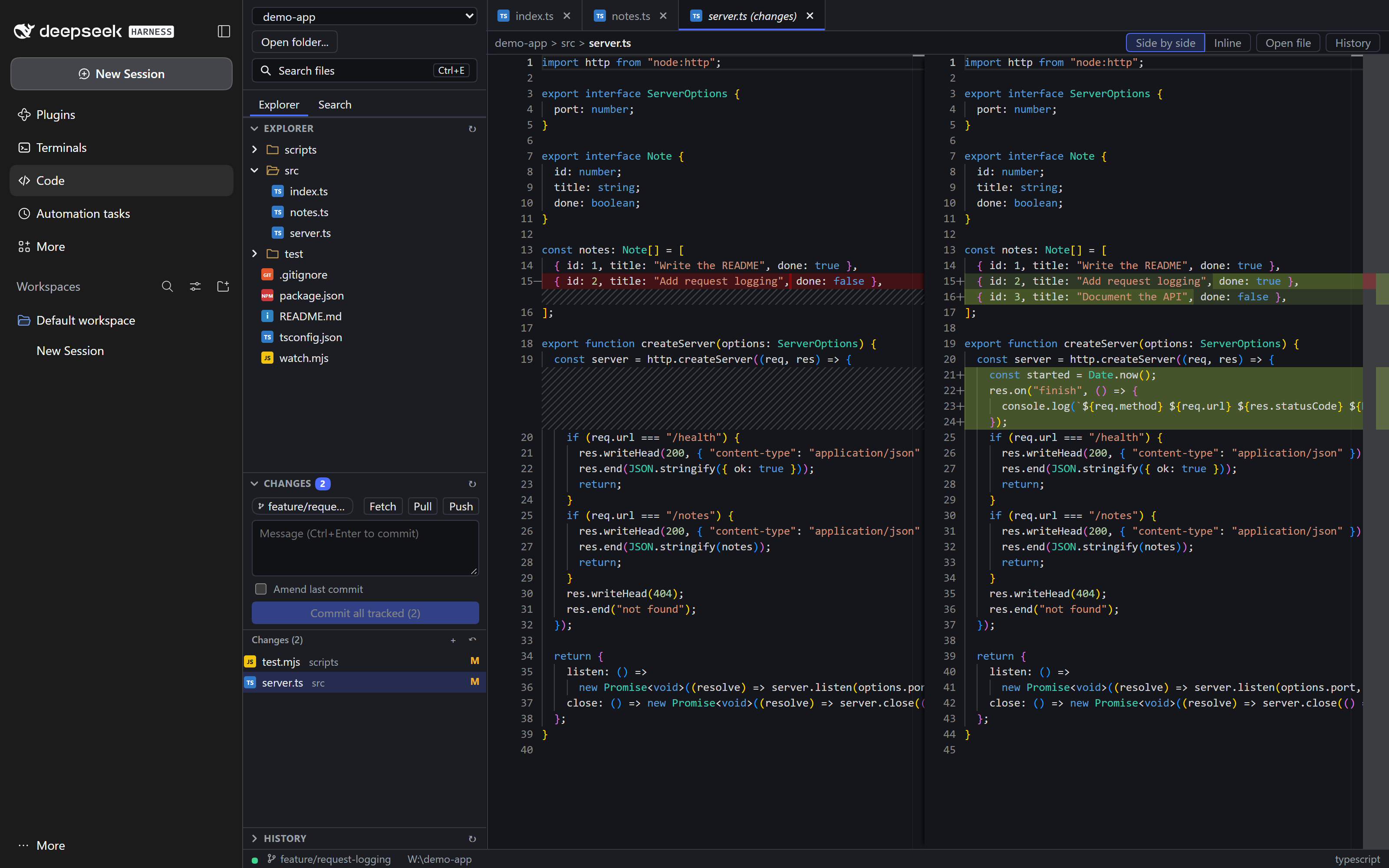
- Monaco editor with tabs, diff editor, safe saving (detects changes on disk)
- Git tools: status, stage/unstage/discard, commit, amend, branches, fetch/pull/push, history, nested repositories
- Search in files, Markdown preview (sanitized), quick open
- "Changed by agent" markers for files a Claude session in a Terminals window edited
- Only folders you register can be read or written, and
.gitinternals are off limits
Install
From npm
For the desktop app:
dsh plugin --profile desktop add @nikodem5/dsh-web-terminal
dsh plugin --profile desktop add @nikodem5/dsh-code-editor
For the browser GUI (dsh web):
dsh plugin --profile web add @nikodem5/dsh-web-terminal
dsh plugin --profile web add @nikodem5/dsh-code-editor
Restart DSH afterwards, since plugins load at startup.
Remove one with dsh plugin --profile <profile> remove <name>.
From a release archive
- Download
dsh-plugins-0.2.1.zipfrom GitHub Releases and unzip it. - Close the app.
- In the unzipped folder run
node install.mjs desktop(orweb; with no profile both are used).--dry-runpreviews. - Start the app.
To update, repeat with the newer archive. To remove: node install.mjs --remove desktop. Use
--package @nikodem5/dsh-web-terminal or --package @nikodem5/dsh-code-editor for just one plugin. --package also
accepts the short name (dsh-web-terminal) or the folder name.
From source
git clone https://github.com/Nikodem5/dsh-web-terminal.git
cd dsh-web-terminal
npm install
npm run build
npm run install:desktop      # or install:web; restart the app afterwards
After that, the help panel (F1) → Update from source pulls, rebuilds and reinstalls with one button; Restart app next to it restarts the app.
npm test runs all tests; npm run pack builds the release archive dsh-plugins-0.2.1.zip into dist/. The installer copies each plugin
into ~/.dsh/profiles/<profile>/node_modules (override the location with DSH_HOME), because linked packages outside
the profile tree do not get their browser half loaded.
Upgrading from 0.1.0
Up to 0.1.0 the plugins were installed under the unscoped names dsh-web-terminal and dsh-code-editor. The archive and source installers replace that copy in 0.2.0; if you switch to the npm packages, first remove the old copy with the installer you used (node install.mjs --remove --package dsh-web-terminal <profile>, and the same for dsh-code-editor), or both copies are loaded.
Requirements
- DeepSeek Harness 0.1.5 or newer (desktop app or
dsh web): the sidebar entries and pages use the panel list added in that version, and older versions load the plugins without showing them. Developed and tested against 0.2.2-rc.1 - Node.js 22+ on PATH. The host runs
nodefor the Claude status-line and hook helpers; without it the usage stats, the sub-agents panel and the "Idle" state of a fresh Claude terminal are unavailable (terminals and the other agent states still work). The installer needs Node as well - Git, for the editor's git features
- Optional: Claude Code CLI and/or Antigravity CLI (
agy), for the agent features (Antigravity reports status; usage and changed-file markers with its opt-in integration; no sub-agents) - Windows is the primary platform, Linux is supported, macOS is untested
How it works
Each plugin has a host half (a Node module mounted in the DSH server: PTY sessions, file and git routes, WebSockets) and a client half (a bundle loaded into the app UI). Every route and socket accepts only loopback peers and Hosts and requires a per-boot token (see SECURITY.md). No data leaves your machine, with two exceptions: what the agents you run in a terminal (Claude Code, Antigravity CLI) send themselves, and the Overseer, which sends terminal content to the model provider configured in the app each time you ask it a question (it says so before the first one).
Security notes
- The tools assume a single-user machine: any local process can connect to the loopback servers.
- The editor reads and writes only inside folders you registered, refuses symlink escapes and
.gitinternals, and never runs git through a shell. - Terminals give a real shell with your privileges; that is their purpose.
- SSH uses your own
sshand~/.ssh/config; the plugin stores no passwords or keys. - Markdown previews are sanitized and never load remote images.
Documentation
- Terminal plugin
- Code editor plugin and its HTTP/WebSocket API
- Shared helpers
- Changelog, Contributing, Security policy
License
MIT, (c) 2026 Nikodem Marcinkiewicz
Related plugins
dsh-web (dsh-task-board)
zhu1090093659/dsh-web
dsh-web (dsh-web-all)
zhu1090093659/dsh-web
dsh-TUI
ccch1mneyyy/dsh-tui
dsh-web-ui (dsh-task-board)
zhu1090093659/dsh-web-ui