dsh-project-shader
omnifj/dsh-project-shader
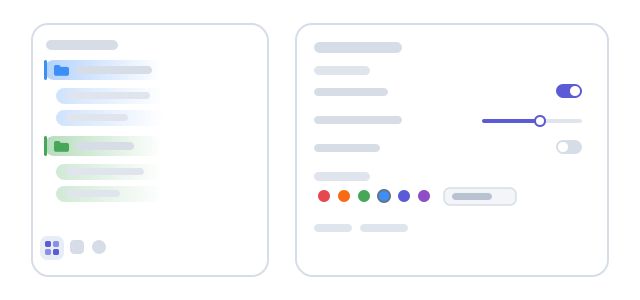
Colors each project in the workspace sidebar and its session rows, drawing a vertical bar and a left-to-right gradient wash over the folder icon, with a lighter tint for each session; a project takes a palette color, a custom hex value, automatic hash-based assignment, or no color, and a bilingual settings panel adjusts gradient on/off, intensity, reach, bar width, folder-glyph tinting and archived-row coloring.
Install
dsh plugin --profile web add github:omnifj/dsh-project-shaderREADME
dsh-project-shader · 项目着色器



给 DeepSeek Harness 左侧工作区侧边栏里的每个项目自动分配专属颜色,并让它的会话行继承同色的浅色底纹。多个项目并排时,一眼就能分清哪个会话属于哪个项目。
目录
功能特性
- 项目行整行着色:在每个项目行左侧画一条竖向色条
|(内阴影实现,不产生布局位移),并铺一层从左到右、到指定像素处完全透明的颜色渐变。 - 文件夹图标同步染色:项目行的文件夹图标和展开箭头使用同一个项目色,视觉上更成组。
- 会话行继承同色:项目下的每个会话行铺一层更浅的同色渐变,形成「项目 → 会话」的层级感;归档会话默认保持朴素灰色,可单独开启。
- 自动配色且互不重复:未手动指定颜色的项目按工作区 ID 做稳定哈希取色,并在当前项目集合内避让,尽量让每个项目拿到不同的颜色;增删项目时自动色可能顺移。
- 每个项目可单独定制:10 色调色板、任意自定义 hex、恢复自动、或干脆「不着色」。
- 右键快速换色:项目标题右键菜单里直接选「项目颜色」,不用打开设置面板。
- 滑杆两端即开关:渐变浓度拉到
0直接关闭该效果,拉到100%整行铺成实色(不再渐变,文字自动切换黑/白保持可读);竖线宽度拉到0隐藏竖线。双击滑杆恢复出厂默认值。 - 荧光效果三态可选:荧光(OKLCH 感知均匀提亮 + 辉光,灰色不染彩)可选择在白天主题、夜晚主题或两者下生效,默认仅夜晚;强度拉到
0即完全关闭荧光。 - 配色预设与实时预览:柔和 / 醒目 / 极简 / 荧光派对 / 纯竖线 / 整行满色 / 轻语 / 重彩 / 夜行者 / 图标点睛共十套预设一键套用;面板顶部的实时预览悬浮置顶,一次展示普通、运行中(呼吸)、等待输入、完成未读、已归档五种会话状态与置顶描边,示例颜色也可任选,所见即所得。面板各分区可点击标题折叠,低频分区默认收起,折叠状态自动记忆。
- 置顶与重要度排序:项目行点 📌 置顶(可多选),置顶组排到侧边栏最前,行尾带 📌 徽标、行周带彩色细描边;用 ↑ ↓ 调整顺序,顺序即颜色重要程度。没有任何置顶时功能自然不生效,无需开关。
- 会话状态动态着色:运行中的会话行以项目色呼吸发光,等待输入的会话显示警告色边缘,完成未读的显示绿色边缘,三个标记可独立开关。
- 色彩友好模式:一键切换 Okabe-Ito 调色板,竖线变双线、渐变叠加 45° 细纹,形状与颜色双通道区分项目。
- 跟随主题品牌色:自动配色优先使用当前主题的强调色,换主题时项目色自动融入。
- 每项目强调星标:给重点项目打星,该项目着色更浓且在任何主题下都带辉光。
- 设置导入/导出:全部设置与项目颜色导出为 JSON 文件,换浏览器/换端口后一键恢复。
- 项目搜索与随机换色:项目列表按名称/路径筛选;右键菜单一键随机换色。
- 完整设置面板:渐变浓度/范围、竖线宽度、图标着色、归档行着色、荧光三态/强度,全部带默认值提示,可一键全部恢复默认。
- 中英双语:界面文案跟随应用语言,除应用语言为英语外默认中文。
- 纯前端、零依赖:只注入生成好的 CSS 规则,不替换宿主组件、不改布局、不发起任何网络请求。
安装
前置条件:DeepSeek Harness 0.2.2-rc.5 及以上、0.3.0 以下(包内
engines.dsh在安装和启动时校验)。浏览器需支持 CSScolor-mix()(Chrome/Edge 111+、Firefox 113+、Safari 16.2+)。
关于 profile:桌面版使用独占的
desktopprofile,只能通过应用内的插件页面管理,命令行dsh plugin --profile desktop ...会被应用拒绝。下面命令行示例中的web可替换成你的实际 profile 名(如tui或自定义 profile)。
方式一:插件页面(桌面版 / Web,推荐)
不需要命令行,桌面版用户请用这个方式:
-
打开侧边栏的 Plugins(插件)页面。
-
点右上角 Add plugin(添加插件)。
-
在包名输入框里填入:
dsh-project-shader -
点 Install 安装;若提示选择 registry,保持默认即可(官方 npm 源,或已同步该包的 npmmirror 镜像都行)。
-
安装完成后点 Enable now(立即启用),插件会出现在 Installed plugins 里。
装好后立即生效,无需重启。
方式二:npm + dsh CLI
已安装 dsh 命令行、或使用 Web/TUI profile 的用户:
# 装到指定 profile(把 web 换成你实际启动的 profile 名)
dsh plugin --profile web add dsh-project-shader

# 然后正常启动该 profile
dsh --profile web
需要固定版本时:
dsh plugin --profile web add dsh-project-shader@1.7.1
dsh plugin 会调用 pnpm 安装包、把 bundle 追加到 profile 的 dsh.profile.bundles 列表并启用对应插件行。该包是纯 JavaScript,没有构建脚本,安装时不会执行任何安装脚本,也不需要 allowBuilds 授权。
如果 profile 用 HMR 运行,改动会即时热加载;否则重启
dsh --profile <name>后生效。
方式三:GitHub 直装
不想经过 npm 源(或想直接跟仓库最新代码)时:
dsh plugin --profile web add github:omnifj/dsh-project-shader
建议锁定 tag 或 commit,避免上游代码变动影响你的环境:
dsh plugin --profile web add github:omnifj/dsh-project-shader#v1.7.1
同样因为包内没有 prepare/build 脚本,GitHub 安装开箱即用,不需要为构建脚本授权。
方式四:本地 tarball
离线机器、或想先审计再装:
# 方式 A:从 GitHub Release 下载 dsh-project-shader-1.7.1.tgz 后
dsh plugin --profile web add ./dsh-project-shader-1.7.1.tgz

# 方式 B:自己从 npm 打包
npm pack dsh-project-shader
dsh plugin --profile web add ./dsh-project-shader-1.7.1.tgz
tarball 同时也是最简单的「审计单位」:解压后只有 index.js、client.js、cordis.patch.yml、locale/、docs/、icon.svg,没有依赖、没有安装脚本。
桌面版用户也可以用插件页面的 Add plugin 填入 tarball 的绝对路径来安装。
方式五:本地目录(改代码时用)
# 开发时把工作区目录直接 link 进 profile(CLI profile,如 web)
dsh plugin --profile web add D:/Project/dsh-plugin/dsh-project-shader
桌面版则用 Plugins → Add plugin 填目录绝对路径,效果相同。
本方式 pnpm 会创建 link: 依赖:修改 client.js 后刷新页面或重启 DSH 即可看到效果,不用反复重装。发布前建议用打包产物再验证一次,因为 files 字段只对打包生效、对 link 目录不过滤。
安装后确认
- Plugins 页面 → Installed plugins 里出现 Project shader / 项目着色器,开关为开。
- 侧边栏底部图标列多出一个四宫格图标,点击打开设置面板。
- 左侧任意项目行出现竖向色条和渐变底纹,其会话行出现同色浅底纹。
使用
设置面板
点击侧边栏底部图标列里的「项目着色」图标(四宫格)打开设置面板。面板顶部是实时预览条(模拟侧边栏,悬浮置顶——向下滚动时始终可见;一次展示普通 / 运行中 / 等待输入 / 完成未读 / 已归档五种会话状态;点右上角 ✕ 可收起,随时再展开)。面板分八段,每段都可点标题折叠(高级、设置数据默认收起,折叠状态自动记忆):
- 预设方案:柔和 / 醒目 / 极简 / 荧光派对 / 纯竖线 / 整行满色 / 轻语 / 重彩 / 夜行者 / 图标点睛,一键套用后仍可逐项微调。
- 项目行:颜色浓度、渐变范围、竖线宽度、图标着色。
- 会话行:颜色浓度、渐变范围,以及归档会话是否着色。
- 荧光效果:荧光在哪种主题生效(白天 / 夜晚 / 同时,默认夜晚)与强度;当前正生效时行尾会显示「当前生效中」。
- 会话状态:运行中呼吸光环(强度可调)、等待输入警告标记、完成未读成功标记,各自独立开关。
- 高级:跟随主题品牌色、色彩友好模式。
- 项目颜色:顶部可按名称/路径筛选,说明文字下有一条 📌 置顶提示;逐个项目选择调色板颜色、输入自定义 hex、点 ★ 强调、点 📌 置顶(可多选,↑ ↓ 调序)、点「自动」恢复哈希分配、或点「不着色」让该项目完全不上色。
- 设置数据:导出 / 导入 JSON,跨浏览器携带配置。
滑杆的两端就是开关:颜色浓度拉到 0 关闭渐变、拉到 100% 整行变成实色;竖线宽度拉到 0 隐藏竖线;荧光强度拉到 0 完全关闭荧光。渐变范围滑杆在渐变关闭或整行实色时会自动禁用;双击任意滑杆恢复该项出厂默认值。
每行右侧都标注了该设置的出厂默认值;面板右上角「全部恢复默认值」只重置上面这些全局参数,不会清掉你为项目挑的颜色(项目颜色用各自的「自动」按钮复原)。
右键菜单快速换色
在项目标题上点右键,菜单里有 Project color / 项目颜色 子菜单:色板 + 「随机换色」+「自动」,当前生效项会带「(当前)」标记并置灰;色板跟随色彩友好/品牌色模式。子菜单底部还有「打开着色设置」,直接跳到设置面板。
全部设置项
| 设置 | 作用范围 | 默认值 | 可调范围 |
|---|---|---|---|
| 颜色浓度 | 项目行 | 20% | 0(关)–100%(实色) |
| 渐变范围 | 项目行 | 48px | 16–200px |
| 竖线宽度「|」 | 项目行 | 3px | 0(关)–12px |
| 文件夹图标着色 | 项目行 | 开 | 开 / 关 |
| 颜色浓度 | 会话行 | 14% | 0(关)–100%(实色) |
| 渐变范围 | 会话行 | 56px | 16–200px |
| 归档会话也着色 | 会话行 | 关 | 开 / 关 |
| 荧光生效主题 | 荧光效果 | 夜晚 | 白天 / 夜晚 / 同时 |
| 荧光强度 | 荧光效果 | 60% | 0(关)–100% |
| 运行中呼吸光环 | 会话状态 | 开 | 开 / 关 |
| 呼吸强度 | 会话状态 | 50% | 0–100% |
| 等待输入警告标记 | 会话状态 | 开 | 开 / 关 |
| 完成未读成功标记 | 会话状态 | 开 | 开 / 关 |
| 置顶 📌 与顺序 ↑↓ | 单个项目 | 不置顶 | 置顶 / 调序 |
| 跟随主题品牌色 | 高级 | 关 | 开 / 关 |
| 色彩友好模式 | 高级 | 关 | 开 / 关 |
| 强调星标 ★ | 单个项目 | 关 | 开 / 关 |
| 项目颜色 | 单个项目 | 自动 | 10 色板 / 自定义 hex / 自动 / 不着色 |
调色板固定为 10 个中间调颜色,在浅色和深色主题下都保持可读:
#e5484d 红 · #f76b15 橙 · #e8930c 琥珀 · #46a758 绿 · #12a594 青 · #3e8ef7 蓝 · #5b5bd6 靛 · #8e4ec6 紫 · #d6409f 粉 · #8b8d98 灰
颜色是怎么分配的
- 你手动指定过颜色的项目,永远优先使用你指定的颜色;指定「不着色」的项目直接跳过。
- 其余项目按
workspaceId做 FNV-1a 哈希,映射到调色板的某一格(默认 10 色板;色彩友好模式为 Okabe-Ito 8 色;开启品牌色后首槽为主题强调色)。 - 如果这一格已经被手动占用、或已被先分配的项目占用,就按固定顺序往后找下一个空位(按
workspaceId排序遍历,结果可复现)。 - 所以:同样的项目集合 = 同样的配色;增加或删除项目时自动色可能变化,手动指定的颜色不会。
数据与隐私
- 所有设置只写入当前浏览器的
localStorage:设置数据在dsh-project-shader:settings:v2,面板折叠/预览收起等界面状态单独存在dsh-project-shader:ui:v1(不会混入设置导出文件)。 - 想换设备携带配置,用设置面板「设置数据」里的导出/导入 JSON;插件本身不会上传任何数据。
- 不会上传、不会跨设备或浏览器同步、不会写入 DSH 的 profile 配置。
- 旧版(
dsh-project-shader:colors:v1)的每项目颜色会在首次加载时一次性迁移到新键,旧键随即删除;更早版本里的开关型设置(渐变开关、竖线开关、旧荧光开关)会自动折算为对应滑杆的0位,意图不丢失。 - 清除站点数据 / 换浏览器 / 换端口访问,都会回到出厂默认外观。
- 插件不发起任何网络请求,不读取会话内容或项目路径以外的信息。
兼容性
- DeepSeek Harness
>=0.2.2-rc.5 <0.3.0(由engines.dsh声明,安装与启动时会校验)。 - 仅 Web 渲染端(桌面版与
dsh web都适用);依赖 Client 侧以下插件的插槽:dsh-client-ui-context-menu、dsh-client-ui-layout、dsh-client-ui-sidebar、dsh-client-ui-workspace。 - 浏览器需支持 CSS
color-mix()。 - 浅色 / 深色主题都可用:颜色用
color-mix()与主题变量混合,不写死背景色;荧光效果默认仅在深色主题生效,可改成白天或两者同时。
已知限制
- 着色依赖宿主行元素上的
data-row-key="workspace:<id>"/data-row-key="session:<id>"属性。如果未来 DSH 版本改了行 key 的命名,颜色会直接失效(不会报错、不影响其它功能),届时需要升级本插件。 - 置顶排序是 CSS 视觉排序(
order),只在分组视图生效;「所有会话一个列表」视图没有项目行,不受影响。宿主的拖拽手动排序与置顶叠加时,未置顶项目仍保持手动顺序。 - 开启「文件夹图标着色」后,项目行的文件夹图标会用项目色,这会盖住宿主原本表示「该行包含当前会话」的高亮色。想保留宿主高亮,请关掉这一项。
- 自动配色是在「当前项目集合」内避让的,所以项目增删后自动色可能顺移,这是设计行为而非 bug。
- 设置按浏览器存储,不跟随 DSH 账号;桌面版与 Web 版、不同端口之间不共享。
- 与其它直接改宿主行样式的插件可能互相覆盖,建议只保留一个同类着色插件。
更新与卸载
快速更新:所有设置保存在浏览器 localStorage,与插件包无关——重装不丢配置,放心更新。
-
桌面版:Plugins → Installed plugins 里卸载 Project shader → Add plugin 输入
dsh-project-shader→ Install → Enable now,立即生效。 -
装了 dshmarket 插件市场:市场里搜
dsh-project-shader一键重装即为最新版。 -
CLI profile(把 web 换成实际 profile 名):
dsh plugin --profile web remove dsh-project-shader
dsh plugin --profile web add dsh-project-shader@1.7.1
停用/卸载:
dsh plugin --profile web remove dsh-project-shader
或在插件页面关掉开关 / 点卸载。停用后侧边栏立即恢复原始外观,重装后颜色设置仍在。
开发
dsh-project-shader/
├── package.json         # 包清单:dsh.bundle + dsh.client + files
├── CHANGELOG.md         # 版本演进记录
├── cordis.patch.yml     # bundle 层:插入一行插件
├── index.js             # Host 半身(空实现,渲染全在 Client)
├── client.js            # Client 半身:注入 CSS、设置面板、右键菜单
├── locale/en.json       # 英文显示元数据 + 插件页面长描述
├── locale/zh.json       # 中文显示元数据 + 插件页面长描述
├── docs/DETAIL.md       # 插件详情页配图(英文)
├── docs/DETAIL.zh.md    # 插件详情页配图(中文)
├── docs/PLAN.zh.md      # 1.3.0 里程碑项目计划书(功能核销记录)
├── docs/preview.svg     # 功能预览图
└── icon.svg             # 插件图标
-
Host 半身
index.js只导出空的apply();所有渲染逻辑在浏览器端client.js,通过window.__ModuleLoader__.load({ id: 'dsh-project-shader', factory })注册工厂,工厂 id 必须与包名一致。 -
生成的 CSS 全部挂在
shell.overlay(整帧常驻、点击穿透的覆盖层)里的一个<style>上;不插入额外 DOM,因此不会挤占布局。 -
本地开发推荐 link 目录:CLI profile 用
dsh plugin --profile web add <本目录绝对路径>,桌面版用 Plugins → Add plugin 填绝对路径。改完刷新页面即可。 -
发布前自检:
node --check index.js && node --check client.js
npm pack --dry-run    # 确认打包文件列表
npm publish           # 需要已登录 npm 账号
English
dsh-project-shader colors every project in the DeepSeek Harness workspace sidebar and tints the sessions underneath it.
- Each project row gets an inset
|color bar, a left-to-right gradient wash over the folder-icon cell, and a tinted folder glyph. - Session rows under a project inherit a lighter wash in the same color; archived sessions stay plain unless you opt in.
- Unassigned projects get a stable hash-based palette color, shifted to the next free slot so two projects do not share one while a slot remains.
- On the dark theme a neon mode (default: dark only; switchable to light or both) brightens every color toward a fluorescent tone in OKLCH (perceptually uniform, grays stay gray) and adds a soft glow over the bar, wash and glyph; intensity is tunable and 0 turns it off.
- Sliders double as switches: wash intensity 0 disables the gradient, 100% fills the whole row with solid color (text auto-contrasts); bar width 0 hides the bar; double-click any slider to restore its default.
- Ten presets (soft / vivid / minimal / neon party / bars only / full fill / whisper / bold / night owl / icon spark) and a sticky live preview strip that shows every session state at once (plain, running, awaiting input, unread, archived) and stays pinned while you scroll make the panel WYSIWYG; sections are collapsible and remember their fold; settings export/import to a JSON file.
- Session status markers: a breathing halo while running, a warning edge while awaiting input, a success edge for unread completions — each individually switchable.
- Color-friendly mode (Okabe–Ito palette, doubled bars, textured washes), follow-the-theme brand colors, a per-project emphasis star, project search, and a right-click "shuffle a color" item.
- Optional pinned ordering with no switch: click 📌 on any project row (multi-select) to float pinned groups to the top of the sidebar, marked with a 📌 badge at the row's end and a fine color rim; ↑ ↓ buttons set the order, which doubles as a color-importance ranking. With nothing pinned the feature simply does nothing. The preview's sample color is selectable and the breathing pulse strength is a slider.
- A Project shader panel (sidebar bottom icon column) exposes every global parameter; a project's right-click menu offers Project color for quick changes.
- Everything persists in
localStorageonly (dsh-project-shader:settings:v2); nothing is uploaded.
Install (pick one):
# A. Plugins page → Add plugin → dsh-project-shader → Install → Enable now
# B. npm + CLI (desktop profile is managed by the Desktop app; use the UI there)
dsh plugin --profile web add dsh-project-shader
# C. straight from GitHub (pin a tag to stay stable)
dsh plugin --profile web add github:omnifj/dsh-project-shader#v1.7.1
# D. local tarball
dsh plugin --profile web add ./dsh-project-shader-1.7.1.tgz
# E. local directory (development link)
dsh plugin --profile web add D:/path/to/dsh-project-shader
Requires DeepSeek Harness >=0.2.2-rc.5 <0.3.0 and a browser with CSS color-mix() support. Pure client-side CSS generation: no dependencies, no install scripts, no network requests.
License
MIT © 2026 omnilm
Related plugins
dsh-web (dsh-task-board)
zhu1090093659/dsh-web
dsh-web (dsh-web-all)
zhu1090093659/dsh-web
dsh-TUI
ccch1mneyyy/dsh-tui
dsh-web-ui (dsh-task-board)
zhu1090093659/dsh-web-ui