dsh-mobile
orderg-x/dsh-mobile
Use DSH from a phone browser. Turn on phone access from the phone button in the session header (or the plugin card) and scan the QR code; the phone opens the official DSH web UI served by the desktop process, with the same sessions updating live, so you can follow a running task, reply and approve away from the computer. A gateway inside DSH (port 18765) proxies the web UI and handles the desktop login itself. One QR code works on Wi-Fi and on mobile data: turning access on also starts a free Cloudflare quick tunnel (cloudflared is downloaded from Cloudflare's GitHub releases if missing), and its address survives DSH restarts, so phones do not need to rescan. Pairing codes are one-time and expire in 10 minutes, each phone gets its own revocable credential, the header button shows when a phone is connected, and idle connections get keepalive pings.
Install
dsh plugin --profile web add github:orderg-x/dsh-mobileREADME




一句话:DeepSeek Harness(DSH)插件,在手机浏览器里用电脑上的 DSH:扫码后看任务进度、回消息、点批准。走免费的 Cloudflare 隧道,在外面用流量也能连,不用装 App。
什么时候用:「出门了想在手机上看任务」「人不在电脑前也想回消息、点批准」。
安装:
dsh plugin add @orderg-x/dsh-mobile(npm 包),重启 DSH。目前只在 macOS 上测过。
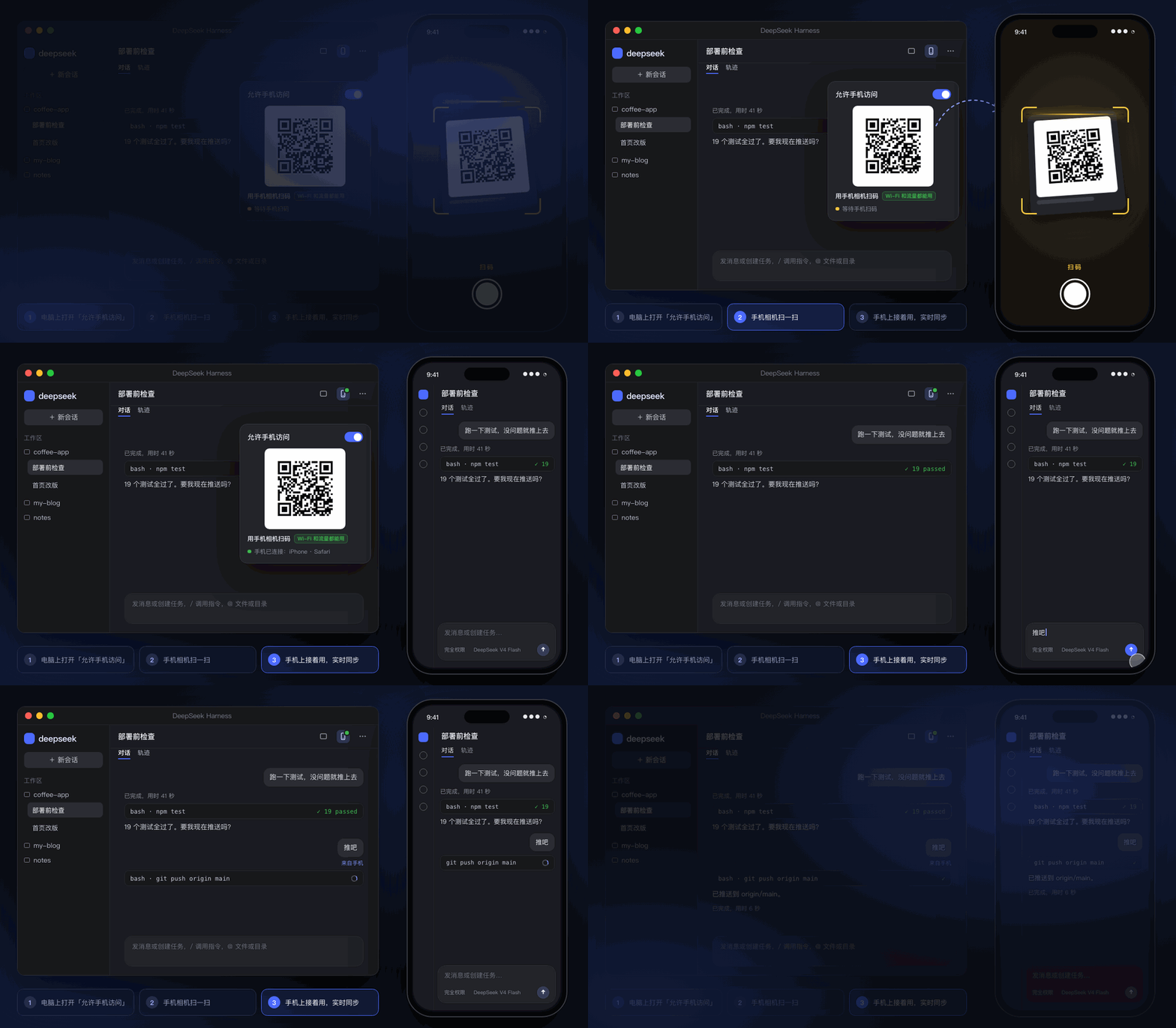
演示动画,内容是示例数据。
有什么好
| 📱 扫一下就能用 | 不用装 App、不用注册账号。手机相机扫码,手机浏览器里就是电脑上那个 DSH。 |
| 🔄 同一批会话,实时同步 | 手机上发的消息,电脑上同时出现;模型干到哪,手机上实时看得到。 |
| 🌍 在哪都能连 | 走 Cloudflare 免费隧道(HTTPS),在家在外都是同一个地址,出门用流量也能连。打开开关就自动准备好。 |
| 🔐 只认你配过的手机 | 二维码只能用一次、10 分钟过期;每台手机一张凭证,随时移除,移除立刻断开。 |
安装
dsh plugin add @orderg-x/dsh-mobile
也可以直接装发布包:dsh plugin add https://github.com/OrderG-X/dsh-mobile/releases/latest/download/dsh-mobile.tgz。装完重启 DSH。DSH「插件」页里显示为「手机端」。
从 0.2.x 升级:0.3.0 起包名改成
@orderg-x/dsh-mobile(npm 上的dsh-mobile是别人的包)。装上新版后,到「插件」页把旧的「dsh-mobile」移除,再重启 DSH。旧版还在时新版不会启动,只提示你移除旧版。设置都会保留;外网地址会换一个,手机重扫一次就好。
怎么用
- 电脑上:点会话顶栏的手机按钮(或 DSH →「插件」→「手机端」),打开「允许手机访问」。
- 手机上:用相机扫出现的二维码,在家在外都能用。
- 以后:直接在手机上打开那个地址就行,建议「添加到主屏幕」。DSH 重启后地址不变,不用重扫。
手机连着时,顶栏的手机按钮会亮绿点。扫不了码就点「复制链接」,发到手机上打开(10 分钟内有效、只能用一次)。
第一次打开外网时会自动下载 Cloudflare 的官方程序 cloudflared(约 20 MB),大约半分钟。这期间先显示一个临时的码,好了自动换掉。
原理
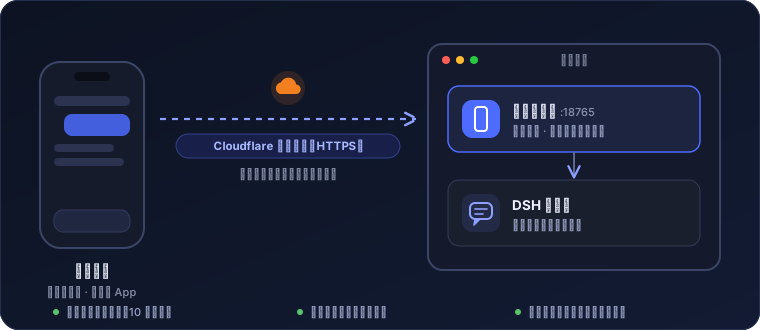
插件在 DSH 里起一个小网关(默认端口 18765),把手机的请求转给本机的 DSH 网页端。手机上跑的就是 DSH 官方网页界面,会话、设置都和电脑上一样。
技术细节
- DSH 桌面版的网页端要登录:网关在 DSH 进程里用启动口令换一张登录 Cookie,替手机带上。这张 Cookie 不会发到手机上。
- 手机自己的凭证由网关发(HttpOnly、SameSite=Strict),盘上只存哈希。凭证只在配对时走的那条路上有效:Wi-Fi(明文)配的拿到外网隧道上用不了。
- 「手机端」的设置(开关、二维码、已配对的手机)只能在电脑上的 DSH 里管理,手机上读不到配对码。
- 局域网是明文 HTTP,浏览器少了一些「安全上下文」才有的接口,网关会给页面补上 DSH 需要的那个。
- 长连接空闲时,网关往手机方向发保活包,免得被隧道或运营商当成死连接掐断。
- 外网用
cloudflared tunnel --url(trycloudflare.com 快速隧道):Cloudflare 把 HTTPS 流量转到你电脑上的网关,门禁照旧是网关的配对。 - 为了地址不变,DSH 退出时隧道程序留在后台(几乎不占资源),下次打开 DSH 接着用;关掉「允许手机访问」就会停掉它。
安全
扫过码的手机能让 DSH 在这台电脑上干活,跟你坐在电脑前一样。所以:
| 情况 | 怎么做 |
|---|---|
| 二维码 | 只用自己的手机扫,别发给别人、别截图到群里 |
| 手机丢了 | 在「已配对的手机」里移除它,立刻断开 |
| 公共 Wi-Fi | 局域网模式是明文 HTTP,别用;用外网(HTTPS) |
| 不用的时候 | 关掉「允许手机访问」,网关就不再监听 |
数据都在 ~/.dsh/dsh-mobile/:state.json(开关)、devices.json(已配对的手机,0600)、mobile.log、tunnel.json 和 cloudflared.log(外网隧道)、bin/cloudflared(下载的话)。
常见问题
要装 App 吗?
不用装。用手机相机扫码,在手机浏览器里打开就是。
换了地方 / 电脑重启了,要重新扫吗?
DSH 重启不用。电脑重启、关掉「允许手机访问」、在 DSH 里停用或卸载这个插件之后,外网地址会换,要重新扫一次。
在中国大陆用流量快吗?
够用。Cloudflare 的免费线路在大陆没有节点,请求会先绕到国外再回来,所以第一次打开要等一两秒;之后看任务、发消息都顺。信号差的时候会明显变慢。
别人捡到我的二维码能连吗?
二维码只能用一次、10 分钟过期。已经被你扫过的码再扫就失效。真被别人先扫了,在「已配对的手机」里能看到,移除就行。
电脑睡着了还能连吗?
不能。电脑睡眠或 DSH 关着时连不上。
限制
- 手机上的界面就是 DSH 网页版,没有专门为手机重新排版。
- 外网用的是 Cloudflare 免费快速隧道,没有可用性保证。
- 只测过 macOS 上的 DSH 桌面版;Windows / Linux 上的 cloudflared 下载路径写了,没实测。
开发
npm test # 网关、配对、长连接、保活的脚本测试
反馈
遇到问题或想要新功能,提一个 issue。报问题时写上 DSH 版本和插件版本,修起来最快。
License
MIT
Related plugins
dsh-web (dsh-ssh)
zhu1090093659/dsh-web
dsh-web (dsh-remote-web-ui)
zhu1090093659/dsh-web
dsh-web-ui (dsh-ssh)
zhu1090093659/dsh-web-ui
dsh-web-ui (dsh-remote-web-ui)
zhu1090093659/dsh-web-ui