P
dsh-task-control
p2coder/dsh-task-control
Pause / resume / cancel the in-flight conversation task from the composer area: forced pause interrupts immediately and remembers the interrupted tool, safe pause lands after the tool or reasoning finishes, resume asks for confirmation, and the default pause granularity is configurable in the settings.
Install
dsh plugin --profile web add github:p2coder/dsh-task-controlREADME
dsh-task-control

English | 中文
为 DSH Web 增加任务暂停、恢复和取消能力。支持安全暂停与强制暂停,恢复时从暂停点继续,不重复已完成的工作。
当前适配 DSH v0.1.1-rc.2(最新版本)。
安装
dsh plugin --profile web add github:p2coder/dsh-task-control
安装后请完整重启 dsh web,然后刷新浏览器页面。
快速使用
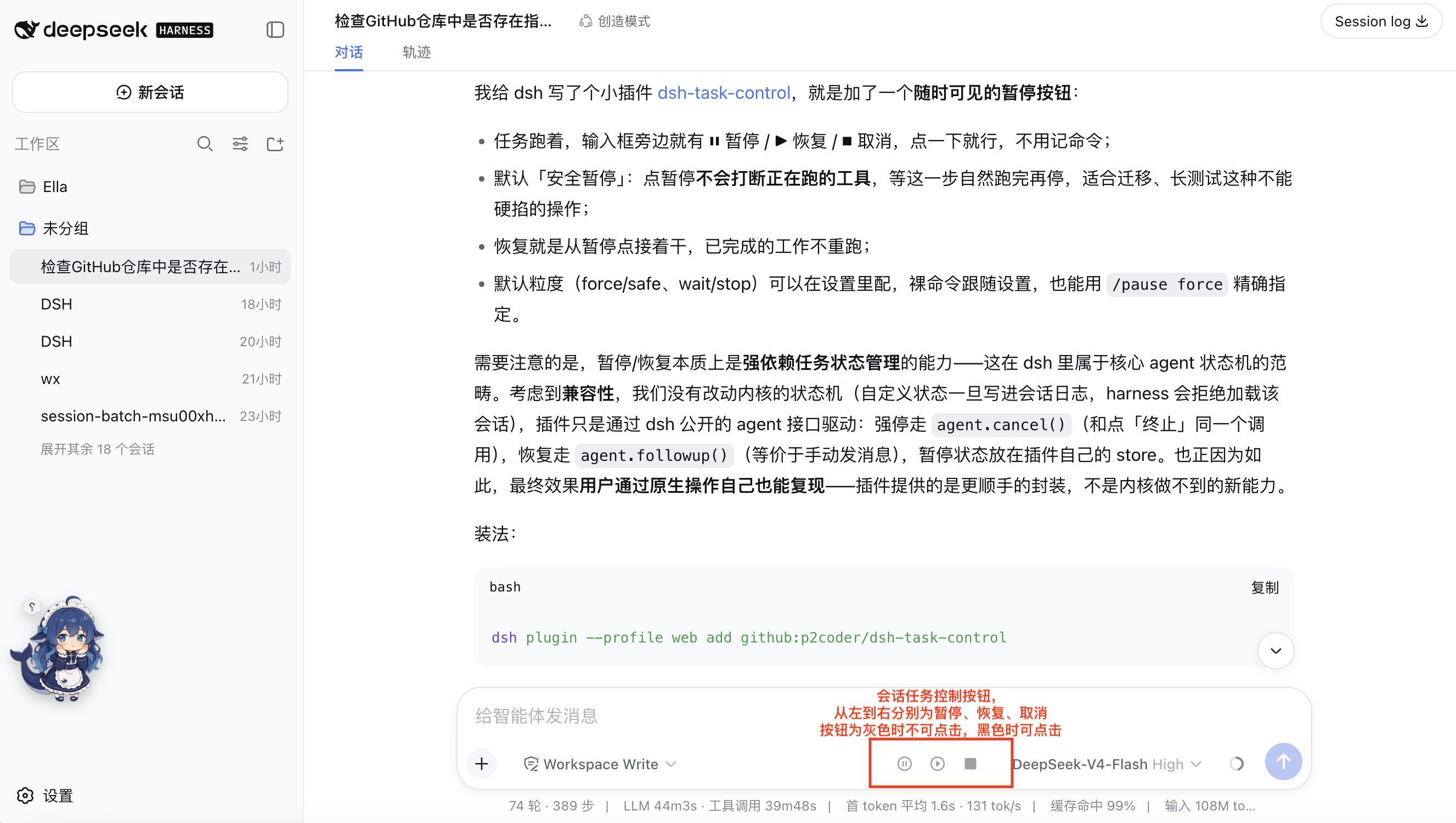
任务运行时,输入框旁会显示三个常驻按钮:
| 按钮 | 作用 | 可用状态 |
|---|---|---|
| ⏸ 暂停 | 按默认粒度暂停任务 | 运行中 |
| ▶ 恢复 | 从暂停点继续 | 已暂停 |
| ⏹ 取消 | 立即终止当前回合 | 运行中或已暂停 |
灰色按钮表示当前不可用,黑色按钮表示可点击。
暂停模式
| 模式 | 行为 | 适合场景 |
|---|---|---|
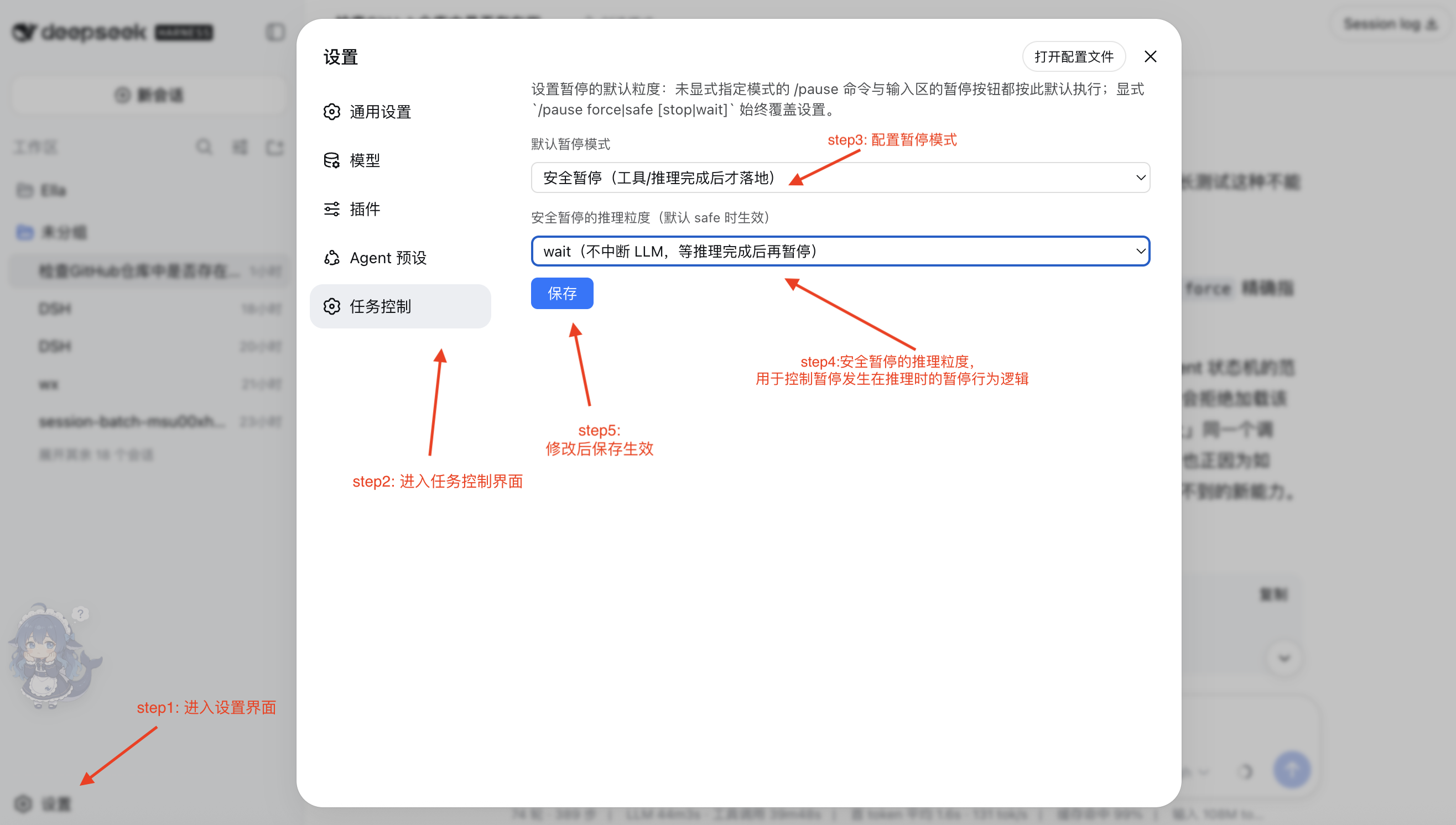
safe wait(默认) | 等待推理和工具自然完成后暂停 | 长任务、迁移、测试 |
safe stop | 工具完成后暂停;可中断当前推理 | 希望更快暂停 |
force | 立即中断推理及在途工具 | 紧急停止 |
在「设置 → 任务控制」中修改默认模式,保存后立即生效:
命令
| 命令 | 说明 |
|---|---|
/pause | 按设置中的默认模式暂停 |
/pause force | 强制暂停 |
/pause safe wait | 安全暂停,不中断推理 |
/pause safe stop | 安全暂停,可中断推理 |
/resume | 恢复任务 |
/resume confirm rerun | 重新执行被中断或未派发的工具后恢复 |
/resume confirm skip | 跳过该工具后恢复 |
/cancel | 取消当前回合 |

供其他插件调用
通过 ctx.get("taskControl") 获取服务:
| API | 作用 |
|---|---|
pause(sessionId, options?) | 暂停任务 |
resume(sessionId, options?) | 恢复任务 |
cancel(sessionId) | 取消任务 |
state(sessionId) | 查询 idle、running 或 offline 状态及暂停信息 |
暂停状态保存在 ~/.dsh/task-control/,重启后不会丢失。测试时可用 DSH_TASK_CONTROL_STATE_DIR 修改存储目录。
注意事项
| 情况 | 说明 |
|---|---|
| 强制暂停 | 工具可能已产生部分副作用;恢复前可选择重新执行、跳过或保持暂停 |
safe wait 的未派发工具 | 恢复时需要选择重新执行或跳过 |
| 暂停期间发送新消息 | 会开启新回合;暂停只控制当前回合 |
| 定时提醒 | dsh-schedule 到期后仍会唤醒 |
| 子代理 | 已派发的子代理不会被父任务暂停 |
| 状态同步 | 浏览器每 2 秒轮询一次,修改插件后需重启 dsh web |
测试
node test/host-smoke.mjs
Related plugins
Z
dsh-web-ui (dsh-chat-recovery)
zhu1090093659/dsh-web-ui
6.2klast monthSessions & MessagesApache-2.0
L
dsh-synapse
liangmianya/dsh-synapse
453last monthSessions & MessagesMIT
R
billion-context
ranxianglei/billion-context
3794 days agoSessions & Messages
N
dsh-chat-import
nwflower/dsh-chat-import
2055 days agoSessions & MessagesMIT