dsh-next-step-suggestion
panmax/dsh-next-step-suggestion
Show a ghost next-step prompt suggestion in an empty composer after an agent turn finishes; press Tab to accept into an editable draft.
Install
dsh plugin --profile web add github:panmax/dsh-next-step-suggestionREADME
dsh-next-step-suggestion
English | 中文




Codex-style ghost next-step prompt suggestions for DeepSeek Harness Web.
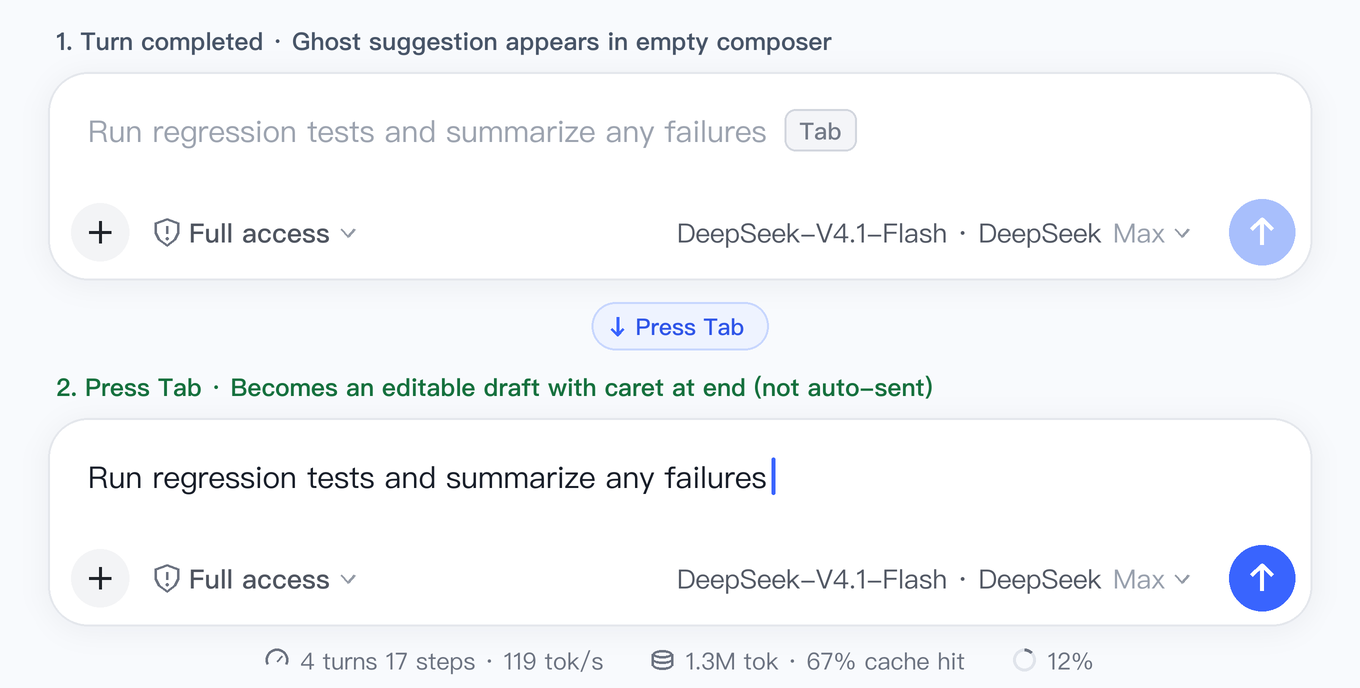
When an agent finishes a turn in the active conversation, an empty composer previews one concise, directly sendable follow-up instruction. Press Tab to accept it as an editable draft, then submit whenever you are ready.
Features
- Restrained, exact trigger conditions — Appears only in the foreground conversation after a normal turn completion (
turn/endwithreason.kind === 'completed') while the composer is editable, Plan Mode is inactive, text/quotes/reference chips/attachments are empty, and no/or@completion menu or composer takeover is open. Streaming, tool execution, permission prompts,ask_user_questionwaits, disabled/read-only composers, cancellations, and errors are skipped. - Two-step safe acceptance (Keyboard & Click/Touch) — The gray ghost preview is rendered separately from the Lexical editor value. Press
Tabwhile the editor holds focus—or click/tap theTabbadge directly—to convert the preview into an editable draft with the caret at the end, never auto-submitting. - Single-shot, bounded background generation — Dispatches at most one tool-free
ctx.llmcall per(sessionId, turn)using only recent human/assistant text and tool-call counts. Full transcripts, system prompts, reasoning traces, and raw tool outputs are never sent, and nothing is written to the session log. - Non-destructive visibility & multi-session isolation — Suggestions are isolated per
sessionId: switching to another session hides the previous session's preview (never leaking across sessions), while returning restores any cached suggestion or backfills a turn that just completed in the background (skipping cold historical sessions). Typing, IME composition, pasting, or adding quotes/attachments only hides the preview; once the composer is empty again the same suggestion reappears without another model request. Only starting a new turn clears it.
Installation
CLI
# Install from npm
dsh plugin --profile web add dsh-next-step-suggestion

# Enable or disable at any time (hot-reloads with HMR)
dsh plugin --profile web enable dsh-next-step-suggestion
dsh plugin --profile web disable dsh-next-step-suggestion

# Remove the bundle
dsh plugin --profile web remove dsh-next-step-suggestion
Web UI
- Open Plugins in the left sidebar.
- Click Add plugin, enter
dsh-next-step-suggestion, and install. - Toggle Next-step suggestion on or off at any time—disabling unmounts the overlay slot, removes plugin styles, and stops all background generation requests immediately.
Keyboard & Interaction Matrix
| Context | Action | Result |
|---|---|---|
| Preview visible + composer focused + no popup open | Tab / → (ArrowRight) | Accepts suggestion into editable draft, moves caret to end, does not send |
| Preview visible + no popup open (mouse or touch) | Click / tap Tab badge | Accepts suggestion into editable draft, focuses composer, does not send |
| Preview visible + focus outside composer | Tab | Preserves native browser focus traversal |
/ or @ menu / command popup open, or Shift+Tab | Tab | Preview hides and yields completely to built-in composer menus |
| User types, pastes, adds quotes/attachments, or accepts then clears back to empty | Any edit | Preview only hides; the same suggestion reappears when the composer becomes empty again, without regenerating |
Configuration
Configure directly in Plugins → Next-step suggestion (select whether to follow the active session's model or pin a dedicated lightweight provider/model, plus collapsible advanced limits), or set optional fields under the next-step-suggestion entry in cordis.patch.yml:
- insert:
    - id: next-step-suggestion
      name: 'dsh-next-step-suggestion'
      config:
        maxInputBytes: 6000
        maxOutputTokens: 4096
        timeoutMs: 30000
        # Optional explicit route override (defaults to the active session's model):
        # provider: deepseek
        # model: deepseek-flash
| Field | Default | Description |
|---|---|---|
maxInputBytes | 6000 | Maximum UTF-8 bytes of recent turn summary sent to the auxiliary model call. |
maxOutputTokens | 4096 | Output token ceiling (accommodates thinking models whose non-disableable reasoning tokens share maxTokens). |
timeoutMs | 30000 | End-to-end deadline in milliseconds for one background suggestion call. |
provider | Session route | Optional explicit LLM provider id (must be supplied together with model). |
model | Session route | Optional explicit model id (must be supplied together with provider). |
Architecture
- Host (
index.js,src/host.js,src/context.js) — RegistersPOST /api/next-step-suggestion/suggestonctx.webServerbehindctx.connection.requestRejectionauthentication, verifiesagent.status === 'idle'andturn/end(completed) onctx.agents, extracts bounded context, deduplicates per(sessionId, turn), callsctx.llm.prepareCallat minimum reasoning effort without tools, and aborts in-flight calls onagent/status(running) orsession/disposed. - Client (
client.js,src/client-core.js,src/client-entry.js) — Registers intoconversation.input.overlay, subscribes touseSession,useInput,useProjection('turnOutline' | 'conversationContinuation'),ctx.inputTriggers, andctx.commandUi, styles exclusively with--dsw-*theme tokens, and arbitrates bubble-phasekeydownevents after Lexical'sCOMMAND_PRIORITY_CRITICALhandlers.
Development
npm run build        # Bundle src/client-core.js + src/client-entry.js into client.js
npm test             # Run Node test suite (context bounds, Host API, acceptance & async races)
npm pack --dry-run   # Inspect packaged file list
License
Related plugins
dsh-web (dsh-task-board)
zhu1090093659/dsh-web
dsh-web (dsh-web-all)
zhu1090093659/dsh-web
dsh-TUI
ccch1mneyyy/dsh-tui
dsh-web-ui (dsh-task-board)
zhu1090093659/dsh-web-ui