dsh-plugin-manager-wj
phoenixlucky/dsh-plugin-manager-wj
Plugin health, configuration provenance, skill catalog and tool-ownership views for DeepSeek Harness; MCP server management is recommended through @tinyforge/dsh-mcp-settings.
Install
dsh plugin --profile web add github:phoenixlucky/dsh-plugin-manager-wjREADME
dsh-plugin-manager-wj



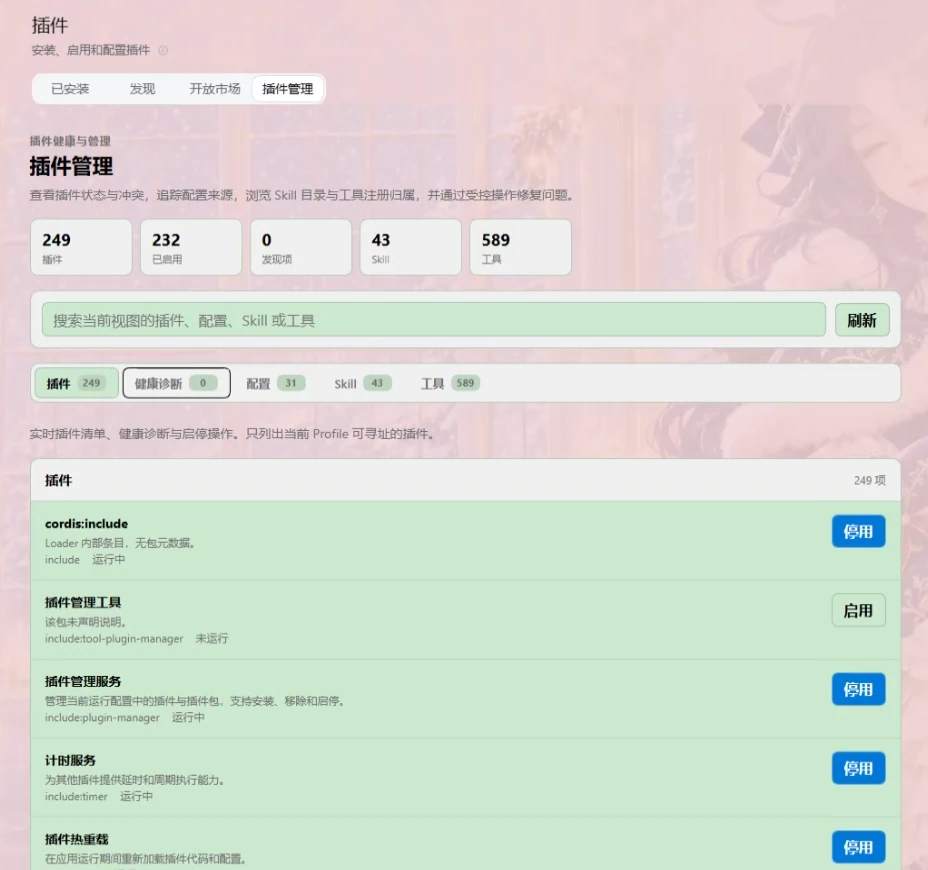
WJ Plugin Management is the Web management layer for DeepSeek Harness's three-layer plugin-management design. It extends the independent WJ bundle and adds a management tab under Settings → Plugins whose five views switch without leaving the page: Plugins, Health, Configuration, Skills and Tools.
Features
- Switchable views: one tab strip switches between the plugin list, health findings, configuration, the skill catalog, and tool registration ownership. A visited view stays mounted, so a configuration draft and the search term survive switching.
- Harness Core: consumes the Host's plugin registry, configuration resolver, conflict detector, lifecycle/dependency manager, and settings services.
- Management API: shows plugin state, derived activation findings, configuration provenance, and tool runtime registrations. It can enable or disable profile-addressable plugins.
- Management UI: filters the active view, edits non-secret scalar settings through the existing schema-backed
configForms, and reports each tool's scope with its owner (an MCP server, or the plugin package the Host half matched). Plugin rows show the package's localized title and introduction; a Loader-internal entry that carries no package metadata states that instead of leaving a blank line.
Views
| View | Source | Notes |
|---|---|---|
| Plugins | the Loader projection from pluginInventory.list() | Enable/disable addressable entries and show each package's localized title and introduction. |
| Health | the same Loader projection | Derived only from entries whose startup failed (the fiber reached failed) and their diagnostic; a zero count says no entry failed to start instead of showing "no records". |
| Configuration | configForms.describe, pluginManager.getConfigProvenance | Secret fields are omitted; provenance shows layers and redacted identities. |
| Skills | skills/list through the active session | Session-scoped, so the catalog resolves from the session working directory and reloads automatically when the active session changes. Model-invocable and user-only entries are marked separately. |
| Tools | this package's Host half, GET /api/wj/tool-inventory | Runtime tool registrations, with the plugin that provides each tool and the scope it applies to. |
Enabling or disabling a plugin writes through the Host's pluginManager.setPluginEnabled. A change can apply immediately, require a restart, be overridden by a higher-priority layer, be cancelled, or be refused by the Host; the outcome is reported as it arrives.
Ownership has three sources: a mcp__<server>__<tool> name belongs to that server; any other name is matched by the Host half against name: '…' literals in each plugin package's entry bundle and labelled inferred; a name neither source explains is reported as unrecorded instead of guessed.
MCP servers themselves belong to the Host's MCP settings bundle (for example @tinyforge/dsh-mcp-settings), which registers the settings.section page mcp and reads mcpClientStatus/list. This bundle neither reads mcpClientStatus nor lists MCP servers a second time, so the settings UI has exactly one MCP management entry point; the Tools view still shows MCP tools, attributed to their server.
Configuration fields are discovered from each Host-provided schema. Secret fields are omitted from the editor, and provenance shows layer names and redacted identities, never values or filesystem paths. The Host remains responsible for schema validation and persistence.
Requirements and limitations
Use a Harness Host that exposes the Loader projection (pluginInventory.list()), which the 0.2.2-rc line does. An older Host that still answers with a toolRegistrations snapshot keeps working: plugin and tool rows render, only the failed-fiber findings are missing. The Tools view needs the /api/wj/tool-inventory route registered by this package's Host half; a Host that mounts only the Client half says so explicitly instead of showing an empty list. Only plugins addressable through the active profile can be toggled.
This package no longer depends on a diagnostics Remote: getHealthSnapshot, previewRemediation and applyRemediation do not exist in the current official Host, so the page derives findings from the Loader projection itself (a failed fiber and its diagnostic) and never falls back to a whole-page "this Host does not expose diagnostics" notice.
The tab hard-injects only two core client services, slots and locale. Everything else — the pluginInventory and pluginManager remotes, configForms, the skills Remote and the live session — is resolved through ctx.get at call time rather than declared in inject, because a Client plugin that lists an optional service in inject stays pending on a Host without it, and a pending plugin registers no tab at all: the settings page then shows no plugin views instead of a degraded one. The Skills view therefore degrades rather than disappearing: no Remote means an explanatory message, and no session means a waiting state that loads the catalog by itself as soon as a session appears or the active session changes, with no manual refresh. The namespace is discovered rather than hardcoded (skills, skill, skillCatalog, then any registered remote.* name containing "skill"), so a Host that renames it needs no code change. Skills are read-only here: the Host exposes only skills/list (policy reader-session-read) and no skills configuration namespace, so there is no Remote to enable or disable an entry and the view shows what the active session can see instead of offering a switch that cannot work. The UI never loads skill bodies. The UI does not install/remove packages, edit credentials, or run arbitrary repair commands.
Install
Published on npm as @tinyforge/dsh-plugin-manager-wj:
npm install @tinyforge/dsh-plugin-manager-wj
- Make the package available to the Harness package resolver — install it through the Host's plugin manager by package name, or with the command above.
- Add the
@tinyforge/dsh-plugin-manager-wjbundle to the target Web profile. - Open Settings → Plugins → Plugin management and use the view tabs.
dsh.client loads the browser client, and cordis.patch.yml inserts the bundle into the Host. Remove the bundle from the profile to remove the management tab. Core registry and management services do not depend on this UI bundle.
Release
npm test                        # node --test: 34 checks (views, findings, tool ownership, Host route, package metadata, inject contract, module id, patch shape)
npm publish --access public     # writes to registry.npmjs.org
The package name is scoped, so publishing a new version needs maintainer access to the @tinyforge npm scope. Tag the published commit (git tag v1.7.1 && git push --tags) so the GitHub history matches the registry.
Development
The package is an ES module with two halves: index.js is the Host entry point and client.js contains the browser UI. Localized package metadata is in locale/; the UI's full dictionaries are registered in client.js.
The Host half publishes what a browser cannot read. The official ctx.remote table is a compile-time allowlist, so a third-party package cannot add a namespace, and ctx.tools only exists on the Host. The tool registry therefore travels through ctx.connection.fetch.register() as GET /api/wj/tool-inventory, which the shared channel admits for owner peers only. Its inject names just connection; a Host without that channel keeps the plugin active and lets the page explain itself, instead of failing activation.
client.js registers with __ModuleLoader__.load({ id: '@tinyforge/dsh-plugin-manager-wj', … }). That id must be the bare package name, scope included: the client module loader keys each Loader row by package name, and a bundle that registers any other id is reported as loaded without registering its row, which leaves the plugin without a fiber and the settings tab missing entirely. Renaming the package means updating that id in the same commit.
node --testruns the bundle behavior checks intests/client.test.js(the four views render and switch, visited views stay mounted, search and enable/disable act on the active view, a secret configuration object stays out of the editor, opening a session loads the skill catalog without a refresh, a renamed skills namespace is discovered, a transient catalog failure recovers from the inline retry, the tab still registers on a Host that mounts no optional services, the tool view reads its Host route, a missing route explains itself, and a legacy snapshot still fills both views) andtests/host.test.js(MCP naming, package-source scan budget, per-scope collection, snapshot shape, the authenticated JSON route, and a Host without the shared channel).node --check client.jsandnode --check index.jscheck both halves' syntax.tests/patch.test.jsparsescordis.patch.ymland asserts no plain scalar starts with a reserved YAML indicator — the scoped package name must stay quoted, or the Host rejects the bundle patch.tests/inject.test.jspins the plugin'sinjectlist to the core services only, so a regressed hard-injection of an optional remote fails the suite instead of silently emptying the settings page on some Hosts.tests/module-id.test.jsasserts the registered module id equalspackage.json'sname, so a rename cannot silently detach the browser bundle from its Loader row.tests/harness.htmlmounts the realclient.jsagainst fixtures in a browser and asserts the same behavior without Node; open it directly from disk and read the JSON report.tests/parse-check.htmlis a minimal browser smoke page: it confirmsclient.jsparses and registersplugins.tab, the Plugins page's tab slot (the oldersettings.plugins.tabdoes not exist in current DSH, so that registration landed nowhere).
Harness API and Host behavior are implemented and tested in the deepseek-harness repository.
License
MIT.
Related plugins
deepseek-harness
deepseek-ai/deepseek-harness
dsh-market
dsh-market/dsh-market
dsh-web (dsh-plugin-manager)
zhu1090093659/dsh-web
dsh-web
zhu1090093659/dsh-web