dsh-science-workbench
poplarity/dsh-science-workbench
Reproducible science workbench: agent-driven cells, inline figures with feedback/rerun, manifest provenance, environment snapshots, and publication-grade figure skills (9 bio_* tools + workbench UI).
Install
dsh plugin --profile web add github:poplarity/dsh-science-workbenchREADME
dsh-science-workbench
English | 中文



A reproducible science workbench plugin for the DeepSeek Harness. It blends the best of three worlds:
- Jupyter — cells and inline figures you can see and re-run;
- Claude Science — an agent as the execution engine;
- Nextflow / nf-core — every artifact carries full provenance.
Core promise: every figure and artifact is traceable and replayable. You can always answer “it = which code + which inputs + which environment + which params/seed”, and re-run it in one click.
✨ Features
- Code → figure → feedback → redraw — the agent runs a self-contained cell to produce figures shown inline; you attach structured feedback to a figure, and
bio_rerun_cellregenerates a derived version (v1 → v2 → v3). - One ledger per project — a plain-text
manifest.jsonis the single source of truth: cells, artifacts, provenance and feedback history. - Reproducible by construction — self-contained scripts, a fresh subprocess per cell,
environment.lock, SHA-256 input/output hashes and a fixed seed. - Git-versioned automatically — each project is
git init-ed on creation and auto-committed at every step (never pushed). - Cross-platform — the Host shell layer speaks bash on macOS/Linux and PowerShell on Windows; Python resolves to
pythonon Windows andpython3on POSIX.
🛠 Tools
Nine agent-facing tools, plus a browser workbench:
| Tool | What it does |
|---|---|
bio_init_project | Create/open a project: code/ data/ figures/ + manifest.json + environment.lock + git init. |
bio_run_cell | Run one self-contained cell, discover figures, register artifacts with hashes, commit. |
bio_rerun_cell | Re-run a cell with edited code as a derived version (lineage recorded). |
bio_add_feedback | Attach structured feedback to an artifact (this is how a “redraw it” note becomes history). |
bio_get_project | Return a project summary: cells, artifacts, provenance and feedback. |
bio_list_projects | List all projects under the projects root. |
bio_set_projects_dir | Set the root directory where projects live (persisted across restarts). |
bio_delete_cell | Delete a cell and its produced artifacts (script + figures). |
bio_mark_cell | Mark a cell as a final (成品) artifact, or unmark it — flagged in the workbench and index. |
The “Analysis workbench” tab shows the notebook, artifacts, provenance and feedback in a three-panel UI with inline figure preview (PNG/JPEG/SVG/PDF/TIFF/BMP), a searchable project picker (filter by name, sorted by most-recent activity), a cell search box, a native directory picker for the projects root, and a mark-as-final badge on completed cells. Very large figures (multi-MB) load on demand and display in full.
The plugin also bundles two publication-grade figure skills (adapted from Claude Science, Apache-2.0): figure-style (figure correctness & legibility rules + apply_figure_style()) and figure-composer (multi-panel figure composition with an adversarial self-review loop). See skills/ and ATTRIBUTIONS.md.
📸 Feature showcase
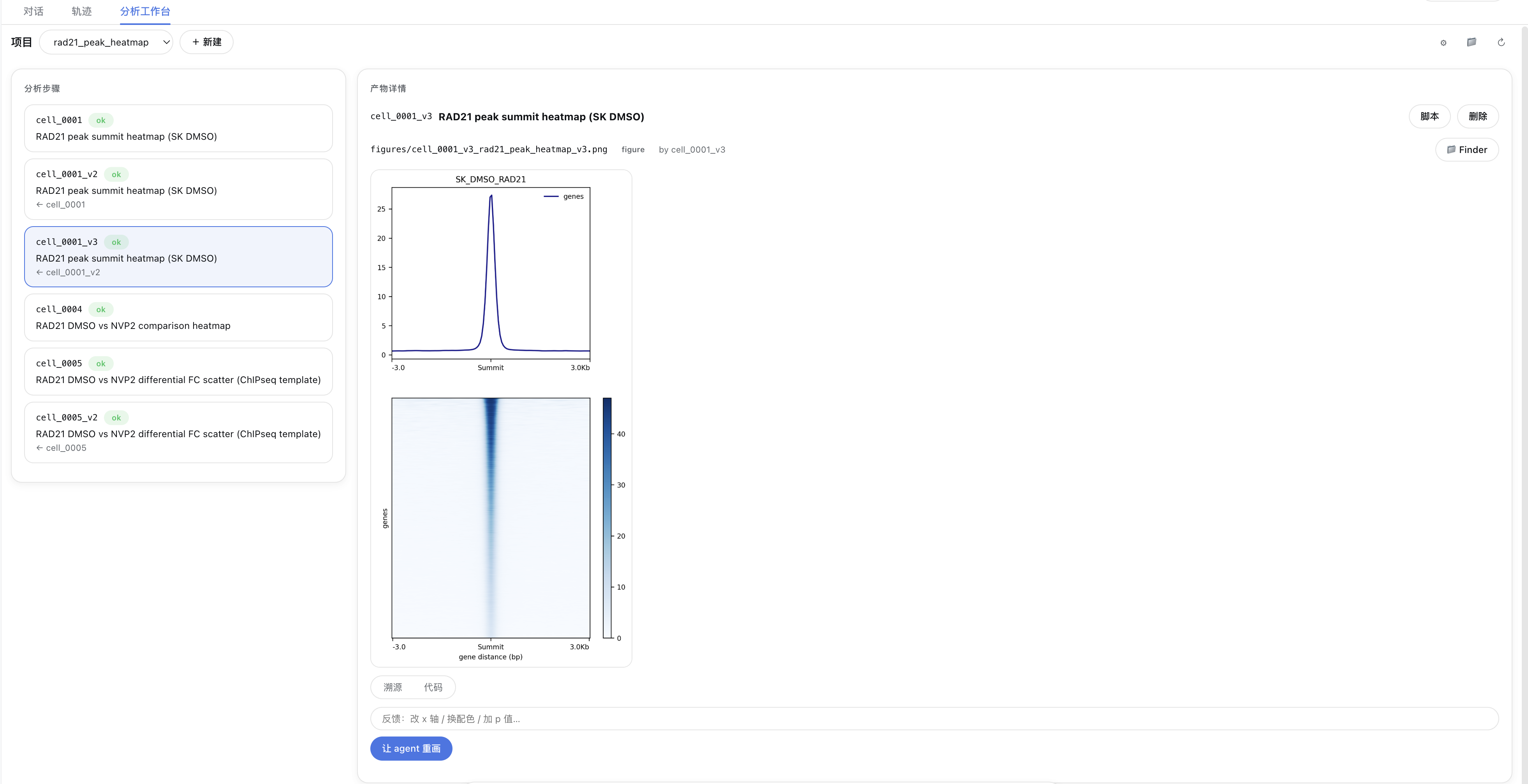
The feedback → redraw loop — every figure keeps its structured feedback history, and a one-click “让 agent 重画” (let the agent redraw) produces a derived version.
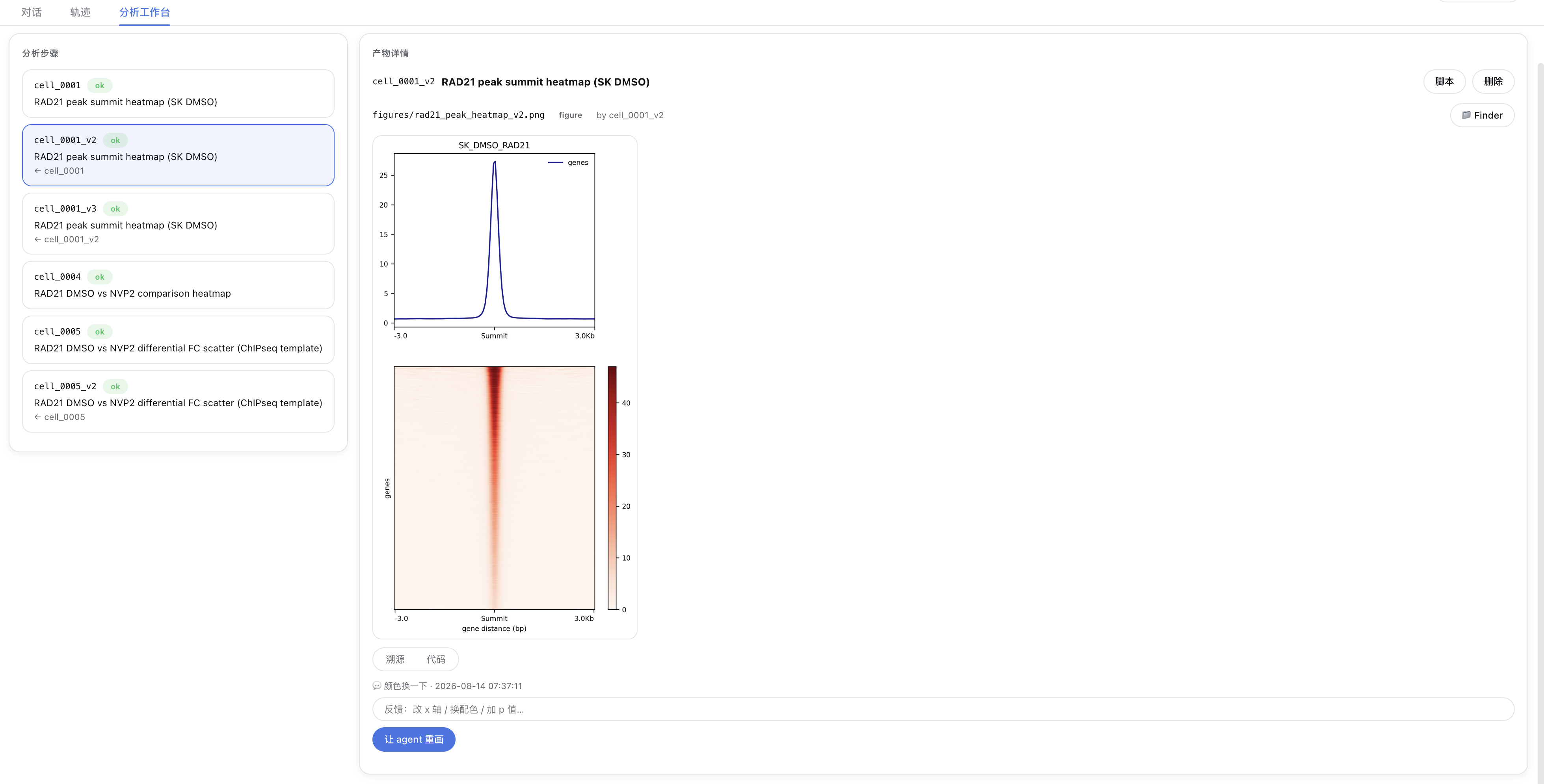
The workbench tab — a three-panel layout: the analysis steps list (with status and lineage cell_0001 → cell_0001_v2 → cell_0001_v3) on the left, and the artifact detail (inline figure + provenance / code tabs + script / delete / Finder actions) on the right.
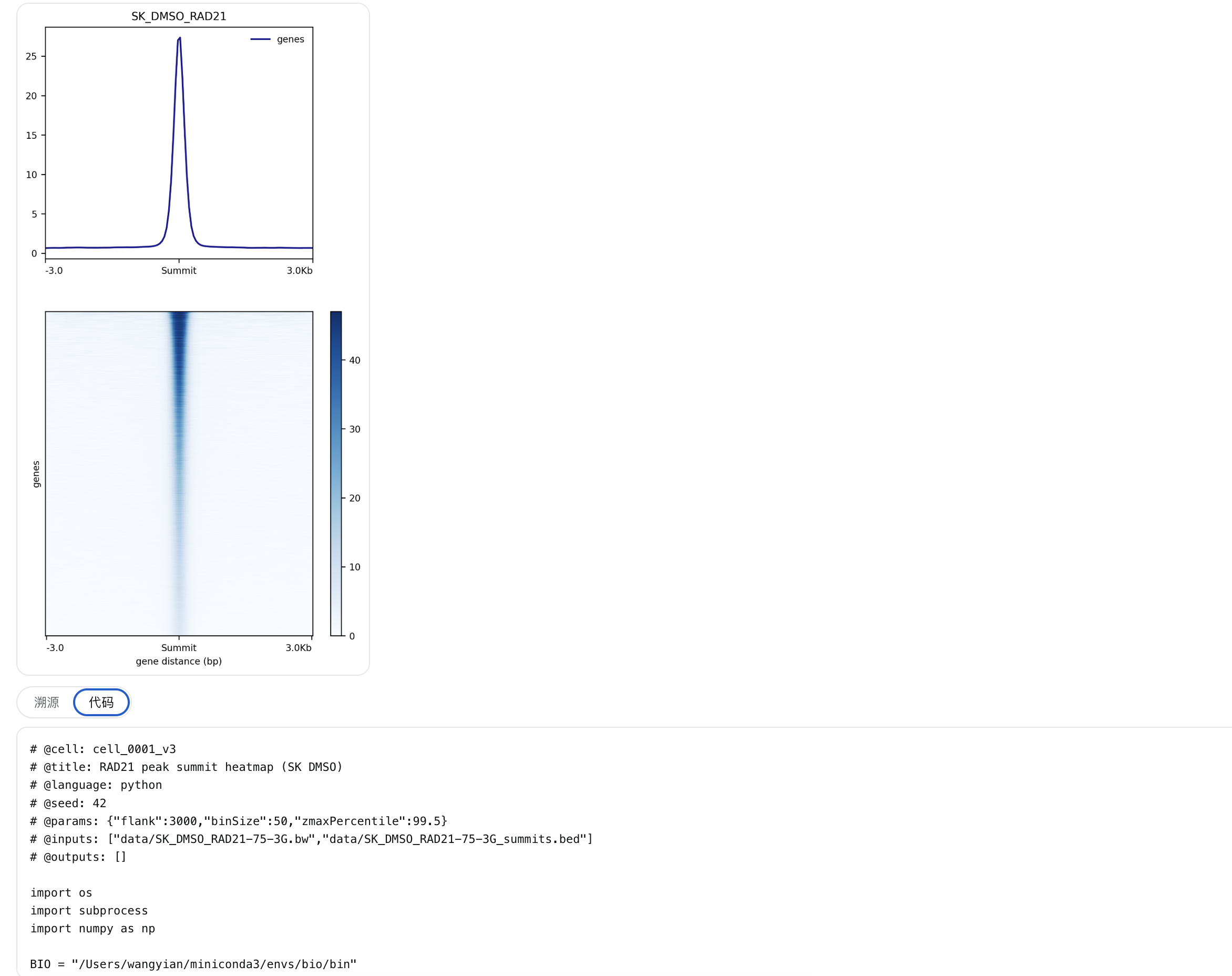
The code tab — every artifact’s generating script carries its declaration header (cell / title / language / seed / params / inputs), so it can be reviewed and reused at any time.
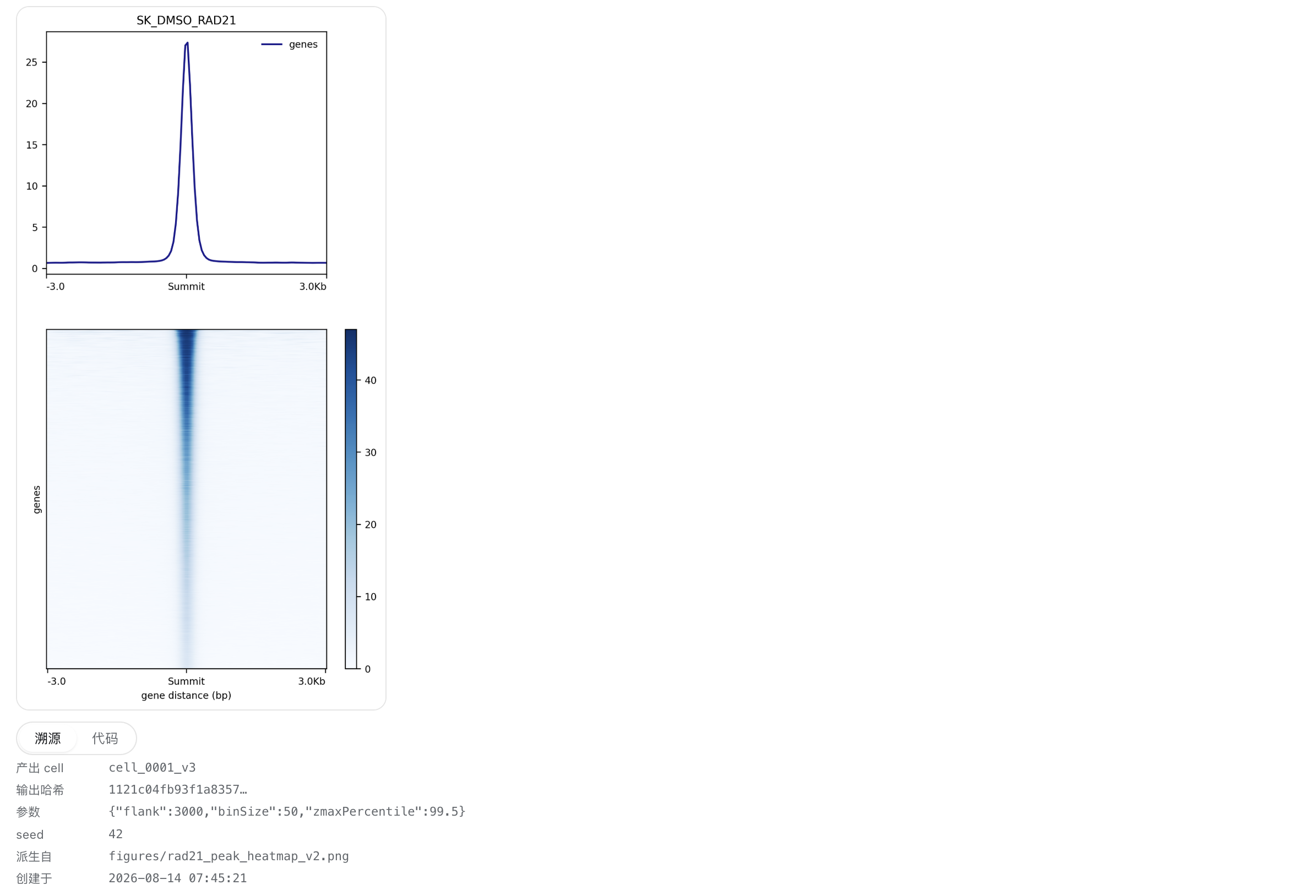
The provenance tab — full provenance: producing cell, output SHA-256 hash, params, seed, derived-from and created time.
📦 Install
dsh-science-workbench is a dual-face DSH plugin (Host + Client). Install it with the standard dsh plugin command — a thin pnpm forwarder that installs the package into a profile and automatically adds it to dsh.profile.bundles (because the package declares dsh.bundle.patch).
# From npm (published):
dsh plugin --profile web add dsh-science-workbench

# Local development (from a checkout):
dsh plugin --profile web add file:/path/to/dsh-science-workbench
Then restart dsh web. The bio_* tools become globally available, the workbench tab appears, and the plugin shows up under Settings → Plugins.
🚀 Quick start
After installing and restarting, just ask the agent in plain language:
“帮我用
demo_tss项目画一个 TSS 附近的信号热图。”
The agent will drive the tools for you. The equivalent manual flow is:
1. bio_init_project { name: "demo_tss" }
2. bio_run_cell { title: "TSS profile", code: "..." }   # writes figures/*.png
3. look at the inline figure → bio_add_feedback { artifactPath, text: "把配色改成 Blues" }
4. bio_rerun_cell { cellId: "cell_0001", editedCode: "..." }  # → cell_0001_v2 + new figure
Every step is committed to the project’s git history and recorded in manifest.json, so the whole lineage (cell_0001 → cell_0001_v2 → …) stays inspectable.
🧪 Reproducibility model
Each cell is a self-contained script with a declaration header:
# @cell: cell_0001
# @title: TSS profile
# @language: python
# @seed: 42
# @params: {"colorMap": "Blues"}
# @inputs: ["data/peaks.bed"]
# @outputs: []
It runs in a fresh subprocess with cwd = project root. On completion the Host:
- discovers figures written to
figures/and prefixes them with the cell id; - hashes every input and output (SHA-256) into the artifact record;
- appends the cell + artifacts to
manifest.jsonand updatesindex.md; - commits everything to the project’s local git repo.
📁 Project layout
<workspace>/bio-projects/<name>/
├─ manifest.json        # single source of truth: cells + artifacts + provenance + feedback
├─ environment.lock     # interpreter version + pip freeze snapshot
├─ index.md             # human-readable project index
├─ code/                # one self-contained script per cell (cell_0001.py, cell_0001_v2.py, …)
├─ data/                # input data
├─ figures/             # figures (cell-prefixed, e.g. cell_0001_tss_profile.png)
└─ .git/                # auto-created, auto-committed
🧩 Architecture
- Host (
lib/index.js) is the single source of truth. It registers thebio_*tools into the hosttoolsregistry, does all execution/provenance, and serves the/biowb/*data routes through thewebServerservice. - Client (
lib/client.js) is a pure projection — a hand-written browser bundle that reads/writes over same-originfetch('/biowb/<method>'). No typert Remote bridge and no harness monorepo build are required. - The convention skill (
skills/bio-workbench) teaches the agent the project layout, the cell contract and the feedback loop.
🌍 Cross-platform
| Operation | macOS / Linux | Windows |
|---|---|---|
| Shell | bash | PowerShell |
| Hash | shasum -a 256 | Get-FileHash |
| mkdir / move / delete | mkdir -p / mv / rm -f | New-Item / Move-Item / Remove-Item |
| Open in file manager | open / open -R | explorer.exe / explorer.exe /select, |
| Python | python3 | python |
🔧 Development
git clone https://github.com/poplarity/dsh-science-workbench
cd dsh-science-workbench

# lint (syntax check)
npm run lint

# install into your profile and restart
dsh plugin --profile web add file:$(pwd)
Structure: lib/index.js (Host) · lib/client.js (Client bundle) · index.js (entry re-export) · cordis.patch.yml (bundle patch) · skills/ (convention skill) · docs/ (design doc) · examples/ (example project).
License
Related plugins
archify (deepseek-harness)
tt-a1i/archify
WeKnora (dsh-weknora)
tencent/weknora
weknora
tencent/weknora
BrowserSkill (dsh-plugin-browserskill)
tencent/browserskill