P

dsh-call-session

popu2do/dsh-call-session

DSH Native Cross-Session Collaboration, In-Process Session Call, and Public Blackboard Plugin

Install

dsh plugin --profile web add github:popu2do/dsh-call-session

README

dsh-call-session

In-process cross-session communication and workspace shared blackboard for DeepSeek Harness (DSH)

License: MIT ADR Architecture Node.js Version Cordis TypeScript Strict

English | 简体中文

Overview

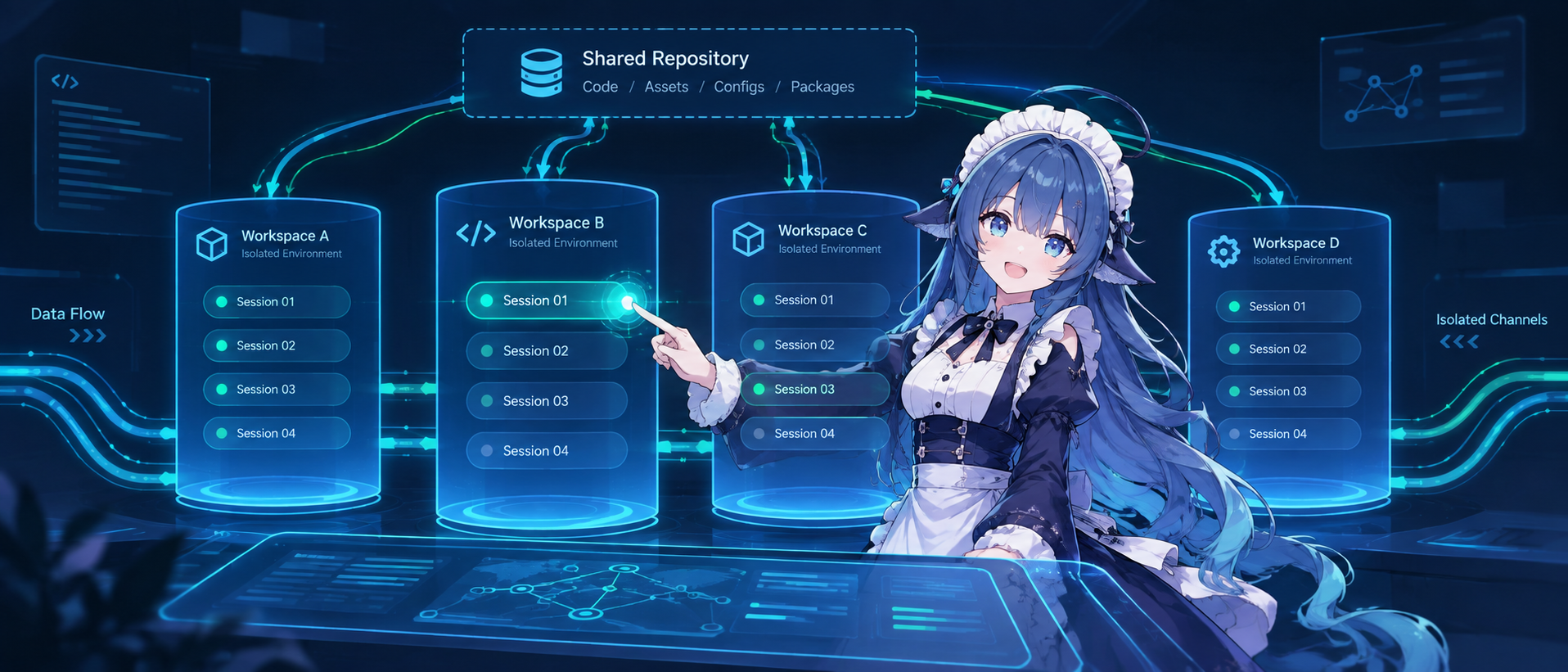
dsh-call-session is a plugin for DeepSeek Harness (DSH) providing in-process cross-session messaging, peer session orchestration, and state sharing.

When multiple agent sessions run concurrently, the plugin provides three collaboration capabilities:

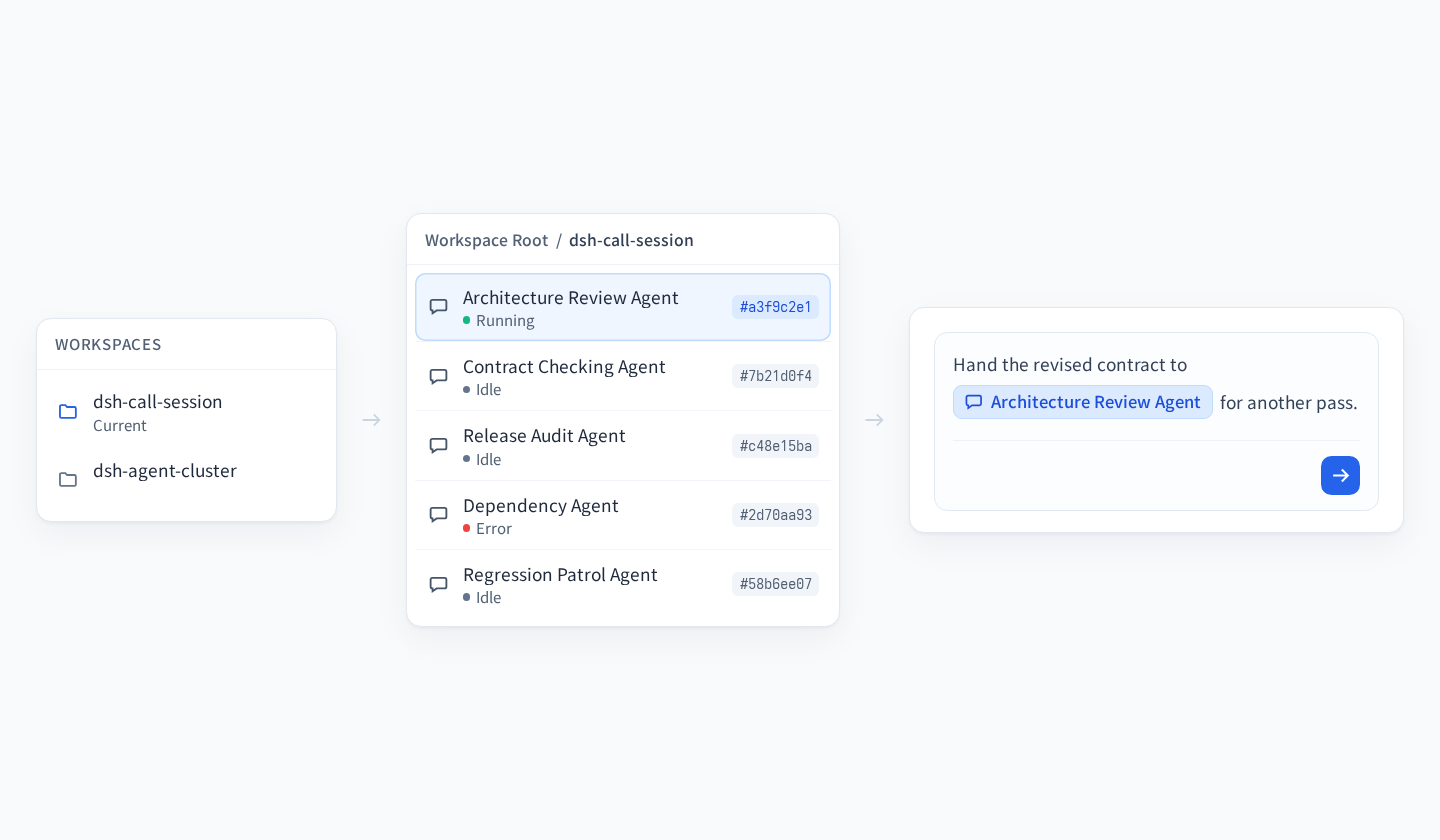
  • Unicast calls: Send 1:1 directives or status reports between independent sessions. Automatically adapts to target state via running steer or idle followup.
  • Peer session creation: Create peer sessions directly in current workspace via session_create, supporting context post mounting and quota controls.
  • Shared blackboard and author reminder: Maintain a workspace-isolated store to post and retrieve milestones or shared state without passive wakeups; and automatically inject pure-state idempotent author reminders into System Prompt Context to protect LLM KV cache.

Install

# Add to target profile web
dsh plugin --profile web add dsh-call-session

# List installed plugins
dsh plugin --profile web list

# Remove plugin
dsh plugin --profile web remove dsh-call-session

Note: The --profile option must follow the plugin subcommand, e.g. dsh plugin --profile web ....

Usage

Unicast Call

Send directives or reports to another session using session_call. The plugin resolves target sessions in-process and injects native notifications:

{
  "name": "session_call",
  "arguments": {
    "target_session_id": "session-be7d7578b0fe",
    "call_type": "task_dispatch",
    "message": "Please review export specifications in types/index.d.ts."
  }
}

Shared Board

Post shared data or milestone results with board_post to obtain a unique postId. Other sessions query entries on demand via board_list without unexpected wakeups:

{
  "name": "board_post",
  "arguments": {
    "topic": "task:audit",
    "content": "Security audit completed. No vulnerabilities found.",
    "tags": ["audit", "passed"]
  }
}

Collaboration Mode

For verbose test logs, audit reports, or code changes, use the two-phase collaboration flow:

  1. The sender posts the bulky payload using board_post and receives a postId.
  2. The sender calls session_call with a concise directive, referencing the postId in context_post_ids.
  3. The recipient receives the directive and retrieves the full content on demand using board_list.

Tools

NameTypeModeDescription
session_callToolPush1:1 unicast call adapting to steer or followup
session_queryToolRead-onlyList active and idle sessions in current workspace or cross-workspace
session_createToolNativeCreate peer sessions running in parallel long-term, unlike temporary subagents
board_postToolPullPublish announcements or artifacts to board without waking other sessions
board_listToolPullQuery board entries with topic/tag/id filters and titles_only mode
board_clearToolManageDismiss archive or purge delete board entries
/dsh-call-sessionSlashInteractiveWeb GUI shortcut for board summary or direct unicast dispatch

session_create

Create peer sessions. Use when the user requests a new session or peer session. Independent sessions run long-term in parallel, unlike temporary subagent tasks.

Parameters:

  • title: string, optional. Title up to 60 characters. Privileged prefixes [SYSTEM], [CAPTAIN], [ROOT] are stripped. If omitted, derived from initial message or numbered fallback.
  • initial_message: string, optional. Initial task directive delivered immediately to ignite first turn. If omitted, session remains idle.
  • context_post_ids: string[], optional. Blackboard post IDs up to 5 entries, mounted to directive header.
  • model: string, optional. Target session model override. Defaults to current session model.

Safety guards:

  • Workspace quota: Maximum 10 active root sessions per workspace, rejected with QuotaExceeded.
  • Rate limit: Maximum 5 creations per minute per session, rejected with RateLimitExceeded.
  • Generation limit: Peer derivation depth limit 2, rejected with GenerationLimitExceeded.

session_call

Dispatch a unicast call to target session. Steers target when running, or wakes a new turn via followup when idle.

Parameters:

  • target_session_id: string, required. Target session ID or unique prefix of at least 8 chars. Wildcards like * or all are forbidden.
  • message: string, required. Directive or report text up to 4000 characters per call.
  • call_type: string, optional. Intent type: task_dispatch, task_report, or notice. Defaults to task_dispatch.
  • context_post_ids: string[], optional. Referenced blackboard post IDs.

session_query

Query sessions and runtime status in current host environment.

Parameters:

  • query: string, optional. Fuzzy filter by session ID or title.
  • running_only: boolean, optional, default false. Return running sessions only.
  • cross_workspace: boolean, optional, default false. Query across workspaces. Defaults to false, current workspace only.
  • limit: integer, optional, default 50. Maximum number of sessions returned.

Returned list contains sessionId, title, status normalized to running or idle, and cwd.

board_post

Post shared information to public blackboard via pull model without waking other sessions.

Parameters:

  • topic: string, required. Topic namespace such as task:audit or build:artifact.
  • content: string, required. Payload text or Markdown up to 64KB.
  • tags: string[], optional. Retrieval tags.
  • ttl: integer, optional, default 3600. Time to live in seconds.

Returns unique postId and entry metadata.

board_list

Query active records on blackboard, isolated by workspace by default. Uses titles_only: true by default to strip content and protect Prompt KV cache. When exact id is specified, titles_only routes to false to fetch full content.

Parameters:

  • id: string, optional. Exact lookup by post ID such as post-1725300000000-abcd. Routes titles_only to false by default.
  • topic: string, optional. Exact topic match.
  • topic_prefix: string, optional. Topic prefix match.
  • tag: string, optional. Filter by tag.
  • titles_only: boolean, optional, default true. Return titles and metadata only. Defaults to true without id, false with id. Explicit parameter takes precedence.
  • cross_workspace: boolean, optional, default false. Query across workspaces.
  • limit: integer, optional, default 20. Maximum entries returned.

Examples: Catalog query with titles-only digest:

{
  "name": "board_list",
  "arguments": {
    "topic": "task:audit"
  }
}

Exact lookup by ID with full content:

{
  "name": "board_list",
  "arguments": {
    "id": "post-1725300000000-abcd"
  }
}

board_clear

Clear finished or expired blackboard records.

Parameters:

  • id: string, optional. Target post ID.
  • topic: string, optional. Target topic.
  • mode: string, optional, default dismiss. dismiss for soft archive, purge for permanent deletion.

Example:

{
  "name": "board_clear",
  "arguments": {
    "topic": "task:audit",
    "mode": "dismiss"
  }
}

Commands

Slash command /dsh-call-session is directly available in DSH Web UI:

  • View summary: run /dsh-call-session to list blackboard entries in current workspace;
  • Send message: run /dsh-call-session <sessionId> <message> to dispatch a direct message to that session.

Canvas

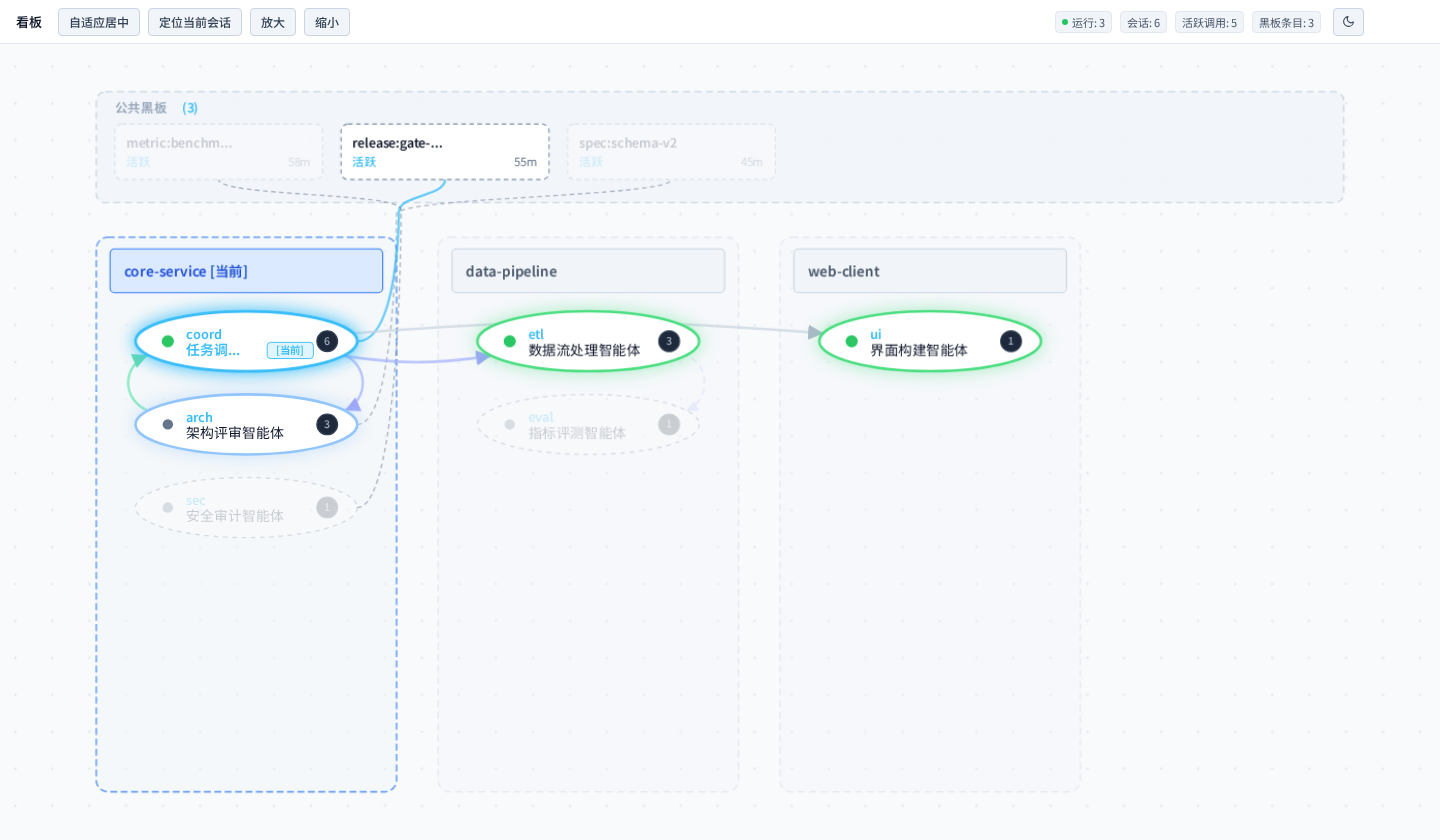
The DSH Web session view exposes a Canvas tab that observes cross-session collaboration in current workspace.

  • Content: workspace swimlanes, session nodes in running and idle states, board posts with remaining TTL, and cross-session call edges coloured by intent task_dispatch, task_report, notice that decay over time.
  • Interaction: hovering highlights the 1-hop connected subgraph; double-click opens a 420px read-only inspector drawer with field copy and ESC dismissal.
  • Read-only boundary: the canvas offers no edit, delete, or dispatch control. Every state change originates from the agents themselves.
  • Data source: the host route GET /plugins/dsh-call-session/telemetry, guarded by Connection authentication, GET-only, never cached. Call traces live in a bounded in-memory ring buffer, default capacity 200, FIFO eviction, never persisted, resetting on host restart.
  • In a webless profile the plugin stays tool-only: no route is registered and boot is never blocked.

Telemetry is never registered as an LLM tool, so System Prompt stays idempotent and Prompt KV cache is undisturbed.

Config

The plugin works out of the box with built-in defaults: 300ms disk debounce, 200 posts capacity.

To customize, add property overrides to ~/.dsh/profiles/web/cordis.patch.yml:

- id: dsh-call-session
  config:
    debounceMs: 500
    maxCapacity: 500

Options:

  • enabled: boolean, default true. Enable or disable plugin tools and commands.
  • debounceMs: number, default 300. Atomic disk write debounce delay in milliseconds.
  • maxCapacity: number, default 200. Maximum entries retained in memory FIFO cache.
  • telemetryCapacity: number, default 200, range 10-2000. Maximum call traces retained in telemetry ring buffer, FIFO eviction.
  • slashCommand: boolean, default true. Register the /dsh-call-session command in Web UI.

Comparison

Comparison of DSH built-in mechanisms and this plugin:

MechanismTypeModelWhen to Use
subagentBuilt-inHierarchical delegation, ephemeral child task, exits on completionScoped exploration, code search, one-off script execution.
dsh-call-sessionPluginPeer-to-peer collaboration, in-process unicast messaging and shared boardDirectives and status sync between independent top-level sessions, or sharing large outputs.

Selection

  • Prefer built-in: For isolated scoped tasks, use DSH built-in subagent directly without installing plugins.
  • Use on demand: When multiple independent top-level sessions need to exchange messages or share bulky context via a blackboard, use dsh-call-session.

Architecture

Key technical decisions are recorded as Architecture Decision Records (ADRs) in docs/adrs/README.md:

ADRTitleStatusDescription
ADR-0001Board vs Unicast separationAcceptedPull board and 1:1 unicast, avoiding broadcast storms
ADR-0002Built-in board storeAcceptedIn-memory cache with local persistence, zero external DB
ADR-0003Workspace isolation by defaultAcceptedScoped by workspace root with controlled cross-workspace queries
ADR-0004Atomic debounced persistenceAccepted300ms debounce, atomic file swap, and .bak self-healing
ADR-0005Two-state session statusAcceptedNormalizes session states to running and idle
ADR-0006In-process context injectionAcceptedDirect in-memory instance calls with native notice tags
ADR-0007Web slash commandAcceptedNative /dsh-call-session command and minimal UI notifications
ADR-0008Profile patch mountingAcceptedDeclarative bundle patch with safe lifecycle disposal
ADR-0009Restrained docs & anti-slopAcceptedZero emoji, radical subtraction, <=4-char headings
ADR-0010State mirror & peer sessionsAcceptedPure-state idempotent injection guarding KV cache, peer quota and rate fuses
ADR-0011Board token governanceAcceptedTitles-only digest by default, exact id lookup routing
ADR-0012Canvas & call telemetryAcceptedBounded in-memory ring buffer, read-only facade, native canvas view

Testing

Built on the Node.js native test runner:

# Run unit tests
npm test

# Lint code
npm run lint

# Pre-release verification
npm run verify

License

Licensed under the MIT License.

Related plugins