dsh-starharbor
richology/dsh-starharbor
Recommends up to ten GitHub repositories daily with a configurable count and saves selected repositories to categorized Markdown.
Install
dsh plugin --profile web add github:richology/dsh-starharborREADME
StarHarbor
StarHarbor is a DSH sidebar plugin that recommends 1–10 public GitHub repositories per day (default: 5). Browse the daily board, revisit previous boards, and save selected projects to a categorized Markdown collection on your computer.
Public candidates are collected by GitHub Actions, even while DSH is closed. The plugin downloads the public feed and selects your board locally using your thresholds, saved projects, and recommendation history. Collections, history, and settings stay on your computer.
Each card shows the repository’s original description, total stars, recommendation source, and measured net star gains when complete observations exist. The interface follows DSH’s Chinese or English language setting. Cloud mode makes no translation requests; descriptions stay in their original language.
Screenshots
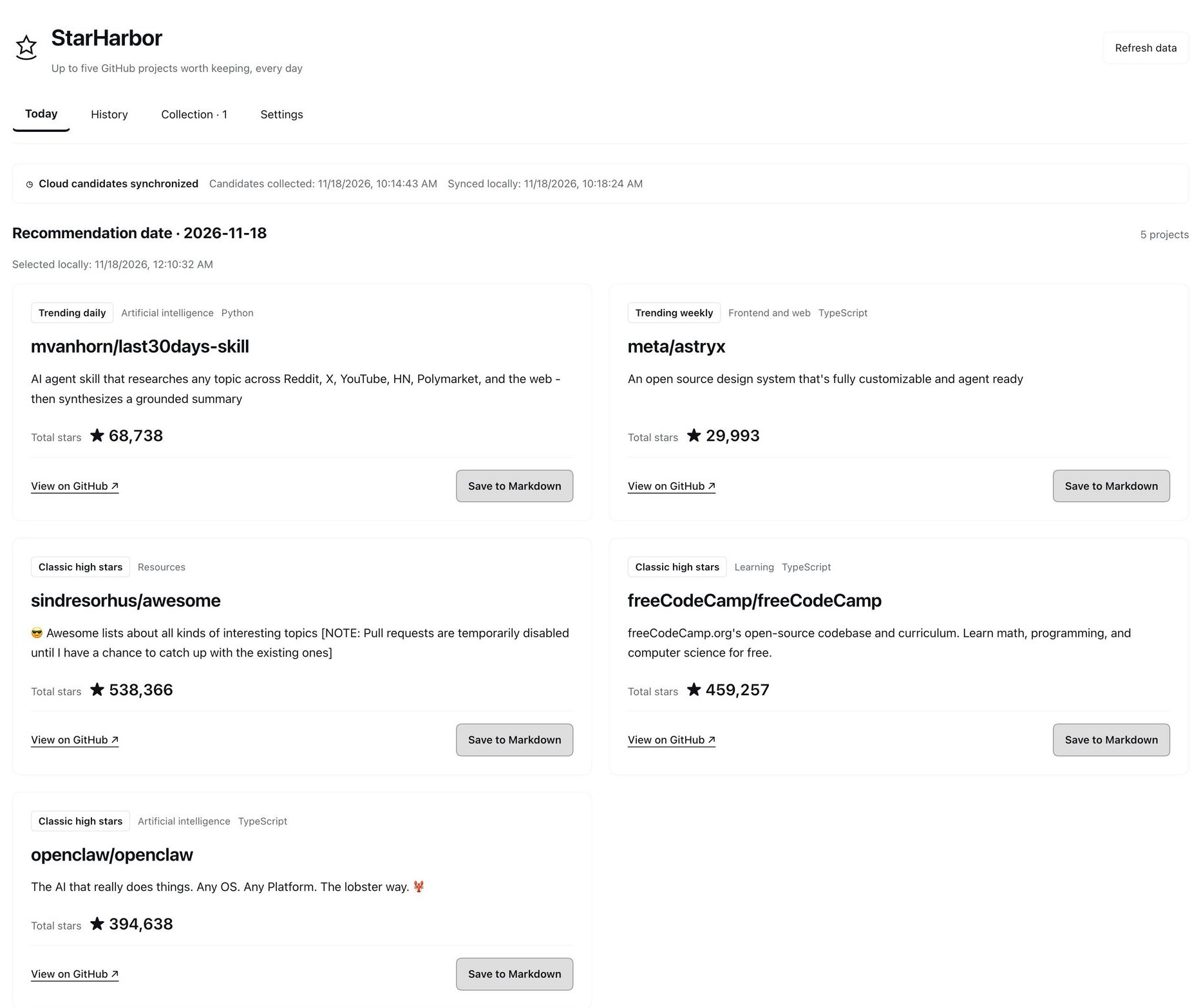
Captured from the installed v0.3.0 interface after a successful sync with the live public feed, and cropped to exclude DSH’s sidebar and private information.
Install and get started
Requires DSH >=0.2.2-rc.1 <0.3.0 and Node.js 22 or later. StarHarbor uses native ESM and the pinned Undici HTTP client; it runs no installation scripts. Public-feed requests honor standard HTTP_PROXY/HTTPS_PROXY/ALL_PROXY and NO_PROXY variables, with lowercase variants taking precedence. On macOS, manual HTTP/HTTPS system proxies are used when no explicit proxy environment is set, including bypass rules. PAC-only and SOCKS-only system configurations are not automatically resolved; use an HTTP proxy environment variable in those cases. Proxy settings are read locally and never uploaded; the plugin does not modify system or global Node networking.
Install from the pinned GitHub source:
dsh plugin --profile <profile-name> add github:Richology/dsh-starharbor#v0.4.3
Or download dsh-starharbor-0.4.3.tgz from the v0.4.3 release, then install the downloaded file:
dsh plugin --profile <profile-name> add /absolute/path/to/dsh-starharbor-0.4.3.tgz
Source: Richology/dsh-starharbor. The npm package is not published and community market inclusion is pending.
After installation:
- Follow any restart instruction shown by DSH.
- Open StarHarbor from the star-and-harbor icon in the sidebar. The plugin checks the feed on startup and when the panel opens, subject to its hourly sync interval.
- Click Refresh data to sync immediately. Before the configured generation hour, this can create the first board early. A completed same-day board stays fixed.
- Open a repository on GitHub or click Save to Markdown. The card shows progress and then a check mark when saving completes.
- In Collection, click Open containing folder to open the Markdown collection directory in your computer’s file manager. The collection path and Copy path remain available in Collection and Settings.
Saving is explicit; recommendations are never automatically added to your collection. History keeps previous daily boards. Settings control star thresholds, the repeat interval, and the daily generation hour.
Recommendation rules
Choose a daily target from 1 to 10 (default: 5). With one slot, daily picks have priority; with two slots, daily and weekly picks have priority; higher targets add classic projects. The default split remains one daily pick, one weekly pick, and three classics. Fewer projects can appear when there are not enough eligible candidates.
| Slot | Default minimum total stars | Selection rule |
|---|---|---|
| Daily: 1 | 5,000 | Use measured net gains for the previous complete calendar day when available; otherwise use GitHub Trending’s daily order |
| Weekly: 1 | 10,000 | Use measured net gains over seven complete calendar days when available; otherwise use GitHub Trending’s weekly order |
| Classics: 3 | 30,000; prefer 50,000 | Prefer the higher threshold, then total stars; prefer different purpose categories |
The cloud collector combines GitHub Trending’s daily and weekly pages with two or three pages of high-star repository search results. It verifies at most 50 additional Trending repositories outside those search results. Rankings cover this collected candidate pool; they do not establish a winner across all of GitHub. Trending order is not a measurement of calendar-day net growth. Lowering a local threshold does not expand the public candidate pool.
The collector excludes forks and archived repositories. Local selection excludes saved projects and repositories in the repeat cooldown. Saved projects remain excluded while their saved state is retained; unsaved recommendations have a default 30-day cooldown. A repository appears only once per board. Stable purpose category IDs use classification rules, rather than programming language alone; classification can be imperfect.
The default board generation hour is 09:00 Asia/Shanghai (Beijing time, UTC+8). While DSH runs, it checks for feed updates hourly, including after a board is complete. On startup or panel open, a due sync can run. At or after the chosen hour, a cached current-day feed can produce the board without waiting for another download. The plugin does not reconstruct missed local boards. Manual Refresh data bypasses the hourly interval and can generate a board early, but never reshuffles an existing board for that feed date. Threshold settings apply to the next board selection. Recommendation count changes take effect on the next calendar day in Asia/Shanghai, even if today has no board yet. Multiple edits before midnight replace the pending count; today’s completed board is unchanged. Settings show the active count and the pending effective date.
All settings are integers. Daily recommendation count accepts 1–10 (default 5); Star thresholds accept 0–1,000,000,000; cooldown accepts 0–3,650 days; generation hour accepts 0–23. The preferred classic threshold must be at least the classic minimum.
Feed freshness and failures
The interface distinguishes fresh, stale, and unavailable feed data and shows the feed’s date and update time. A feed is fresh only when its date is the current Shanghai date and it was generated within 36 hours. An older date is stale even if it was downloaded just now.
An old feed is never relabeled as today’s recommendations. If a previous board exists, StarHarbor retains it. With no existing board, a usable old feed may produce a board labeled with its original date and a stale-data warning. Failed downloads, malformed data, and invalid future timestamps retain the last valid cache, boards, saved projects, and settings. The first failed download does not lock in an empty daily board. Check the displayed error and try syncing again.
What growth figures mean
The cloud collector samples total stars near midnight in Asia/Shanghai. Net growth includes unstars and can be negative. Yesterday’s gain requires both calendar-day endpoints; seven-day gain requires eight endpoints spanning seven consecutive complete days.
Each repository’s actual observation must fall within midnight ±5 minutes. These are approximate boundary observations, not an exact record at midnight. GitHub Actions delays, network failures, API limits, or a repository missing from the candidate pool can leave gaps. Missing growth is unknown and is omitted, rather than displayed as zero. Keeping your own DSH open across midnight is unnecessary: observation history accumulates in the public cloud data. A new feed may use Trending until enough valid endpoints exist.
Repository descriptions
The displayed text comes from the public GitHub repository description. Cloud mode makes no translation or README-summary requests. Chinese and English interfaces therefore show the original description, which may be in any language. An original description containing Chinese characters can also populate the Chinese summary field; this is original source text, not a translation or generated assessment.
Privacy, network, and local data
The default feed is the public latest.json on the data branch. It contains public repository metadata, rankings, observation intervals, and source warnings. Public midnight observations are stored separately in snapshots.json. These files contain no user collections, local history, or local preferences.
In default cloud mode, the plugin requests this feed without a GitHub token or cookies. It does not call GitHub Trending or the GitHub API directly, fall back to direct collection, or send translation requests. You do not need to configure GITHUB_TOKEN locally. Clicking a repository link opens GitHub in your browser normally. Sidebar operations use DSH’s authenticated local connection.
To use another public feed, set plugin configuration feedUrl or the environment variable STARHARBOR_FEED_URL before starting DSH; configuration takes precedence. Use a trusted compatible feed. These settings change the source, not the local storage location.
By default, local data is stored in StarHarbor/ under DSH’s default working directory. Switching a chat’s workspace does not move it. Use the resolved collection path shown in the interface.
| Local file | Contents |
|---|---|
GitHub收藏.md | Selected repositories grouped by purpose, with GitHub links, descriptions, and star counts recorded at selection time |
state.json | Local settings, daily boards, saved state, validated feed cache, sync status, and compatible older state |
Existing collections and history remain readable. You can add notes to the Markdown collection: the plugin preserves existing text, headings, and notes, and uses numeric repository IDs to avoid duplicate entries after renames. Upgrading does not bulk-rewrite the Markdown. Do not manually edit state.json while DSH is running. Back up both files to preserve the collection and local exclusions.
To override the directory, set an absolute dataDir in plugin configuration or set STARHARBOR_DIR before starting DSH. Configuration takes precedence. The directory is shared by the plugin instance, independently of the active chat.
Cloud operation
The maintainer’s GitHub Actions workflow publishes public candidate data as latest.json and snapshots.json to the public data branch, alongside a short generated README. It is scheduled at 00:02, 04:17, 08:17, 12:17, 16:17, and 20:17 Asia/Shanghai. The UTC cron expressions are 2 16 * * * and 17 0,4,8,12,20 * * *; UTC 20:17 is 04:17 the following Shanghai date.
Standard GitHub-hosted Linux runner compute is free for public repositories. GitHub does not guarantee scheduled start times: runs can be delayed or dropped, and public-repository schedules can be disabled after 60 days without repository activity. A delayed midnight run does not count as a valid endpoint outside the sampling window. Feed freshness and growth availability reflect the actual results. Maintainer setup and manual recovery commands are in CONTRIBUTING.md.
FAQ and feedback
Why are there fewer projects than my configured target?
Candidate availability, thresholds, saved exclusions, and cooldown may leave too few eligible repositories. The plugin shows available projects and warnings. A local threshold change does not request additional cloud candidates.
Why are growth figures missing?
Complete cloud midnight observations are required. A delayed or failed collector run can leave a gap; refreshing locally cannot recover missing historical endpoints.
Why did refreshing not change today’s projects?
The board is fixed for its feed date. Refreshing updates the public candidate cache, freshness, and errors while preserving the completed selection. The updated pool can be used for the next day.
Why does the Chinese interface show another language?
Descriptions retain the repository’s original language. Cloud mode does not use translation services.
Where did my collection go after switching chat workspaces?
It stays under the configured data directory or DSH’s default working directory. Use the collection path shown in StarHarbor.
Report bugs and suggestions in GitHub Issues. Include DSH and StarHarbor versions, interface language, reproduction steps, feed date/status, and any visible error. Remove tokens, personal paths, local notes, and private sidebar content before attaching logs or screenshots.
Development and tests
Use Node.js 22 or later:
npm run check
npm test
npm pack --dry-run
DSH supplies React at runtime. The sidebar and starharbor agent tool share local application logic. The four actions are status, refresh, save, and settings. status is read-only and makes no network requests; refresh syncs candidates and force: true bypasses the hourly interval. save accepts the numeric ID from an existing recommendation. Tool output limits history to the last seven boards and saved entries to the last 50, with totals; local files are not truncated.
Tests cover feed validation, cloud freshness, timeouts, cancellation, local selection, privacy, cooldown, persistence, failure recovery, and duplicate-safe collection. The low-level createHarbor API retains direct collection when feedUrl is omitted for legacy callers and tests; this is not a user-facing mode in the installed plugin. See CONTRIBUTING.md and CHANGELOG.md.
Released under the MIT license.
Related plugins
archify (deepseek-harness)
tt-a1i/archify
WeKnora (dsh-weknora)
tencent/weknora
next-ai-draw-io (dsh-plugin)
dayuanjiang/next-ai-draw-io
weknora
tencent/weknora