dsh-super-leader
rickt34/dsh-super-leader
Leader agent preset that clarifies requirements, dispatches tasks to workspaces and sessions, and relays worker reports.
Install
dsh plugin --profile web add github:rickt34/dsh-super-leaderREADME
dsh-super-leader
English | 中文
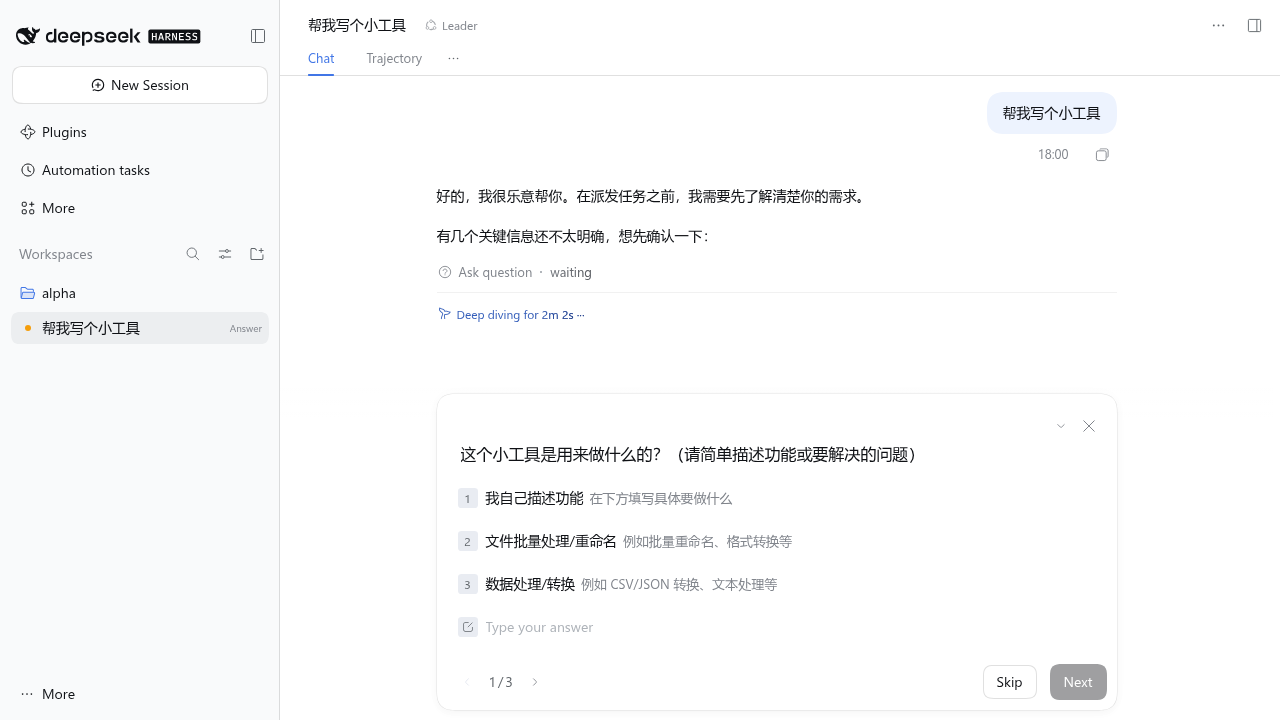
A Leader agent preset for DeepSeek Harness. A Leader session does not do the work itself. It talks with you until the request is clear, picks or creates the right workspace and session, hands the task to a worker session, and relays the worker's report back to you.
- Asks first. The Leader checks the goal, scope, deliverable, acceptance criteria, and target workspace before dispatching, and asks with
ask_user_question(one-click options) when any of them is unclear. - Coordinator tools only. A Leader session sees this plugin's tools and
ask_user_question. Global tools registered by other plugins are hidden unless you explicitly add them toallowTools. - Approval for write actions. Creating a workspace, dispatching a task, changing a session's model, and cancelling a task show an approval card. For a dispatch, the card starts with the target: whether it continues an existing session or creates a new one, the workspace name and path, the session title and id, and, for a running session, whether the task is queued or injected. The full brief follows. When the session's access mode is Full access, they run without approval.
- Knows what each session did. Before continuing an existing session, the Leader reads its recent requests, replies, todo list, and changed files, so a follow-up brief only says what is new.
- Automatic reports. When a worker finishes its turn, its final reply is sent back to the Leader, which summarizes it and turns open questions into questions for you.
Install
Requires DeepSeek Harness >=0.2.2-rc.1 <0.3.0.
dsh plugin --profile web add dsh-super-leader
Or install the latest code from GitHub: dsh plugin --profile web add github:RickT34/dsh-super-leader.
Restart dsh web. Then click New Session, open the mode menu next to the workspace picker, and choose Leader. The preset can only be chosen while a session is still empty, so start a new session for it.
Tools
| Tool | Approval | What it does |
|---|---|---|
list_workspaces | No | List registered workspaces with their purpose notes |
list_sessions | No | List sessions with workspace, running state, model, the first line of the latest request, and latest Leader task |
read_session | No | Show what a session actually did: recent requests and replies, earlier requests, todo list, files it changed, Leader tasks sent to it |
list_models | No | List routable providers and models with their reasoning efforts, and the host default model |
task_status | No | Show dispatched tasks and their reports |
create_workspace | Yes | Create a directory under an allowed root (optionally git clone, git init, or write AGENTS.md) and register it as a workspace |
dispatch_task | Yes | Send a task brief to an existing session, or to a new session in a workspace; optionally run it on a given model |
cancel_task | Yes | Stop the worker's current turn |
set_session_model | Yes | Change the model an existing worker session uses |
"Approval: Yes" means the call waits for Allow once unless the Leader session's permission preset is listed in fullAccessPresets (by default danger-full-access, shown as Full access). Which tools need approval is set by writeTools. If you saved your own list in an earlier version, it is kept, and set_session_model is added to it, so changing a model never skips approval outside Full access. On the settings page its checkbox is checked and cannot be cleared.
Configuration
Open Plugins → Super Leader in the Web app. The settings form is on the plugin's page, and changes apply to Leader sessions without a restart, including sessions that are already open.
The form edits the super-leader entry in your profile's cordis.patch.yml, so you can also edit the file directly:
- id: super-leader
  config:
    workspaceRoots:            # create_workspace may only create directories here
      - ~/Work
    allowTools: []             # global tools the Leader may still use, e.g. dsh_im_return_file
    fullAccessPresets:         # permission presets under which write tools skip approval
      - danger-full-access
    workerPreset: standard     # preset for new worker sessions; empty uses the host default
    reportMaxChars: 4000       # maximum length of a relayed report
| Option | Default | Meaning |
|---|---|---|
presetId | leader | Agent preset id treated as the Leader (file only, needs a restart) |
allowTools | [] | Extra global tools a Leader session may still use |
writeTools | create_workspace, dispatch_task, cancel_task, set_session_model | Tools that require approval. set_session_model is always added, even when a saved list omits it |
fullAccessPresets | [danger-full-access] | Permission presets that skip approval |
workspaceRoots | [~/Work] | Allowed parent directories for new workspaces |
workerPreset | host default | Preset for new worker sessions; must not be the Leader preset |
reportMaxChars | 4000 | Report length limit |
ledgerFile | $DSH_HOME/super-leader/ledger.json | Task ledger location (file only, needs a restart) |
Using your own memory plugin
Choose and enable a memory plugin in your DSH profile, then open Plugins → Super Leader → Extra tools the Leader may use. Check only the tools you want the Leader to use and save. For tools that are not loaded yet, enter their exact registered names in the extra-tool names field. This works with any plugin that registers global DSH tools; Leader does not select a memory system or grant any memory tools automatically.
You can also add the names to allowTools in your profile patch. For example, if you use Mnemon and want its hot-memory writer, Document search and Memory Spaces recall:
- id: super-leader
  config:
    allowTools:
      - mnemon_runtime_memory
      - mnemon_document_search
      - mnemon_recall
Merge these names with any tools you already allow. This is an example, not a dependency or a required tool set; use the names from your own memory plugin instead when appropriate. Leave out capabilities you do not need. To additionally require Leader approval for a memory write tool, add its exact name to writeTools, preserving your existing entries.
Allowing a tool only makes it visible to the Leader. The memory plugin still owns storage, scope, write permissions, context snapshots and protocol instructions. Enable those features in that plugin if needed; Leader does not load a separate memory protocol. Do not duplicate a host-scoped memory service inside every Leader preset.
For Mnemon specifically, hot memory, Documents and Memory Spaces are separate layers. mnemon_recall needs an active searchable Memory Space and a recall route offered by the current View; enabling the tool alone does not provide that route. If no such space is configured, use the native hot-memory snapshot and Document search, or configure and activate a Memory Space in Mnemon. The same requirements apply to the standard preset.
How it works
- The plugin declares the
leaderagent preset (Leader tools,ask_user_question,AGENTS.md/CLAUDE.mdinstructions, time context, and context compaction) and a host plugin. Instructions load the same way as in the standard preset:$DSH_HOME/AGENTS.md,~/.agents/AGENTS.md, and the files in the session's workspace. - For each Leader session, the host plugin denies every global tool that is not in
allowTools, and keeps doing so as new global tools appear. - A
tools/pre-executegate turns write tools into approval requests unless the session has full access. This is needed because DSH's Full access uses theneverapproval policy, which rejects anything that asks for approval. read_sessionbuilds its digest from the session's event log (through DSH'ssessionQueryservice), so it reflects what the worker did, not just the title.dispatch_taskrecords the task in the ledger, creates the worker session if needed, and sends the brief with a report format appended. When the worker's turn ends, the last assistant reply of that turn is relayed to the Leader as an agent message.- The Leader cannot dispatch to itself or to another Leader session.
- Models:
list_sessionsandread_sessionreport the model a session will use next (from the live Agent, or folded from the stored log).set_session_modeland theprovider/model/reasoning_effortfields ofdispatch_taskrecord a session-level model choice, the samemodel/selectionevent the model picker writes. Unlike the picker, they do not change the host default model. A model change on a running session takes effect from its next step, sodispatch_taskrefuses a model for a session that is running.
See DESIGN.md (Chinese) for details.
Recovering task state
On plugin startup or recovery, and when task_status is called, the ledger is reconciled against each worker's actual turn log. Ended turns get their terminal status; tasks still running that exact turn or still in the durable inbox remain tracked. A turn that stopped without an end, a removed request, or a confirmed missing session is marked interrupted. Temporary log-read failures remain open with reconciliation_error and are retried.
task_status shows report_state and report_missing, including in list output. A missed report recovered from the log is recovered; no final report is lost. Both are explicitly marked missing at the original delivery, with a reconciliation note and timestamp. No work is re-run and no old reports are automatically re-delivered; use task_status to read recovered text and decide whether to continue an interrupted task.
Using it with IM (dsh-im)
You can talk to a Leader from a chat app through @xmanrui/dsh-im: bind the chat to the Leader session (for example with dsh-im's /session <ID>), then discuss and dispatch from the chat. This section describes dsh-im 5.10.0.
Approval targets in IM. dsh-im reads the approval's reason. It keeps the original English approval explanation and now appends a one-line target summary: workspace name and path, session title and id (or “new session”), and idle / queue / steer status. No task brief is copied into this summary or the approval log. The Web card's localized displayReason is unchanged. Approve/reject still matches the approval id, not this text.
Why deliverModelAnswers is needed. When you write in the chat, the Leader's reply goes back through the chat's own reply path; that needs no setting. A worker's report is different: this plugin sends it to the Leader as an agent message, so the turn in which the Leader relays the report was not started by the chat. dsh-im does not deliver answers of such turns by default, so without the switch the relayed report appears only in the Web UI.
Where to turn it on. Settings → IM bots → General settings → Delivery. Under Session sync, check Deliver model answers and click Save delivery settings. It is stored as deliverySync.deliverModelAnswers in <dshHome>/integrations/dsh-im/delivery-sync-settings.json.
What else it sends. The switch is global: it applies to every bot and every session, not only to Leader sessions. For each session that is currently bound to a chat, when a turn that did not start in that chat completes, dsh-im sends the turn's final answer (the text after its last tool call) to the chat. That covers:
- the Leader's reply after a worker report, which is the reason to turn it on;
- answers to messages you send to that session from the Web UI;
- answers in turns started by schedules, answered-question receipts, and internal notices such as
subagent-settled.
It does not send turns that started in the chat (they already reply there), turns that were cancelled or failed, tool progress, images, files, or approval cards. Sessions with no chat binding, such as the worker sessions the Leader creates, send nothing. The separate Mirror messages typed in the Web UI switch (mirrorUserInput) is not needed for this and can stay off.
If the Leader asks a question or needs an approval while it handles a report, whether that reaches the chat depends on dsh-im's own question and approval sync, which works only in private chats with session sync enabled on a delivery target. Otherwise answer it in the Web UI; the turn does not finish, and nothing is delivered, until you do.
Limitations
- If a worker asks a question or waits for approval in the middle of a turn, the Leader is not notified until that turn ends.
- Interrupted tasks are not resumed automatically; unreadable logs defer reconciliation until storage recovers.
- Prompt sections from other plugins may still mention tools that the Leader cannot see.
Development
git clone https://github.com/RickT34/dsh-super-leader.git
cd dsh-super-leader
mkdir -p node_modules/@deepseek-ai
ln -s "$(npm root -g)/@deepseek-ai/dsh/node_modules/@deepseek-ai/schemastery" node_modules/@deepseek-ai/schemastery
npm test
dsh plugin --profile web add "$(pwd)"
License
Related plugins
billion-context
ranxianglei/billion-context
dsh-web-ui (dsh-chat-recovery)
zhu1090093659/dsh-web-ui
dsh-synapse
liangmianya/dsh-synapse
dsh-archive-manager
michengai/dsh-archive-manager