dsh-flick
rigelmansid/dsh-flick
A macOS menu bar companion for DeepSeek Harness that lists recent sessions and lets you allow or reject permission requests while the app is out of view.
Install
dsh plugin --profile web add github:rigelmansid/dsh-flickREADME

DSH Flick
Approve DeepSeek Harness permissions from any window.
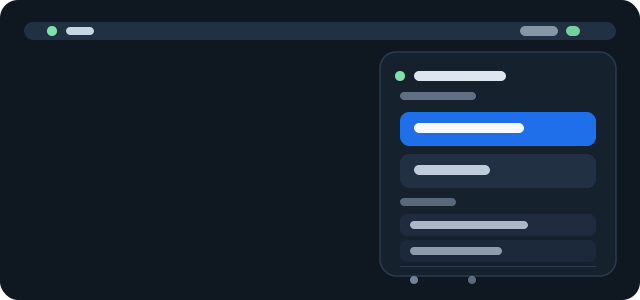
A small macOS menu bar companion for DeepSeek Harness (DSH). When DSH asks for a permission while its window is out of sight, the request shows up in the menu bar, and one click answers it.






English · 简体中文
Unofficial personal project, not affiliated with DeepSeek. The icons are original and contain no DeepSeek artwork. See Trademarks and thanks.
Why DSH Flick
- Approve from wherever you are. DSH window minimized, on another Space, or hidden behind a full-screen app? A new permission request appears in the menu bar panel with the session it came from and what it wants. Reject or Allow once right there, or View details to jump to that session. You don't have to switch windows to keep an agent moving.
- Light on purpose. One small native panel: open DSH, start a session, the five latest sessions, pending approvals. No Dock icon, no third-party dependencies, no Accessibility permission.
- Comes and goes with DSH. The plugin starts it when DSH opens and it exits when DSH quits. No login item, no leftover background process.
- Stays on this Mac. It only talks to
127.0.0.1and reads DSH's login state read-only.
Features
Approvals
- Each card shows the session title, the requested permission, and Reject / Allow once / View details
- Answers go through the same
PendingApproval.answer()the DSH composer uses, so the menu bar and the main window always agree on what's still pending - Several sessions waiting at once stack vertically; the panel grows to a cap, then scrolls
- A red count badge stays on the icon while anything is pending
- Auto-open approval panel (on by default) pops the panel up when DSH isn't visible. Turn it off in the plugin settings to keep just the badge
Sessions
- Open DeepSeek Harness: bring the main window forward, or launch it
- New session: start one in the current or most recent workspace and open it
- Recent sessions: the five latest top-level sessions, one click to jump
Menu bar
- Original monochrome template icon that follows the light or dark menu bar, dimmed when offline
- Global hotkey ⌥⌘D shows or hides the panel from any app, using Carbon
RegisterEventHotKey(no Accessibility or Input Monitoring permission) - Hide icon removes it for this DSH run; it comes back next time DSH starts
Two ways to run
| Plugin mode (recommended) | Standalone app | |
|---|---|---|
| Started by | the DSH plugin, with DSH | you, or a login item you turn on |
| Panel | small native panel: approvals, sessions, quick actions | 460×660 panel embedding the signed-in DSH web UI |
| Approvals in the menu bar | ✅ | — |
| Quits | when DSH quits or the plugin is disabled | when you quit it |
The rest of this README is mostly about plugin mode. The standalone app is covered under Standalone app.
Install
Requires macOS 14 or later and the DeepSeek Harness desktop app (/Applications/DeepSeek Harness.app),
signed in at least once. Approvals need DSH 0.2.2-rc.5 or later; on older versions the approval
section hides itself and everything else still works.
As a DSH plugin
dsh plugin --profile desktop add "git+https://github.com/rigelmansid/dsh-flick.git"
Then open the Plugins panel in the left sidebar of the DSH main window, enable DSH Flick, and restart DSH once. The icon appears in the menu bar while DSH is running.
Use the Plugins panel to enable or disable it. Settings → Built-in plugins is a read-only list; it shows the status but has no toggle.
You can also download dsh-flick-<version>.tgz from
Releases and install it as a local
package.
If the standalone app is already running when the plugin starts, the plugin's copy exits at once (one instance at a time). Quit the standalone app before you switch to plugin mode.
Standalone app
Download DSHFlick-<version>-macos-universal.zip from
Releases, unzip it, and move
DSH Flick.app to ~/Applications, or build and install it from source:
git clone https://github.com/rigelmansid/dsh-flick.git
cd dsh-flick
./scripts/build.sh              # -> dist/DSH Flick.app
./scripts/install.sh --launch   # copy to ~/Applications and open it
The app is ad-hoc signed and not notarized. A copy downloaded in a browser is blocked on first launch: Control-click it and choose Open, or allow it under System Settings → Privacy & Security. A copy you build yourself opens normally.
install.sh needs no sudo and writes only under your home folder. Launch at login in the
right-click menu adds ~/Library/LaunchAgents/com.rigelmansid.dshflick.plist; turning it off removes it.
Uninstall
- Plugin: remove it in the DSH Plugins panel.
- Standalone app:
./scripts/install.sh --uninstallquits the app, removes the login item and deletes~/Applications/DSH Flick.app.
Neither touches DeepSeek Harness itself.
Using it
Plugin mode
| Action | What it does |
|---|---|
| Click the icon / ⌥⌘D | Show or hide the panel |
| Open DeepSeek Harness | Bring the main window forward |
| New session | Start a session in the current or latest workspace and open it |
| Recent sessions | Jump to one of the five latest top-level sessions |
| Pending approval | Reject, Allow once, or View details to open that session |
| Reconnect | Rediscover DSH and refresh the panel |
| Hide icon | End the menu bar process for this DSH run |
| Right-click | Open, new session, recent sessions, reconnect, about, hide |
Standalone app
| Action | What it does |
|---|---|
| Click the icon / ⌥⌘D | Show or hide the embedded DSH panel; click outside or press Esc to close |
New chat (panel header, or ⌘N in the right-click menu) | Clicks the new-chat entry in the web UI |
| Reload | Reload the embedded page |
| Open DeepSeek Harness | Activate or launch the desktop app |
| Reconnect | Rediscover the service and login state |
| Launch at login | Add or remove the login item |
Quit (⌘Q) | Quit DSH Flick |
When DSH isn't running, the panel offers Launch DeepSeek Harness and waits up to about 45 seconds for it to come up.
How it works
DSH Flick doesn't modify DeepSeek Harness or speak its own chat protocol. It finds the DSH desktop app's local web service and reuses its login.
- Find the service. The DSH desktop app serves its web UI on a random
127.0.0.1port. DSH Flick lists local listening ports (lsof, falling back tonetstat) and sends each a cookie-lessGET /. DSH answers401 dsh web authentication required, which identifies it. - Sign a session cookie. Since DSH
0.2.2-rc.3, the browser-session signing key lives in~/.dsh/.credentials.yaml. DSH Flick reads it read-only and signs a cookie bound to127.0.0.1:<port>in DSH's own format (HMAC-SHA256, 29 days, under the server's 30-day cap). Older DSH versions kept the cookie in Electron's Cookies SQLite; that path is still supported, also read-only. - Check it. A request with the cookie must return
200and a page containing__DSH_BOOT__, so it never attaches to some other local service. - Use it. The standalone app loads the page in a
WKWebViewwith that cookie. In plugin mode, the native panel talks to the plugin over a loopback bridge, and the plugin's page half runs the actions inside DSH.
A fresh cookie is signed on every discovery, so expiry and DSH's port changing on restart are handled without any setup.
Plugin bridge routes
| Route | Purpose |
|---|---|
GET /dsh-flick/api/ping | bridge health and page heartbeat |
GET /dsh-flick/api/recent?limit=5 | recent sessions from ctx.sessionQuery |
POST /dsh-flick/api/action | queue new-session / open-session |
GET /dsh-flick/api/pending | page polls queued commands |
POST /dsh-flick/api/ack | page reports a command ran |
POST /dsh-flick/api/approvals/sync | page mirrors its pending approvals |
GET /dsh-flick/api/approvals | pending approvals and the auto-open setting |
POST /dsh-flick/api/approval-answer | queue an allow / reject decision for the page |
The page half calls ctx.uiWorkspace.startSession() / openSession(id) and mirrors
ctx.uiSession.sessionStatus.pendingInteraction. The listener is loopback-only, and requests are
checked against the DSH browser credential when the connection service is available.
The plugin starts resources/DSH Flick.app --managed --native-menu with a stdin pipe held open. The
app exits when the pipe closes or the DSH host process disappears.
Privacy and safety
- Loopback only. DSH Flick talks to
127.0.0.1and nothing else. No analytics, no other hosts. - Read-only login state.
~/.dsh/.credentials.yamland the legacy Cookies database are opened read-only. DSH Flick never writes, changes or deletes DSH's credentials. - No changes to DSH. Nothing is injected or patched; removing DSH Flick leaves DSH as it was.
- No secrets in output. Logs and
--discoverprint the port, cookie name and expiry, never a key or cookie value. - No extra permissions. No Accessibility, Input Monitoring or Screen Recording.
LSUIElement, so no Dock icon.
FAQ
The icon doesn't appear in plugin mode
- Make sure the plugin is enabled in the Plugins panel (not Settings → Built-in plugins), then restart DSH once.
- If the standalone app is running, the plugin's copy steps aside. Quit the standalone app and restart DSH.
- If you used Hide icon, it returns the next time DSH starts.
Approvals don't show up in the menu bar
- Approvals need DSH
0.2.2-rc.5or later. - With auto-open off, a new request only adds the red badge; click the icon to see it.
- Each session shows one pending request at a time, as DSH does.
Can I always allow a permission from the menu bar?
No. The menu bar offers Allow once and Reject. For anything else, use View details to answer in the main window.
It says DSH isn't running, or no login was found
Open the DeepSeek Harness main window once (sign in if asked), then choose Reconnect. If the desktop app is running but its web service isn't listening yet, wait a moment and reconnect.
⌥⌘D does nothing
Another app has taken the shortcut. Click the menu bar icon instead, or quit the app that holds it. The hotkey isn't configurable yet.
macOS says the app can't be opened
The app is ad-hoc signed and not notarized. Control-click it and choose Open, or allow it under
System Settings → Privacy & Security. If you trust the copy, xattr -dr com.apple.quarantine "DSH Flick.app"
also works. Building it yourself avoids the prompt.
Known limitations
- Desktop DSH only. It relies on the Electron app's local web service; CLI-only or remote DSH isn't supported.
- Tied to DSH internals. Login state and the plugin bridge depend on how DSH stores its signing
key and exposes
uiWorkspace/uiSession. A large DSH change may need an update; if the bridge is unavailable, the panel falls back to open + status. - Fixed hotkey.
⌥⌘Dcan't be changed yet. - Not notarized, no auto-update. Ad-hoc signed, meant for personal use.
- Local plugin installs are linked. Installing from a local folder links DSH to it; moving or
deleting the folder breaks the plugin. Use the release
.tgzto avoid that.
Development
Command Line Tools are enough (xcode-select --install); Xcode and SwiftPM aren't used.
./scripts/build.sh                     # release build -> dist/DSH Flick.app
./scripts/build.sh --debug             # faster debug build
./scripts/build.sh --universal         # arm64 + x86_64
./scripts/build-plugin.sh              # build and copy into plugin/resources/
./scripts/build-plugin.sh --universal  # universal plugin package for release
./scripts/run-dev.sh                   # debug build and launch
./scripts/make-icons.sh                # regenerate menu bar and app icons (needs Pillow)
Command-line diagnostics
The same executable has diagnostic modes:
APP="./dist/DSH Flick.app/Contents/MacOS/DSHFlick"
"$APP" --discover                   # find the DSH port and sign a cookie (prints no secrets)
"$APP" --probe /tmp/dsh-probe.png   # load the web UI headless, dump a DOM summary and screenshot
"$APP" --bridge-check               # plugin bridge status
"$APP" --bridge-recent              # recent sessions as JSON
"$APP" --bridge-action new-session  # or: open-session <sessionId>
"$APP" --bridge-approvals           # pending approvals as JSON
"$APP" --bridge-answer <key> rejected <clientId>
Project layout
Sources/DSHFlick/
  main.swift     entry point: menu bar app or a diagnostic mode
  App/           menu bar UI: standalone WebView panel, native plugin panel, bridge client,
                 hotkey, managed lifecycle, login item
  Core/          discovery: port scan, cookie signing, desktop launch, single-instance lock, probe
plugin/          DSH plugin: host half (index.js), page half (client.js), bundled app, locales
Resources/       app icon and menu bar template icons
scripts/         build, plugin packaging, install, icon generation
Info.plist keys
| Key | Value |
|---|---|
CFBundleIdentifier | com.rigelmansid.dshflick (also the login item label) |
CFBundleExecutable | DSHFlick |
LSUIElement | true, menu bar only |
LSMinimumSystemVersion | 14.0 |
NSAppTransportSecurity.NSAllowsLocalNetworking | true, to load http://127.0.0.1 |
Trademarks and thanks
DSH Flick is an unofficial personal tool with no connection to DeepSeek. The app and menu bar icons are original (a blue rounded square with three white lines and a green status dot) and contain no DeepSeek artwork. DeepSeek and DeepSeek Harness are trademarks of DeepSeek. Thanks to the DSH team for the local web UI and plugin system that make this possible.
License
Related plugins
dsh-purge
kingcharleslzy-ai/dsh-purge
dsh-web (dsh-ssh)
zhu1090093659/dsh-web
dsh-web (dsh-remote-web-ui)
zhu1090093659/dsh-web
dsh-web-ui (dsh-ssh)
zhu1090093659/dsh-web-ui