dsh-pulse-rail
rinsoraa/dsh-pulse-rail
Turns the DSH turn-navigation rail into a music visualiser: each thin bar grows and thickens with its own frequency band, from system audio captured with WASAPI loopback. Geometry only, no colour or glow, and the rail keeps its native hover preview, click-to-jump and wheel scrolling.
Install
dsh plugin --profile web add github:rinsoraa/dsh-pulse-railREADME
dsh-pulse-rail
Turn the DeepSeek Harness turn-navigation rail into a music visualiser: every thin bar grows and thickens with the system audio that is playing right now.
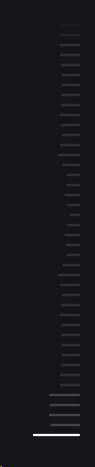
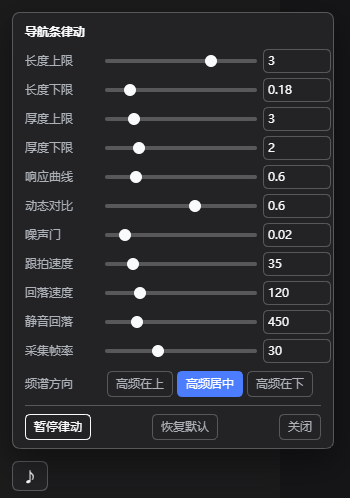 | A ♪ button sits right above the bottom-left user row. It opens a slider panel; every change is written back to config.json immediately — no restart. |
- Windows, no admin, no drivers, no third-party runtime. System audio is captured with WASAPI
shared-mode loopback by a tiny self-contained helper (
lib/pulse-tap.exe, built fromlib/pulse-tap.cswith the in-box .NET Framework compiler). - Nothing but the bars change. Bar length tracks its frequency band; bar thickness follows the
beat. No glow, no colour, no shadow — pure geometry, and the whole thing is a compositor-only
transform: scale(), so the right edge never jitters. - Native behaviour is untouched. Hover previews, click-to-jump and wheel scrolling of the rail keep working exactly as before; with silence the bars return pixel-for-pixel to the stock look.
Requirements
| DSH | desktop / web profile (platform: web client half) |
| OS | Windows 10/11 x64 (WASAPI loopback) |
| Runtime | none — .NET Framework 4.x csc is used only to build the helper |
| Audio | any default render device (headphones, USB DAC, HDMI, …) |
Install
A. Through the plugin manager (recommended)
- Settings → Plugins → Add plugin and give this repository's URL (or a local path to a clone).
- Enable it, then restart DSH (the host half is composed at boot).
The manager refuses to install while an agent is running — do it from an idle session.
B. From npm
Published as dsh-pulse-rail:
dsh plugin add dsh-pulse-rail # or: npm i dsh-pulse-rail
C. Manual (what this plugin was developed with)
git clone https://github.com/<you>/dsh-pulse-rail.git
xcopy /E /I dsh-pulse-rail "%USERPROFILE%\.dsh\profiles\desktop\node_modules\dsh-pulse-rail"
Then add "dsh-pulse-rail" to dsh.profile.bundles in
%USERPROFILE%\.dsh\profiles\desktop\package.json:
{
  "dsh": { "profile": { "bundles": [
    "@deepseek-ai/dsh-base", "@deepseek-ai/dsh-web-app", "dsh-pulse-rail"
  ] } }
}
and restart DSH. (Adding the package to dependencies as well makes it show up in the
installed-plugin list and protects it from pnpm install pruning.)
Tuning
Everything lives in %USERPROFILE%\.dsh\pulse-rail\config.json. Edit it from the ♪ panel, or by
hand — then apply with the bundled helper:
%USERPROFILE%\.dsh\pulse-rail\tune-config.cmd
{
  "enabled": true,      // false = stop immediately, rail returns to stock
  "minW": 0.18,         // shortest bar, in units of the native 20px bar
  "maxW": 2.6,          // longest bar (panel slider goes up to 4 = 80px)
  "minH": 2,            // thinnest bar (px) — 2 is the app's native thickness
  "maxH": 7,            // thickest bar (px) — keep <= 8, marks are 10px apart
  "gamma": 0.6,         // response curve: <1 punchier, >1 calmer
  "gate": 0.02,         // noise floor: bands below this count as silence
  "agcMix": 0.6,        // dynamic contrast: compare each band with its own slow baseline
  "atkMs": 35,          // attack / release time constants of the bars
  "relMs": 120,
  "silentMs": 450,      // how long after the last audible frame the rail resets
  "freqLayout": "center",// "top" high frequencies on top | "center" both ends low | "down" highs at the bottom
  "fps": 30,            // capture frame rate
  "tapIdleMs": 20000    // stop the capture helper after this much idle time
}
Live apply without editing files (the port is the one in DSH_WEB_URL):
Invoke-WebRequest -UseBasicParsing -Method POST -ContentType 'application/json' `
  -Body (Get-Content -Raw $env:USERPROFILE\.dsh\pulse-rail\config.json) `
  http://127.0.0.1:19387/pulse-rail/config
| Want | Turn |
|---|---|
| much more dramatic | maxW → 3–4, agcMix → 0.8–1.0 |
| calmer / less busy | agcMix → 0.3, gate → 0.05–0.1 |
| thicker pumping | maxH → 8 (max before the bars touch) |
| faster reaction | atkMs → 15–25 |
How it works
default render device
   │  WASAPI shared-mode loopback (48 kHz, N-channel, float32)
   ▼
lib/pulse-tap.exe ── 1024-point FFT ──► 12 log-spaced bands (45 Hz – 15 kHz)
   │  one JSON line per frame on stdout, 30 fps
   ▼
host half (lib/index.js)  ──  GET /pulse-rail/state  ──►  browser half (lib/client.js)
                                    │                        │
                                    │                        └─ finds the rail, maps the 12 bands onto
                                    │                           however many marks are on screen right now
                                    └─ /pulse-rail/config, /pulse-rail/health, /pulse-rail/diag
- Host half (
lib/index.js+lib/tap.js): lazily spawns the capture helper, keeps the last frame, serves it on same-origin routes. The helper is killed after 20 s without a request, is restarted with back-off if it dies, and self-terminates if the host stops heart-beating it. - Browser half (
lib/client.js): locates the rail by geometry (narrow column of small marks near the right edge, with abutton[data-index]fallback), re-maps every frame to the currently rendered mark count, and writes one custom property per mark. Length and thickness are both expressed astransform: scale()on the mark's::before, withtransform-origin: 100% 50%. Because the scroll container of the rail clips horizontally at 28 px, the plugin widens that container leftwards (right edge unchanged, hit area unchanged,pointer-eventspassed through) so long bars are actually visible. - Silence removes every override — the rail is byte-for-byte the app's own rendering again.
Privacy
The helper reads the system mix in memory and emits only band levels (12 floats) plus RMS/peak.
No audio is recorded, buffered or written to disk. It runs only while the page asks for data and
stops on its own 20 s after the last request; you can also watch it as pulse-tap.exe in Task
Manager, or set "enabled": false.
Troubleshooting
GET /pulse-rail/health | helper status: running / playing / pid / restarts / last error |
POST /pulse-rail/restart | restart the capture helper |
GET /pulse-rail/diag | last browser-side discovery reports |
%USERPROFILE%\.dsh\pulse-rail\diag.jsonl | rolling client diag log (256 KB cap) |
%APPDATA%\@deepseek-ai\dsh-desktop\logs\crash-*-web-boot.log | renderer console.error lines (e.g. [dsh-pulse-rail] …) |
lib\pulse-tap.exe --fps 30 | run the helper by hand and watch the JSON stream |
No sound in the bars? Play something and check /pulse-rail/state → playing. If running is
false, look at lastError (a USB/Bluetooth endpoint that reports all-zero samples is re-initialised
automatically after 5 s of silence).
Development
| Tool | What it does |
|---|---|
tools/verify-install.mjs | quickest sanity check: route registration + helper frames |
tools/harness.mjs (+ page.mjs) | offline bench that replicates the rail DOM/CSS and reports every bar's measured geometry |
tools/host-test.mjs | runs the real lib/index.js against a minimal webServer |
tools/cdp-check.mjs | headless Edge + CDP: samples ::before transforms, right-edge alignment and hit-testing |
tools/mktone.py, tools/mkmusic.py | generate test tones / pseudo-music |
Rebuild the helper whenever pulse-tap.cs changes:
"C:\Windows\Microsoft.NET\Framework64\v4.0.30319\csc.exe" /nologo /platform:x64 /optimize+ ^
  /out:lib\pulse-tap.exe lib\pulse-tap.cs
Uninstall
- remove
"dsh-pulse-rail"fromdsh.profile.bundles(and fromdependencies), - delete
node_modules\dsh-pulse-rail, - optionally delete
%USERPROFILE%\.dsh\pulse-rail\, - restart DSH.
License
MIT — see LICENSE.
Related plugins
dsh-web (dsh-task-board)
zhu1090093659/dsh-web
dsh-web (dsh-web-all)
zhu1090093659/dsh-web
dsh-web-ui (dsh-task-board)
zhu1090093659/dsh-web-ui
dsh-web-ui (dsh-web-ui-all)
zhu1090093659/dsh-web-ui