dsh-conversation-sync
sheenisme/dsh-conversation-sync
Import and bidirectionally sync conversations from Claude Code, Codex, WorkBuddy, TRAE, Antigravity, OpenCode, JSONL and DeepSeek exports over local disk or SSH.
Install
dsh plugin --profile web add github:sheenisme/dsh-conversation-syncREADME
中文 · English
dsh-conversation-sync





Maintained by @sheenisme · Homepage · npm · Issue · 中文
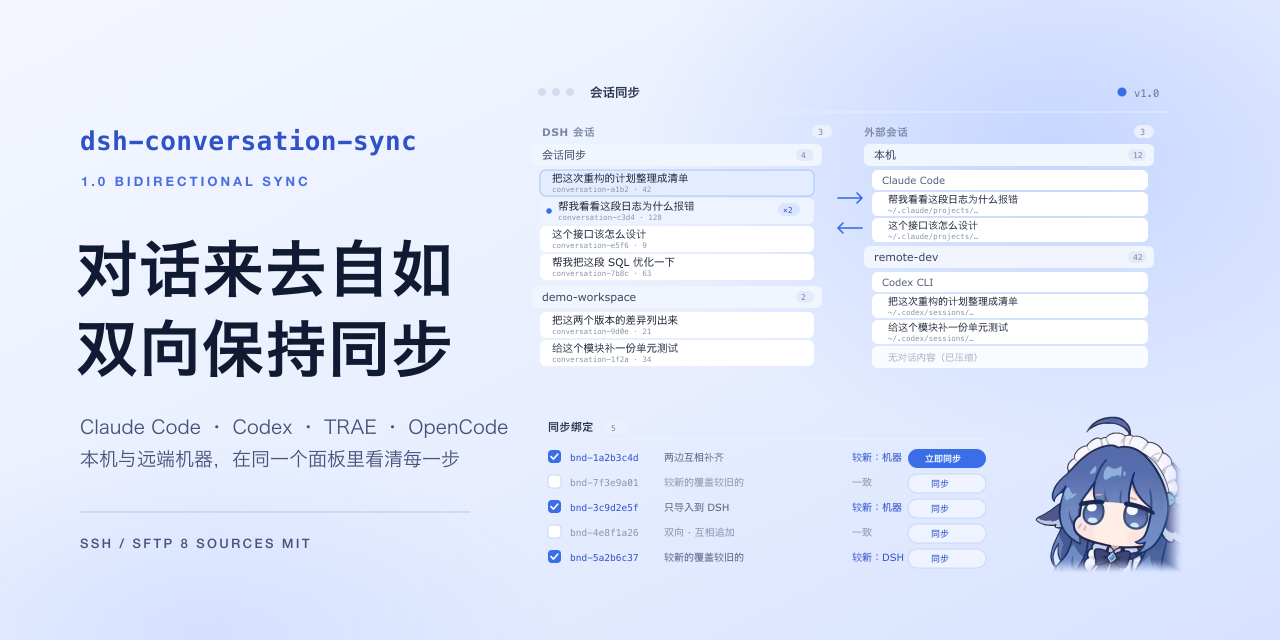
Import conversations into DeepSeek Harness from the tools you already use — and keep them in sync both ways, locally or over SSH.
Two headline features:
- Real bidirectional sync. New messages on either side propagate to the other. You choose the direction per pair of sessions: import, export, or either of the two-sided modes.
- Remote-SSH machines are first-class. Sessions do not have to live on this
machine. The plugin reads
~/.ssh/configand treats the local machine, every SSH host, and every jump host as a source you can sync with.
Install
dsh plugin --profile <name> add dsh-conversation-sync
Or from the UI: Plugins → Install bundle. The bundle ships its own
cordis.patch.yml, so nothing in your profile manifest has to be edited by hand.
Quick start
- Open the panel: Settings → Conversation sync, the sidebar icon, or Plugins → Conversation sync — both entries can be switched off independently on the page itself.
- The right side lists the local machine plus every host from
~/.ssh/config, jump hosts included. For an SSH machine, set the private-key path once; it is stored as a DSH credential, never as plugin config. Point it at the matching.pubfile to authenticate throughssh-agent. - Select a session on each side — the left one is what gets written, the right one is the source or destination — then choose how they behave.
- Every import lands in one
会话同步workspace. A remote session's title is prefixed with its machine (BAAI-Ascend · …), because DSH requires a session's working directory to equal its workspace path; a per-machine folder would have to be its own workspace. Sessions imported by an older build that did create one workspace per machine are moved in on the next start.
Supported sources
| Kind | Typical location |
|---|---|
| Claude Code | ~/.claude/projects/<slug>/<sessionId>.jsonl |
| Codex CLI | ~/.codex/sessions/YYYY/MM/DD/rollout-*.jsonl |
| WorkBuddy / CodeBuddy | ~/.workbuddy/projects/**, ~/.workbuddy-ai/projects/**, ~/.codebuddy/projects/** |
| TRAE | ~/.trae/cli/**, ~/.trae-cn/cli/** |
| Antigravity | ~/.gemini/antigravity{,-cli,-ide}/brain/<uuid>/.system_generated/logs/transcript.jsonl |
| OpenCode | ~/.local/share/opencode/opencode.db (SQLite) |
| Generic JSONL | any JSONL file with role and content/text per line |
| DeepSeek export | web export ZIP (export_format_version: 3) |
OpenCode and the DeepSeek export are import-only: OpenCode keeps sessions in a live SQLite database, and an export ZIP is a snapshot rather than a conversation the tool can resume.
Each tool gets a different line shape, and syncing has to respect it: a Claude
Code file needs parentUuid chains and tool_use/tool_result blocks, a Codex
rollout needs session_meta plus ascending ordinal values. The exact rules,
per tool and per field, are in docs/FORMATS.md.
Safety
Both directions go through the same three steps, so a sync either lands completely or not at all:
- Pre-flight (read-only). Data directory writable, source readable, target session present, direction known. A failed check refuses the sync before anything is touched, and names the check.
- Backup. The external file and the DSH session's whole on-disk directory are copied aside, then read back — a backup that cannot be read aborts the sync.
- Verify, then roll back. After writing, both sides are read again. A mismatch restores the previous state from the backups.
Warning — exporting modifies live files. Export appends messages to the original tool's session files. Backups are taken before every write and restored on failure, but data loss is still possible. Leave the export direction off for sources you cannot afford to lose.
Development
npm test # unit tests, node:test, no network and no DSH needed
225 unit tests cover the pure modules; CI additionally installs the packed plugin into five real DSH releases and drives the actual RPC surface through thirteen scenarios. See docs/TECHNICAL.md for what each CI job proves and how to run the harness locally.
License
MIT © 2026 sheenisme
Acknowledgements
- DeepSeek Harness (MIT) —
the host. Its official
dsh-deepseek-chat-importplugin and the session format packages were the reference for event shapes, thetool/call→tool/resultlifecycle, and how a plugin registers a web route. - dsh-remote (MIT) — the model for
the SSH layer: connection pooling, host-key fingerprinting, the key ordering
that avoids tripping
MaxAuthTries, and failure classification with actionable hints. - dsh-chat-import (MIT) — the
reference for materializing sessions through
sessionPersistence. - DeepSeek Balance Whale Widget —
the little whale in the cover. Its
assets/art is provided as-is (see docs/ASSETS.md); this free, non-commercial project uses it unmodified, with credit, and will remove it on request. - dsh-plugin-cc (MIT) — a clean example of a bundle's shape and of how to test a DSH plugin.
Related plugins
billion-context
ranxianglei/billion-context
dsh-web-ui (dsh-chat-recovery)
zhu1090093659/dsh-web-ui
dsh-synapse
liangmianya/dsh-synapse
EduWork (dsh-side-chat)
ecnu/eduwork