dsh-card-board
soffits/dsh-card-board
A data-driven card board for DeepSeek Harness: scripts write small JSON cards, the Web UI shows each person the boards they may see.
Install
dsh plugin --profile web add github:soffits/dsh-card-boardREADME
dsh-card-board
A card board for the DeepSeek Harness Web UI. Your own scripts write small JSON files, one per card; the plugin shows them as a page of numbers, charts and lists, and each signed-in person sees only the boards they're allowed to.
The plugin only displays. It makes no outbound requests, holds no credentials and never runs anything, so keeping data fresh is up to whatever writes the files: a cron job, a watcher, a script on another machine that syncs the folder. There's no model in the loop and no cost per refresh.
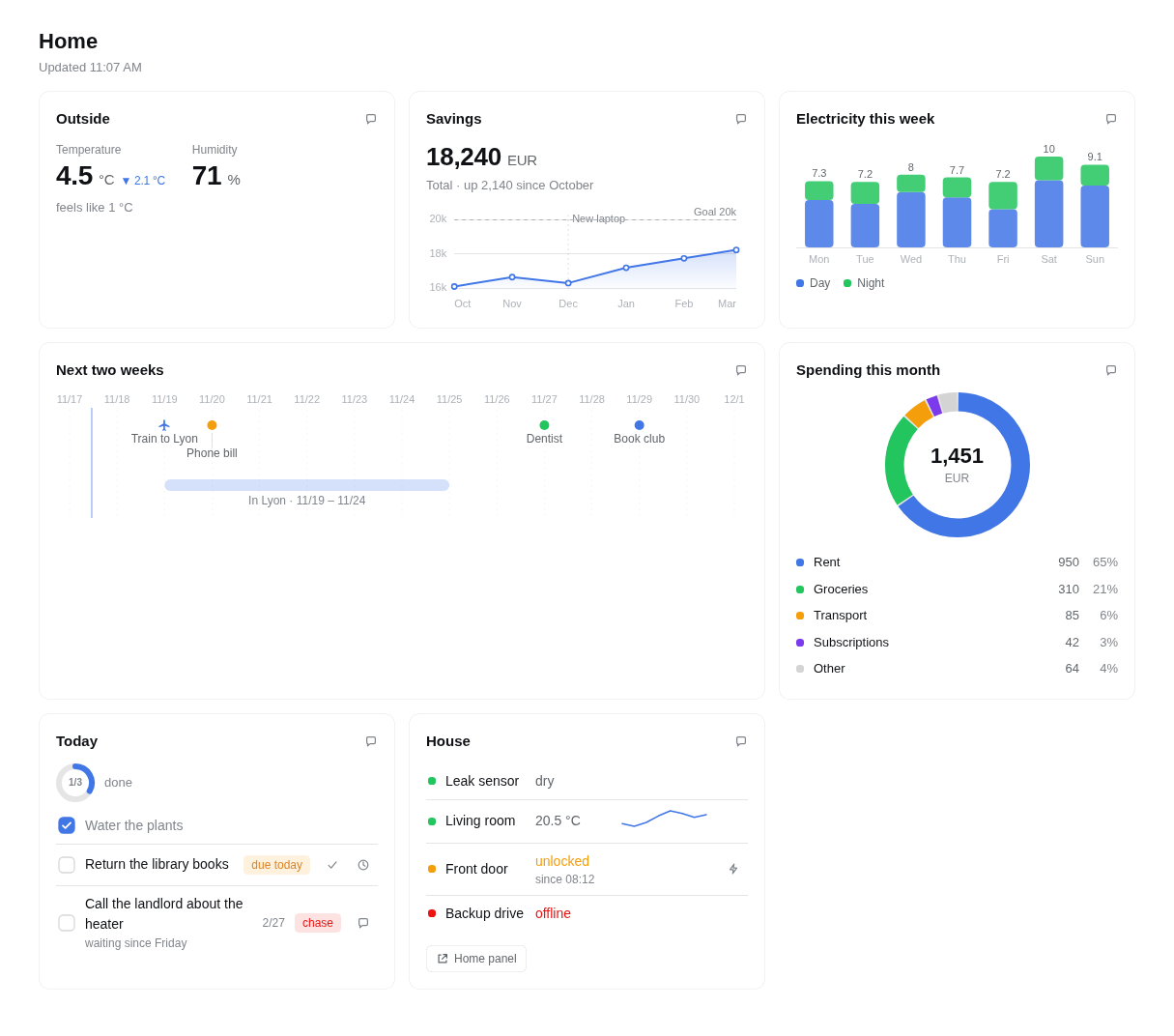
Install
npx @deepseek-ai/dsh plugin --profile web add @soffits/dsh-card-board@latest
It needs @soffits/dsh-ui-kit, the small shared pieces the page is drawn with (icons, ticking times, rings, the live dot), and uses @soffits/dsh-ui-actions for buttons when it's there:
npx @deepseek-ai/dsh plugin --profile web add @soffits/dsh-ui-kit@latest @soffits/dsh-ui-actions@latest
Restart dsh web afterwards. It adds one Host row, card-board, and a Boards entry in the sidebar. Boards live in card-board under the DSH home unless you set dataDir.
Configuration
Override the row in your profile's cordis.patch.yml:
- id: card-board
  config:
    dataDir: ~/boards
    peopleFile: ~/people.json
    peopleKey: users
| Option | Default | What it does |
|---|---|---|
dataDir | <DSH home>/card-board | The folder with the boards. ~/ means the home folder. |
people | {} | Verified user id → person id, for a DSH several people sign in to. |
peopleFile | A JSON file with more of that mapping, re-read when it changes. people wins on a clash. | |
peopleKey | The key in peopleFile that holds the mapping; empty means the whole file. | |
pollSeconds | 30 | How often an open, visible page checks for changes while its live connection is down. A hidden tab doesn't poll. |
actionLog | <dataDir>/.actions.jsonl | Where action presses are appended. |
actionTimeoutSeconds | 300 | A press nobody handles within this time shows as not handled. |
Who sees what
With no people and no peopleFile, the plugin assumes a single-person DSH: everyone DSH lets in sees every board.
With a mapping, each request is checked on the server. The plugin asks the requestIdentity service who made the request, maps that user id to a person id, and serves only boards whose viewers list that person. A request without a verified identity sees no boards; a board the person may not see answers 403, the same as one that doesn't exist. The tabs in the page come only from the server's list. Person ids compare without regard to case.
Seeing and acting are separate. A board can name actors, the people who may press its buttons; without it, the viewers may, so a board that never heard of actors behaves as it always did. Someone who may see a board but isn't an actor gets it without any button the board declares (done, snooze, step, event and chat; plain link buttons stay) and with a "View only" note beside the title, and their presses answer 403. A declared chat button is the board owner's, speaking in the owner's words, so it goes with the rest; the page's own "Chat about this" and "Ask" stay, since they ask the assistant about what the viewer sees, in the viewer's own new conversation. Acting needs seeing: naming someone in actors who isn't in viewers gives them nothing. Reading, marking cards seen and arranging the board for yourself stay open to every viewer, since they only touch the viewer's own view. This is how a person lets someone they trust look at their board without that person's taps landing on their items: "viewers": ["alex", "sam"], "actors": ["alex"]. Why it is shaped this way: docs/decisions/board-actors.md.
requestIdentity is a small service any sign-in plugin can provide. dsh-oidc (0.3.0-alpha.9 or later) does; another plugin can provide the same interface:
interface RequestIdentityService {
  /** The verified person behind the /api request being handled, or null. */
  current(): { provider: string; issuer: string; id: string; name?: string } | null
}
A shared board can carry cards meant for only some of its viewers: cardViewers in board.json maps a card id to the people who may see it (a person's own to-do card on a family board). Everyone else gets the board without that card: it is left out of the board, its own route answers 404 as if it weren't there, the events stream never mentions it, and its buttons can't be pressed. The board's viewers still decide who sees the board at all.
The card board reads it with ctx.get('requestIdentity') at request time, so it doesn't depend on any one sign-in plugin. Deciding who a request is, including one that reaches DSH without passing the sign-in (a local port), is the provider's job; the board only maps the id it gets. With a mapping configured and no provider running, the board routes answer 503 rather than showing everything.
Data layout
<dataDir>/
  <board>/
    board.json
    cards/<card>.json
Board and card ids are lowercase letters, digits, - and _, up to 64 characters.
board.json:
{
  "title": "Home",
  "viewers": ["alex", "sam"],
  "actors": ["alex"],
  "cardViewers": { "alex-todo": ["alex"] },
  "order": ["weather", "savings", "energy"],
  "layout": { "weather": { "size": "small" }, "energy": { "size": "wide" } },
  "assistant": "Robin"
}
actors is optional: the viewers who may also press the board's buttons, all of them when it is left out ([] makes a board nobody can press). cardViewers is optional: a card listed there shows only to the people it names (Who sees what). order lists cards to put first; the rest follow by id. This is the default: each person can arrange their own view. layout sets how wide a card is: small (a third of a wide screen), medium (a half), large (two thirds) or wide (all of it). Without it a card takes its type's default: summary and timeline are wide, countdown large, stat small, the rest medium; a summary is always wide. On a tablet small and medium cards take half the width and large and wide ones all of it; on a phone every card is full width. Heights are the cards' own: the board packs them like masonry, so a long card never stretches its neighbours and short ones fill the space beside it. A list longer than six rows shows six, then "N more", which opens the rest in place (a row that is new or just changed always shows). assistant is optional: the name the chat buttons ask ("Ask Robin" instead of "Ask"). title can be text in several languages.
A card:
{
  "type": "stat",
  "title": "Outside",
  "updatedAt": "2026-03-02T09:30:00Z",
  "staleAfter": 3600,
  "link": "https://example.com/weather",
  "data": { "items": [{ "label": "Temperature", "value": 4.5, "unit": "°C" }] }
}
| Field | |
|---|---|
type | summary, countdown, stat, line, bar, donut, list, timeline or status |
title | Shown on the card. |
icon, tone | An icon on a tile tinted with the tone, before the title. Icons are Lucide names; the bundled set is in dsh-ui-kit's icons.json, and a name it doesn't have draws nothing. |
updatedAt | ISO date-time with a zone. The CLI fills it in when you leave it out. |
staleAfter | Seconds. Past this the card is dimmed and says how old it is. |
link | An http(s) URL or a /path the title row links to. |
stat | Headline numbers above a chart or rows (beside a chart when the card is wide): the same shape as a stat card's data. |
raise | { from?, until?, label? }: during this window the card floats to the top; see Order, pins and raised cards. |
actions | Buttons on the card; see Actions. |
detail | More to show when the card is opened; see Opening a card. |
data | Depends on the type, below. |
Unknown fields are errors, so a typo fails when the file is written instead of quietly not showing. A card that doesn't parse or fails the schema shows as a small error card with the reason; the rest of the board is unaffected.
Colours are never given directly. tone is one of ok, warn, bad, accent, violet or muted, and the page maps it to DSH's theme, light or dark. Dates are YYYY-MM-DD or ISO date-times. Numbers, dates and units are formatted by the page in the viewer's language.
Languages
Every text a person reads (titles, labels, units, sub-lines, chip text, list rows, point and span labels, a status row's value, action labels) is either a string, shown as it is to everyone, or a map from language id to text:
"title": { "en": "Today", "fr": "Aujourd’hui", "zh": "今天" }
Ids are lowercase BCP 47 tags and en is required, the same shape DSH uses for localized package text. The page shows the text for DSH's active language: the exact tag (pt-br), then its primary language (pt), then en. So one board reads in French to one person and in Chinese to another, and the file holds no preference of its own. Things that are data, not words (a to-do's title, a merchant), stay plain strings. Bar series names (the keys of values) and x values are not translated.
The page's own words (buttons, empty states, errors) live in locale/<tag>.json, under ui, one file per language. English, French and Chinese ship. Which languages exist is whatever files are there: a new language is one new file with the same keys as en.json, no code change (a test checks every file has every key and the same {placeholders}), and a missing key falls back to the primary language, then English.
summary
A full-width line at the top of a board: what matters now, in a sentence, with a few facts as chips. The page heads it with the day and its part ("Tuesday afternoon") from its own clock, so that is always right.
{ "text": "A quiet day: the library books are due, and the train leaves the day after tomorrow.",
  "chips": [
    { "icon": "train-front", "text": "Train", "tone": "accent", "to": "2026-03-04T07:40:00+01:00" },
    { "icon": "book-open", "text": "Books due today", "tone": "warn" }
  ] }
A chip with to (an ISO time) gets a ticking "in 1d 19h" after its text.
countdown
A big ticking number until to, and the stops on the way (up to 24) with the next one marked and the passed ones dimmed. After to it says "now"; after expiresAt the card hides itself, so whoever writes it needn't remove it on time.
{ "to": "2026-03-04T07:40:00+01:00", "label": "until the train leaves", "sub": "3 h 10 m, one change", "icon": "luggage",
  "steps": [
    { "at": "2026-03-04T07:15:00+01:00", "label": "At the station" },
    { "at": "2026-03-04T10:50:00+01:00", "label": "Arrive in Marseille", "sub": "14° and sunny", "zone": "Europe/Paris" }
  ],
  "expiresAt": "2026-03-04T10:50:00+01:00" }
icon puts a big tile, tinted with the card's tone, before the number. A step with a zone (an IANA name) other than the viewer's shows the wall-clock time of its own offset, so write the local time from the ticket with its offset; the zone's short name follows when the browser's zone data agrees, the offset ("GMT−7") when it doesn't.
stat
One to six big numbers.
{ "items": [
  { "label": "Temperature", "value": 4.5, "unit": "°C", "icon": "thermometer", "sub": "feels like 1 °C",
    "delta": { "text": "2.1° colder than yesterday", "tone": "accent", "dir": "down" },
    "strip": [{ "label": "11", "value": 5.6, "icon": "sun" }, { "label": "12", "value": 6.2, "icon": "sun", "on": true }] },
  { "label": "Spent this month", "value": 3423, "unit": "of 4,310", "progress": { "value": 3423, "max": 4310, "text": "on pace for 4,286" } },
  { "label": "Total", "value": 18240, "unit": "EUR", "spark": [16100, 16850, 17200, 18240] }
] }
value is a number or a string (for numbers you've already formatted). tone on an item colours its value. icon draws a big tile beside the label and number, tinted with iconTone, else the item's tone, else the card's (a gold coin beside a plain balance: "icon": "coins", "iconTone": "warn"). Give it to the numbers a glance should find by picture, not to every item; the reasoning is in docs/decisions/stat-icons.md. Each item may add a delta (a change in words, with a tone and a dir of up, down or flat for its arrow), a progress bar, a spark line or a strip of small values with icons, like the next hours of weather (on marks one).
line
{
  "series": [{ "name": "Savings", "points": [{ "x": "2025-10-01", "y": 16100 }, { "x": "2026-03-01", "y": 18240 }] }],
  "unit": "EUR",
  "area": true,
  "goal": { "label": "Goal 20k", "y": 20000 },
  "markers": [{ "x": "2025-12-01", "label": "New laptop" }]
}
x is a date, a number or a label; dates are spaced by time. y may be null for a gap. A goal is a flat y or its own points (a rising target, say). Up to six series, each with an optional tone.
bar
{
  "bars": [{ "x": "Mon", "values": { "Day": 5.2, "Night": 2.1 } }, { "x": "Tue", "values": { "Day": 4.8, "Night": 2.4 } }],
  "stacked": true,
  "unit": "kWh",
  "goal": { "label": "Target", "y": 8 }
}
Each bar has a single value or named values; with values and no stacked, the series stand side by side.
donut
{
  "segments": [{ "label": "Rent", "value": 950 }, { "label": "Groceries", "value": 310 }, { "label": "Other", "value": 64, "tone": "muted" }],
  "centre": { "text": "1,324", "sub": "EUR" },
  "unit": "EUR"
}
list
{
  "progress": { "done": 1, "total": 3, "label": "done" },
  "rows": [
    { "title": "Water the plants", "checked": true },
    { "title": "Return the library books", "checked": false, "chip": { "text": "due today", "tone": "warn" } },
    { "title": "Call the landlord", "sub": "waiting since Friday", "date": "2026-02-27" }
  ],
  "empty": "Nothing left for today."
}
A row with a done action shows a checkbox, and ticking it presses that action (the row's separate done button then goes); checked: true shows it ticked. A row without a done action shows no checkbox. A done with a label is a choice rather than a tick (one answer of a question, say "White" or "Oak"): it stays a button of its own, so a row can offer several. progress draws a ring above the rows, with its label and an optional sub.
Rows (of lists and status cards) may also have an icon and a tone (a tile before the row), a key (a stable id, so the page can tell which row changed) and active: { from, to }: during that window the row is highlighted and says "now", earlier the same day it says "from 18:00". The page decides when, so nobody has to rewrite the file at noon. A row's date shows relative to today ("tomorrow", "in 3 days") and moves on by itself. A row may have a link (an http(s) URL, opened in a new tab, or a /path of this app, opened in place): tapping the row goes there. A keyed row may have a detail (below): tapping it opens it. Stat items take a link too.
timeline
{
  "from": "2026-03-02",
  "to": "2026-03-16",
  "points": [{ "date": "2026-03-04", "label": "Train to Lyon", "kind": "travel" }, { "date": "2026-03-05", "label": "Phone bill", "kind": "due" }],
  "spans": [{ "from": "2026-03-04", "to": "2026-03-09", "label": "In Lyon" }]
}
kind is travel, due, event, health, home or money, each drawn with its own icon and default tone; tone overrides it. Today gets a thin line.
status
{ "rows": [
  { "label": "Leak sensor", "value": "dry", "tone": "ok" },
  { "label": "Living room", "value": "20.5 °C", "tone": "ok", "spark": [19.8, 19.6, 20.4, 20.8, 20.5] },
  { "label": "Front door", "value": "unlocked", "tone": "warn", "sub": "since 08:12" }
] }
spark draws a small line beside the value.
The examples folder has a complete board with one card of each type.
Order, pins and raised cards
A board's order is the default order. Each person can arrange their own view of a board without changing anyone else's: drag a card (a mouse pulls it by the handle that shows on hover; on a touch screen press and hold its head, then drag), or open its menu for Pin to top, Move up and Move down (with a keyboard, Alt+↑ and Alt+↓ on the menu button move it too). Pinned cards sit first, in the order they were pinned. Reset order next to the board's status goes back to the default. The arrangement is kept by the plugin, per person (the same identity as who sees what), so it follows them across devices, and it is the only thing the plugin stores about cards. A card the person never placed, such as a new one, goes where the board's order puts it.
A producer can raise a card for a while:
"raise": { "from": "2026-03-03T07:40:00+01:00", "until": "2026-03-04T10:50:00+01:00", "label": { "en": "Leaves tomorrow", "fr": "Départ demain" } }
From from until until (either may be left out, but not both) the card sits above everything else, above pins too, since an urgent card shouldn't be buried by a standing preference. It carries a small tag, label or "Up for now", and drops back by itself. The page uses its own clock and one timer for the next moment a window opens or closes, so nobody has to rewrite the card then. Among raised cards the person's own order decides. The reasoning is in docs/decisions/card-order.md.
What is new, and what just changed
Nothing to write for these. Each card has a content version (a hash of the card without updatedAt, so rewriting the same data changes nothing), and each keyed row its own. The server remembers, per person, which versions they have seen, so a dot marks what changed since they last looked, on any device. A card or row that changes while the page is open gets a short wash and "just now" first (only the dot with reduced motion).
Opening a card
Tapping a card (anywhere that isn't one of its buttons, links or rows that open themselves), or its open button, opens it over the page in DSH's own dialog: the whole list, a taller chart, all its buttons, and its detail when it has one. Rows open the same way, with just that row, its detail and its buttons. The URL follows (?board=home&card=chores, &row=<key> for a row), so a link opens the board page with the card open, and Back closes it.
"detail": {
  "text": "Three books, due at the branch on Elm Street.",
  "facts": [{ "label": "Renewals left", "value": 1 }, { "label": "Fine per day", "value": "0.25 EUR" }],
  "chart": { "type": "bar", "data": { "bars": [{ "x": "2026-02", "value": 4 }, { "x": "2026-03", "value": 3 }] } },
  "history": [{ "at": "2026-02-20T15:10:00+01:00", "text": "Borrowed" }],
  "actions": [{ "kind": "done", "id": "library-books:returned-elm", "label": "Returned at Elm Street" }]
}
Every part is optional: text, facts (label and value, up to 24), chart (a line or bar card's data), history (newest first, up to 100) and actions, buttons shown only in the opened view, below the detail (Actions; their ids must differ from the card's or row's own buttons, since a press names its button by id). Buttons that only make sense with the detail in view go there, so the row on the board stays short: a question's answers under the note that asks it, with only a chip and a snooze on the row. A row needs a key to carry a detail.
On a chart, hovering or tapping shows the value and date of the point under the pointer. Cards and rows answer a hover and a press; a row's buttons show on hover with a mouse and are always there on touch. A card that changes settles into place, numbers ease to their new value and rows that a list opens fade in; nothing moves with reduced motion. Buttons, tags, axes and other chrome aren't selectable; titles, notes and numbers are.
Actions
A card, a list row or a status row can carry up to six buttons (a list or status row also gets the Ask button below):
"actions": [
  { "kind": "done", "id": "library-books:done", "inverse": { "kind": "reopen" } },
  { "kind": "snooze", "id": "library-books:snooze", "inverse": { "kind": "unsnooze", "payload": { "until": "2026-03-02T09:00:00Z" } } },
  { "kind": "step", "id": "library-books:renew", "label": { "en": "Renew the books online", "fr": "Renouveler les livres en ligne" } },
  { "kind": "chat", "id": "landlord:ask", "label": "Draft a message", "payload": { "prompt": "Help me write a short follow-up to the landlord." } },
  { "kind": "event", "id": "front-door:lock", "label": "Lock" },
  { "kind": "link", "id": "panel", "label": "Home panel", "payload": { "url": "https://example.com/home" } }
]
chatopens a new conversation (or the session named inpayload.session) with a draft that quotes the card or row and carries its ids as JSON, afterpayload.promptif you gave one. Nothing is sent until the person sends it, so the message comes from them like any other. Every card also has a chat button in its corner without declaring one ("Chat about this"), and every list and status row has one at the end of its buttons ("Ask"), about that row and its card; a row that declares achataction keeps its own, and one with six buttons already gets none. Setask: falseon a row, or on a card for all its rows, where asking makes no sense (a row that only says "nothing else today"). When the board names anassistantthe buttons say who they ask ("Ask Robin"). Alabelandpayload.promptcan be text in several languages. People who may see a board but not act on it (Who sees what) get none of its declared buttons, chat included, only the built-in two.stepis a suggested next step the assistant starts on one tap (on a row it sits with the row's other buttons, "Start" for instance): the label says the step plainly ("Renew the books online") and the tap is the person's go-ahead for exactly that. The press is recorded on the server likedone, then the page sends the step (payload.promptwhen it needs more words than the label, never more than it authorises; otherwise the label) with the card or row into a new session (orpayload.session) as the person, with no draft to confirm, and the button links to that session. At most 3 steps per card or row; add one only where the data has a clear next step. The label (up to 80 characters) is required.done,snoozeandeventare pressed on the server. A snooze withoutpayload.untilasks: in 3 hours, tomorrow at 9:00, or a time.linkopenspayload.url.
id is yours: letters, digits and . _ : -, unique within the card or row. label is optional except for event and step. payload is any small object (up to 4 KB of JSON).
inverse (on done, snooze and event) says the action can be taken back: kind is the name its owner knows the way back by (reopen, unsnooze), payload what that needs (a snooze's previous date). A press of such an action shows an Undo in a toast for about 8 seconds, and a ticked row stays in view, struck through, until the board is refreshed or left; unticking it is the same undo. A step has no inverse.
The plugin doesn't act on a press itself. It checks that the person may see the board and that the action is in the card as written, then records an event:
{
  "press": "fcb114dd-3890-42e6-af4b-b23173edf8e0",
  "action": "done",
  "id": "library-books:done",
  "payload": {},
  "person": "alex",
  "user": "<verified user id>",
  "at": "2026-03-02T09:41:12.000Z",
  "source": { "plugin": "dsh-card-board", "board": "home", "card": "chores", "row": 1 }
}
It's appended to the action log, emitted in-process as the Cordis event card-board/action, and published on channel ui.action.<kind> through dsh-cron-jobs when that's installed, so a job subscribed to ui.action.done can mark the thing done wherever it lives. person is owner on a single-person DSH.
Taking a press back is another press, appended to the same log, so every record says who, when, what and whether it was undone. Its action is undo (channel ui.action.undo), undoes names the press, of is the kind it takes back, inverse the declared name, and payload is the action's own payload without the time the person picked, plus the inverse's. The press keeps the inverse as the card offered it, so an undo works after the card was rewritten, and a press taken back shows as undone. A handler that receives a press and its undo in one batch should treat the pair as nothing happening.
{ "press": "5d0f…", "action": "undo", "of": "done", "id": "library-books:done", "undoes": "fcb114dd-3890-42e6-af4b-b23173edf8e0", "inverse": "reopen", "payload": {}, "person": "alex", "at": "2026-03-02T09:41:15.000Z", "source": { "plugin": "dsh-card-board", "board": "home", "card": "chores", "row": 1 } }
The press log is never a second source of the item's state: a press only marks the gap until the owner of the item writes the card again, and after that a row's box follows the card's checked.
The button shows the press as pending until the card file is written again, then done (a step is done once recorded, since sending it is the whole job). If nothing rewrites the card within actionTimeoutSeconds, it says nothing picked the press up. So a handler should rewrite the card when it has acted, even if only updatedAt changes.
The buttons come from @soffits/dsh-ui-actions, a separate plugin the board uses when it is installed (dsh plugin --profile web add @soffits/dsh-ui-actions; DSH 0.2.2-rc.1 or later). Without it cards show no buttons. A chat button opens a new conversation with the card or row attached to the message box as a small card, and the person writes beside it; a chat button's words ("Ask", "Chat about this") and the done and snooze buttons' words come from that plugin, in the person's language. On a phone the buttons are at least 40 px, and a snooze picker opens as a sheet at the bottom of the screen.
Writing cards: the CLI
dsh-card-board validates a card and writes it atomically (a temporary file, then a rename), so the page never reads half a file and bad data fails at write time:
export CARD_BOARD_DIR=~/boards
dsh-card-board board home board.json          # write home/board.json
echo '{"type":"stat","title":"Outside","data":{"items":[{"label":"Now","value":4.5,"unit":"°C"}]}}' \
  | dsh-card-board put home weather            # write home/cards/weather.json
dsh-card-board rm home weather
dsh-card-board check card.json                 # validate only
dsh-card-board check --board board.json
dsh-card-board check --dir ~/boards            # everything under a data folder
Input comes from the file argument, or stdin when it's - or left out. --dir overrides CARD_BOARD_DIR. An invalid card exits with status 1 and prints each problem with its path (data.rows[0].title: is required); usage errors exit with 2.
From JavaScript the same checks are import { checkCard, checkBoard } from '@soffits/dsh-card-board/schema'.
How the page updates
GET /api/card-board/events?board=<board> is a Server-Sent Events stream: the plugin watches the board's folder and sends { "type": "card", "id": … } for a card written, added or removed, { "type": "board" } for board.json, { "type": "arrange" } when this person arranges the board from another page, and a comment every 25 seconds to keep proxies from closing it. The page then fetches only that card from GET /api/card-board/card?board=<board>&id=<card>. Who may listen is checked like any read, and someone a board.json change takes off the viewers gets { "type": "gone" } and the stream closes.
While that stream is down (or a press waits to be picked up), the page polls GET /api/card-board/board?id=<board> instead, with the last ETag in If-None-Match. The tag is built from file sizes and times, so an unchanged board answers 304 without reading a card. Coming back to the tab checks at once. The page reports what the person has seen to POST /api/card-board/seen, and keeps their own order and pins with POST /api/card-board/arrange ({ board, pinned, order }, or { board, reset: true }); the board answer carries it as arrangement. The page's words come once per language from GET /api/card-board/locale?tag=<id> (the merged locale/*.json, English filling gaps).
Development
npm install
npm run build   # client.js from src/client/
npm run check   # client.js is current, syntax of every file, and the example board against the schema
npm test        # node --test, including a run behind DSH's real Connection
License
MIT
Related plugins
dsh-web (dsh-task-board)
zhu1090093659/dsh-web
dsh-web (dsh-web-all)
zhu1090093659/dsh-web
dsh-TUI
ccch1mneyyy/dsh-tui
dsh-web-ui (dsh-task-board)
zhu1090093659/dsh-web-ui