dsh-nanshan-market-publish
southm/dsh-nanshan-market-publish
Scans DSH components under development on this machine (or folders you add) and walks you through two independent tracks from the official contributing.md: pushing the code to GitHub, and opening the market listing PR. It checks the dsh.bundle manifest, the one-day repository age, the dsh-plugin topic, the category and the description rules, then writes data/plugins/<owner>__<repo>.yml. Open Nansh. Its HTTP routes have no DSH access check, and they can push code and open pull requests on GitHub with the token you give it.
Install
dsh plugin --profile web add github:southm/dsh-nanshan-market-publishREADME
【南山】DSH插件市场发布助手
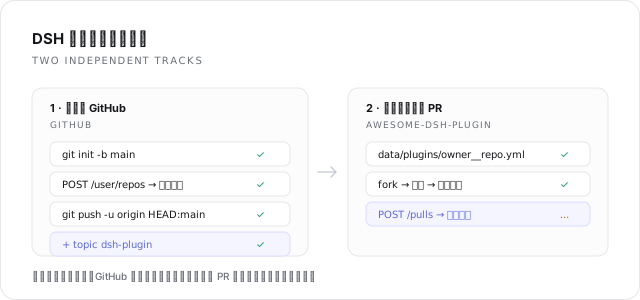
左侧栏插件:扫描本机正在开发的 DSH 组件,按官方 contributing.md 分两条互相独立的轨道引导发布:
- GitHub 提交 —— 初始化仓库、创建公开仓库、提交推送、添加
dsh-plugintopic。 - 市场收录 PR —— 生成
data/plugins/<owner>__<repo>.yml,fork 官方列表仓库、写入条目、开 PR,并跟踪 CI 与held: author状态。
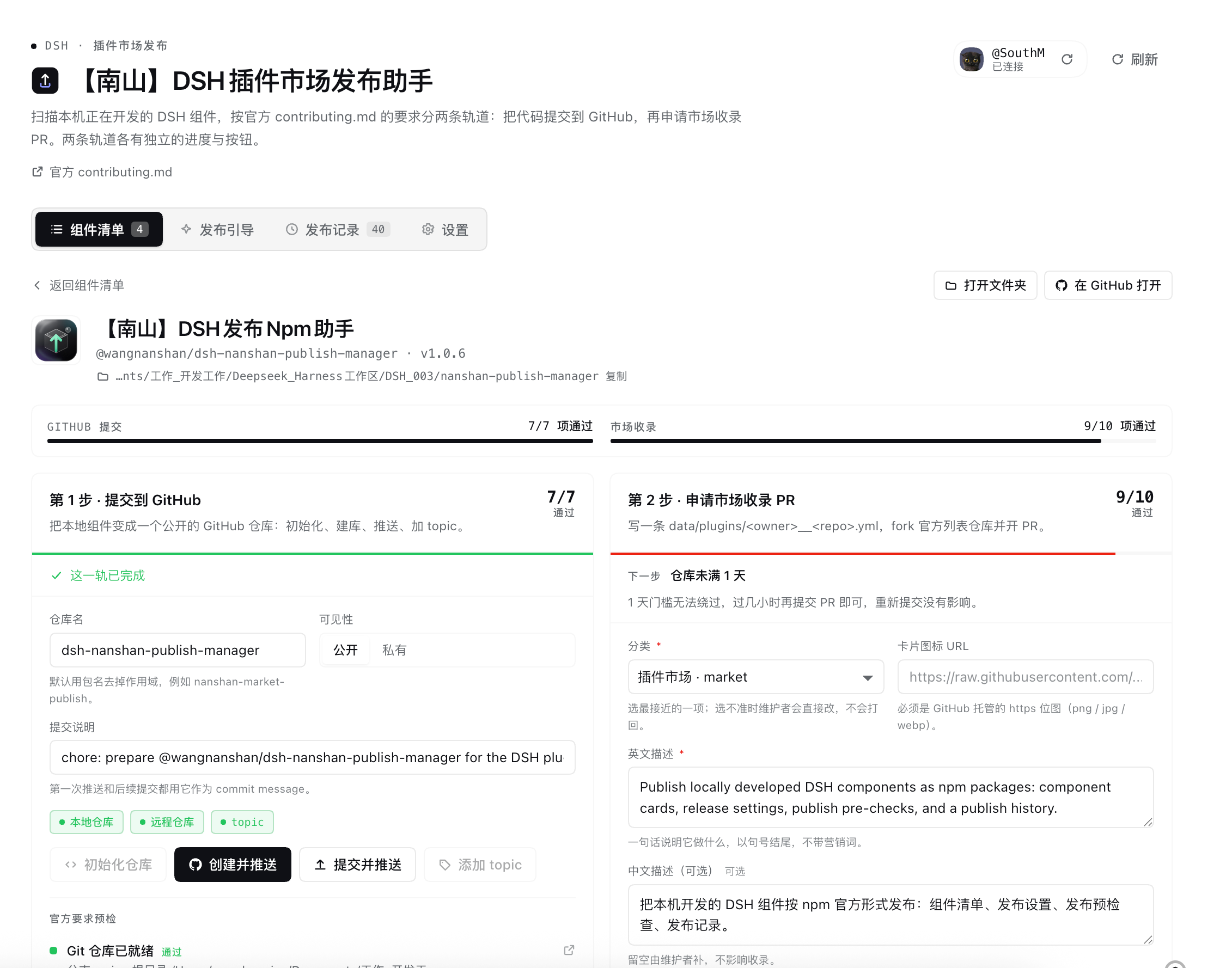
两条轨道各自有独立的进度与按钮:只做完 GitHub 提交,组件已经是可安装的公开仓库;再做收录 PR,市场里才能搜到它。
功能
- 组件发现:自动发现本机档案里以
link:安装的 DSH 组件,以及打开的 workspace;也可以点「选择文件夹」调起系统原生文件夹选择器,选中任意组件目录后加入清单(校验package.json里是否有dsh.bundle/dsh.client)。原生选择器不可用时(例如某些远程页面)才会退回手工输入绝对路径。 - 官方预检:把 contributing.md 里会被 CI 与人工评审检查的项目逐条算成清单——
dsh.bundle声明、真实代码、仓库公开、满 1 天、dsh-plugintopic、分类取值、英文描述必填与句号、描述含营销词、图标必须是 GitHub 托管的位图、tarball 链接、monorepo 子包路径、官方包需用peerDependencies等。 - 一键动作:初始化仓库、创建并推送、提交并推送、加 topic、提交收录 PR,背后是
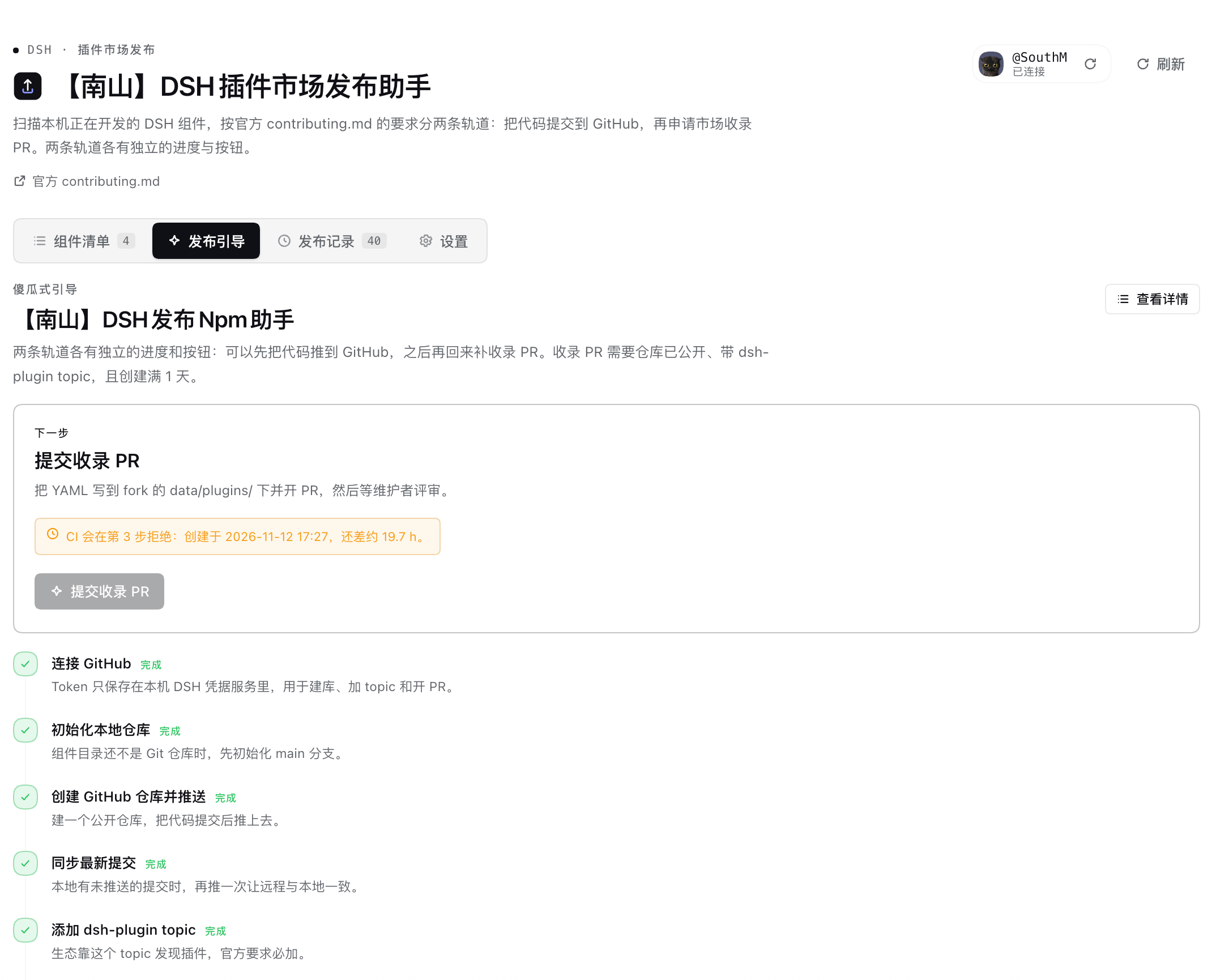
git与 GitHub REST API。 - 傻瓜式引导:7 步流程,只把「下一个还没完成的动作」放大显示,做完一步自动推进。
- PR 跟踪:PR 状态、CI 检查项、标签(含
held: author)、变更文件、最近评论;可直接补一条评论。 - 记录:建库、推送、topic、PR、评论都留本地记录,附 GitHub 链接。
安装
# 本地目录安装
dsh plugin add /path/to/nanshan-market-publish
或在 DSH 的 插件 页面选择 添加插件 并指向本目录。安装后在左侧栏点 「插件市场发布助手」。面板分四个页签:组件清单、发布引导、发布记录、设置。
连接 GitHub
打开 设置 → GitHub 连接,填入一个 classic Token,勾选 public_repo(需要操作私有仓库时用 repo)。
- Token 写入 DSH 凭据服务(
ctx.credentials的 record),不写进配置文件、不会回传给页面、不进入状态文件。 - 也支持环境变量
GITHUB_TOKEN/GH_TOKEN/NSMP_GITHUB_TOKEN作为兜底来源。 - 不需要安装
ghCLI。
两条轨道分别做什么
轨道 A:GitHub 提交
| 步骤 | 动作 | 产物 |
|---|---|---|
| 初始化 | git init -b main(父目录已是仓库时跳过) | .git |
| 创建并推送 | POST /user/repos 建公开仓库 → 设置 origin → git add -A + git commit → git push -u origin HEAD:main | 远端仓库 |
| 提交并推送 | 之后每次改动的增量提交与推送 | 新提交 |
| 添加 topic | PUT /repos/{owner}/{repo}/topics 追加 dsh-plugin | topic |
推送使用一次性 credential helper(Token 通过子进程环境变量传入),不会把 Token 写进 .git/config。
轨道 B:市场收录 PR
- 填条目:分类(官方 23 个取值)、英文描述(必填)、中文描述(可选)、可选的卡片图标与 tarball。
- 预检:逐条对照官方要求,失败项写明「怎么改」。
- 提交:fork
awesome-dsh-plugin/awesome-dsh-plugin→ 从默认分支开add-<repo>-<id>分支 → 写入data/plugins/<owner>__<repo>.yml→ 开 PR。 - 跟踪:PR 状态、CI check-runs、标签、变更文件、评论;被打上
held: author时给出「推同一分支 + 留一条评论」的说明。
仓库创建不满 1 天时,插件会在本地拦下 PR 提交并显示还差多久——CI 一定会拒,提前开 PR 只会多一个红叉。到点后再点一次即可。
提交重试是幂等的:分支名固定为 add-plugin-<repo>,已有分支和条目文件会被复用/更新,不会每次都留下一个孤儿分支。
一个 PR 只提交 1 条条目;描述含 : 会自动加引号,避免 YAML 解析成嵌套键。
官方要求(插件内置了同一份清单)
package.json声明dsh.bundle(只写dsh.client无法安装,是最常见的被拒原因)。- 仓库公开、有真实可用代码、创建满 1 天。
- 仓库带
dsh-plugintopic。 - 一个 PR 只加一个文件,最多 3 条条目;描述必须属实、不带营销词,分类选最贴近功能的。
- 可选:1-8 张截图写在仓库自己的
screenshots.json;发 npm 时repository必须指回该仓库。
CI 通过只是前置条件,维护者会读代码;需要修改时会被打上 held: author。
常见问题
推送报 Error in the HTTP2 framing layer
GitHub 的 HTTP/2 连接被代理、VPN 或公司网关打断时的典型报错。插件会自动改用 http.version=HTTP/1.1 重试一次;成功后会把「这个组件走 HTTP/1.1」记在本地,之后直接走 HTTP/1.1(操作记录里会标 HTTP/1.1)。命令行里遇到同样问题时:
git config --global http.version HTTP/1.1 # 撤销:git config --global --unset http.version
如果重试仍失败,检查 HTTPS_PROXY / HTTP_PROXY 是否指向一个已经失效的代理。
推送被拒:Authentication failed
Token 需要 repo 权限(classic)或对目标仓库有 Contents 写权限(fine-grained);远程地址是 SSH 时则依赖本机 SSH 密钥。
数据与隐私
- 状态:
~/.dsh/nanshan-market-publish/state.json(组件清单、条目草稿、PR 编号、操作记录)。 - Token:DSH 凭据服务的
nanshan-market-publish/github-token记录。 - 只读取你选择或扫描到的组件目录中的 manifest、patch、locale、图标与 Git 元数据,不执行组件代码。
- 除 GitHub API(
api.github.com)与本地git外不发起任何网络请求。 - 卸载插件不会删除 GitHub 上的仓库与 PR;本地状态文件可以手动删除。
限制
- 未安装
ghCLI 也能用:所有 GitHub 操作走 REST API 与git。 - GitHub 仓库年龄由 GitHub API 返回的
created_at计算;未连接 Token 时这一项显示为「待确认」。 - 推送走 HTTPS。若
origin是 SSH 地址,插件会执行普通的git push,需要你本机已配置 SSH 密钥。 - 无法在本机完成 fork 的自动同步:fork 落后时用新条目分支提交即可,条目文件是新增文件,一般不受影响。
English
A left-sidebar DSH plugin that scans DSH components under development on this machine and walks you through the official
contributing.md in two independent tracks:
submitting the code to GitHub (initialise, create a public repository, commit and push, add the dsh-plugin topic) and opening
the market listing PR (generate data/plugins/<owner>__<repo>.yml, fork, write the entry, open the PR, follow CI and
held: author).
Every mechanically checkable rule from the guide is computed as a checklist with a concrete fix, and each track can be completed
without the other. A GitHub token with public_repo scope is required and is stored in the DSH credentials service; repository
creation, topics, the fork branch and the PR all go through the GitHub REST API, so no gh CLI is needed. The plugin reads only
manifests, patches, locale files, icons and Git metadata of the folders you choose, never executes component code, and sends
nothing anywhere except GitHub.
Related plugins
deepseek-harness
deepseek-ai/deepseek-harness
dsh-market
dsh-market/dsh-market
dsh-web (dsh-plugin-manager)
zhu1090093659/dsh-web
dsh-web
zhu1090093659/dsh-web