dsh-remote-ssh
strepsiades2/dsh-remote-ssh
SSH remote hosts for DeepSeek Harness: pick a host from ~/.ssh/config, keep a local forward alive, and open its DSH web UI in the browser.
Install
dsh plugin --profile web add github:strepsiades2/dsh-remote-sshREADME
dsh-remote-ssh
SSH remote hosts for DeepSeek Harness: pick a host from your existing ~/.ssh/config, keep an SSH local forward alive, and open that machine's DSH web UI in your browser.
It is the DSH equivalent of VS Code Remote-SSH — same SSH config, keys, and jump hosts, but the remote side serves DSH instead of a language server.
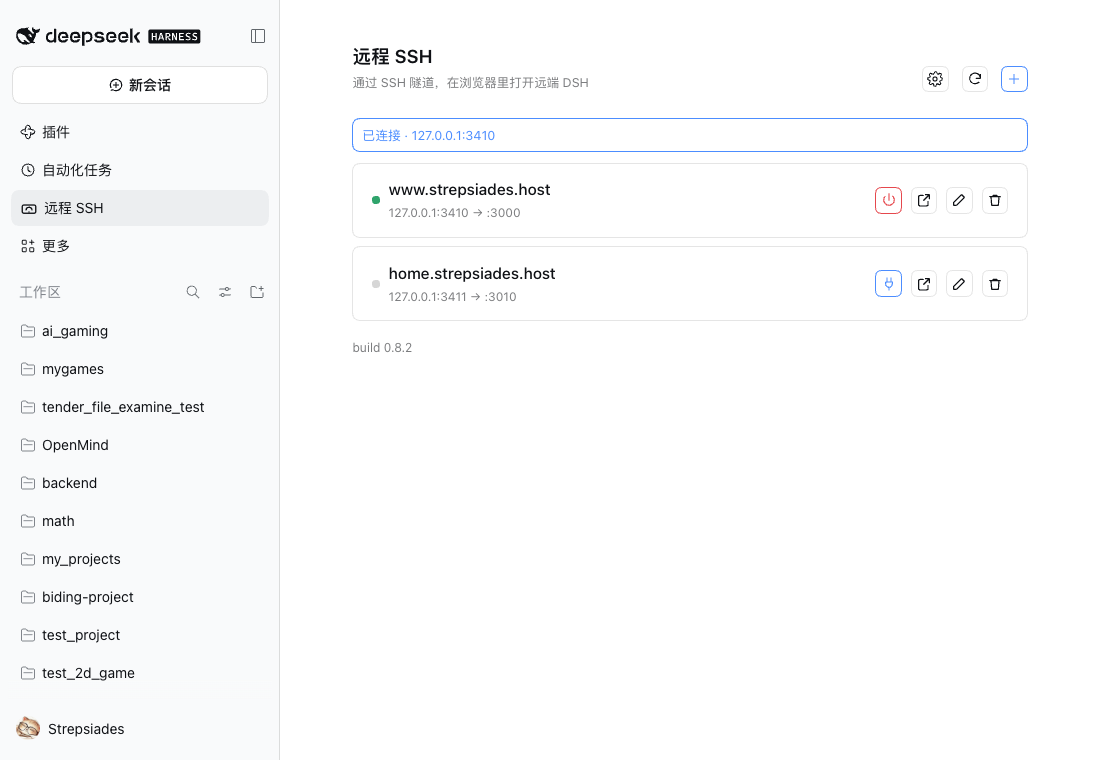
Features
- Hosts come from
~/.ssh/config— one source of truth, nothing to retype - One-click connect / disconnect, then open the remote web UI through the local forward
- Reads the web token from the remote log over SFTP and verifies it through the tunnel before showing a 401
- Password, keyboard-interactive, and encrypted-key passphrase authentication
- ProxyJump hops, so hosts behind a bastion work without extra forwarding
- Pure-JS SSH client (
ssh2): no systemssh, no askpass helper, one code path on macOS, Linux, and Windows - Ships a
remote-dsh-opsskill so an agent can prepare a bare machine as a remote DSH host
Install
Requirements:
- DSH
>=0.2.1-rc.5 <0.3.0 - A remote machine with an OpenSSH server
- No SSH client on the local machine — SSH is implemented in-process
dsh plugin --profile desktop add @strepsiades/dsh-remote-ssh
Use --profile web if the plugin should live in a web profile. Then open Plugins and enable Remote SSH.
Adding the package only installs it; it does not enable the bundle. Reload DSH if the sidebar has no Remote SSH entry.
Usage
- Sidebar → Remote SSH → +
- Pick a host from your SSH config
- Click Connect
- Click the external-link icon to open the remote DSH UI
The plugin does not provide reachability. If the host is not already reachable over SSH (LAN, VPN, Tailscale, jump host), the connection fails.
Host options
| Option | Meaning |
|---|---|
| Remote DSH port | Where dsh web listens on the remote |
| Local port | Leave empty to auto-assign; pin it to keep the browser cookie valid |
| Web token | Usually empty — read from the remote log on every connect |
| Start command | Optional; executed when the plugin has to start dsh web |
| Stop command | Optional; executed when the plugin stops or restarts dsh web |
{port} in the start or stop command is replaced with the remote DSH port.
Starting and stopping the remote DSH
The built-in start and stop scripts are POSIX. On Windows, provide startCommand and stopCommand yourself; they run over SSH exactly as written.
The plugin only executes those host commands. It does not detect Windows, install or upgrade DSH, create profile links, or repair a broken remote installation. An agent can prepare the host and write the command into the host entry; see the bundled remote-dsh-ops skill for a Windows runbook.
Settings:
- Start the remote DSH automatically — off by default
- Stop the remote DSH when disconnecting — off by default
A failed start or stop reports the remote output and a hint for the common cases: a POSIX command on Windows, a missing profile package, or a port already in use.
Security
- Custom routes ride DSH's authenticated
/apichannel - Passwords and key passphrases are used only for that connection and are never written to disk
- The plugin never reads or copies private keys
- The web token stays in memory; the registry is written with
0600permissions - The browser cookie is issued by the remote
dsh web
Platform support
| macOS | Linux | Windows | |
|---|---|---|---|
| Local plugin: connect, token, browser | ✅ | ✅ expected | ✅ |
| Password / keyboard-interactive / passphrase auth | ✅ | ✅ expected | ✅ expected |
| Remote token over SFTP | ✅ | ✅ | ✅ expected |
| Remote start / stop | ✅ POSIX built-in | ✅ POSIX built-in | Via configured startCommand / stopCommand |
| ProxyJump | Single hop verified; chains implemented | — | — |
Known gaps
ProxyCommandis not implemented; use the systemsshbinary for that case- Windows remotes need their own
startCommandandstopCommand - WSL is not treated as a separate remote OS: commands run on Windows and the token is read from
%USERPROFILE% - No mobile-specific client: the result is the remote DSH web UI in a browser
Development
| File | Role |
|---|---|
index.js | Host half: routes, registry, remote commands, skill registration |
client.js | Client half: panel and dialogs |
transport.js | SSH transport: config resolution, auth, ProxyJump, forwarding, SFTP, exec |
skills/remote-dsh-ops/SKILL.md | Runbook for preparing a remote DSH host |
locale/ | Plugin metadata strings |
cordis.patch.yml | Bundle insert declaration |
Local UI checks live in scripts/ and are intentionally not tracked.
License
MIT © Strepsiades
中文说明
从 ~/.ssh/config 里选一台机器,保持一条 SSH 本地转发,然后在浏览器里打开那台机器上的 DSH Web 界面。
安装
要求 DSH 0.2.1-rc.5 或更新;远端需要有 OpenSSH 服务端。
dsh plugin --profile desktop add @strepsiades/dsh-remote-ssh
web profile 用 --profile web。然后在 插件 页启用 远程 SSH。
只加依赖不会自动启用 bundle;如果侧栏没有「远程 SSH」,刷新 DSH。
使用
侧栏「远程 SSH」→「+」→ 选主机 →「连接」→ 点外链图标打开远端界面。
如果机器本身不能通过 SSH 到达(局域网、VPN、Tailscale、跳板机),连接会失败——本插件不提供可达性。
远端启停
内置的启动/停止脚本是 POSIX。Windows 需要自己提供 startCommand / stopCommand,插件只通过 SSH 执行它们,不负责安装、升级或修复远端 DSH。
startCommand / stopCommand 里的 {port} 会替换成远端 DSH 端口。Windows 的准备方法见 remote-dsh-ops skill。
安全
密码和私钥口令只用于本次连接;插件不读取或复制私钥;web token 只保存在内存;注册表以 0600 写入。
许可
MIT © Strepsiades
Related plugins
dsh-purge
kingcharleslzy-ai/dsh-purge
dsh-web (dsh-ssh)
zhu1090093659/dsh-web
dsh-web (dsh-remote-web-ui)
zhu1090093659/dsh-web
dsh-web-ui (dsh-ssh)
zhu1090093659/dsh-web-ui