dsh-custom-menu
tan90tan90/dsh-custom-menu
Sidebar launcher: pin your own entries — one click opens a local folder in the file manager or a web page in a new tab. Can also group and hide the built-in entries. No embedded browser. Its open-folder route has no DSH access check, so a web page open in your browser could ask it to open a local folder in the file manager.
Install
dsh plugin --profile web add github:tan90tan90/dsh-custom-menuREADME
dsh-custom-menu
侧栏启动器:把网页和本地文件夹钉在 DSH 左侧栏。 Sidebar launcher for DeepSeek Harness: pin web pages and local folders to the sidebar.
在左侧栏加上你自己的入口,点一下:网页在新标签页打开,本地文件夹直接用资源管理器弹出来。顺带可以把自带菜单分组、隐藏掉不用的那些。
Add your own rows to the DSH sidebar. One click opens a web page in a new tab, or opens a local folder in your file manager. Built-in entries can be grouped and hidden as well.
为什么还做一个 / Why another sidebar plugin
侧栏整理这一格已经有人占着了:排序、分组、隐藏、按钮行布局、溢出收进「更多」,市场里都有更完整的实现(见文末 边界)。但有一件事一直空着——把本地文件夹钉上侧栏,点一下就打开。
Sidebar organizers already exist (sorting, grouping, hiding, layout modes, overflow into “More”), and bookmarks docks exist for URLs. What was missing: a one-click shortcut to a local folder. That is the first feature here, not an afterthought.
第二个边界:不做内嵌浏览。很多站点要么 X-Frame-Options: DENY,要么登录态在 iframe 里直接失效,嵌在面板里显示的结果是白屏或未登录。这里只负责「打开」,把页面交回浏览器。
Second scope decision: no embedded browsing. Sites that refuse framing or need sign-in break inside an iframe. This plugin only opens things.
Screenshots / 截图
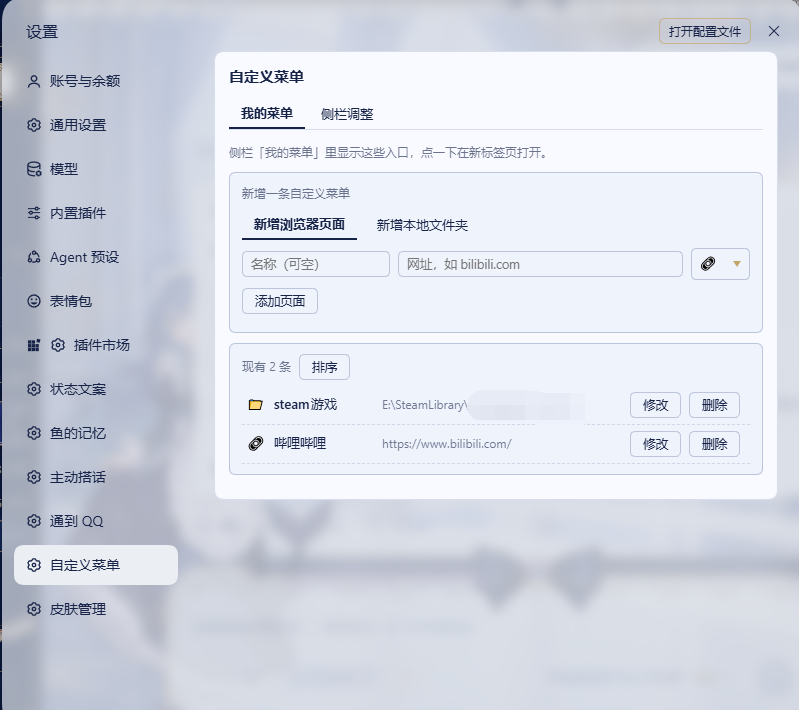
自定义菜单 / Custom entries
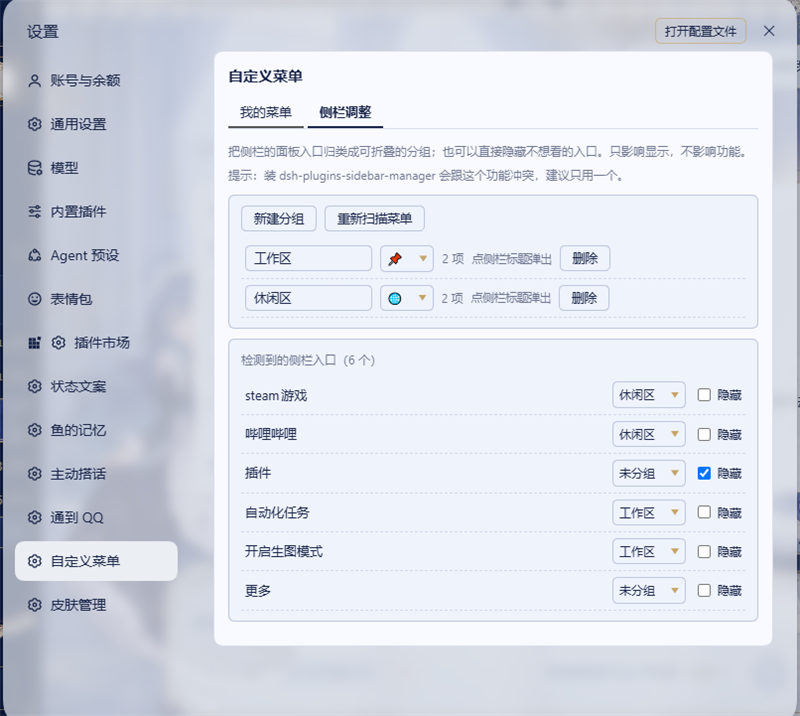
侧栏调整 / Sidebar adjustment
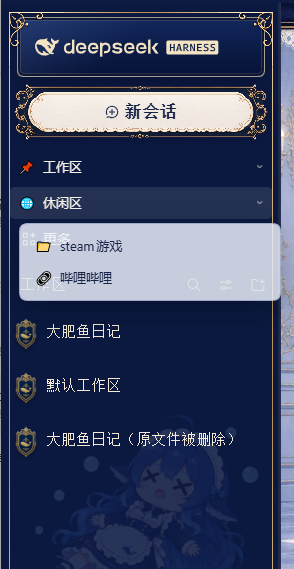
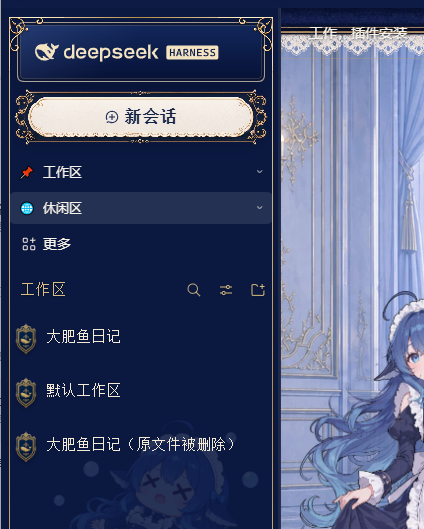
分组浮层与整理后的侧栏 / Group popover and the organized sidebar
Features / 功能
1. 本地文件夹直达 / Local folder shortcuts
把任意目录钉进侧栏,点一下就弹出系统文件管理器。
Pin any directory to the sidebar; clicking it opens your file manager at that path.
- 支持
D:\照片、D:/work、\\nas\share\项目这类绝对路径(UNC 也可以) - Windows 用
explorer.exe,macOS 用open,Linux 用xdg-open - 路径不存在时不会静默失败,会在条目上给出提示
- 新建条目默认就是文件夹模式,图标默认 📁,改地址不用改图标
2. 网页入口 / Web shortcuts
https://… 在新标签页打开。地址栏会被限宽,长链接不会把侧栏撑开。
https://… opens in a new tab. Long URLs are truncated in the row, so they cannot stretch the sidebar.
3. 每个条目都能就地改 / Edit in place
名称、地址、图标随时改,不用删了重建。图标可以直接填 emoji 或图片 URL。
Name, address and icon are editable inline after creation. The icon accepts an emoji or an image URL.
4. 拖动排序 / Drag to reorder
点「排序」进入拖动模式,抓住 ⠿ 直接拖,松手即生效;再点一下退出。
Toggle「排序」, drag by the ⠿ handle, and the new order is saved on drop.
5. 分组自带菜单 / Group built-in entries
把自带菜单项归进可折叠的分组,分组可以自定义名称和图标;点分组弹出浮层列出组内条目(行为和自带的「更多」一致)。
Group built-in entries under a custom name and icon; clicking a group opens a popover listing its entries.
6. 隐藏不用的入口 / Hide entries
单独隐藏用不上的菜单项,只影响显示,功能照旧可达。
Hide individual entries you never use. Hidden entries stay functional and reachable elsewhere.
7. 「更多」固定最后 / “More” stays last
自带的「更多」入口始终排在侧栏末尾,分组标题按顺序插在它前面。
The built-in “More” row is always pinned to the end of the column.
Install / 安装
dsh plugin --profile desktop add github:tan90tan90/dsh-custom-menu
装完重启 DSH,然后在 设置 → 自定义菜单 里加条目。
After installing, restart DSH, then open Settings → 自定义菜单.
How it works / 实现说明
-
设置页通过宿主的
settings.section槽注册,客户端用官方的window.__ModuleLoader__.load约定加载。 -
侧栏行是「装饰」出来的,不是搬动机有的 React 节点:插件把自己的行作为面板列的直接子节点追加,隐藏用
display: none,排序在自己插入的节点之间用 DOM 顺序完成(该列不是 flex 容器,CSSorder无效)。MutationObserver在宿主重渲染后补写,并带内容签名与自身写入的抑制标记,避免反复插入。 -
打开本地文件夹走宿主路由
POST /dsh-custom-menu/open:只接受绝对路径(^[A-Za-z]:[\\/]或 UNC)且必须是已存在的目录,参数以数组传递、不经过 shell。Windows 上explorer.exe成功时也可能返回退出码 1,所以只判定进程是否启动,不看退出码。请求需要一次性令牌,详见下面的安全一节。 -
Opening a local folder goes through a host route. Only absolute paths are accepted, the target must be an existing directory, and arguments are passed as an array (no shell interpolation). On Windows
explorer.execan return exit code 1 even on success, so the spawn is treated as fire-and-forget. Requests need a one-time token — see Security.
Security / 安全
从 v0.9.2 起,那个「打开文件夹」的宿主路由不再是裸接口。它现在要过四道门:
Since v0.9.2 the open-folder host route is no longer a bare endpoint. A request must clear four gates:
| 约束 | Why | |
|---|---|---|
| 1 | 一次性令牌:GET /dsh-custom-menu/token 领取,X-CM-Token 头带上,用一次即失效(60 秒过期) | 跨站页面读不到同源响应正文,也就伪造不出请求 |
| 2 | 来源校验:Sec-Fetch-Site: cross-site 直接 403;Origin 若是 http(s) 源,必须与 Host 一致 | 挡住「浏览器里随便打开一个网页就能调用本机接口」 |
| 3 | Content-Type: application/json | 跨站表单提交发不出这个类型,只能走被 CORS 拦下的 fetch |
| 4 | 只允许目录(statSync().isDirectory()),文件一律拒绝 | 堵掉把本地已存在的可执行文件交给默认程序打开这条路 |
其余同上:绝对路径白名单、路径存在性检查、参数数组传参不经过 shell、响应带 X-Content-Type-Options: nosniff、不留 CORS 头。
回归测试不需要启动 DSH:node test/smoke-route.mjs(10 个用例,覆盖上面四道门 + 一次令牌一次的语义)。
Regression test without booting DSH: node test/smoke-route.mjs — 10 cases covering the four gates above plus single-use token semantics.
所有配置都存在浏览器 localStorage,插件不往 DSH 的 profile 文件里写任何东西。Config lives in localStorage; nothing is written into DSH profile files.
Requirements
- DSH desktop with a web-based client
- Windows / macOS / Linux
Known limitations
- 侧栏行按标签定位,DSH 大改侧栏结构时可能需要调整
lib/client.js里的KNOWN_LABELS。 - 只支持
http(s)链接和绝对本地路径,不支持自定义 URI scheme。 - 隐藏只是视觉隐藏,被隐藏的入口仍然可以经由它自己的菜单位置访问。
- 只能打开文件夹,不能打开文件:宿主侧只放行目录,这是刻意的安全取舍——把任意文件交给默认程序打开,等于给 web 页面一条执行本机程序的路径。
- 不做内嵌浏览:点开就是交给外部浏览器或系统文件管理器。
Scope / 边界
这个插件不是一个完整的侧栏菜单编辑器。如果你要的是顶栏一起管、按钮行/列表布局、行数上限、溢出收纳、Agent 可调接口,市场里有更完整的实现:
- 1499501762/dsh-sidebar-manager — 侧栏 + 顶栏菜单编辑器,排序/分组/图标/隐藏/拖拽 +
window.__dshSidebarManager - devome/dsh-panel-layout — 面板菜单布局、按钮行行数、拖动排序、溢出收进「更多」
- @qzsy/dsh-custom-pages — 侧栏自定义页,网页内嵌在面板里打开,支持登录站点转右侧浏览器
本插件的定位只有一条:把入口钉上去,点一下就打开,包括本地文件夹。
This plugin is deliberately scoped: pin entries, open them on click — local folders included. For full sidebar/top-bar menu editing, use the plugins above.
Credits / 致谢
The sidebar grouping approach borrows its idea from HighToward/dsh-plugins-sidebar-manager: rather than moving nodes that React owns, decorate the rendered column (self-inserted group titles, display: none for hidden rows). No code was copied; the implementation here is written independently.
侧栏分组的实现思路借鉴了 HighToward/dsh-plugins-sidebar-manager:不移动 React 拥有的节点,改用 DOM 装饰(自插标题行、display:none)实现分组与隐藏。未复制其代码,本插件为独立实现。
The settings-page registration follows the settings.section slot usage documented by Yuuyuko-uu/dsh-speak-up and DSH's own window.__ModuleLoader__.load client-side convention.
设置页的注册方式参考了 Yuuyuko-uu/dsh-speak-up 的 settings.section 用法,以及 DSH 官方的 window.__ModuleLoader__.load 客户端加载约定。
License
MIT
Related plugins
dsh-web (dsh-task-board)
zhu1090093659/dsh-web
dsh-web (dsh-web-all)
zhu1090093659/dsh-web
dsh-TUI
ccch1mneyyy/dsh-tui
dsh-web-ui (dsh-task-board)
zhu1090093659/dsh-web-ui