dsh-musage
thedeergod666/dsh-musage
Shows coding-plan usage and balance for 5 AI providers (MiniMax, DeepSeek, Kimi, OpenRouter, Zhipu) beside the composer input, switching with the selected model and reusing API keys configured in DSH model settings.
Install
dsh plugin --profile web add github:thedeergod666/dsh-musageREADME
dsh-musage
DSH (DeepSeek Harness) 版的 Musage — 在 DSH composer 工具栏里实时显示 6 家 AI 套餐 provider 的用量余额, 跟着当前模型自动切换.







Screenshots
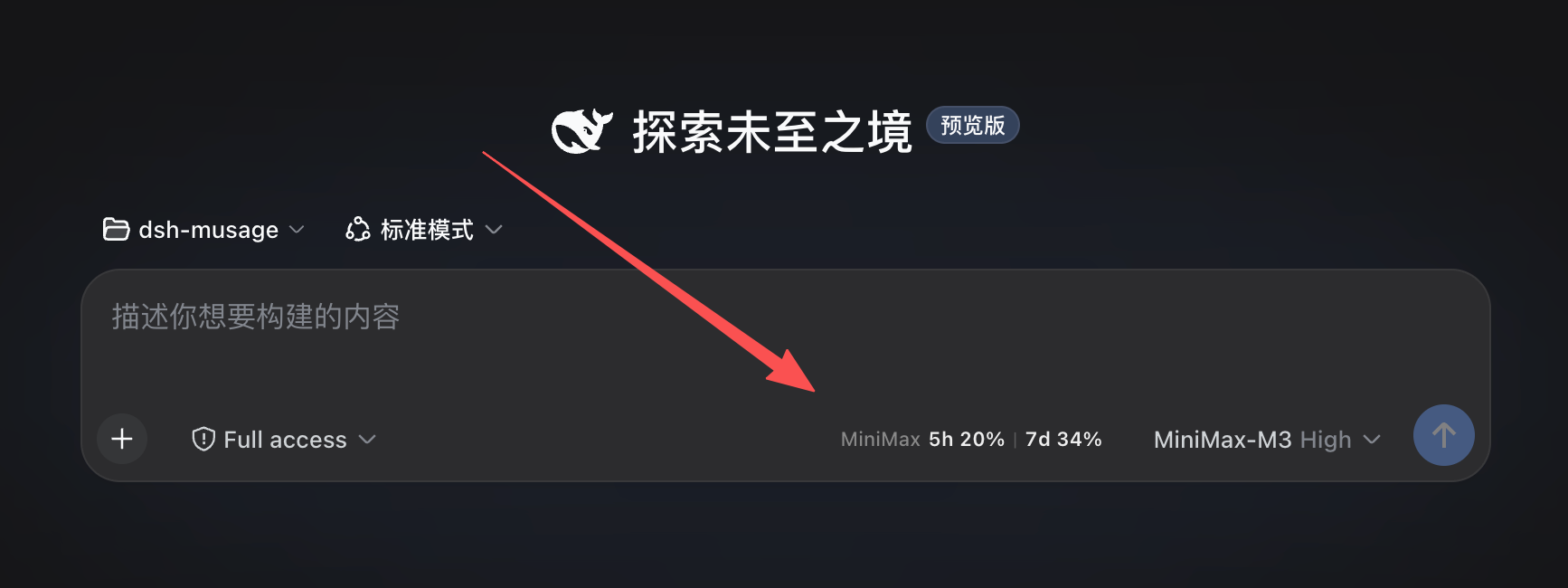
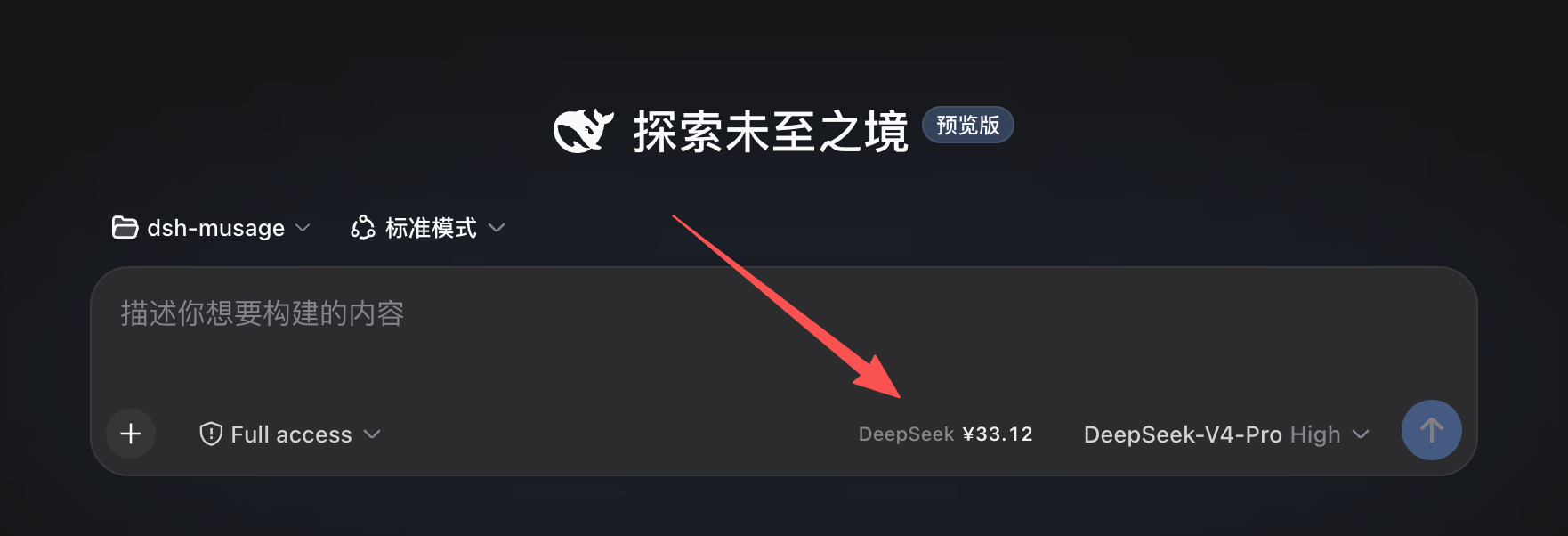
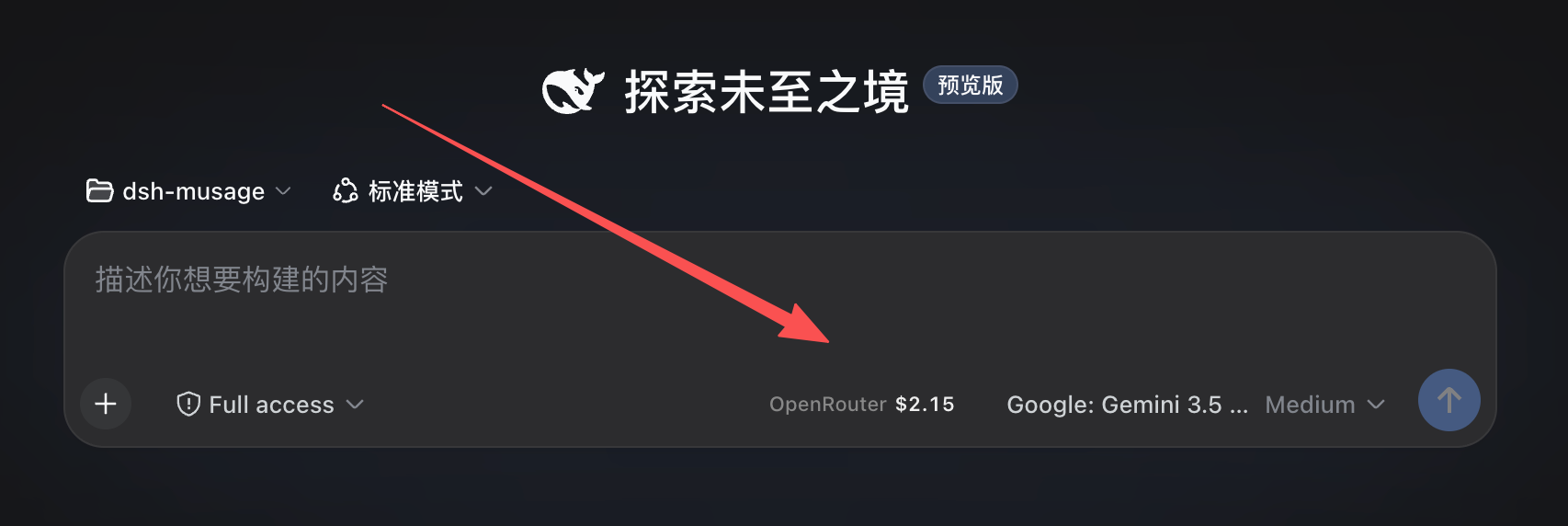
这是什么
Musage 是我 (Thedeergod666) 维护的 Tauri 桌面应用, 核心功能是实时跨 14 个 AI 套餐 provider 监控用量 (悬浮窗 + 系统托盘). 桌面形态完整有效, 但跟 DSH 这类 AI harness 生态割裂, 用户切到 DSH 工作时看不到用量.
dsh-musage 把 Musage 的核心能力搬进 DSH 浏览器页面里:
- ✅ 6 个 provider 当前实装: MiniMax · DeepSeek · Kimi · OpenRouter · 智谱 GLM (zai-coding-cn) · 阿里云百炼 Coding Plan (dashscope)
- ✅ 跟着模型自动切换 — 切到 minimax-cn 显示套餐用量, 切到 deepseek 显示余额, 切到 zai-coding-cn 显示智谱套餐, … 全自动
- ✅ 复用 DSH 已配 API Key — 在 DSH 模型设置里配过 minimax / deepseek / openrouter / zhipu 的话, plugin 立刻拿到, 不需重复填
- ✅ 5h + 周 双窗口套餐 (minimax / kimi / zhipu), 5h/周/月 三窗口 (百炼 Coding Plan) 或 余额 (deepseek / openrouter) 自动选合适显示
- ✅ 零侵入 — 注册到
conversation.input.rightslot (紧邻 model select 左侧), 不挡对话/输入 - ✅ 失败静默 — 拉数据失败只显示
Provider ⚠, hover 看具体错误, 不刷屏
演示
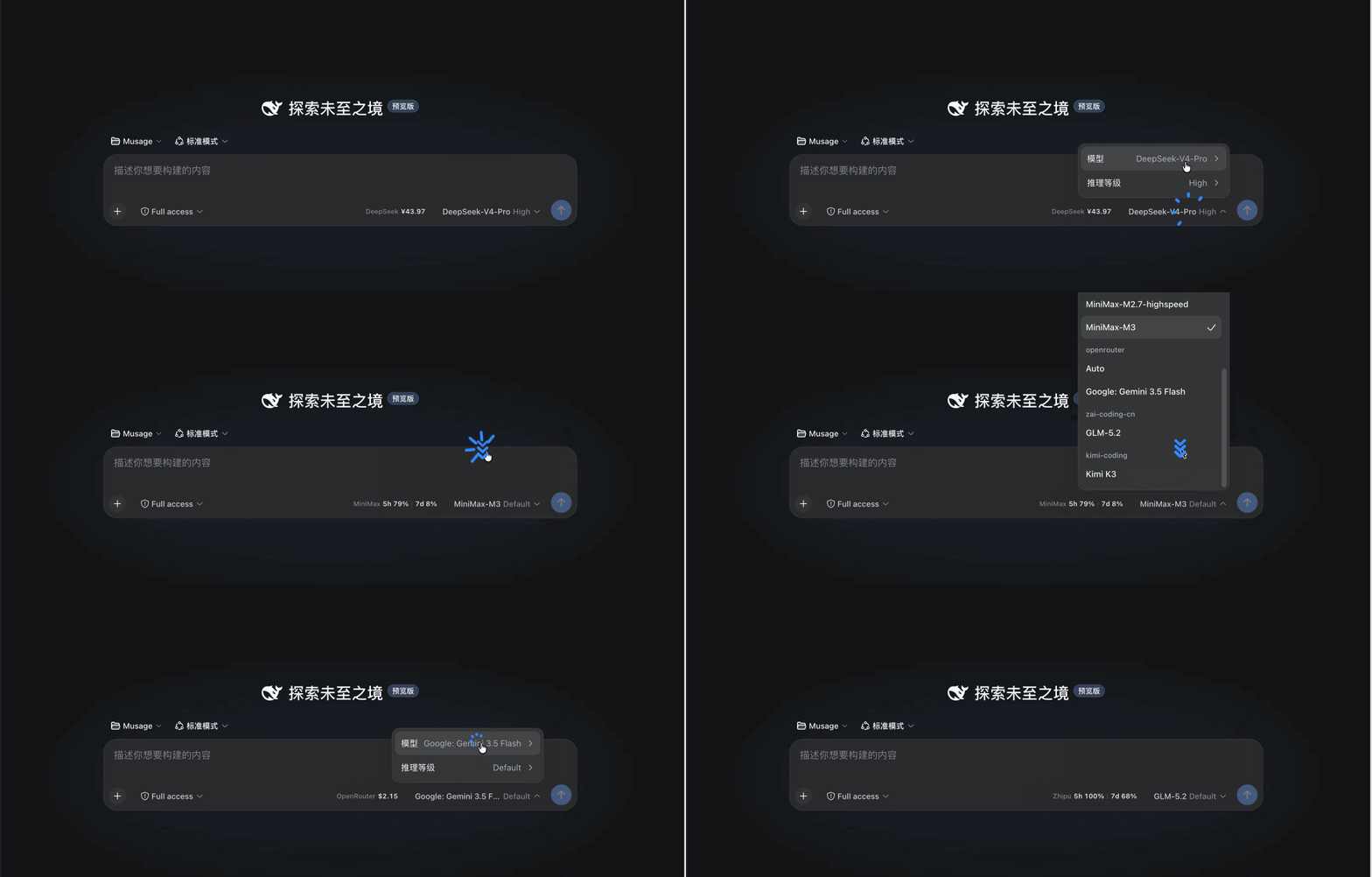
(GIF: minimax 5h/周 双窗口 → 切到 deepseek 自动显示余额 → 切到 zai-coding-cn 显示智谱套餐. 中间切换无刷新无 loading 态.)
支持的 Provider
| Provider (DSH route id) | 显示 | 端点 | Schema 来源 |
|---|---|---|---|
minimax / minimax-cn / minimax-en | MiniMax 5h X% | 7d Y% | api.minimaxi.com/coding_plan/remains | Musage minimax.rs (ccswitch 逆向, 2026-06-01 双 schema) |
deepseek / deepseek-official | DeepSeek ¥X.XX (CNY) / $X.XX (USD) | api.deepseek.com/user/balance | Musage deepseek.rs |
kimi / kimi-coding | Kimi 5h X% | 7d Y% | api.kimi.com/coding/v1/usages | Musage kimi.rs |
openrouter | OpenRouter $X.XX | openrouter.ai/api/v1/credits | Musage openrouter.rs |
zhipu / zai-coding-cn | Zhipu 5h X% | 7d Y% | open.bigmodel.cn/api/monitor/usage/quota/limit | Musage zhipu.rs |
dashscope / bailian / qwen / coding-plan / ... | Bailian 5h X% | Wk Y% | Mo Z% (三窗口) | bailian.console.aliyun.com (国内) → modelstudio.console.alibabacloud.com (国际回退) · queryCodingPlanInstanceInfoV2 | 控制台 API (第三方实现验证) |
显示根据 state.currency 字段自动选 ¥ / $ 符号, 同一份 plugin 国内/海外账号都直接显示对.
百炼 Coding Plan 的 key 说明
阿里云百炼 Coding Plan 用的是专用 API Key (sk-sp- 开头) 和专用 Base URL (coding.dashscope.aliyuncs.com), 与按量计费的 sk- key / dashscope.aliyuncs.com 不互通. 在 DSH 模型设置里添加 provider 时 (route id 任意, dashscope / bailian / qwen / coding-plan 都能识别), 请填 Coding Plan 专用 key —— 用量查询走百炼控制台 API, 国内宿主不可用时自动回退国际宿主. 套餐额度按模型调用次数计 (Pro: 5h 6000 / 周 45000 / 月 90000).
跟 Musage 桌面端的关系
| 维度 | Musage (桌面) | dsh-musage (本插件) |
|---|---|---|
| 形态 | 悬浮窗 + 系统托盘 + 系统启动 | DSH 页面内一行 |
| 覆盖 provider | 14 个内置 (minimax / deepseek / xiaomi / tavily / zenmux / openrouter / kimi / zhipu / stepfun / siliconflow / claude_official / anysearch / volcengine_ark / tokendance) + 自定义 New API 中转站 | 6 个 (PoC 已覆盖 A 档最常见的 6 家) |
| 鉴权 | API Key + Cookie + WebView 一键登录 | 复用 DSH 模型设置已配 API Key (Bearer, 大多数) |
| 鉴权凭证来源 | 本地 keys.json (Unix 0600, 原子写) | DSH credentials Service (.credentials.yaml) |
| 跨屏置顶 / 系统托盘 | ✅ 私有 API | ❌ DSH 自身无此 slot |
| WebView 一键登录 | ✅ (xiaomi / anysearch / stepfun / kimi 总套餐) | ❌ DSH 无 WebView 创建接口 |
| 发布渠道 | GitHub Releases (dmg / nsis / AppImage / deb / rpm) | dsh plugin add / npm / dsh-market (bundle 形态) |
核心结论: dsh-musage 是 Musage 在 DSH 内的伴侣形态, 不是替代品. 完整功能 (14 provider + 悬浮窗 + 托盘 + 一键登录) 仍然在 Musage 桌面端. 本插件先做"DSH 内能用"路径, 6 个最常见 provider 已覆盖.
为什么有这个项目: 我用 DSH 写代码, 想一边写一边看套餐还剩多少, 不可能再开一个 Musage 桌面 app 切来切去. 直接嵌在 DSH composer 旁边最自然. 这也是给 Musage 桌面端带量 — 体验到 DSH 端轻量用法的用户, 可能愿意装完整桌面 app 拿 14 provider + 系统托盘 + 跨屏置顶.
安装 / 部署
v0.1.0 起为可安装 bundle, 与 dsh-market 装的插件同一机制. Web 和桌面端都能装, 但入口不同.
DSH 桌面端 (DeepSeek Harness.app)
桌面端是 DSH 官方产品, 内置了图形插件管理页:
- 侧边栏点 插件 (在「新会话」下面、「工作区」上面那个风车图标)
- 点 + 添加插件, 粘贴下面这行, 回车
- 安装 → 立即启用
github:Thedeergod666/dsh-musage
装完不用重启 — 桌面端 profile 默认开着 HMR, patch 改动会自动重载. 刷一下页面, 回到会话看 composer 工具栏.
⚠️ 不要去 设置 → 内置插件. 那个分区是只读清单, 列的是"本部署随附"的官方插件, 装不了也搜不到社区插件 — 装插件只有侧边栏那个页面.
⚠️ 桌面端 profile 被应用独占,
dsh plugin --profile desktop add ...会被 CLI 拒绝 (error: profile "desktop" is managed exclusively by the Electron application). 桌面端只能通过上面那个界面装;--profile web仍然是 CLI 可管的普通 profile.
DSH Web (dsh web)
一条命令安装:
dsh plugin --profile web add github:Thedeergod666/dsh-musage
装完重启 dsh web. 收录 awesome-dsh-plugin 注册表后, 也可在 设置 → Plugin Market 一键安装/更新.
两种环境都要做的
- 在 DSH 模型设置里配置好你要监控的 provider (minimax-cn / deepseek / zhipu 等)
- 切到对应 model, composer 工具栏里出现
[Provider 5h X% | 7d Y%]或[Provider $X.XX]
本地开发 / 升级 / 故障排查见 deploy.md.
桌面端额外注意: 桌面端首次初始化只带
minimax-cn一个 provider. 切到其它 provider 的模型前, 要先把 provider 声明写进 profile patch —— 见deploy.md的「桌面端模型 provider 迁移`. 光有 API Key 不会自动出现 provider 条目.
前置依赖
- DSH 部署里需要
subprocess+credentials+timer三个 Service (DSH ship 自带, 不需额外安装) - DSH 模型设置里配置好对应 provider 的 API Key (DSH 客户端 → 设置 → 模型 → 添加 provider, 填 API Key, 选 DSH 不一定 ship 的 provider 比如
minimax-cn/kimi-coding时手动输 provider id)
架构
host 半边 dsh/index.js (ESM: quota fetch + 缓存 + GET /musage/quota 路由), client 半边 dsh/client.js (lazy-CJS: composer slot + 模型订阅). 参见 docs/architecture.md + docs/cordis-pitfalls.md (15 个踩坑沉淀).
License
MIT, Copyright (c) 2026 Thedeergod666.
Related plugins
DeepSeek-Balance-Whale-Widget
meteornox/deepseek-balance-whale-widget
dsh-context
bowenliang123/dsh-context
dsh-cost-meter
han-1413141/dsh-cost-meter
dsh-damage-pulse
wssfk12138/dsh-damage-pulse