session-kanban
thunderunruly/session-kanban
Session board in the left sidebar: every chat session's current work, todos and progress, with a searchable overview heatmap and one-click navigation back to the session.
Install
dsh plugin --profile web add github:thunderunruly/session-kanbanREADME
DSH Session Kanban




English | 简体中文
Documentation Wiki · Releases · Issues
A session kanban board plugin for DeepSeek Harness (DSH). It adds a board to the DSH Web UI sidebar where every chat session's current work, todo progress, running state and recent activity are visible at a glance — click any card to jump straight back into that session.
Screenshots
Overview page.
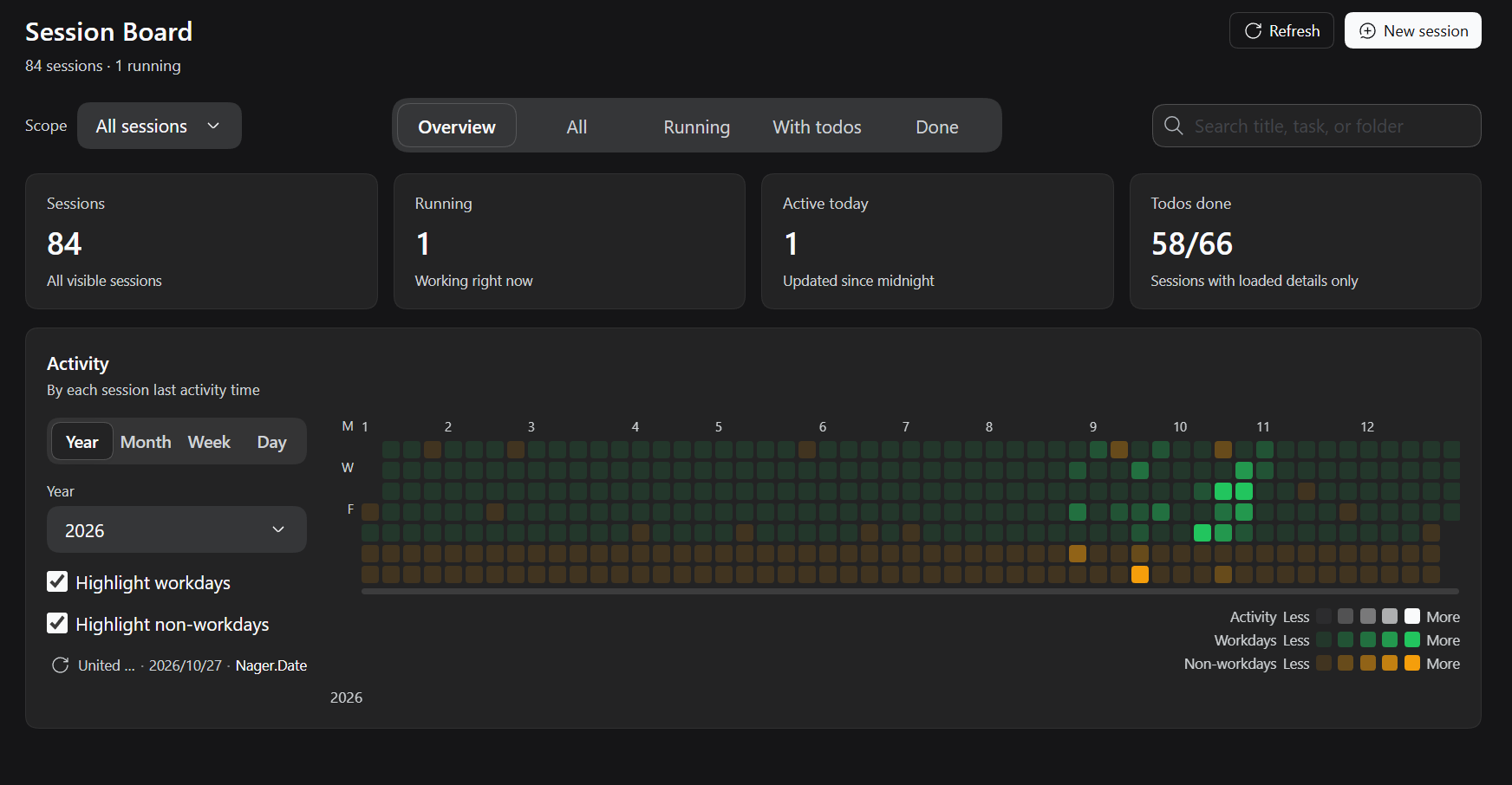
Table of contents
- Features
- Requirements
- Installation
- Usage
- Configuration
- How it works
- Workday calendar data sources
- Privacy
- Development
- Project structure
- Limitations
- License
Features
- Sidebar entry — a panel icon next to the built-in panels opens the kanban board.
- Overview home — session totals, running count, todo completion and a GitHub-style activity heatmap with year / month / week / day scales, plus workday/non-workday highlighting for the selected country.
- Session cards — current request and latest reply, todo progress bar, updated time, working directory, running state; click a card (or press Enter/Space) to open the session.
- Quick actions — pin / unpin, inline rename, fork, copy Session ID, archive (with confirmation), refresh and new session. Sessions owned by subagent routing cannot be renamed: the action is disabled and hovering it explains why. Archiving the Session currently held by the main view reopens the board afterwards instead of leaving the user on the new-session home.
- Tabs and search — Overview / All / Running / With-todos / Completed, plus a search box that filters both the board and the overview aggregates. The three content tabs partition every visible session: Completed is the catch-all for sessions with no unfinished todos (fully done, no todo list, or details not loaded yet), so nothing is left only in All.
- Session relationships — subagent and team-member child sessions show a compact row naming the relation and linking to their parent; parent cards count the child sessions visible in the current view. One family shares one accent colour (parent and children have the same tinted left edge and relation dots), so scattered masonry cards can be matched to their parent regardless of order. Forked sessions are independent top-level sessions (the source is only fork provenance), so they are neither shown as children nor counted; an archived parent keeps its title with an “archived” marker instead of a dead “not visible” link.
- Filters — the Agent Team scope (when teams exist) and a Workspace filter (defaults to All workspaces, hidden when the host has only one Workspace, persisted across reloads) combine with the tabs and search. Sessions the host does not account to a Workspace directly — subagent, team member and fork children — inherit their parent Session's Workspace, so they stay visible under that filter.
- Adaptive dropdowns — selects reuse the host
Menuprimitive, measure the free space beside the trigger and open above or below it, with long lists scrolling inside the card. - Native look — card hover actions reuse the native Session-row action geometry and the
native
Tooltipbubble; settings rows match the built-in General rows, so light/dark theme changes apply automatically. - Scalable rendering — masonry columns, automatic pagination when scrolling near the bottom and an incremental detail pump for cold sessions. Cards are laid out at their natural height, so the last rows are never clipped.
Requirements
- DeepSeek Harness (DSH) with the Web UI and plugin support (developed and tested
against DSH
0.2.1-rc.3, desktop profile). - The package is ESM (
"type": "module") and loadsreactfrom the running DSH host, so no runtime dependency is bundled. node+pnpmare only needed for the offline tests.
Installation
Install from npm into a DSH profile:
dsh plugin --profile web add dsh-session-kanban
Then reload the DSH window once so the client bundle enters the boot graph. After that, client-only changes hot-reload in place.
From a local checkout
Use the DSH plugin manager:
install_bundle <absolute path to this folder>
Or add the folder as a linked dependency and let cordis.patch.yml insert the plugin row
into the profile:
"dependencies": {
  "dsh-session-kanban": "link:F:/path/to/session-kanban"
}
Reload the window once after installation.
Usage
- Open the board from the Session Kanban panel icon in the left sidebar.
- Overview shows the totals, todo completion and the activity heatmap; switch the heatmap scale with Year / Month / Week / Day and, in Settings, the workday calendar country.
- Switch to All for the masonry card list; each card shows the session's current work, latest reply, todo list, working directory and updated time.
- Click a card to jump back into that session. Hover the card footer for pin, rename, fork, copy Session ID and archive actions.
- Narrow the list with the tab filters, the Agent Team scope, the Workspace filter and the search box — all filters combine.
- The heatmap sidebar keeps a compact status row: refresh icon · country · last refresh
date (
YYYY/MM/DD) · data source, e.g.↻ China · 2026/10/26 · Holiday CN. Hover it for the full status and workday rule; click the refresh icon to update immediately.
Configuration
Settings are registered in DSH → Settings → General:
| Setting | Default | Options | Effect |
|---|---|---|---|
| Workday calendar | China | 24 countries | Source of the workday/non-workday shading in the heatmap |
| Auto-update calendar | 1 month | 1 day / 1 week / 1 month / 3 months / 6 months / 1 year | How often the browser refetches the holiday data |
Board preferences (tab, search scope, workspace filter, heatmap scale, highlights) are
stored in localStorage under dsh.session-kanban.* keys and restored on reload.
How it works
Two halves ship in one bundle:
index.js— host half. Registers thesessionKanbansession projection, foldinguser/message,assistant/message,turn/start,turn/endandtodo/writeinto{ request, reply, turn, endKind, todos, done, inProgress, total }, so cards render without replaying session logs.client.js— client half. Registers the sidebar entry (sidebar.panellist), the board panel (main) and the General-settings rows (settings.general.item), then renders the board with React based on the hostMenu/Tooltip/Buttonprimitives.cordis.patch.yml— bundle patch that inserts the plugin row into the profile.
Workday calendar data sources
Holiday data is fetched directly by the browser from public, CORS-enabled endpoints and
cached in localStorage per country. A dedicated source that is unreachable falls back to
Nager.Date per year, and the source name shown in the UI follows the data actually in use.
| Region | Source | Notes |
|---|---|---|
| China | holiday-cn mirrors (jsDelivr, then raw.githubusercontent.com) | Holidays, make-up workdays and adjusted weekends |
| Japan | holiday-jp | Cabinet Office holidays, substitute holidays and citizens' holidays |
| South Korea | holidays-kr | Includes substitute holidays |
| Russia | isdayoff.ru | Production calendar with transferred working days |
| Every other country | date.nager.at | Public holidays plus the country's local weekend rule |
An embedded China snapshot for 2023–2026 keeps the board usable offline.
Privacy
- Requests are made by the browser only, to the public endpoints listed above.
- Results are cached in
localStorage; no credentials, session contents or personal data are sent. - The plugin adds no telemetry.
Development
Offline verification, no browser required:
cd tests
pnpm install
node fold-test.mjs      # host projection fold
node render-test.mjs    # client SSR render (zh + en, heatmap, tabs, scope, pagination)
react / react-dom are installed only for the SSR test; the browser bundle requires the
harness-provided react module at runtime. There is no build step — client.js is loaded
as a single-file module bundle.
Project structure
client.js           # browser half: sidebar entry, board panel, settings rows
index.js            # host half: sessionKanban projection
cordis.patch.yml    # bundle patch inserting the plugin row
package.json        # bundle manifest (dsh.bundle / dsh.client)
locale/             # panel title and description dictionaries
icon.svg            # sidebar icon
docs/screenshots/   # README screenshots
tests/              # offline fold / SSR tests
Limitations
- Holiday data is national-level only. Countries whose states/provinces differ (Germany, Canada, Australia, Spain, Switzerland, …) would need a subdivision selector, which is not implemented yet.
- Nager.Date currently has no dataset for the UAE, Saudi Arabia, Israel, Thailand, Malaysia or India, so those calendars fall back to the weekend rule only until a dedicated source is added.
- This is a local/experimental plugin, not an official DeepSeek product.
License
MIT © Thunderunruly
Related plugins
dsh-web (dsh-task-board)
zhu1090093659/dsh-web
dsh-web (dsh-web-all)
zhu1090093659/dsh-web
dsh-web-ui (dsh-task-board)
zhu1090093659/dsh-web-ui
dsh-web-ui (dsh-web-ui-all)
zhu1090093659/dsh-web-ui