dsh-novel-studio
tonglingming-hue/dsh-novel-studio
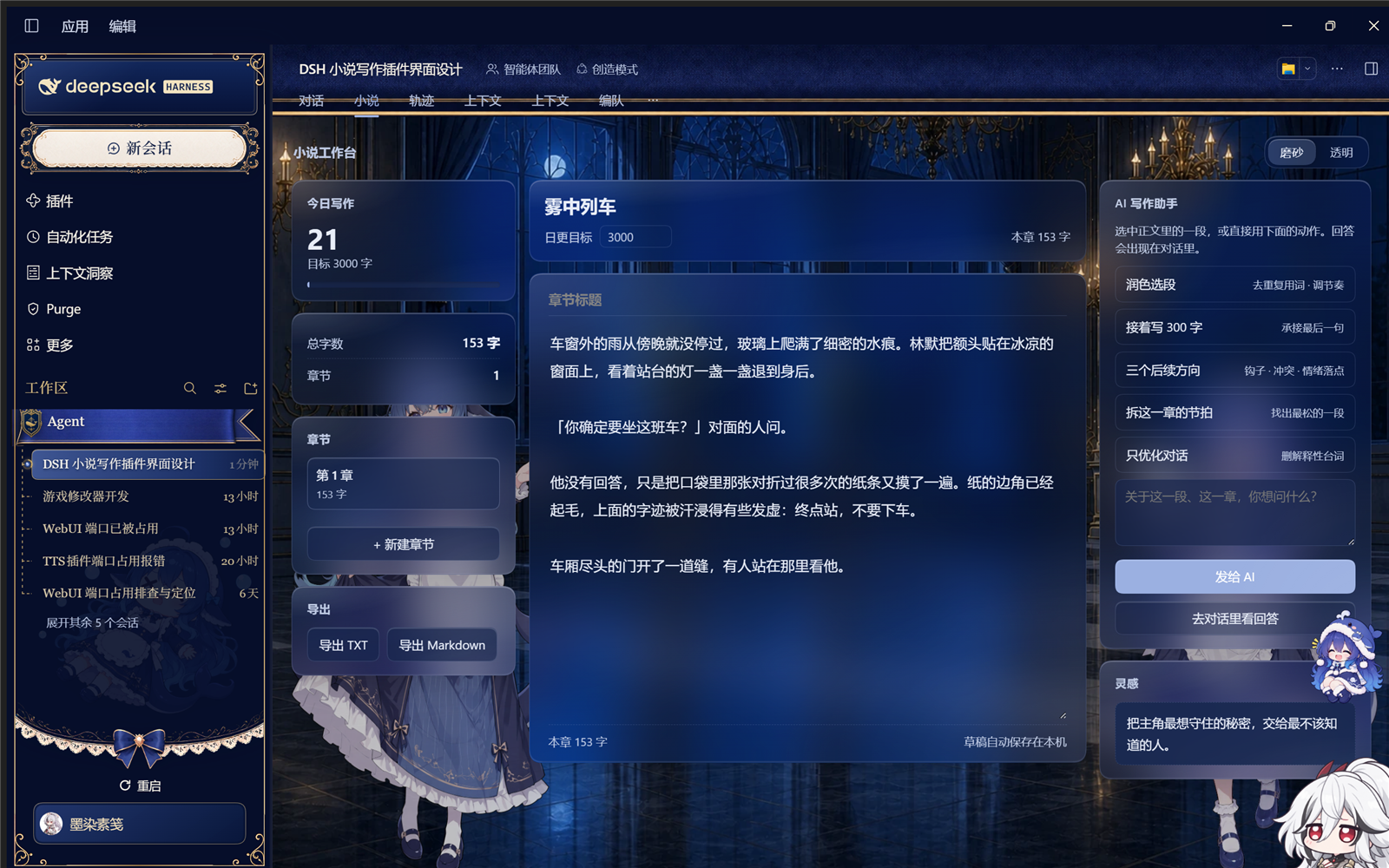
Novel writing workspace view with live word counts, chapter cards, frosted-glass panels, and selection-to-AI polish, continuation, and story-direction prompts.
Install
dsh plugin --profile web add github:tonglingming-hue/dsh-novel-studioREADME
dsh-novel-studio
A novel-writing workspace for DeepSeek Harness. It adds a Novel view tab to every session: three frosted-glass card columns, live word counts, chapter cards, and selection-to-AI actions — polish, continue, three story directions, or ask anything about the passage you selected.
Install
dsh plugin add dsh-novel-studio
Or through the market: Plugins → Discover → Index sources → add https://cdn.jsdelivr.net/npm/dsh-plugin-catalog/index.json and search for novel studio.
Reload the page (or restart the desktop app) and the Novel tab appears next to the chat tab.
What you get
| Column | Contents |
|---|---|
| Left | Today's word count vs. daily goal, total count, chapter count, chapter list, export TXT / Markdown |
| Middle | Work title, goal, chapter title, editor, live "this chapter" counter in the footer |
| Right | Five AI actions, a question box, a random story-spark card |
Live counts — characters with all whitespace stripped; the editor, the left rail and the footer update on every keystroke. "Today" keeps a per-day baseline and resets itself at midnight.
Selection bar — select any passage and a bar floats above it:
132 selected · Polish · Continue · Directions · Ask
The first three fire immediately; Ask expands an inline input. With nothing selected, the right rail falls back to the text just before the caret.
How actions reach the chat — primarily through the session API (sessions.using(...).prompt([{type:'text',text}], 'queue')), so the prompt lands in the current conversation and the model answers there. If that path is unavailable the prompt is placed in the composer instead, with a visible note either way.
Material — cards, floating bar, inputs and buttons are semi-transparent frosted glass: backdrop-filter: blur() saturate() brightness(), a gradient fill and a specular edge. Every colour comes from host theme tokens (--dsw-alias-*), so the plugin follows any theme.
Data
Drafts live in localStorage under dsh-novel-studio:v1:<sessionId> — one manuscript per session. Saves are debounced at 400 ms and also flush on pagehide, beforeunload and unmount, so a reload never eats the last few seconds of typing. Export writes TXT or Markdown.
Compatibility
- Requires dsh
>=0.2.1-rc.1 - Client-only: no host data access, no network calls, no telemetry
中文说明
完整中文说明见 README.zh.md。
简单说:对话页多一个「小说」标签,三栏卡片写着写着就顺手了——字数实时跳、章节随便切、选中一段就能让 AI 润色/续写/给三个后续方向,或者就着你选的那句话提问。草稿按会话独立存在本机,刷新不丢。
License
MIT
Related plugins
dsh-web (dsh-task-board)
zhu1090093659/dsh-web
dsh-web (dsh-web-all)
zhu1090093659/dsh-web
dsh-TUI
ccch1mneyyy/dsh-tui
dsh-web-ui (dsh-task-board)
zhu1090093659/dsh-web-ui