dsh-agy-native
weijiafu14/dsh-agy-native
Native LlmAdapter for Google AI Pro and Ultra subscriptions over official agy acp --stdio: loopback Streamable-HTTP eager MCP tool bridge with 25ms parallel micro-batching, sticky worker pool with isolated title slot, ReplayEnvelope context sync, image input, and dsh-agy-native doctor diagnostics.
Install
dsh plugin --profile web add github:weijiafu14/dsh-agy-nativeREADME
dsh-agy-native
TOS-safe native DeepSeek Harness (dsh) LLM provider for Google AI Pro / Ultra subscriptions via the official Antigravity CLI (agy acp --stdio).
dsh-agy-native connects your existing Google AI Pro / Ultra subscription (agy login) into DeepSeek Harness as a first-class LlmAdapter — without third-party OAuth token scraping, without unofficial cloudcode-pa HTTP requests, and without brittle OpenAI proxy wrappers.
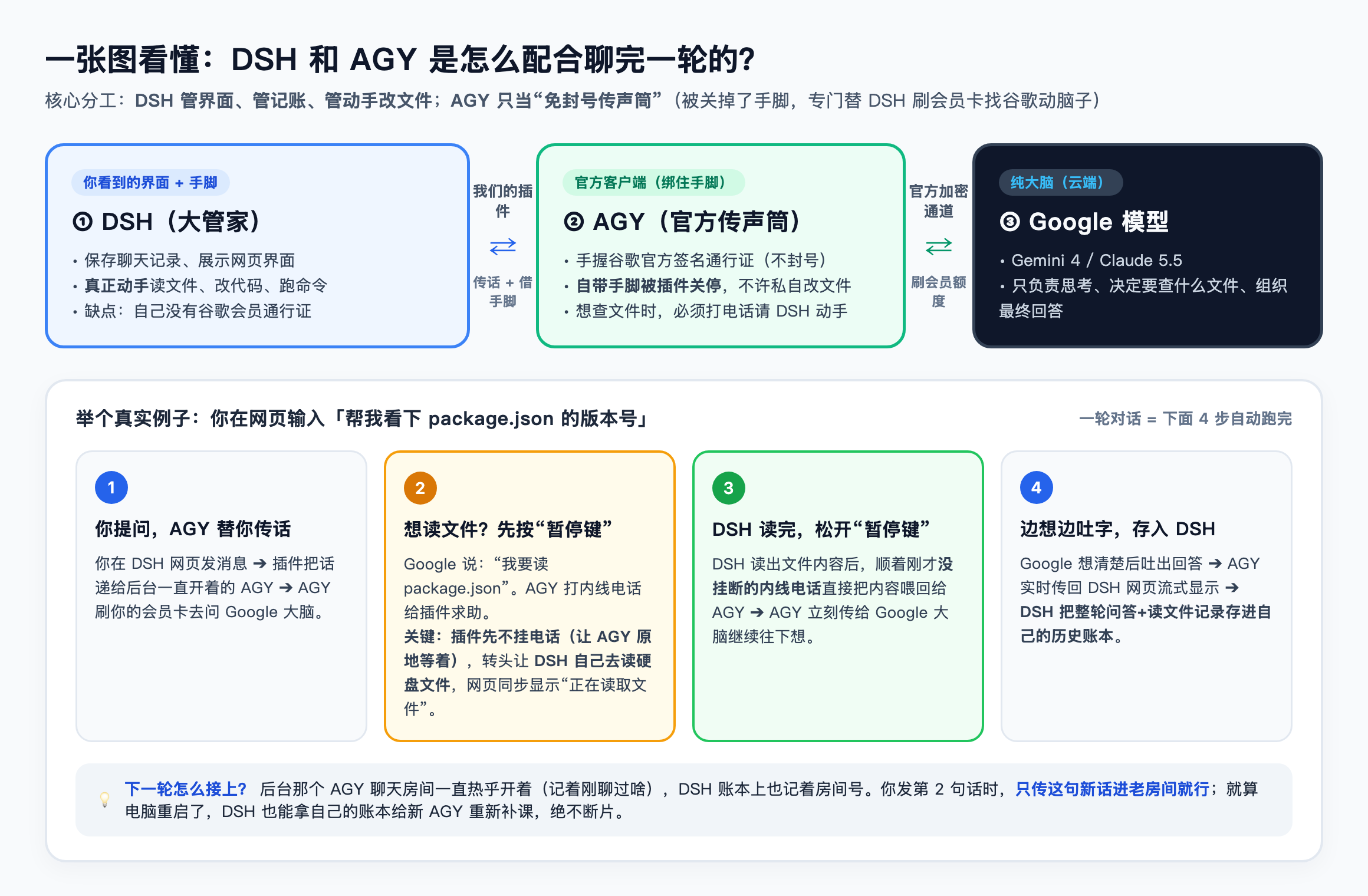
Why dsh-agy-native?
Third-party OAuth proxies that impersonate Antigravity clients directly against Google's internal v1internal endpoints face active prompt-fingerprint detection (429 RESOURCE_EXHAUSTED -> 403 TOS_VIOLATION two-strike account bans). Meanwhile, naive CLI wrappers (agy -p) hide tool execution from DeepSeek Harness, breaking DSH approvals, subagents, and context orchestrators.
dsh-agy-native solves both problems cleanly:
- 100% Official Binary Egress & Untouched
systemInstruction(Zero OAuth Scraping) — Every upstream model request is authenticated and sent exclusively by your locally installed, Google-signedagybinary over the Agent Client Protocol (agy acp --stdio). OfficialsystemInstructioncomponents remain 100% untouched (excludeDefaultComponentsis never set and third-party persona prompts are never appended intosystemInstruction), backed by an attempt-1 upstream429/403circuit breaker that immediately cancelsagy's internal 8-attempt retry loop to prevent retry storms. - First-Class Eager DSH Tools (
eagerMcpServers) — Mounts a loopback-only (127.0.0.1:0) Streamable-HTTP MCP bridge with per-session cryptographic tokens so DSH tools appear to Gemini/Claude as native first-class tools (nocall_mcp_toollazy-loading indirection or 2 KB output truncation). - Parallel Tool Micro-Batching & Argument Sanitization — Coalesces concurrent MCP
tools/callarrivals into unified DSHToolCallBlockbatches and stripsagy-injectedtoolSummaryfields to preserveadditionalProperties: falseschemas. - Warm ACP Worker Pool + Context-OS Resilience — Maintains warm conversation workers (no 10-minute idle kills), isolates auxiliary background requests (such as session title generation) onto a dedicated worker slot, and uses
ReplayEnvelopeturn anchors so dynamic context rewrites (e.g.,dsh-context-ossurfaceOp: 'replace') never break warm sessions. - Full Model & Thinking Level Support — Automatically discovers all models available to your subscription tier (
Gemini 4 Neonincludingxhigh,Gemini 4 Carbon,Gemini 4 Argon,Gemini 4 Hydrogenincludingxhigh,Gemini 3.8 Flash,Claude Opus 5.5,Claude Sonnet 5.5,Orchestrator, etc.), native multimodalImageBlockinputs, streamingreasoningchunks, and disjointTokenUsagemetrics.
Prerequisites
- Node.js
>= 22.13.0 - Official Antigravity CLI (
agy) installed (e.g.,~/.local/bin/agyor inPATH) and signed in:agy login - Verify your local environment (uses zero model tokens):
npx dsh-agy-native doctor
Installation in DeepSeek Harness
Install from npm
# Add to your Web GUI profile
dsh plugin --profile web add -w dsh-agy-native

# And/or add to your TUI / headless CLI profiles
dsh plugin --profile tui add -w dsh-agy-native
dsh plugin --profile headless add -w dsh-agy-native
Or install directly inside the DeepSeek Harness Web GUI → Settings → Plugins → search dsh-agy-native.
Install from a local build
git clone https://github.com/weijiafu14/dsh-agy-native.git
cd dsh-agy-native
npm install
npm test
npm pack
dsh plugin --profile web add -w ./dsh-agy-native-0.1.0.tgz
Once enabled, select Antigravity (Google AI Ultra / Pro) in the DSH model picker and choose both your model family (e.g., Gemini 4 Carbon, Gemini 4 Hydrogen) and reasoning effort (Low, Medium, High, XHigh).
Live Plugin Settings
dsh-agy-native exposes live-editable settings in DSH Settings (via @deepseek-ai/schemastery volatile fields):
| Option | Default | Description |
|---|---|---|
providerId | "agy-acp" | Provider route ID registered in ctx.llm. |
providerName | "Antigravity (AGY ACP)" | Display name in selectors (auto-enriched with subscription tier, e.g. Antigravity (Google AI Ultra)). |
agyPath | "" | Explicit path to agy; auto-discovered from AGY_BIN, ~/.local/bin/agy, PATH, or standard install paths when empty. |
poolSize | 2 | Maximum concurrent warm ACP conversation workers (1–8). |
idleMinutes | 60 | Minutes before recycling an idle worker (0 keeps workers warm indefinitely). |
batchWindowMs | 25 | Micro-batch window (ms) for coalescing concurrent MCP tool invocations. |
maxToolOutputBytes | 180000 | UTF-8 safe byte cap per tool output returned over the MCP bridge. |
resumeSessions | true | Attempt ACP session/load recovery across worker restarts before falling back to lossless structured transcript replay. |
forwardContextUpdates | true | Forward mutated developer context surfaces incrementally without tearing down warm ACP sessions. |
Architecture Overview
DeepSeek Harness (Agent Loop + Context OS + Tool Sandbox + Attachments)
   │
   │  ctx.llm.registerAdapter(['agy-acp'], AgyAcpAdapter)
   ▼
AgyWorkerPool (Sticky conversation slots + isolated #auxSlot for title/summary)
   │
   ├──► stdio (JSON-RPC 2.0 ACP) ──► Official `agy acp --stdio` binary ──► Google Cloud Code (Official Auth)
   │                                    • enabledTools: []
   │                                    • eagerMcpServers: ['dsh']
   │                                    • default prompt components preserved
   │
   └──◄ 127.0.0.1:0 Streamable HTTP MCP (`x-dsh-mcp-token`) ◄── Eager native tool calls (`mcp_dsh_*`)
        (Suspends MCP response -> yields ToolCallBlock to DSH -> resolves when DSH returns ToolResultMessage)
CLI Diagnostics & Testing
# Run unit, mock ACP, and real Cordis + LlmRuntime integration tests
npm test

# Run zero-token diagnostic check against your local official `agy` binary
npm run doctor

# Run opt-in end-to-end live test against your signed-in `agy` binary
npm run test:live
Publishing to dsh-plugin-catalog
- Publish to npm (
npm publish --access public). Ensure"dsh-plugin"remains inpackage.json#keywordsand"dsh.bundle.patch"points to./cordis.patch.yml. - The official DeepSeek Harness plugin crawler indexes public npm packages tagged with
dsh-plugin, or you can submit the package to awesome-dsh-plugin.com.
License
Related plugins
dsh-our-free-model
ebony-vinyl/dsh-our-free-model
dsh-routing-suite
yjh051108/dsh-routing-suite
dsh-connect-workbuddy
dingminhua/dsh-connect-workbuddy
dsh-workbuddy-connect
corrinehu/dsh-workbuddy-connect