dsh-composer-balance
weiw0923/dsh-composer-balance
One chip in the composer dock: the account balance plus what the current chat has cost, priced per turn at the tariff in force when each turn ran. Clicking it opens a 264px card in the panel style of the host, with refresh and settings buttons.
Install
dsh plugin --profile web add github:weiw0923/dsh-composer-balanceREADME

dsh-composer-balance



A minimal balance chip for DeepSeek Harness: one line in the composer dock showing the account balance and what the current session has cost, in the host's own visual language.
◔ 42% ¥ 14.55 │ 0.003
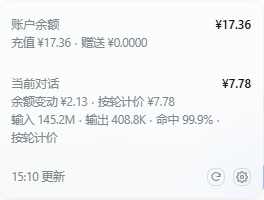
Clicking the chip opens a small card (264px, the same box the host's context card uses):
账户余额            ¥14.55
充值 ¥14.55 · 赠送 ¥0.00
───────────────────────────
当前会话            ¥0.003
输入 35.2K · 输出 800 · 命中 96.6%
───────────────────────────
12:34 更新            (↻) (⚙)
What it does
- Balance — read from DeepSeek's
/user/balanceon the host, cached forrefreshIntervalMs; the browser never holds the API key. - Current session spend — priced per settlement: the plugin registers its
own session projection (
composerBalanceCost) that folds each provider usage sample and charges it at the tariff in force at that turn's own timestamp (peak 09–12 / 14–18 CST weekdays costs double). A session that spans peak and off-peak therefore adds up correctly instead of being priced at whatever tariff happens to be live when the chip renders. Offline replay of a real session matched the account's own daily figure within a few percent. - One card — balance, session, last update, refresh and settings. Nothing else competes for attention.
- Native look and feel — the chip uses the same geometry as the context
meter beside it; the card uses
--dsw-specific-menu,--dsw-elevation-prominent,--dsw-radius-lgand a 12px/20px rhythm. Click to open,Escor an outside click to close. - Local settings — warning / critical thresholds (they only colour the ¥
icon) and the auto-refresh interval, stored in
localStorage.
Install
dsh plugin --profile web add dsh-composer-balance   # once published
# or from a checkout / local directory:
dsh plugin --profile web add /path/to/dsh-composer-balance
Then restart the harness (sudo systemctl restart dsh-web for a systemd
deployment) and reload the page.
If you also run another balance chip in the composer, disable one of them — each entry renders its own chip.
How the session figure is produced
余额变动  ¥2.83 · 按轮计价 ¥6.49          ← 两个来源都显示出来
输入 106.3M · 输出 344.7K · 命中 99.8% · 按轮计价
- 按轮计价 is the primary figure: every provider usage sample is priced at its own timestamp (peak/off-peak aware), summed over the session. It is the number the provider would bill for that session's tokens.
- 余额变动 is the accumulated drop of the account balance since the chip started watching. It is the ground truth for "what left my account", but it also includes any other activity on the same key.
- The displayed value never walks backwards: it is the max of the two and of the highest value already shown for that session.
Configuration
Write overrides into your profile's cordis.patch.yml:
- id: dsh-composer-balance
  config:
    apiKeyRef: DEEPSEEK_API_KEY       # credential reference holding the key
    baseUrl: https://api.deepseek.com # /user/balance is appended
    refreshIntervalMs: 120000         # how long one reading stays fresh
    warningThreshold: 10              # chip turns amber at or below this
    dangerThreshold: 5                # chip turns red at or below this
    defaultPrice: { cacheHit: 0.2, cacheMiss: 2, output: 8 }  # ¥ / 1M tokens
    modelPrices:                      # per-model overrides
      deepseek-flash: { cacheHit: 0.02, cacheMiss: 1, output: 2 }
defaultPrice / modelPrices ship with placeholder numbers — replace them with
the provider's current list price so the session estimate is meaningful. Tokens
are always shown; a missing price only greys out the amount.
Notes
- The route is read-only and never returns the API key; it sits behind the same fence as the rest of the web app.
- The entry renders last in the composer dock (
order: 1), so it lines up after the host's token/context meter. - The bundle is written against the host's public client seats: the
conversation.composer.dockslot, thetokenUsageprojection, and locale dictionaries.
Licence
MIT — see LICENSE. This is an independent implementation; it shares no code with other balance plugins.
Related plugins
DeepSeek-Balance-Whale-Widget
meteornox/deepseek-balance-whale-widget
dsh-context
bowenliang123/dsh-context
dsh-cost-meter
han-1413141/dsh-cost-meter
dsh-damage-pulse
wssfk12138/dsh-damage-pulse