dsh-restart
wellsoren/dsh-restart
Adds two rows to the DSH sidebar More menu: Reload plugins applies plugin updates and installs without a restart; Restart DSH restarts the DSH process and asks for a second click to confirm, preventing accidental restarts. For Linux systems.
Install
dsh plugin --profile web add github:wellsoren/dsh-restartREADME
dsh-restart


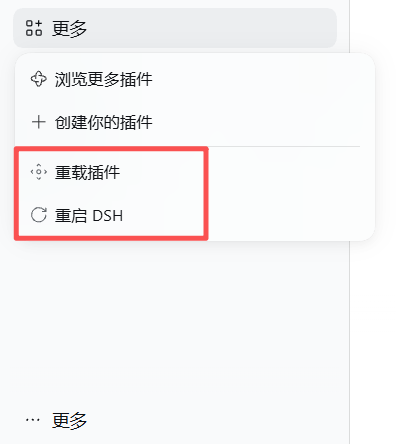
给 DeepSeek Harness(DSH)的侧边栏「更多」菜单加两行:
- 重载插件:改完插件或配置,一点就生效。连接不断、页面不刷新、会话不丢。
- 重启 DSH:干净退出,由 systemd 立刻拉起,页面自动重连。
本插件适用于 Linux 系统下的 DSH:重载随时可用;重启依赖 systemd,需要 DSH 由 systemd 托管并设置 Restart=always。
一句话:能重载就别重启,必须重启时重启得干净。
English summary at the end.
安装
要求:DSH 0.2.x(≥ 0.2.2-rc.5)。
- 打开 DSH 的 插件(Plugins)→ 添加插件(Add plugin)。
- 输入仓库地址
https://github.com/wellsoren/dsh-restart;也可以先git clone再选本地目录。 - 安装并启用后刷新一次页面,菜单才会出现。
- 让 systemd 在 DSH 退出后自动拉起(一次性)。执行一次
/restart:如果还没配好,插件会查出主管当前进程的 unit,把要执行的命令原样告诉你,复制执行即可(非 systemd 环境则只提示不支持重启)。
没配好也没关系:重启行会变红并拒绝执行,不会把服务停掉;配好后再点一次即可恢复。
使用
侧边栏面板列表的「更多」菜单底部多了两行:
| 菜单项 | 行为 |
|---|---|
| 重载插件 | 点击立即执行,结果显示在行内,约 1.5 秒后菜单收起 |
| 重启 DSH(空闲) | 第一次点击只检查,变成「再次点击以重启 / 3 秒内有效」;3 秒内再点才执行 |
| 重启 DSH(有代理运行) | 变成琥珀色警示「确认中断并重启 / N 个代理正在运行」;再点才执行 |
| 重启 DSH(条件不满足) | 变红并说明原因;修好后可以再点一次重新检查 |
菜单不方便用时,也可以直接发命令:
| 命令 | 作用 |
|---|---|
/reload | 立即重载插件与配置 |
/restart | 检查后重启;有代理运行时拒绝并提示 |
/restart now | 强制重启(跳过代理检查,仍校验 systemd) |
/restart check | 只检查,不重启 |
/restart status | 查看 unit、Restart 配置、MainPID、运行中代理数 |
几点说明:
- 重启期间页面会短暂断线,恢复后自动重连,不需要刷新;被中断的回合不会自动续跑。
- 每次操作都会在当前会话留下一条命令卡片(例如
/restart check · 可以重启…),方便回看。 - 菜单文案跟随界面语言(中/英);命令输出固定中文。
工作原理
- 菜单动作走 DSH 的命令通道,不额外开 HTTP 接口。
- 重载 = 宿主 HMR 的
reconcileProfile():只替换能就地替换的模块,需要整体重启时会明确提示。 - 重启 = 先确认当前 unit 的
LoadState=loaded且Restart=always,再appExit(0);unit 从/proc/self/cgroup自动识别,不写死名字。 - 非 systemd 环境(容器、用户级 scope)只提供重载,重启会被拒绝并说明原因。
已知限制
- 重启会中断正在运行的回合和子代理,且不会自动续跑。
- 只重启主管本进程的那个 systemd unit,不处理其他服务。
- 能打开 GUI 的人都能触发重启(DSH 单用户模型),不要把 DSH 暴露给不信任的人。
- 重载不是万能的:宿主模块或未托管的插件会继续跑旧代码,提示「需整体重启」时请用重启。
问题与建议
遇到问题请开 Issue;PR 也欢迎。
English
dsh-restart is built for DSH on Linux. It adds two rows to the sidebar "More" menu: Reload plugins (apply changed plugins and config in place, no process restart) and Restart DSH (graceful exit, then systemd brings it back).
Requires DSH 0.2.x (≥ 0.2.2-rc.5); restart needs DSH managed by systemd with Restart=always.
- In DSH, open Plugins → Add plugin.
- Enter
https://github.com/wellsoren/dsh-restart(or clone the repo and pick the local directory), then enable it and refresh the page once. - Run
/restartonce. If the unit is not configured yet, the plugin prints the exact systemd drop-in command for the unit that supervises DSH — copy, run, done.
Commands: /reload, /restart, /restart now, /restart check, /restart status.
License
Related plugins
deepseek-harness
deepseek-ai/deepseek-harness
dsh-market
dsh-market/dsh-market
dsh-web (dsh-plugin-manager)
zhu1090093659/dsh-web
dsh-web
zhu1090093659/dsh-web