dsh-roam
winlin926/dsh-roam
Remote access to running DeepSeek Harness sessions from a phone browser: scan a one-time QR code to continue conversations, answer approvals and start new tasks over Wi-Fi or a tunnel.
Install
dsh plugin --profile web add github:winlin926/dsh-roamREADME
dsh-roam
电脑在跑任务,你不一定要一直坐在电脑前。
dsh-roam 远程连接电脑与手机:把 DeepSeek Harness 的会话带到手机浏览器,看看进展、补一句要求、处理需要你确认的工具调用,或者在外面重新开一个小任务。扫码就能用,不用远程桌面,也不用安装 App。
English · 安装与使用 · 连接方式 · 1.2.0 更新内容
这是一个独立的 DeepSeek Harness 插件,不是 DeepSeek 官方出品的手机客户端。手机端只有浏览器界面,不依赖任何 App。
它能帮你做什么
- 接着聊:电脑正在进行的会话,手机上可以继续提问、补充要求。
- 新开任务:在首页写下想做的事,选择工作区、模型、思考强度和会话模式,发送后就开始。
- 少一点等待:查看待办和工具进展;需要授权或回答问题时,在手机上直接处理。
- 随手带资料:相册、拍照、粘贴图片,或发送其他文件。
- 不用担心找不到会话:左上角打开抽屉,最近、已归档、搜索、切换工作区都在这里。
- 知道谁连过:「连接设备」显示本次运行中的配对会话、最近请求时间和状态,不把旧连接误报成在线。
它只做手机上的任务交互,不把完整桌面 IDE 塞进手机。终端、插件管理和复杂文件操作仍然留在电脑上。
安装与使用
先准备
- 电脑运行 DeepSeek Harness 0.2.x,Node.js 为 22.19 或更新版本。
- 手机有浏览器即可,不需要安装应用。
- 最简单的情况:电脑和手机连接同一个 Wi-Fi。
安装插件
在 DSH 里安装(推荐给大多数朋友)
打开 设置 → 插件市场,搜索 dsh-roam,点击安装,然后重启 DSH。
喜欢用命令行,也可以这样安装:
dsh plugin --profile web add dsh-roam@1.2.0
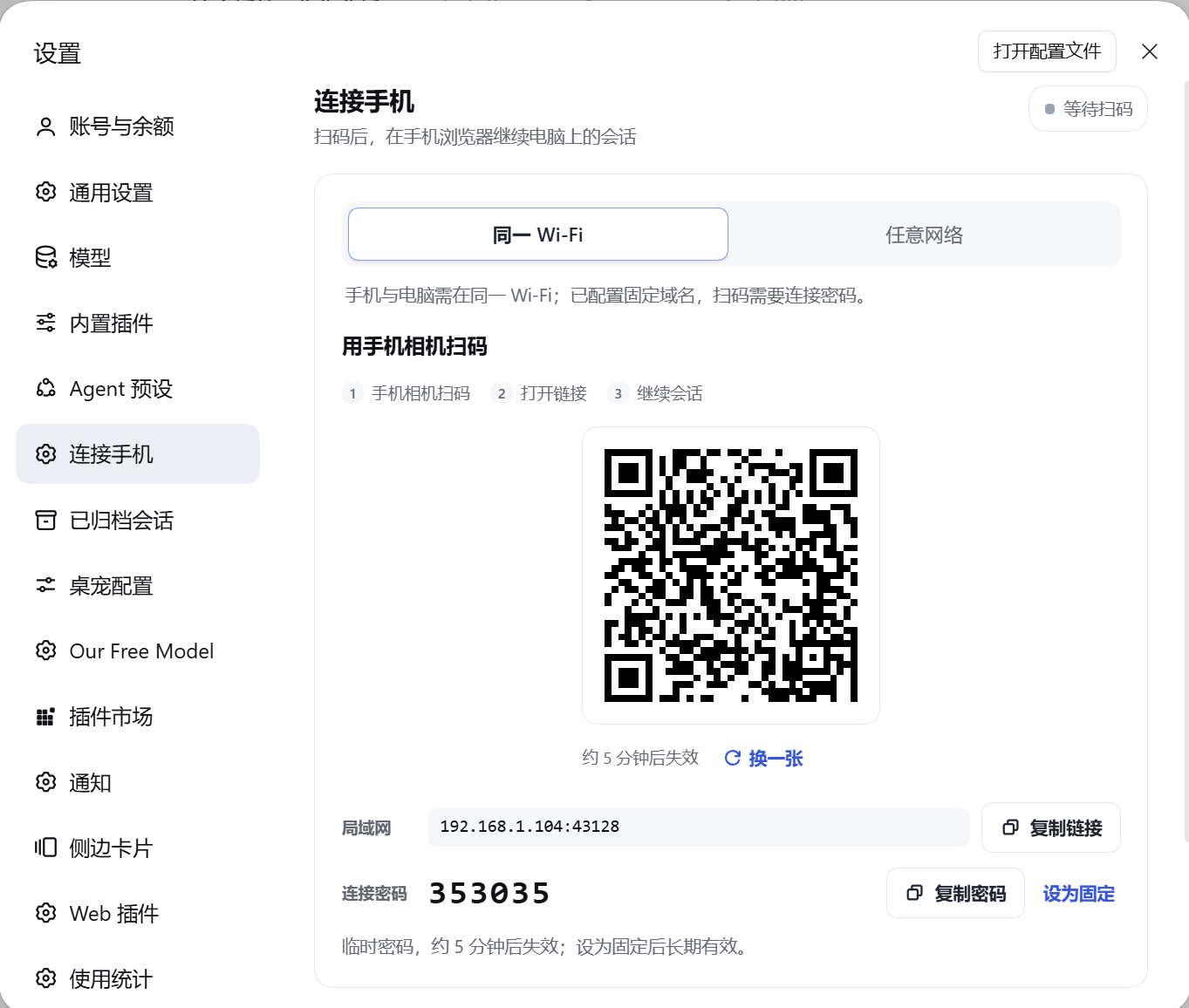
装好后进入 设置 → 连接手机。
第一次连接
- 在「连接手机」里选择 同一 Wi-Fi。
- 用手机相机扫描页面上的二维码。
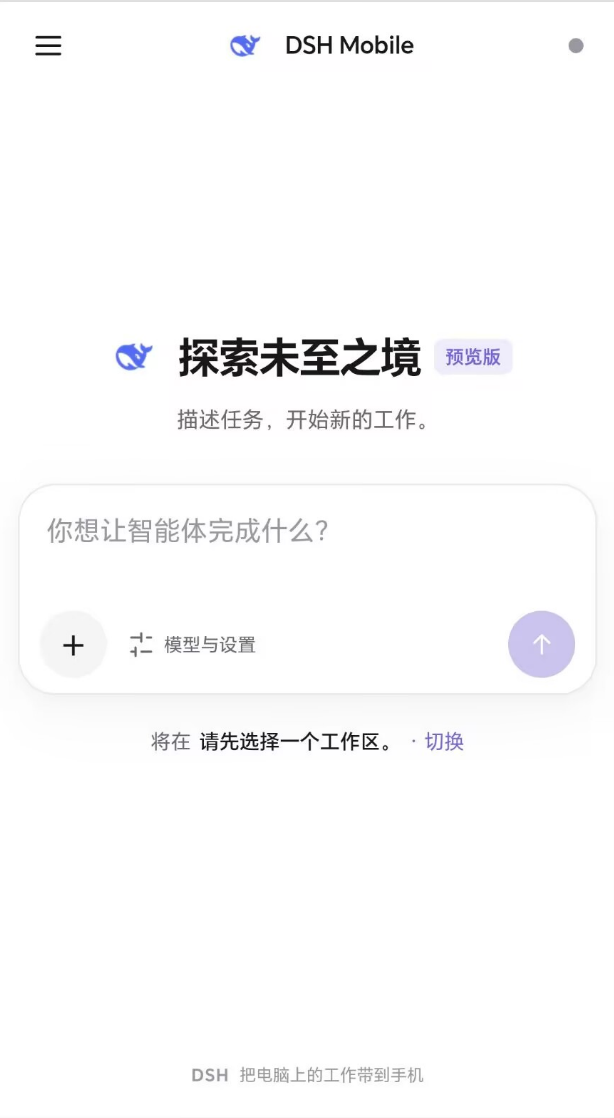
- 浏览器打开首页后,输入第一句话,发送即可创建会话。
- 想继续之前的工作,点左上角 ☰,从左侧抽屉选择会话。
二维码是一次性的,5 分钟内有效;过期或已经用过,点「换一张」即可。
公网入口会要求输入页面显示的 6 位连接密码。浏览器会话只保存在内存中,插件或 DSH 重启后需要重新扫码,这是为了不给旧连接留下长期有效的入口。
连接方式
| 你的情况 | 建议用法 |
|---|---|
| 电脑和手机在家或同一个办公室 Wi-Fi | 选 同一 Wi-Fi,扫码即可,最省事 |
| 临时出门,手边没有域名 | 在 高级设置 → 网络配置 开启临时隧道,优先 Cloudflare,失败可回退 Pinggy |
| 有自己的域名,准备长期使用 | 配置固定域名 + frpc / SakuraFrp,再申请证书 |
没有域名也能用:临时隧道不需要你购买域名,也不需要配置固定公网 IP。隧道地址每次开启可能变化,适合临时使用;手机记得重新扫码。若希望地址长期不变,再配置自己的域名。
固定域名目前支持 HTTPS 和 Let's Encrypt 证书申请/续期。详细的 frpc 配置、数据目录和安全边界见连接与安全。
手机上具体能用哪些功能
- 新建首页直接输入任务,发送后才创建会话。
- 全屏聊天,模型、思考强度和会话模式都可以从输入卡调整;会话模式在第一条消息后锁定。
- 图片多选、拍照、粘贴,自动压缩后发送;历史图片可放大查看。
- 文件先上传,再随消息发送;历史显示文件名和大小,文件内容暂时请在电脑端查看。
- 工具审批「允许一次」或「拒绝」。
- 生成中可排队补充;想立即改变方向,点「打断」。
- 长会话可「加载更早」,回看时保持阅读位置。
- 会话重命名、归档、取消归档、按标题或内容搜索;全文搜索不可用时退回标题过滤。
- 待办、提问、连接状态和最近设备一目了然。
连接与安全
dsh-roam 默认不把你的工作台直接暴露出去:
- 设置管理接口只接受电脑本机回环请求,并校验 Host 和同源。
- 二维码令牌一次性、5 分钟有效;公网入口必须输入 6 位密码,连续输错会限速。
- 浏览器只接受服务端签发的 Cookie,不因为来自同一个 IP 就自动放行。
- 修改连接密码会立即使已连接的浏览器失效。
- 没有应用层端到端加密。公网 TLS 在 Cloudflare、Pinggy、frps 或反向代理处终止,相关运营方理论上可以看到会话明文。内容比较敏感时,建议使用自己控制的固定域名和反向代理,或只在可信局域网使用。
本地设置、连接密码和证书状态位于 %USERPROFILE%\.dsh\dsh-roam(DSH_HOME 可覆盖)。没有遥测,也没有插件自己的账号体系。只有开启临时隧道或申请/续期证书时,才会连接相应外部服务。
1.2.0 更新内容
这一版,手机端终于更像一个能随手拿起来用的工作台了。
- 首页更清净:只保留当前要做的事,最近会话不再挤占首屏。
- 找会话更顺手:左上角 ☰ 打开左侧抽屉,工作区、搜索、最近会话、归档都在这里。
- 聊天更像手机:独立返回、清楚的标题和运行状态、底部输入区,模型与模式选择也换成了适合触屏的底部面板。
- 小细节补上了:键盘和焦点、弹层返回、流式消息、长会话阅读位置、慢请求切换会话,以及发送失败后的草稿和附件保留。
- 连接情况看得见:新增「连接设备」,活跃会话有几个、最近什么时候有请求、是否手动断开,一看就明白。
- 第一次来也能看懂:README 增加中英文说明、真实手机与设置截图,安装、连接和使用路径重新梳理。
完整的兼容边界、测试记录和升级说明见 1.2.0 发布说明。
常见问题
手机打不开二维码里的地址? 先确认电脑和手机确实在同一个 Wi-Fi,防火墙允许面板显示的端口。端口不是 43128 时,以页面显示为准。
隧道连不上? 多半是 cloudflared 下载失败,换个网络再试,或改用固定域名。临时隧道每次地址可能不同,出门前重新扫码。
为什么升级后要重新扫码? 浏览器会话只存在内存里,插件重启后旧 Cookie 不再有效。设置和公网配置不会因为升级被删除。
开发与发布
pnpm install --frozen-lockfile
pnpm build
pnpm test
pnpm test:browser
npm pack --dry-run
src/ 是源码,lib/ 是构建产物,不要直接修改后者;提交前请先跑完上面的构建与测试。
当前验证:20 个 Node 测试文件、226 条测试通过;真实 Chrome 移动交互验收 24/24 通过。Android / iOS 真机、Safari、Firefox 和真实桌面 Host 的完整回归仍需要继续验证,移动模拟不等于真机测试。
许可证
MIT,Copyright (c) 2026 winlin926。
dsh-roam (English)
Your computer can keep working even when you are not sitting in front of it.
dsh-roam is a remote connection to your DeepSeek Harness sessions from a phone browser: check progress, add a requirement, approve a tool call, or start a small task while you are away. Scan a QR code and you are in — no remote desktop, no extra app.
中文说明 · Install and connect · Connection options · What is new in 1.2.0
An independent plugin for DeepSeek Harness, not an official DeepSeek mobile client. The phone side is browser-only — no app required.
Why you might want it
- Continue a conversation started on your computer, right from your phone.
- Start something new with a workspace, model, reasoning effort and session mode of your choice.
- Keep work moving with to-dos, tool progress, questions and approval prompts.
- Bring context along with photos, camera capture, pasted images and other files.
- Find your sessions in the left drawer: recent, archived, search and workspace switching.
- See what connected with recent request times and honest status — an old pairing is not presented as an active connection.
It is a phone-friendly task interface, not a miniature desktop IDE. Terminals, plugin management and advanced file work stay on your computer.
Install and connect
What you need
- DeepSeek Harness 0.2.x on your computer, with Node.js 22.19+.
- A phone browser. Nothing to install on the phone.
- For the simplest setup, connect the phone and computer to the same Wi-Fi.
Install the plugin
In DSH (recommended): open Settings → Plugin Marketplace, search for dsh-roam, install it and restart DSH.
Or use the command line:
dsh plugin --profile web add dsh-roam@1.2.0
Then open Settings → Connect Phone.
Pair your phone
- Choose Same Wi-Fi.
- Scan the QR code with your phone camera.
- Type your first request on the new-task home screen and send it to create a session.
- To continue earlier work, tap ☰ in the top-left corner and choose a session in the drawer.
The QR token is single-use and valid for five minutes. If it expires or has already been used, select New QR code.
Public connections ask for the 6-digit pairing password shown in the panel. Browser sessions live in memory only, so pairing again is required after the plugin or DSH restarts. Old connections are intentionally not kept alive indefinitely.
Connection options
| Your situation | Recommended option |
|---|---|
| Phone and computer on the same Wi-Fi | Same Wi-Fi — the easiest setup |
| Away temporarily, without a domain | Enable the temporary tunnel in Advanced Settings → Network Configuration. Cloudflare is tried first, with Pinggy as fallback |
| A domain of your own for long-term use | Configure a fixed domain with frpc / SakuraFrp and request a certificate |
A domain is not required. A temporary tunnel needs neither a purchased domain nor a fixed public IP. Its address can change each time it starts, so scan the new QR code when needed. For a stable long-term address, use your own domain.
Fixed domains support HTTPS and Let's Encrypt certificate issuance/renewal. See Connection and security for the boundaries and local data locations.
What is new in 1.2.0
This release makes the phone feel like a workspace you can actually pick up and use.
- A clean new-task home screen, without recent sessions taking over the first view.
- A shared left drawer for workspaces, recent conversations, archives and search.
- A proper mobile chat experience with a visible back button, clear session status and a comfortable bottom composer.
- Better small details: keyboard and focus behavior, overlay navigation, streaming message nodes, reading anchors, slow-request isolation, and drafts/attachments that survive a failed send.
- A new Connected devices card with active pairing counts, recent request times and honest disconnected/idle states.
- A friendlier bilingual README with real mobile and settings screenshots, clearer installation and connection guidance.
See the 1.2.0 release notes for compatibility notes and validation.
Connection and security
- Management routes accept loopback requests only and validate Host and same-origin rules.
- Pairing tokens are single-use and time-limited. Public access requires a 6-digit PIN and rate-limits repeated failures.
- Only server-issued browser cookies are accepted; an IP address alone never grants access.
- Changing the pairing PIN immediately revokes connected browser sessions.
- There is no application-layer end-to-end encryption. Public TLS terminates at Cloudflare, Pinggy, frps or your reverse proxy, whose operator could theoretically read session traffic. For sensitive work, use infrastructure you control or stay on a trusted LAN.
Settings, PIN state and certificate data live in %USERPROFILE%\.dsh\dsh-roam (override with DSH_HOME). There is no telemetry or plugin account system. External connections are used only for temporary tunnels and certificate operations.
Development and release
pnpm install --frozen-lockfile
pnpm build
pnpm test
pnpm test:browser
npm pack --dry-run
Source lives in src/; generated files in lib/ should not be edited by hand. Run the full build and test suite above before contributing.
Validation currently includes 226 passing Node tests across 20 files and 24 passing real-Chrome mobile interaction cases. Full physical Android/iOS, Safari, Firefox and real desktop-Host regression is still needed; mobile emulation is not a substitute for device testing.
MIT License, Copyright (c) 2026 winlin926.
Related plugins
dsh-web (dsh-ssh)
zhu1090093659/dsh-web
dsh-web (dsh-remote-web-ui)
zhu1090093659/dsh-web
dsh-web-ui (dsh-ssh)
zhu1090093659/dsh-web-ui
dsh-web-ui (dsh-remote-web-ui)
zhu1090093659/dsh-web-ui