dsh-perch
wjinxuan/dsh-perch
A Dynamic-Island-style status panel that lives in the macOS notch and lists running turns, background jobs and subagents, with a completion banner and a spoken reminder.
Install
dsh plugin --profile web add github:wjinxuan/dsh-perchREADME
栖岛 Perch
A Dynamic-Island-style status panel for DeepSeek Harness that lives in the macOS notch, not inside the DSH window.
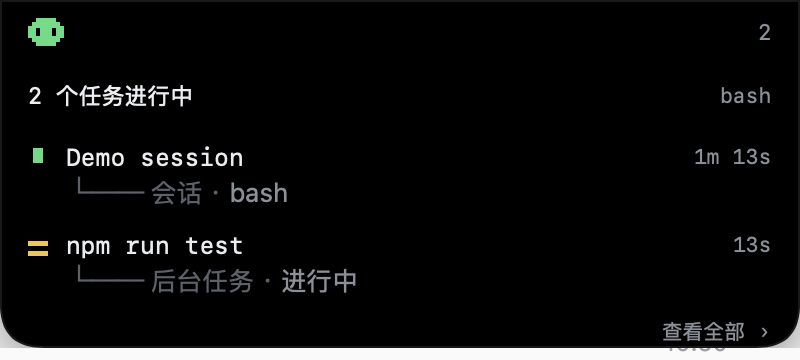
Collapsed, it merges with the camera housing: a pixel creature in the left wing, the running-task count in the right wing. Hover it, click it, or press ⌥⌘P and it unfolds into the task list. When a task finishes it shows a completion card, posts a system notification and can speak the reminder out loud.

What it shows
Everything is derived from projections DSH's browser half already maintains — no session event is ever appended, nothing is polled:
| Row kind | Source |
|---|---|
| Session | catalogued sessions whose turn is open (running projection, the binding's snapshot, or an open turn/start in the event window) |
| Job | the jobs client service roster (whole-set replacement stream) |
| Subagent | catalogue rows with origin: 'subagent' |
Each row shows the readable title, the elapsed time and the current action (tool name, step ordinal or "working"), folded from turn/start, step/start, tool/call and tool/result.
Requirements
- macOS 13 or newer. The screen-level panel is a small AppKit helper (no Dock icon, no focus stealing).
- DSH 0.2.2 or newer, desktop profile.
- The helper is bundled prebuilt; rebuilding it needs the Xcode command line tools.
Install
From the DSH plugin manager:
- Copy this repository's absolute path and add it as a local bundle (Plugins → Add plugin), or install it with
install_bundle, or install straight from the market entry. - The plugin row appears under Plugins; the notch panel shows up immediately.
The plugin launches the helper on startup (open -g overlay/PerchOverlay.app). If you quit the helper, restart DSH or launch it again by hand.
Settings
Right-click the notch panel → 设置… / Settings…:
- system notification banner on/off
- spoken reminder on/off
- voice per language (the system's installed voices; enhanced/premium ones sound better)
- speech rate
- one reminder line per language, picked by DSH's active UI language
- restore defaults
Everything applies immediately — no restart. Settings are stored in the helper's UserDefaults (local.perch.overlay); the bundle patch only seeds the first run.
The completion banner is posted by the DSH page itself (Notification API), because macOS refuses notifications from an ad-hoc signed helper. That means System Settings → Notifications → DeepSeek Harness must allow notifications, or the banner stays silent. The spoken reminder does not need any permission.
Configuration
cordis.patch.yml carries the seed values (config.notify, config.text, config.overlay). overlay: false disables the screen-level panel entirely.
config:
  overlay: true
  notify:
    system: true
    voice: true
  text:
    zh: 任务完成
    en: Task complete
The patch is composed at DSH startup: edit it, then restart DSH. Runtime edits can leave the row unaddressable.
How it is built
| File | Role |
|---|---|
client.js | Browser half: aggregates running work, posts presentation-ready JSON to 127.0.0.1:47823, posts the completion banner, serves nothing to the DOM |
index.js | Host half: launches the helper, forwards config.notify to it, retries + 30s heartbeat |
overlay/main.swift | The AppKit helper: notch-shaped panel, NSTrackingArea hover, ⌥⌘P hotkey, right-click menu, settings window, TTS, POST /state + GET /settings |
locale/*.json | Plugins page metadata (zh/en) |
icon.svg | Original pixel-notch icon |
Rebuild the helper after editing overlay/main.swift:
cd overlay
swiftc -O -swift-version 5 -target arm64-apple-macos13.0 main.swift \
  -o PerchOverlay.app/Contents/MacOS/PerchOverlay
codesign --force --sign - PerchOverlay.app
Helper log: ~/Library/Logs/PerchOverlay.log (trimmed at 256 KiB) — useful to see settings, state, speech lines.
Limitations
- The panel is drawn below the camera housing, not over it: the notch's pixels are physically unavailable.
- macOS reserves Siri's natural voices for Siri; they are filtered out because selecting one silently falls back to the default voice.
- Clicking a row brings DSH to the front. A separate process cannot deep-link to one session.
- The helper is ad-hoc signed, so macOS does not let it post notifications; that is why the banner comes from the DSH app instead.
License
MIT. The pixel creature, markers and icon are drawn for this project.
Related plugins
dsh-web (dsh-task-board)
zhu1090093659/dsh-web
dsh-web (dsh-web-all)
zhu1090093659/dsh-web
dsh-TUI
ccch1mneyyy/dsh-tui
dsh-web-ui (dsh-task-board)
zhu1090093659/dsh-web-ui