dsh-plugin-doubao
woc-jpg/dsh-plugin-doubao
Adds a Doubao model provider to DeepSeek Harness with QR sign-in, twelve selectable models, a live credit panel and prompt-bridged tool calls. Sign-in requires a Doubao desktop client signed in once on the same machine for the device fingerprint, and a scan with the Douyin app. Its HTTP routes have no DSH access check, so a web page open in your browser could call them.
Install
dsh plugin --profile web add github:woc-jpg/dsh-plugin-doubaoREADME
dsh-plugin-doubao
Use Doubao (豆包) models inside DSH as a normal
provider. Install the plugin, sign in once by scanning a QR code with the Douyin app, then pick a
doubao/* model in the picker.
There is no proxy to start and no browser to drive. The plugin speaks the same HTTP endpoints the web client uses, from inside the harness process.
The model list is read from the client's own menu payload, not shipped as a table:
POST /alice/slot/action_bar_v3/brief_listreturns the rows behind the model picker, each carrying its wire key (model_item_key), its display name, the surface it belongs to (default_mode), the context window (model_extra_params.total_window_size) andreasoning_effort_config.option_list— the thinking tiers that model actually accepts.- A model Doubao adds shows up without a release; one it retires disappears on its own. The twelve rows
below were the whole list on 2026-11-19; the live list the same day also carried
qwen4-max,qwen3.8-maxandqwen3.8-flash. - Before sign-in (and whenever the endpoint is unreachable) the shipped reading is used, so the picker is never empty.
The reading taken on 2026-11-19:
doubao                     快速
doubao-expert              专家
doubao-auto                自动
doubao-2.1-lite            豆包 2.1 Lite
doubao-2.1-pro             豆包 2.1 Pro
deepseek-v4.1-flash        DeepSeek V4.1 Flash
deepseek-v4-pro            DeepSeek V4 Pro
kimi-k3.1-pro              Kimi K3.1 Pro
kimi-k3.1-pro-highspeed    Kimi K3.1 Pro 高速
kimi-k3                     Kimi K3
glm-5.3                    GLM 5.3
glm-5.3-flash              GLM 5.3 Flash
qwen4-max                  Qwen 4 Max
qwen3.8-max                Qwen 3.8 Max
qwen3.8-flash              Qwen 3.8 Flash
Picking one is not just a name. The client sends a five-tuple — model_item_key, mode_id,
agent_mode, conversation_mode, reasoning_effort (plus a thinking-mode id) — and repeats it in
three places in the request body. The server reads whichever copy it wants, so a field left at the
default silently answers from the plain chat model instead of the one you picked.
Thinking depth: every model's own tiers
Doubao numbers its thinking tiers per model and the ladders do not match:
| models | tiers | wire levels |
|---|---|---|
doubao, doubao-expert, doubao-auto, doubao-2.1-* | 低 / 中 / 高 | 3 / 4 / 5 |
deepseek-v4.1-flash, deepseek-v4-pro, kimi-* | 低 / 中 / 高 / 极高 / 最高 | 3 / 4 / 5 / 6 / 7 |
glm-5.3, glm-5.3-flash | 低 / 高 / 最高 | 3 / 5 / 7 |
qwen4-max, qwen3.8-* | 低 / 高 / 极高 | 3 / 5 / 6 |
The harness effort ids map onto that ladder one-to-one — low/medium/high/xhigh/max are levels
3/4/5/6/7 — and each model advertises only the ids its own row lists. Asking GLM 5.3 for medium
therefore is not an option the picker offers, because the service does not have a level 4 for it.
The level travels to the wire as a number in model_config.reasoning_effort and as a string in the two
other copies of the same field; model_extra_params (memory_profile, total_window_size) is
forwarded verbatim, which is what tells the service how much memory to reserve.
Credit multipliers
Like the WorkBuddy provider, each model name carries its credit multiplier on the right, separated
by a middle dot — Doubao 2.1 Pro · x0.65, Kimi K3.1 Pro Highspeed · x1.44. Promo tags ride
along too (x0.01 限时优惠, 小额免费). The suffix goes on name rather than description
because DSH's model seat and /model popup render only name; routing still uses id, so this is
display-only and cannot change which model answers.
The table is read live from the client's action_bar_v3/brief_list endpoint at most once every ten
minutes, with a snapshot from 2026-11-14 as the seed so the picker is informative even before the
first lookup (or if it fails). A failed lookup returns "nothing new" instead of restoring the seed,
so a fresher rate is never rolled back to an older one. Doubao and Doubao Expert have no tag in
the client's own list and are shown without a suffix.
Prerequisites — read this first
The plugin is not standalone. All four must hold, or the install succeeds but sign-in fails:
- DSH — this is a DSH provider, not a standalone app.
- The Doubao desktop client, installed and signed in at least once on the same machine that runs DSH. Doubao checks a device fingerprint on every request and only accepts one this account has used before. There is no API to get it: the plugin reads it from the client's
Local State, and a freshly generated device id is always refused (710022004). Windows, macOS and Linux are supported, a non-default install path is fine, and the client does not need to stay running — it only has to have been signed in once. - The Douyin app (抖音) on your phone — sign-in is a QR scan and must be done with Douyin, not the Doubao app (which fails silently). Scan on the machine that runs DSH; signing in elsewhere does not carry over.
- A Doubao account with available credit — a fresh free account starts with 9,000 monthly + 2,000 activity points.
Without #2, node bin/login.js prints No Doubao desktop client identity found on this machine. and exits. See One thing you should know before installing for how the fingerprint is read and when the client is actually needed.
Install
One line — paste this
dsh plugin --profile web add dsh-plugin-doubao
The package is published on npm as dsh-plugin-doubao, so the bare name resolves
from the registry — no GitHub access required. If your npm registry is a mirror
that has not synced yet, use the GitHub shorthand instead:
dsh plugin --profile web add github:woc-jpg/dsh-plugin-doubao
Then restart DSH, pick a Doubao model, and (first time only) sign in with the helper bundled inside the installed package:
node "$(dsh plugin --profile web exec pwd)/node_modules/dsh-plugin-doubao/bin/login.js"
If that path lookup is awkward on your shell, the same helper is at
~/.dsh/profiles/<profile>/node_modules/dsh-plugin-doubao/bin/login.js — or just clone
the repo and run node bin/login.js from it.
Both github:woc-jpg/dsh-plugin-doubao and woc-jpg/dsh-plugin-doubao also work.
Do not paste the browser address https://github.com/woc-jpg/dsh-plugin-doubao:
pnpm treats a bare https://... as a git dependency and runs git ls-remote, which
stalls or fails on many networks. The github:owner/repo form downloads a codeload
tarball instead and takes a few seconds.
dsh plugin add installs the package and activates it as a profile bundle automatically
(the package declares dsh.bundle.patch). The session is cached in
~/.dsh/doubao-local/credentials.json; you sign in only once.
If your DSH profile is the desktop app's, dsh plugin refuses to touch it (the Electron app
owns that profile). Add the dependency to the profile's package.json by hand and run
pnpm install there instead:
"dsh-plugin-doubao": "^0.2.0"
and add "dsh-plugin-doubao" to dsh.profile.bundles in the same file.
Sign in — no conversation needed
Signing in is a standalone step. You do not need to chat with the agent first
(in fact you can't: until you sign in, every Doubao request fails with AUTH_MISSING),
and you do not need to find any file or open a terminal.
Easiest — sign in inside DSH itself. After installing, look at the row beside the message composer: there is a small 豆包登录 / Doubao sign in button (a grey dot when signed out, green when signed in). Click it and a window opens inside DSH with the QR code — no browser, no file manager, no command line. Scan it with the Douyin app, the button turns green, and you can start picking Doubao models right away. The modal shows the live scan status and a 重新扫码 / Re-scan button if the code expires.
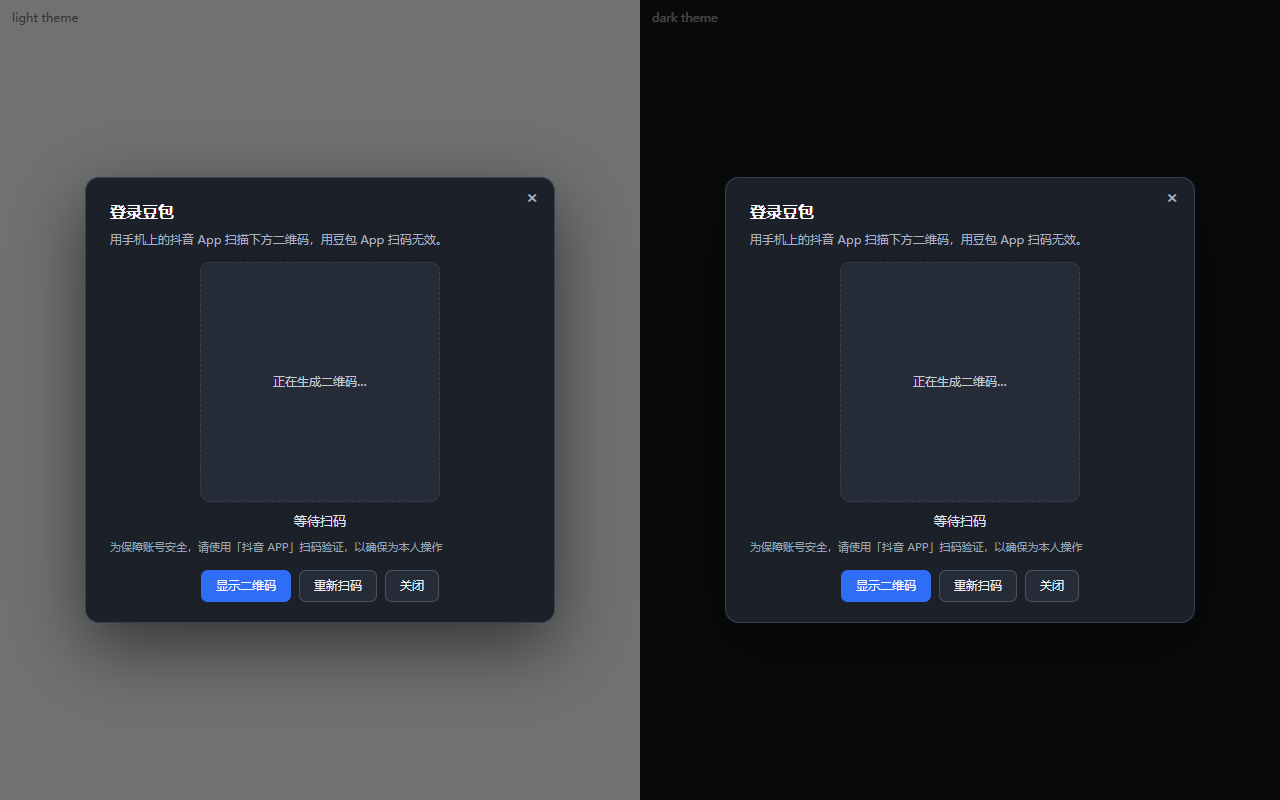
Already signed in? The panel says 已经登录 / Already signed in and shows no QR. That is deliberate: a QR for an account that is already connected only invites a pointless second scan. Use 重新扫码 / Re-scan if you want to switch accounts.
If the panel is blank, or a button seems to do nothing, check the version first — the old 0.2.2 build borrowed DSH theme tokens that do not exist, which renders a white box with white text on a light UI. Anything from 0.2.5 on paints its own palette and reports failures in the panel instead of swallowing them:
dsh plugin --profile desktop add dsh-plugin-doubao@latest
Use 0.2.6, not 0.2.5. Those two are the same code, but the 0.2.5 tarball shipped a
package.json with a UTF-8 byte-order mark at the front. JSON.parse rejects it, DSH's
profile loader catches the throw and silently skips the whole bundle, so the plugin never
runs and the Doubao models simply are not in the picker — no error, no log line, nothing
to search for. 0.2.6 is that file with the three bytes stripped. Install @latest or
@^0.2.6; if you already have 0.2.5, upgrade, or delete the first three bytes of
node_modules/dsh-plugin-doubao/package.json and restart DSH.
Also available — a standalone command / double-click launcher. The package ships a
dsh-plugin-doubao command and a bin/login.bat that open the same QR in a browser.
Use these if the DSH panel is unavailable or you are signing in before DSH is installed.
Windows — double-click: bin/login.bat in the cloned repo, or
node_modules\dsh-plugin-doubao\bin\login.bat inside your DSH profile directory. It finds
Node by itself, opens the browser, and waits for the scan.
Any OS — terminal:
dsh-plugin-doubao            # opens the browser at http://127.0.0.1:8899/
dsh-plugin-doubao --status   # check whether you're signed in and when it expires
dsh-plugin-doubao --force    # sign in again (the normal run is a no-op if already signed in)
dsh-plugin-doubao --port 9001 --no-open   # custom port / don't launch a browser
From a checkout, node bin/login.js accepts the same flags. Once the page opens, scan with
the Douyin app (抖音), not the Doubao app — Doubao's own QR page says so, and scanning with
Doubao fails silently. The QR refreshes automatically every ~60 s, so take your time. When it
succeeds the page says saved, the command prints the credential path, and you can go straight
to DSH and pick a Doubao model. No restart, no chat, no agent round-trip.
The sign-in needs the device fingerprint from a Doubao desktop client that has been signed in at least once on this machine — see Prerequisites. If that client is missing, the command tells you exactly which paths it looked in and exits.
One thing you should know before installing
Doubao checks a device fingerprint on every request, and it only accepts the fingerprint of a device the account has already used. Two failure modes follow from that, and they look alike:
| What was sent | What comes back |
|---|---|
| a valid session, but a device id the account has never seen | 710022004 — "rate limited" (it is not a rate limit) |
| no session at all | 710012001 — login invalid |
A freshly generated device id is refused no matter how valid the session is. So the plugin reads the
device id out of the installed Doubao desktop client's Local State file, and pairs it with the
session from your scan. That means:
- The Doubao desktop client must be installed and signed in at least once on the same machine.
Without it there is no device id to use. The client is supported on Windows, macOS and Linux; the
plugin finds it from the running process, the OS install record (Windows registry / macOS Spotlight),
or the usual install locations, so a non-default install path is fine. Stopping a stale instance
uses
taskkillon Windows andpkillon the other two. - Signing in on a different machine than the one that runs DSH will not work; run
loginwhere DSH runs.
Requests go out as plain HTTPS first — the same shape the current web client uses — so on a healthy
account the desktop client is never touched, and restarting DSH changes nothing. Only when Doubao
answers 710022004 does the plugin need a signature; it then remembers that state for a while and
routes subsequent turns through the client's page, whose own hook signs them. If no client with a
debugger port is running, it starts (or restarts) one with the flag — that is the only time it
launches an app on your behalf. Reading Local State is passive; the restart only happens after a
request has actually been refused. Set allowBridge: false if you would rather switch models than
ever have the client started.
login tells you straight away if no client identity is found, and lists the directories it looked in.
Why not read the cookies from the client too?
Two reasons. The client's Cookies database is exclusively locked while it runs (SQLite cannot open it
even read-only), and it is encrypted with DPAPI. Local State and Local Storage, by contrast, are
plain files that stay readable — so only that half is read.
The leveldb directory is a fallback, not the primary source: leveldb blocks are prefix-compressed,
so once the client compacts its database client_device_info is no longer a contiguous byte run and
a scan finds nothing. Local State survives that compaction, so it wins when both are available.
Configuration
All optional. Set them in the profile's cordis.patch.yml entry for dsh-plugin-doubao:
| Key | Default | What it does |
|---|---|---|
providerId | doubao | Provider id shown to the harness. Change it if another plugin already claims doubao. |
displayName | Doubao | Name shown in the picker. |
minIntervalMs | 1500 | Minimum gap between turns. Turns are serialized and spaced; see below. |
credentialsPath | ~/.dsh/doubao-local/credentials.json | Where the session is cached. |
loginPort | 8899 | Port for the QR page served inside a session. |
bridgePort | 9222 | DevTools port used for the fallback client bridge, including when starting the client. |
allowBridge | true | Try plain HTTPS first and fall back to the signed client bridge on 710022004. Set false for direct-only — the client is never probed or launched. |
riskTtlMs | 1800000 | How long (ms) a 710022004 flag keeps routing through the bridge before the direct path is tried again. |
nativeEnabled | true | When a turn carries tools on a work-surface model (DeepSeek/Kimi/GLM/Qwen), run it through Doubao's own local-sandbox channel so tools actually execute on this machine, instead of the model merely describing them. Falls back to the text bridge if the channel is unavailable. Set false to always use the text bridge. |
nativeWorkspace | process cwd | Directory the sandbox is confined to — tool calls cannot escape it. The harness request carries no cwd, so set this to the project you are working in (e.g. D:\\path\\to\\project). |
nativePermission | AskOnRisk | Sandbox permission: AlwaysAsk, AskOnRisk, or FullAccess. Risky commands (deletes, format, downloads-piped-to-shell, etc.) are refused locally unless FullAccess. |
nativeHomeDir | ~ | Home directory passed to the sandbox task. |
Environment, all optional:
| Variable | Read by | What it does |
|---|---|---|
DSH_HOME | everything | Base directory; the credential file lives under it. Defaults to ~/.dsh. |
DOUBAO_CREDENTIALS | the provider | Overrides credentialsPath when the config key is unset. |
DOUBAO_LOGIN_PORT | bin/login.js only | Port for the standalone QR page. The in-session panel uses the loginPort config key instead, because a plugin cannot pick a port for a server it does not own. |
DOUBAO_UA | lib/doubao.js | Overrides the chat request's User-Agent. The default claims the Windows client; set this on macOS/Linux if the risk engine ever starts looking at it. |
DOUBAO_LOGIN_UA | lib/login.js | Overrides the User-Agent used during the QR/passport flow. |
DOUBAO_CHANNEL | lib/doubao.js | Overrides the channel query parameter (default win). |
DOUBAO_TZ | lib/doubao.js | Overrides the tz_name query parameter (default: the process's own time zone). |
Rate limiting
Doubao's risk engine reacts to bursts, not volume. Five quick calls in a row were enough to earn a
cooldown that outlasted the run producing them. So the plugin holds an exclusive lock for the whole
turn — request and stream — and keeps at least minIntervalMs between turns. Releasing the lock
after the POST is not enough: overlapping streams are exactly the pattern that trips 710022004.
When a refusal does arrive, the adapter backs off for a minute and reports it as an error finish with
code RATE_LIMIT. It deliberately does not throw: a thrown error makes the harness retry, and
retrying a rate limit only deepens it. The provider also ships its own retry policy
(RETRY_POLICY) with RATE_LIMIT removed from retryableCodes — the harness default would retry
it five times, which is the opposite of what a flagged account needs.
The gap used to default to six seconds, which is longer than a turn's own time-to-first-token and was
felt as lag rather than as caution — the lock already serialises turns, so a healthy account rarely
gets near it. It now defaults to 1.5s and the real protection moved to the 710022004 cooldown above.
Signing in does not clear a flag that is already set. If the account is flagged, the desktop client
shows a picture-selection captcha the next time you send a message from it, and solving it is what
restores access; the flag is account-wide, so the plugin recovers as soon as it is cleared. Note that
the captcha also expires quickly — a challenge that sits unsolved for a minute or two comes back as
NotFoundChallengeId and a fresh question, so the desktop client may need a restart before a slow
solve can succeed.
Switching models mid-session
Switching the model used to leave the next turn hanging, for two reasons that only showed up when a turn did not end the way the plugin assumed.
- A turn that was abandoned kept the lock. The pacer releases its turn lock in a
finally, which runs when a stream is closed — but not when the consumer simply drops the iterator. A cancelled turn, or a host that stops reading on a switch, leftthis.tailpending forever and every later turn waited on it, whichever model it asked for. The lock is now a lease: it is renewed on every chunk that comes out of a stream, and it expires on its own when nothing has moved forleaseMs(45s — longer than a healthy stream, short enough that a dead one is obvious). An abort signal also releases it immediately, so a cancelled turn never holds the queue. - A cooldown was account-wide. One model answering
710022004set a one-minute penalty that every other model had to sit through, which is exactly the "switched model, still nothing" feeling. Penalties are now keyed by model. A response-filter refusal is a property of the conversation, not of the model, so that one is still deliberately unscoped —penalize(ms)with no key keeps the old account-wide meaning.
Both are covered by tests (a stream dropped without return() stops blocking the next turn,
aborting a turn lets the next one start immediately, a cooldown belongs to the model that earned it) and were reproduced against the live endpoint before and after the fix.
When the risk engine takes an interest
While an account is in good standing, a plain HTTPS request is enough and this plugin is as
self-contained as it looks — that is the path every turn takes first, and it needs no client at all.
Once the semantic risk model flags the account, that stops being true: every unsigned request comes
back as 710022004, no matter how the payload is shaped. That was measured rather than assumed —
a client request was captured and then bisected field by field:
| Variation | Result |
|---|---|
Vary the query string (versions, web_id, device_platform) | still 710022004 |
| Vary the session cookie (stored vs. the client's live jar) | still 710022004 |
| Vary the model or the wording | still 710022004 |
Vary client_meta (conversation id, last section, message index) | no effect |
Vary option | this is what the check reads |
Reuse a conversation_id that already exists | accepted, but only replays history |
| Replay a captured signed URL | accepted, but only replays history |
The last two rows are the interesting ones. A captured request is signed with a_bogus plus an
msToken, and those are bound to the body: change one field and the signature stops matching, which
is why a replay only ever returns what the original call returned. New conversations are refused
outright, so no amount of shape-matching inside Node can make a fresh request pass — and the signer
is not reachable either, since a_bogus appears in none of the client's 26 loaded bundles and
window.byted_acrawler does not exist. The signing lives in the client's preload, wrapped around
fetch itself.
So the plugin borrows the signer instead of imitating it — but only when it must. The flow is:
- Healthy account: the first request goes out as plain HTTPS. The client is never probed, let alone launched, and a DSH restart makes no difference. This is the normal case.
- 710022004 on the direct path: no partial answer is leaked; the account is marked in a short-lived
riskMemory(seelib/risk-memory.js, default 30 minutes, persisted under~/.dsh/doubao-local/risk-flags.json), and the same turn is retried through the signed bridge. - Flagged on entry: the doomed direct probe is skipped and the turn goes straight to the bridge. The flag expires on its own, so an account that recovers (a completed slider, a different network) drifts back to direct requests without any manual reset and without launching the client again.
lib/bridge.js connects to the client's chat page over the DevTools protocol and lets the page
perform the signed request: its own preload hook adds the signature, and each response chunk is
pushed back through a runtime binding as it arrives, so the plugin still streams rather than
buffering. The bridge uses port 9222 by default.
Getting there is automatic once needed. The debugger port only exists when the client was started
with --remote-debugging-port, which an ordinary launch does not pass — and a second launch against
a running client just joins it and drops the flag. So the plugin starts the client with the flag,
stopping and restarting an existing instance if one is in the way. The attempt is made once per port
per process and its result cached (success or failure), so a missing install is not retried on every
message. In practice a plain client is brought up to a working bridge in about five seconds, once.
The bridge is a transport, with a clear failure model:
- No client and no way to start one (the executable is not installed) → the direct request stands and
the
710022004is reported. Nothing could sign it anyway, so this is honest, not degraded. - A client reachable but the page dies mid-flight → the turn fails with code
BRIDGE, mapped toTRANSPORTso the harness may retry it. That is deliberately not reported asRATE_LIMIT: retrying a rate limit deepens it, while retrying a dropped local connection is harmless. allowBridge: false(orbridge: falseon a single call) forces direct-only: no memory, no fallback, and the client is never probed or launched.bridgePortoverrides the port.
What this does not do is make a flagged account work in general: the bridge satisfies the signature check, so an account held only by that check recovers immediately, but an account under an active semantic flag can still be refused, and only the captcha in the client clears that.
Content moderation
Doubao's content filter does not return an error code. It answers with a canned notice as an ordinary
text stream and a stop finish:
该内容涉嫌违反豆包使用规范,若有误判,请长按本条消息后点击"反馈与举报"进行反馈。
Left alone, the harness renders that as the model's reply — to the user it just looks like the model "cannot chat". The plugin handles this in two layers:
- It does not ship the host's own instructions. DSH appends its operating-mode preamble,
AGENTS.md, and the project memory to the messages it hands an adapter (inside<system-reminder>blocks, tens of thousands of characters). Those words are for this agent, not conversation content, and phrases like "execute without refusal" are exactly what tripped the consumer endpoint's moderation.toPromptstrips the reminder tags and drops long host preambles while keeping short system hints and any long document the user actually pasted. - It never shows a canned refusal as an answer. If a refusal still arrives (in one chunk or
split across several), the adapter catches it before a single character reaches the UI and emits a
plain explanation instead — "Doubao 内容审核拦截了本次请求(不是模型故障)…" — plus a short
cooling-off. It stays a
stopfinish rather than a thrown error, so the harness does not retry into the same filter.
Normal replies are unaffected: the refusal check only buffers deltas while they are still a prefix of the notice's lead, which is shorter than one chunk, so a real answer starts streaming on its very first delta.
Streaming: thinking and time-to-first-token
Doubao streams a deep-thinking model in two phases, and the wire format does not label them the way
you would hope. A block_type: 10040 thinking_block carries only titles (正在思考 / 已完成思考)
— no body. The reasoning text itself is an ordinary block_type: 10000 text_block whose
parent_id points at that 10040 block, followed by CHUNK_DELTA frames that carry {"text": …} and
nothing else. The final answer is another 10000 block with no thinking parent.
The adapter used to take every CHUNK_DELTA as answer text, so the reasoning was welded onto the
front of the reply ("用户要解题,我先算出甲效率为1/6…\n\n3") and nothing appeared on screen until the
answer block began. createTextTracker now remembers which block ids were thinking parents, attributes
each CHUNK_DELTA to the most recently declared text block, and stream() maps the two kinds onto
separate DSH blocks: block-start+reasoning-delta for thinking, block-start+text-delta for the
answer. The client's ReasoningRow renders the first as a collapsible "thinking" strip, so the turn
starts moving as soon as the model starts thinking.
Two limits are worth knowing. Models that do not reason at all (deepseek-v4.1-flash, doubao-2.1-*
under a low effort) emit no reasoning stream, so there is nothing earlier to show; their
time-to-first-token is whatever the service gives (measured 2.3–7.0s for a one-line question, and the
surface tuple — mode_id / agent_mode / conversation_mode / reasoning_effort — moved it within
noise, 2.3–7.4s, so it is not worth retuning). The request also sits behind the turn lock, so the
first token of turn N cannot arrive before turn N-1 finished plus minIntervalMs.
prepareCall no longer awaits the credit-rate fetch either: rates only decorate the model name shown
in the turn record, and blocking the first byte on a brief_list round trip was pure latency. The
picker still awaits them, where accuracy is what matters.
Context budget / long sessions
The endpoint is stateless: DSH replays the whole visible conversation on every turn, and this adapter
has to flatten it into one text_block.text. A long session therefore used to produce a request body
of 2,253,285 characters (1,497 blocks, including compressed summaries, tool results and injected
runtime notes). Doubao's gateway answers an oversized single text block with a plain
common invalid param SSE error — no error code, HTTP still 200 — so the UI just showed a failed
turn with no explanation. A fresh session (≈900 characters) worked, an old one always failed.
toPrompt now applies a MAX_PROMPT_CHARS = 32_000 budget before the body is built, following the
same idea as workbuddy's applyContextBudgets / keepPromptLast:
- Runtime injections (
Time sampled while preparing turn …,Current runtime context, ACP markers,[model changed: …], compressed-section headers) are not conversation and are dropped. - Host-marked assistant/tool meta-discussion (
AGENTS.md, operating-mode phrases) is dropped too; a short user question mentioning those words is kept, and so is a long document the user pasted. - If the remaining history still exceeds the budget, the adapter keeps the leading system hint, a
[… earlier turns omitted …]marker, and as many recent turns as fit. The last user turn is never dropped; when a single turn is itself oversized, its tail is kept because that is where the actual instruction lives.
If the gateway ever returns invalid param again, the error finish now carries the wire prompt size
and the budget, so a recurrence is self-diagnosing.
Remaining credit
Beside the composer, next to the model seat, the plugin shows 积分 9,793 while a Doubao model is
selected — same place and same styling as the WorkBuddy plugin's credit readout. Hovering it breaks
the total down per quota window; clicking re-reads it. It refreshes once a minute.
The number comes from POST /alice/commerce/sale/subscription/quota/summary/, the endpoint the Doubao
web client itself calls, authorised by the same cookies the chat requests already use. Two quota
windows arrive (活动赠送额度 and 月度额度), each with a thousand-separated total_amount and
used_amount; there is no ready-made remaining field, so it is total - used, clamped at zero.
Three details are deliberate:
- A read failure shows
—, never0. Not signed in, offline, or an upstream shape change all mean "could not read it", which is a different fact from "you have none left".creditsFromSummaryreturnsundefinedfor a payload it cannot parse, and the route answers{"credits": null}. - The browser never talks to doubao.com. The host reads the balance and serves it on
GET /plugins/dsh-plugin-doubao/credits(loopback-only, GET-only,Cache-Control: no-store); the client bundle just fetches that same-origin path, so no cookie ever enters the page. - It renders for the Doubao provider only. The slot is drawn for every provider, so the component
runs its hooks unconditionally and returns
nullafterwards — switching to a WorkBuddy model must not leave a stale Doubao number sitting in the composer.
Limitations
- Text only. Doubao's web endpoint accepts no images here, so nothing advertises image input.
- Tool calling is a prompt bridge, not a native capability.
www.doubao.com/chat/completionhas notools/function_callfield (that lives on the paid Volcengine Ark API), so the plugin serialises the harness tool schemas into the prompt and asks the model to answer with a strict[TOOL_CALL]{"name":…,"arguments":{…}}[/TOOL_CALL]marker. Those markers are translated back into the harnesstool-callchunk protocol and the agent loop executes them locally — so Doubao models can run terminal commands, read files and use the other harness tools. This is model-compliance dependent: if the model ignores the marker or writes a malformed one, the turn is rendered as plain text instead of a call. Turns with no tools configured are byte-for-byte unchanged. - Token counts are estimates. The endpoint returns no usage block, so counts are derived from character length (roughly two characters per token). Good enough for a meter, not for billing.
- The thinking toggle reaches the chat models; the routed ones take a level instead.
doubaoanddoubao-experttake aneed_deep_thinkflag, so the harness reasoning setting turns their thinking pass on and off. The routed models carry depth as the numericreasoning_effortlevel, which the adapter sends as whatever tier you picked — a real, measured difference in time and answer length on a hard question, not a no-op switch. - Not every tier exists on every model. The service lists the tiers per model (GLM has 3/5/7, Qwen 3/5/6), so the picker offers exactly those. A tier id a model does not list is refused by the harness before any request goes out, and the adapter falls back to that model's default level rather than sending a number the service would reject.
- No conversation continuity. Each turn is a fresh conversation on Doubao's side, because the endpoint is stateless per request and passing a conversation id back would require server-side state the harness does not give the adapter.
Development
npm test # all 150 tests, no arguments needed
npm test runs node --test with no path, so Node discovers test/*.test.mjs itself. Naming the
files explicitly also works:
node --test test/plugin.test.mjs    # protocol, framing, pacer, identity, credentials
node --test test/catalog.test.mjs   # model rows read from the menu payload, tiers, wire level
node --test test/apply.test.mjs     # wiring into a cordis context
node --test test/login.test.mjs     # QR flow, cookie harvest, credential storage
node --test test/login-routes.test.mjs  # the three loopback sign-in routes
node --test test/credits.test.mjs   # quota parsing and the loopback credits route
node --test test/manifest.test.mjs  # packaging: no BOM, strict JSON, files whitelist
Pass a file, or nothing — not the directory: node --test test/ is treated as a module path and
fails with Cannot find module.
manifest.test.mjs also runs as prepack, so npm pack and npm publish refuse to build a tarball
whose package.json would not parse. That is the one failure mode that ships cleanly, installs
cleanly, and then leaves the plugin invisible with nothing in the log — see the 0.2.5 note above.
The identity reader can be checked against the real client on this machine:
node -e "import('./lib/identity.js').then(m => console.log(m.toIdentity(m.findClientIdentity({}).info)))"
Layout
| File | Role |
|---|---|
lib/catalog.js | The model rows read from Doubao's own menu payload: ids, names, surfaces, context windows, per-model thinking tiers. |
lib/doubao.js | The wire protocol: query/body shaping, SSE framing, thinking/answer attribution, the turn pacer. |
lib/bridge.js | The signed-request bridge: drives the running client over the DevTools protocol. |
lib/identity.js | Reads device_id and friends out of the installed client's Local State. |
lib/adapter.js | The LLM provider: model catalog, stream mapping, error mapping. |
lib/rates.js | Fetches Doubao's menu payload once and reads the credit multipliers out of it. |
lib/credits.js | Reads the remaining credit from Doubao's quota-summary endpoint. |
lib/client.js | The browser half: the credit readout in conversation.input.right. |
lib/login.js | QR sign-in page, cookie harvest, credential storage. |
lib/index.js | apply(): registers the provider, the doubao service and the credits route. |
bin/login.js | The dsh-plugin-doubao command. |
Legal
This uses your own Doubao account through the same endpoints its web client calls. It is not affiliated with ByteDance. Automating a consumer account may violate the service's terms, and the account is yours to risk.
Related plugins
dsh-our-free-model
ebony-vinyl/dsh-our-free-model
dsh-routing-suite
yjh051108/dsh-routing-suite
dsh-connect-workbuddy
dingminhua/dsh-connect-workbuddy
dsh-workbuddy-connect
corrinehu/dsh-workbuddy-connect