dsh-global-instructions
wuzeno/dsh-global-instructions
Save, switch, and pause global instruction profiles in DeepSeek Harness (DSH). 多套全局指令,一键切换与暂停。
Install
dsh plugin --profile web add github:wuzeno/dsh-global-instructionsREADME
DSH Global Instructions / DSH 全局指令
English · 简体中文 · Download / 下载
A DeepSeek Harness (DSH) plugin for saving multiple global instruction profiles, applying one at a time, and pausing or resuming without losing your saved instructions.
为 DeepSeek Harness 保存多套全局指令,一次只应用一套,可随时暂停或恢复。
English
Use different defaults for coding, writing, or everyday chats without rewriting your global AGENTS.md by hand.
Install
Download the .tgz from GitHub Releases and install it as a local package in the DSH plugin manager. Alternatively, download and extract the source ZIP, then install the extracted directory containing package.json. Developed and tested against DSH 0.2.2-rc.5. No extra npm dependencies or build step; not published to npm.
Use
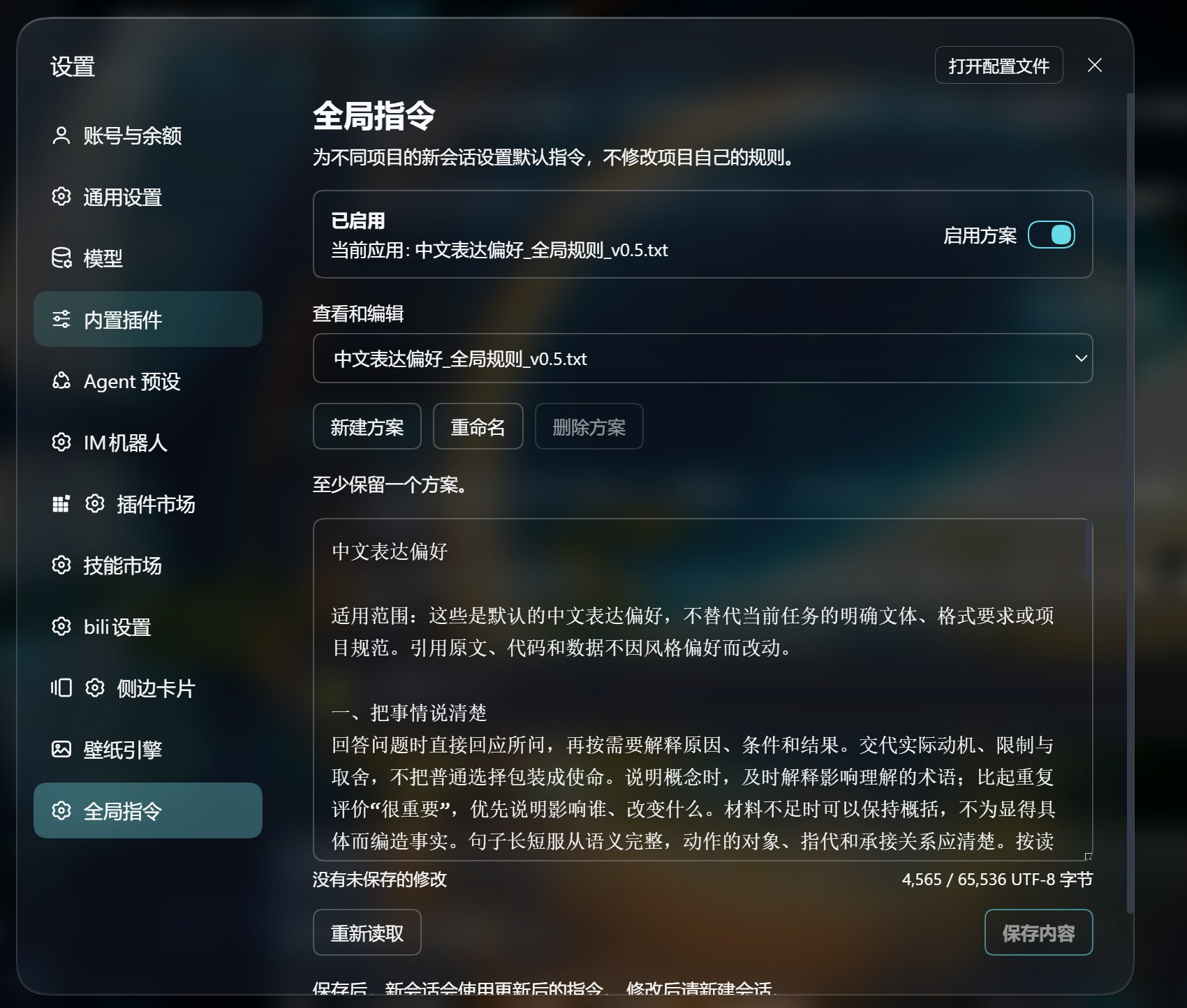
Open Settings → Global instructions. Create and save a profile, then select Apply this scheme to switch to it while enabled. If global instructions are paused, choose the profile for the next enable and turn on the switch. The dropdown only changes what you are viewing or editing. The switch pauses global instructions without deleting profiles and restores the selected profile when turned back on. Start a new session after changing the applied instructions.
Existing instructions and local storage
An existing DSH AGENTS.md appears as the default profile. Opening the page does not modify it. Profiles stay in the DSH home directory, and only the active profile is written to the global AGENTS.md. The plugin checks for external changes before writing rather than silently overwriting them. Project and shared rules are untouched. Uninstalling leaves saved files on disk. The UI supports English and Simplified Chinese.
简体中文
安装
从 GitHub Releases 下载发布包。支持本地安装包的 DSH 可在插件管理器中选择下载的 .tgz;也可以下载源码 ZIP,解压后选择包含 package.json 的插件目录安装。安装后,打开「设置 → 全局指令」。本项目没有发布到 npm。
使用
打开「设置 → 全局指令」。可新建、编辑或重命名方案,也可以删除非当前选中的方案。正在编辑的方案和当前选中的方案彼此独立;查看、新建和保存其他方案都不会自动切换。关闭全局指令开关会暂停应用,重新开启后使用当前选中方案。支持中文、英文和明暗主题。
已有全局指令会作为默认方案显示。仅浏览不会创建或更改文件。插件把方案放在 $DSH_HOME/.global-instructions-schemes.json,把启用方案的内容写到 $DSH_HOME/AGENTS.md;未设置 DSH_HOME 时使用 ~/.dsh。暂停时保留方案内容,将已生效的文件内容清空而不删除文件。不会改变项目规则、~/.agents、预设或插件配置。卸载保留两个文件,也不会自动恢复暂停前的内容。
通过公开的 settings.section 插槽添加独立设置页,不替换账户菜单,也不改动登录、退出或通知。
保存后建议新建会话以完整应用规则;不承诺改变已运行会话的上下文。规则不能覆盖系统、安全要求和更高优先级指令。
保存与边界
- 最多保存 16 套,每套最多 65,536 UTF-8 字节,计数按字节而非字符。其他全局规则也可能占用 DSH 的加载额度。
- 所有操作检查方案和文件版本。如果外部编辑过指令,插件不覆盖它,需重新读取后明确导入成新方案;外部删除则可确认暂停并保留所有方案。有未保存草稿时,请在重新读取前手动备份。
- 要同时更新方案和指令文件时,会先保存恢复记录。启动后按文件版本识别完成或中断;如果有无法判定的外部修改,停止写入,保留磁盘上的两个文件。遇到这种情况,先备份两个文件,勿删除方案文件;需将指令文件恢复到中断操作前或后的原始状态(包括是否存在)才能继续。
- 临时文件独占创建、同步、同目录重命名;不先删除原文件,不使用原地截断写入。失败保留草稿。
- 拒绝符号链接、目录、硬链接和非 UTF-8 文件。拒绝不安全的祖先路径。保存保留已有文件模式;Windows 上的权限还由父目录 ACL 决定。
- 插件内部保存按目标路径串行化。Node 的检查与重命名不是文件系统事务,无法绝对阻止第三方在最后检查与重命名间的极短竞争窗口;不对恶意本地进程作隔离承诺。
- HTTP 接口仅允许已认证 owner 访问,不暴露任意路径接口;写入必须为 JSON 请求:Web 校验同源,桌面端转发移除来源头时要求专用写入请求头;不开放跨站预检。请不要将未加保护的 DSH 实例公开到网络。
- 草稿保留在当前页面内存,切换设置项或关闭再打开设置时仍在。刷新、退出或卸载可能丢失草稿;不会把指令写入浏览器存储。
本地开发
npm test
用 DSH 插件管理器安装本目录,或通过其“安装包”功能安装发布后的 npm 包。不要手改 DSH 安装目录或 profile。插件没有构建步骤;浏览器模块使用宿主 React,Host 使用 Node 内置模块。
目录包含 Host HTTP 层、隔离的文件存储层、Client UI、单元测试和中英文元数据。测试使用独立临时目录,不读写真实全局指令。
兼容与许可
以 DSH 0.2.2-rc.5 为开发和验证基准;其他版本尚未逐个验证。使用 MIT 许可。
Related plugins
deepseek-harness
deepseek-ai/deepseek-harness
dsh-market
dsh-market/dsh-market
dsh-web (dsh-plugin-manager)
zhu1090093659/dsh-web
dsh-web
zhu1090093659/dsh-web