dsh-e621-style
xiaohuangbo/dsh-e621-style
给 DeepSeek Harness 换上 e621 经典深蓝六边形主题:自定义背景、随机图库、定时轮换、彩色代码高亮,以及独立的设置页面。
Install
dsh plugin --profile web add github:xiaohuangbo/dsh-e621-styleREADME

DSH e621 Style · e621 蓝色主题
The classic e621 navy hexagon theme for DeepSeek Harness — custom backgrounds, a random image library, timed rotation, colorful code highlighting and an in-page settings panel.
给 DeepSeek Harness 换上 e621 经典深蓝六边形主题:自定义背景、随机图库、定时轮换、彩色代码高亮,以及独立的设置页面。



Author / 作者: xiaohuangbo
Repository / 仓库: https://github.com/xiaohuangbo/dsh-e621-style
效果预览 / Preview
点击图片可查看完整尺寸。Click an image for the full size.
| 设置 → e621 蓝色主题 / Settings → e621 blue theme | 会话界面 / Session view |
|---|---|
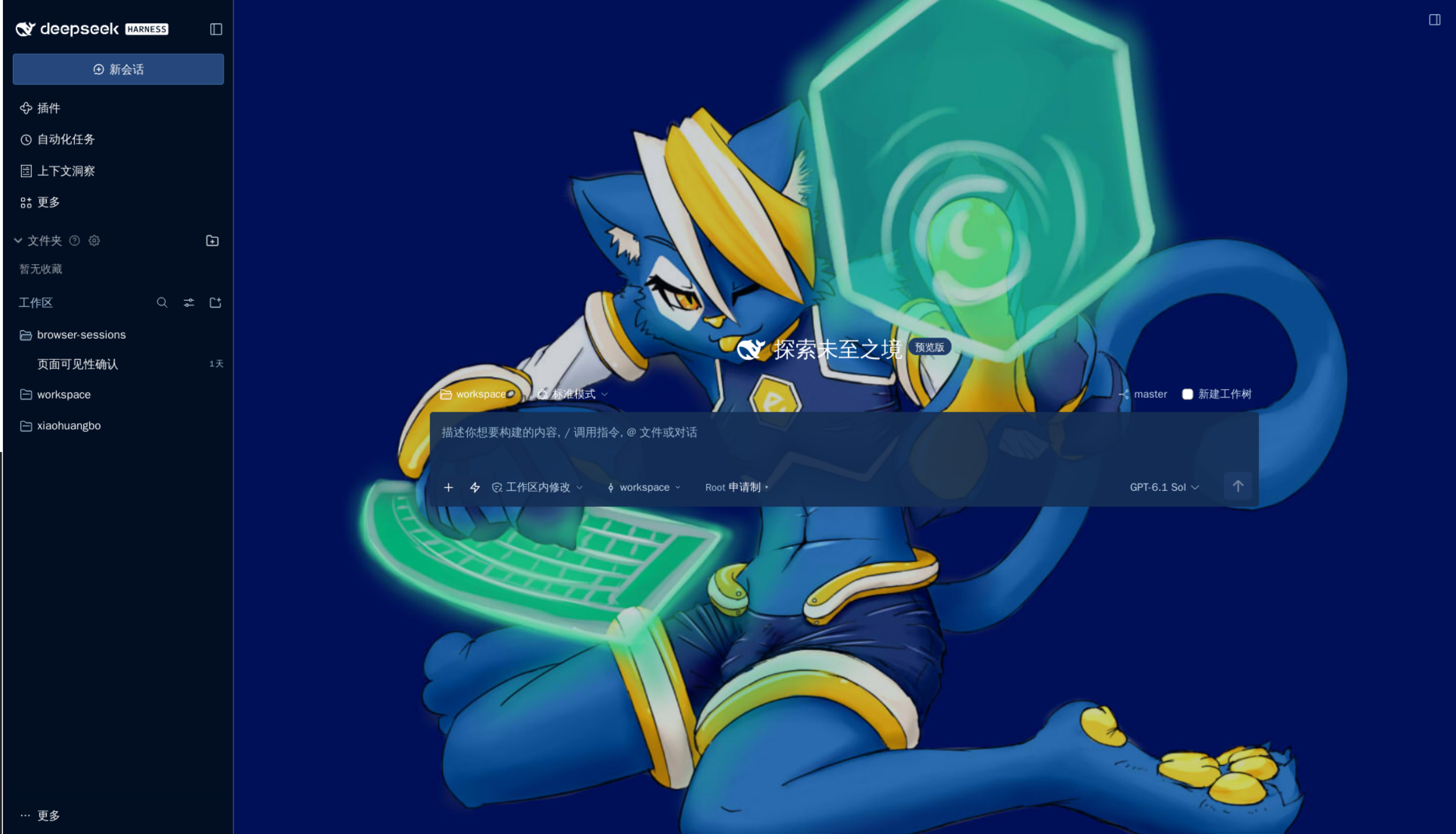 | 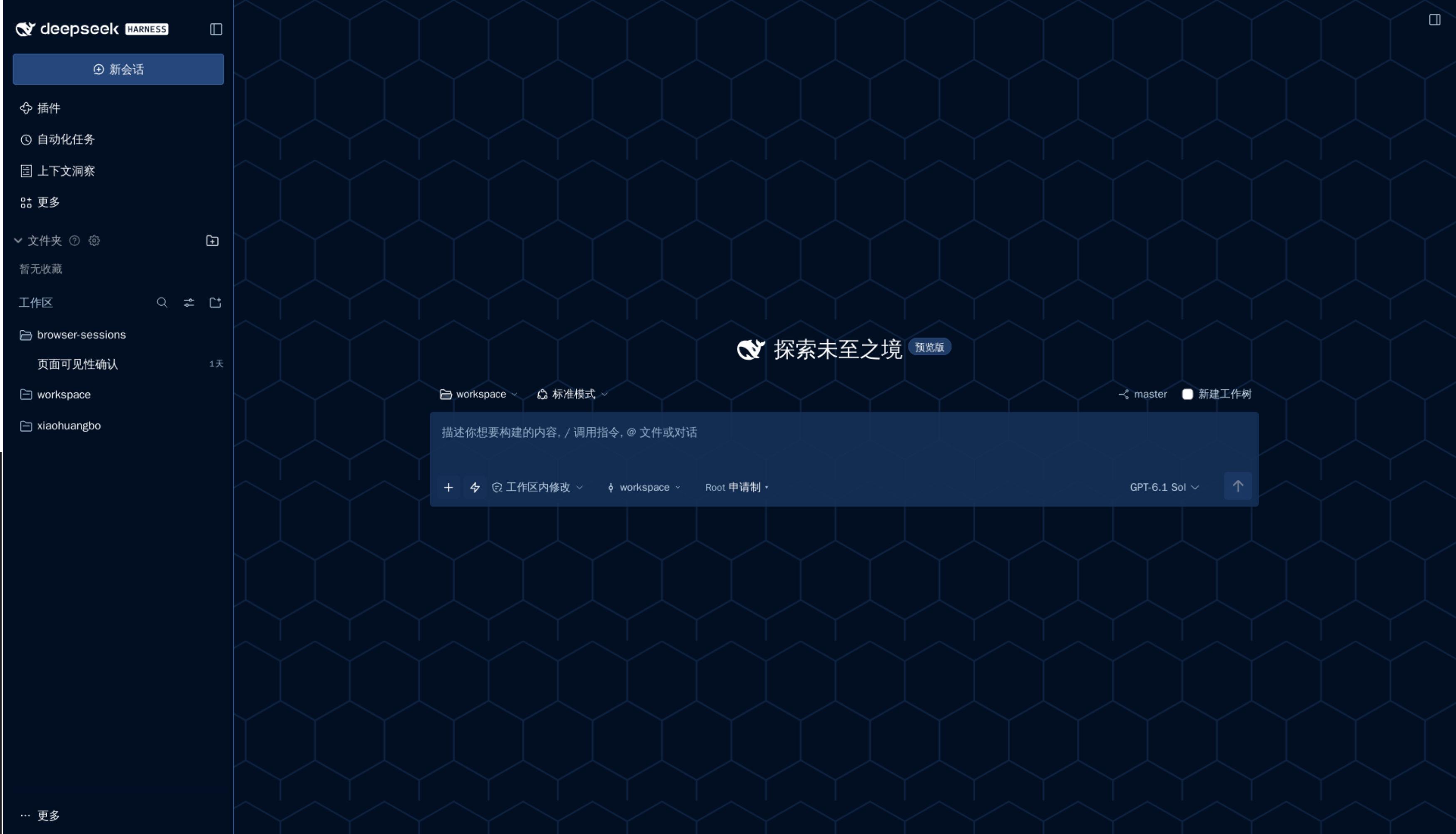 |
English
A single-package skin that adapts the default hexagon theme of the local e621ng frontend to the DeepSeek Harness Web GUI. It keeps DSH's conversation, sidebar, editor and tool interactions, and restyles them with the classic e621 look: layered navy panels (#020f23 / #152f56 / #1f3c67), pale blue links (#b4c7d9), gold accents (#e8c446), the Verdana font stack, 4 px radii and light text inputs with a pale yellow focus fill.
Features
- Classic hexagon background — an original, self-drawn hexagonal texture in the theme colors. No e621 artwork, logos or mascots are bundled.
- Custom background image — paste an HTTP(S) image URL or pick a local PNG/JPEG/WebP/GIF/AVIF file (up to 6 MiB).
- Random background library — add image URLs line by line or import local images in bulk (up to 100 images, about 24 MiB of data). Random picks avoid immediate repeats where possible.
- Timed rotation — rotate the background every 15–86400 seconds; rotation pauses while the page is hidden. Randomize on every page load, or restore the last successfully shown image.
- Readability controls — panel opacity 35–100%, background dimming 0–85%, blur 0–20 px, image scale 25–300%, sizing (
cover/contain/auto) and position. - Code highlighting — purple-pink keywords, mint strings, gold functions and inline code, light-blue constants, orange parameters and pale blue comments on the e621 DText-style blue code surface with a gold left rule. All syntax colors, comments included, pass a 4.5:1 contrast check on the default opaque code background.
- Settings page —
自动/中文/Englishlanguage buttons (auto follows the DSH language; forced languages affect only this page), e621-style square toggle switches, gold pressed states and a live background preview. - Local storage — visual preferences and imported images live in this browser's IndexedDB for this site; the plugin never reads conversations, never writes profile files and never scrapes e621. Remote images are loaded by the browser directly.
Installation
Install from npm into the current DSH profile:
env 'npm_config_@xiaohuangbo:registry=https://registry.npmjs.org' dsh plugin add @xiaohuangbo/dsh-e621-style@1.2.0
The explicit environment override matters when ~/.npmrc maps the @xiaohuangbo scope to GitHub Packages. To install the latest main code from GitHub instead, paste the repository URL into the same add box:
dsh plugin add 'github:xiaohuangbo/dsh-e621-style#main'
On the official desktop app, open Plugins → Add plugin and enter the npm package name @xiaohuangbo/dsh-e621-style. For local development, install the project directory from the DSH Plugin Manager with install_bundle, using the package directory as the target.
After enabling, restart DSH once (or refresh the page), then open Settings → e621 blue theme. No build step or install scripts are required; the package has zero runtime dependencies.
Keep one skin enabled
This is a whole-interface skin. If another full skin (such as a Claude-style skin) is enabled at the same time, both rewrite the same global appearance and the page can look wrong. Keep exactly one of them enabled; the others can stay installed.
Update
dsh plugin --profile web update @xiaohuangbo/dsh-e621-style
Under the default DSH pnpm settings, npm releases younger than 24 hours are not picked up automatically; install the fresh version explicitly with @xiaohuangbo/dsh-e621-style@^<version>.
Troubleshooting
- Page still shows the old skin — refresh the browser; if nothing changes, make sure the plugin is enabled and other whole-interface skins are disabled.
- Settings page is missing — check that the bundle is enabled in the Plugin Manager, then reopen Settings.
- A background fails to load — the previous usable background is kept and an error is shown. Check the URL, hotlink protection, mixed HTTP content or the network; local images and data URLs do not depend on the network.
- Storage errors — clearing site data removes the library and preferences; a browser that blocks IndexedDB still shows defaults, and saving reports an error.
Compatibility
Tested with DSH 0.2.2-rc.1 web profiles. The theme registers a dark in-process theme and token overrides through ctx.theme, mounts an unloadable style layer in shell.overlay, and contributes its page through settings.section; unloading the plugin removes its tokens, styles, image events and timers without touching the DSH root. Browsers need CSS :has() support. Colors hardcoded by third-party plugins may not follow DSH theme tokens.
Development and tests
npm run build
npm run check   # syntax checks plus 20 tests
npm pack --dry-run
Tests cover URL validation and library limits, normalization and numeric boundaries (including language and scale), random selection, CSS escaping, syntax/control/state contrast, and the scoping of theme styles. The browser artifact is assembled from core.js, theme.js, styles.js, storage.js and client.source.js by scripts/build.mjs with no bundler.
Publishing
npm run publish:npm    # npmjs.org
npm run publish:gh     # GitHub Packages (npm.pkg.github.com)
npm run publish:both   # publish to both registries in sequence
First authenticate to npmjs with npm login. For two-factor authentication pass the current code with npm run publish:npm -- --otp=123456. For GitHub Packages, create a classic token with write:packages, configure ~/.npmrc (@xiaohuangbo:registry=https://npm.pkg.github.com and the _authToken), export GITHUB_TOKEN, then run npm run publish:gh. GitHub Packages visibility is not guaranteed by --access public: after the first publish, open the package settings and choose Public.
License
MIT for the plugin's own code and original artwork (the hexagon texture and icon are self-drawn). The palette and layout values are adapted from the local e621ng source (Danbooru Project, BSD 2-Clause); see THIRD_PARTY_NOTICES.md. This project is not affiliated with e621 or the Danbooru Project, and bundles no e621 artwork.
简体中文
单包皮肤,把本地 e621ng 前端的默认 hexagon 主题适配到 DeepSeek Harness Web GUI。保留 DSH 的会话、侧栏、编辑器与工具交互,套上经典 e621 外观:三层深蓝面板(#020f23 / #152f56 / #1f3c67)、淡蓝链接(#b4c7d9)、金色强调(#e8c446)、Verdana 字体栈、4px 小圆角,以及聚焦变淡黄的亮色输入框。
功能
- 经典六边形背景:按主题色重新绘制的原创六边形纹理,不附带 e621 的任何美术、徽标或吉祥物。
- 自定义背景图片:粘贴 HTTP(S) 图片网址,或选择本地 PNG/JPEG/WebP/GIF/AVIF 文件(单张最多 6 MiB)。
- 随机背景图库:逐行添加图片网址或批量导入本地图片(最多 100 张、总数据约 24 MiB),随机选择时尽量避免与上一张重复。
- 定时轮换:每 15~86400 秒切换背景,页面隐藏时暂停;可每次打开页面随机,或恢复上次成功显示的随机图片。
- 可读性调节:面板不透明度 35%~100%、背景暗色遮罩 0%~85%、模糊 0~20px、图片缩放 25%~300%、缩放模式(铺满 / 完整显示 / 原始大小)与位置。
- 代码高亮:关键字粉紫、字符串薄荷绿、函数与行内代码金黄、常量浅蓝、参数橙色、注释浅蓝,配 e621 DText 式蓝色代码底和金色左边线;所有语法颜色(含注释)在默认不透明代码背景上通过 4.5:1 对比度检查。
- 设置页面:
自动/中文/English语言按钮(自动跟随 DSH 语言,强制语言只影响本页)、e621 方形开关、金色选中态与实时背景预览。 - 本地存储:视觉偏好与导入图片保存在当前浏览器、当前站点的 IndexedDB;插件不读取会话、不写 profile 文件、不抓取 e621 图片,外部图片由浏览器直接加载。
安装
从 npm 安装到当前 DSH profile:
env 'npm_config_@xiaohuangbo:registry=https://registry.npmjs.org' dsh plugin add @xiaohuangbo/dsh-e621-style@1.2.0
若 ~/.npmrc 把 @xiaohuangbo scope 指向 GitHub Packages,上面的显式环境变量覆盖必不可少。想用 main 分支最新代码,在同一个添加框里填入 GitHub 地址:
dsh plugin add 'github:xiaohuangbo/dsh-e621-style#main'
官方桌面版在「插件 → 添加插件」中填入 npm 包名 @xiaohuangbo/dsh-e621-style。本地开发时,可在 DSH Plugin Manager 中用 install_bundle 安装项目目录,并把项目目录作为 target。
启用后重启一次 DSH(或刷新页面),然后打开「设置 → e621 蓝色主题」。无需构建或安装脚本,包没有任何运行时依赖。
一次只开一套皮肤
这是整页皮肤。若同时启用另一套整体皮肤(例如 Claude 风格皮肤),双方会改写相同的全局外观,界面可能错乱。同一时间只启用一套;其他皮肤可以保留安装状态。
更新
dsh plugin --profile web update @xiaohuangbo/dsh-e621-style
DSH 内置 pnpm 默认不自动选择发布未满 24 小时的 npm 版本;想立即用新版,可显式安装 @xiaohuangbo/dsh-e621-style@^<版本号>。
遇到问题
- 页面还是旧皮肤:刷新浏览器;仍然没有变化时,确认本插件已启用、其他整体皮肤已停用。
- 找不到设置页:在插件管理器中确认 bundle 已启用,再重新打开设置。
- 背景加载失败:会保留上一张可用背景并显示错误。检查网址、防盗链、HTTP 混合内容或网络;本地图片与 data 图片不依赖网络。
- 存储报错:清除站点数据会删除图库与偏好;浏览器禁用 IndexedDB 时仍显示默认外观,保存操作会报错。
兼容范围
已在 DSH 0.2.2-rc.1 Web profile 上验证。主题通过 ctx.theme 注册进程内深色主题并叠加令牌层,在 shell.overlay 挂载可卸载的样式层,通过 settings.section 贡献设置页;卸载插件会清除令牌、样式、图片事件与计时器,不替换 DSH 根组件。浏览器需要支持 CSS :has()。第三方插件硬编码的颜色可能不跟随 DSH 主题令牌。
开发与测试
npm run build
npm run check   # 语法检查与 20 项测试
npm pack --dry-run
测试覆盖 URL 校验与图库容量、配置归一化与数值边界(含语言与缩放)、随机选择、CSS 转义、语法色/控件/文字对比度,以及主题样式的作用域限定。浏览器产物由 scripts/build.mjs 从 core.js、theme.js、styles.js、storage.js、client.source.js 组装,无需打包器。
发布
npm run publish:npm    # 发布到 npmjs.org
npm run publish:gh     # 发布到 GitHub Packages(npm.pkg.github.com)
npm run publish:both   # 依次发布到两个 registry
先用 npm login 登录 npmjs;如需双重验证,运行 npm run publish:npm -- --otp=123456(换成当前六位验证码)。发布到 GitHub Packages 需要带 write:packages 权限的 classic token,配置 ~/.npmrc(@xiaohuangbo:registry=https://npm.pkg.github.com 与 _authToken),导出 GITHUB_TOKEN 后运行 npm run publish:gh。GitHub Packages 的公开状态不由 --access public 自动保证:首次发布后请在包设置中选择 Public。
许可
插件自有代码与原创美术(六边形纹理、图标均为自绘)采用 MIT。配色与布局数值改编自本地 e621ng 源码(Danbooru Project,BSD 2-Clause),详见 THIRD_PARTY_NOTICES.md。本项目与 e621、Danbooru Project 无隶属关系,也不附带 e621 美术资源。
Related plugins
dsh-wallpaper-engine
elysia395/dsh-wallpaper-engine
dsh-deep-whale (maid-atelier)
small-tailqwq/dsh-deep-whale
dsh-deep-whale
small-tailqwq/dsh-deep-whale
dsh-claude-style
nwflower/dsh-claude-style