md2chat-dsh-share
yingqi-studio/md2chat-dsh-share
Adds a Share to chat action under each reply: converts the answer to WeChat or WeCom text, ordered segments or a long image, editable-table email HTML, or a downloadable Word document.
Install
dsh plugin --profile web add github:yingqi-studio/md2chat-dsh-shareREADME
md2chat share
给 DeepSeek Harness(Web 与 Desktop)每条完成的回复加一个 「分享到聊天」 按钮。回复里的 Markdown 会走 md2chat 自己的渲染管线——表格、代码、公式、Mermaid 变图片,正文保持文字——再按目标平台需要的样子写进剪贴板。
| 目标 | 剪贴板里得到什么 |
|---|---|
| 微信 | 按内容自动决定:没有要转图的块就复制纯文本;正文夹少量图文块时复制一份 HTML 富文本(文字 + 图片);结构复杂或篇幅很短时生成一张长图 |
| 企业微信 | 同样的策略,但文字和图片按顺序分段交付——企微输入框不能一次粘贴图文混排。第一段在点击时复制,其余在对话框里逐段复制 |
| 图片 | 始终是一张长图 image/png;超过 md2chat 的像素上限时按行拆成多张 |
| 邮件 | 可编辑表格的 HTML,外加纯文本备选 |
| Word | 直接下载 .docx:表格、列表、代码块都是 Word 原生可编辑结构,不经过浏览器渲染 |
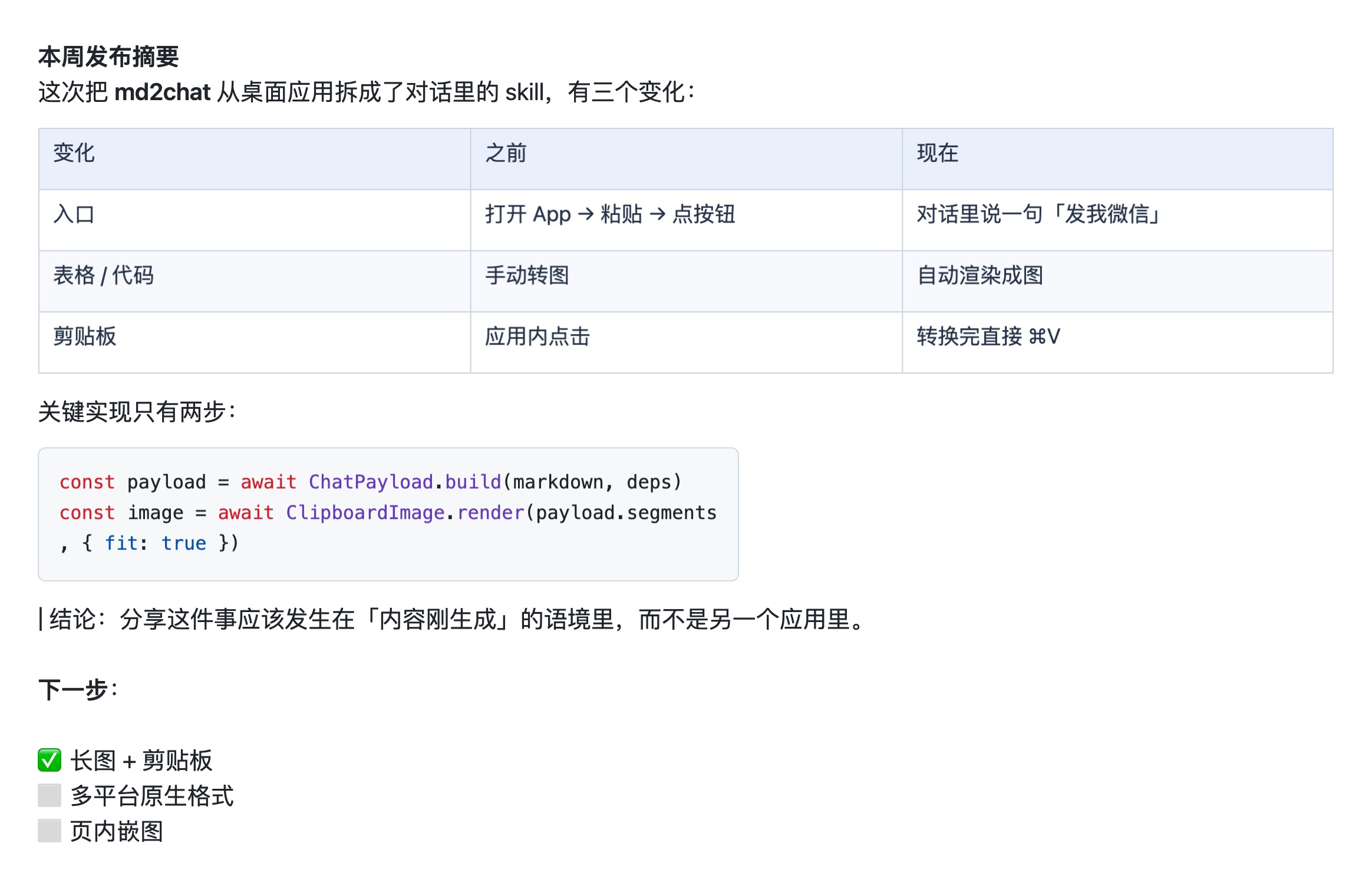
一份带表格、代码块和公式的回答,转成微信里能直接粘贴的长图。
转换全部在本机完成:只有 Markdown 里的远程  图片会联网,正文不上传。
安装
dsh plugin add md2chat-dsh-share
也可以直接从仓库装:
dsh plugin add github:yingqi-studio/md2chat-dsh-share
需要 DeepSeek Harness Web 或 Desktop。
工作原理
index.js—— Host(Node)半边。在 Harness 的连接鉴权围栏内注册三个路由:GET /api/md2chat-share/vendor/*,按需提供 md2chat 的 MathJax、Mermaid、highlight.js;POST /api/md2chat-share/word,把回复的 Markdown 解析成块,用内置的 OOXML 生成器写出.docx字节流。
src/docx/—— Word 导出,纯 Node、零依赖、无子进程:markdown.mjs解析块与行内样式,ooxml.mjs拼document.xml/styles.xml/numbering.xml,zip.mjs手写 ZIP,index.mjs抓取远程图片并装配全部 part。不依赖 Chrome、不需要 macOS,Windows 和 Linux 上一样能用。src/client/—— 浏览器半边。index.ts往conversation.chat.assistant-actions槽位注册入口。reply.ts从 Chat 快照里读出回复的文本块。convert.ts直接调用 md2chat 的核心文件而不改动它们(chat-payload.js、chat-markdown.js、renderers.js、table-images.js、chat-targets.js、clipboard-image.js),并负责投递策略。ShareAction.tsx是按钮和对话框。
scripts/build.mjs用 esbuild 产出 Harness 客户端 bundle 格式的lib/client.js(window.__ModuleLoader__.load({ id, factory }));React 与@deepseek-ai/*走壳层的模块表。按需加载的 vendor 渲染器复制到lib/vendor/,由 Host 半边提供。
转换复用了 md2chat 桌面应用的核心文件,所以输出与它一致。对话框打开时开始转换,点击目标即刻写剪贴板;ClipboardItem 的 promise 让这次点击的用户激活在较慢的 Mermaid / MathJax 渲染期间保持有效。
开发
npm install
npm run build        # lib/client.js + lib/docx(lib/vendor 已随仓库提交)
npm test             # 构建 + 单元测试
npm run typecheck
md2chat 的核心文件(chat-*.js、renderers.js 等)vendor 在 vendor/md2chat/,克隆下来直接就能构建。要刷新 MathJax / Mermaid / highlight.js 的打包产物时,再指一次上游:
MD2CHAT_ASSETS=/path/to/md2chat/assets npm run build
许可
MIT。随包附带的 md2chat 核心、Marked、MathJax、Mermaid 与 highlight.js 的第三方声明见 THIRD_PARTY_NOTICES.md。
限制
- 只转换文本块,与 Harness 内置的「复制」一致。Markdown 里的远程图片会去抓取;本地路径和图片附件暂不支持。
- 不提供钉钉、飞书的原生剪贴板格式。
- Word 导出只认 PNG / JPEG / GIF 图片,WebP 会被丢弃;公式保持原始 LaTeX 文本,不转成 Word 公式对象。
English
Adds a Share to chat button under each finished reply in DeepSeek Harness (Web and Desktop). The reply's Markdown is converted with md2chat's own pipeline — tables, code, formulas and Mermaid diagrams become images, prose stays text — and the result is written to the clipboard in the shape each destination needs.
| Destination | What lands on the clipboard |
|---|---|
| Depends on the reply: plain text when there is nothing to rasterise; one HTML rich-text paste (text + images) for prose with a few blocks; a long image when the reply is structured or short | |
| WeCom | The same policy, but text and images are delivered as ordered segments — the WeCom input cannot mix them in one paste. The first segment is copied on click, the rest one by one from the dialog |
| Image | Always one long image/png, split at line breaks into several images when it exceeds md2chat's pixel limit |
| Editable-table HTML plus the plain-text alternative | |
| Word | A .docx download: tables, lists and code blocks stay native, editable Word structure — nothing is rasterised |
Conversion happens on your machine: only remote  images in the
Markdown are fetched, the text itself never leaves it.
Install
dsh plugin add md2chat-dsh-share
Or straight from the repository:
dsh plugin add github:yingqi-studio/md2chat-dsh-share
How it works
index.js— the Host (Node) half. Inside the Harness connection authentication fence it registers:GET /api/md2chat-share/vendor/*, serving md2chat's lazily loaded MathJax, Mermaid and highlight.js bundles;POST /api/md2chat-share/word, which parses the reply's Markdown into blocks and writes.docxbytes with a built-in OOXML writer.
src/docx/— Word export, plain Node, no dependencies and no subprocesses:markdown.mjsparses blocks and inline styles,ooxml.mjsassemblesdocument.xml/styles.xml/numbering.xml,zip.mjswrites the ZIP, andindex.mjsfetches remote images and lays out the package. No Chrome and no macOS: it works the same on Windows and Linux.src/client/— the browser half.index.tsregisters an entry in theconversation.chat.assistant-actionsslot.reply.tsreads the reply's text blocks from the Chat snapshot.convert.tscalls md2chat's core files without modifying them (chat-payload.js,chat-markdown.js,renderers.js,table-images.js,chat-targets.js,clipboard-image.js) and owns the delivery policy.ShareAction.tsxis the button and the dialog.
scripts/build.mjsuses esbuild to producelib/client.jsin the Harness client-bundle formatwindow.__ModuleLoader__.load({ id, factory }); React and@deepseek-ai/*come from the shell's module table. The lazily loaded vendor renderers are copied tolib/vendor/for the Host half to serve.
The conversion reuses the same core files as the md2chat desktop app, so output
matches it. Conversion starts when the dialog opens; clicking a destination writes
the clipboard immediately, and a ClipboardItem promise keeps the click's user
activation alive across slow Mermaid/MathJax renders.
Develop
npm install
npm run build        # lib/client.js + lib/docx (lib/vendor is committed)
npm test             # build, then unit tests
npm run typecheck
md2chat's core files (chat-*.js, renderers.js, …) are vendored under
vendor/md2chat/, so a clone builds as-is. To refresh the MathJax / Mermaid /
highlight.js bundles, point at the upstream app:
MD2CHAT_ASSETS=/path/to/md2chat/assets npm run build
License
MIT. Third-party notices for the bundled md2chat core, Marked, MathJax, Mermaid and highlight.js are in THIRD_PARTY_NOTICES.md.
Limitations
- Only text blocks are converted, the same as the Harness's built-in Copy.
Remote
images in the Markdown are fetched; local paths and image attachments are not supported yet. - DingTalk and Feishu native clipboard formats are not part of this plugin.
- Word export embeds PNG / JPEG / GIF images only; WebP is dropped. Formulas stay as LaTeX text instead of becoming native Word equations.
Related plugins
dsh-web (dsh-task-board)
zhu1090093659/dsh-web
dsh-web (dsh-web-all)
zhu1090093659/dsh-web
dsh-TUI
ccch1mneyyy/dsh-tui
dsh-web-ui (dsh-task-board)
zhu1090093659/dsh-web-ui