dsh-simulink-mcp
yrsxy/dsh-simulink-mcp
Builds, wires, compiles and simulates Simulink models inside the MATLAB session you already have open. Its HTTP routes have no DSH access check, so a web page open in your browser could call them.
Install
dsh plugin --profile web add github:yrsxy/dsh-simulink-mcpREADME
dsh-simulink-mcp



DSH plugin that gives the agent — and the settings UI — control of a live
Simulink session. It registers the MathWorks MCP server plus 32 Simulink tools
(mcp__simulink__sl_*), ships its own runtime, installs four agent skills, and
adds a Simulink settings page.
Install
dsh plugin --profile desktop add dsh-simulink-mcp
or install it from the DSH plugin market. Either way, reload the window after installing so the settings page appears.
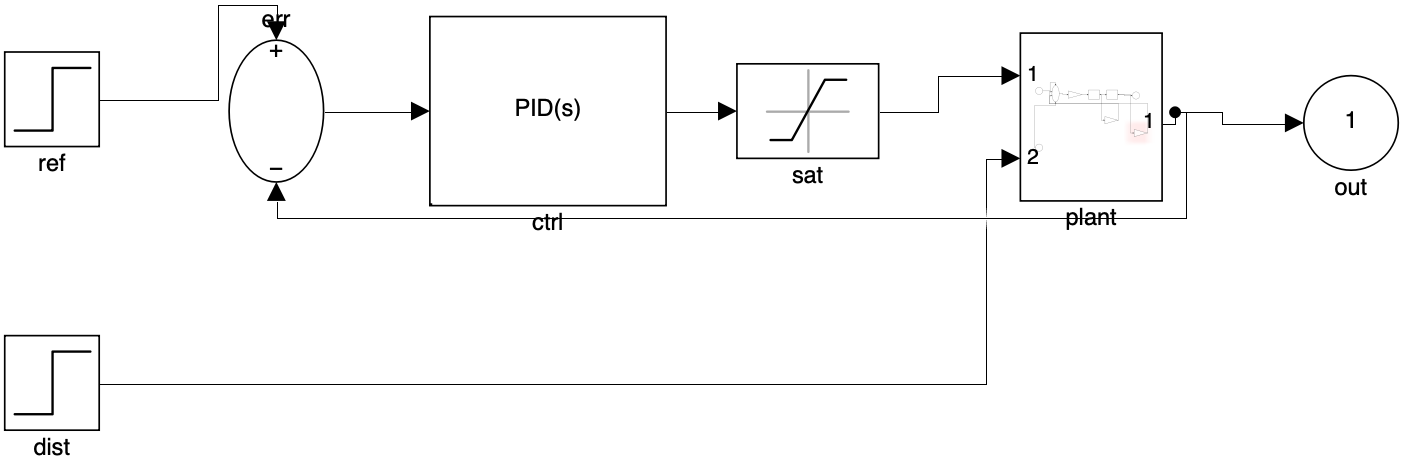 | 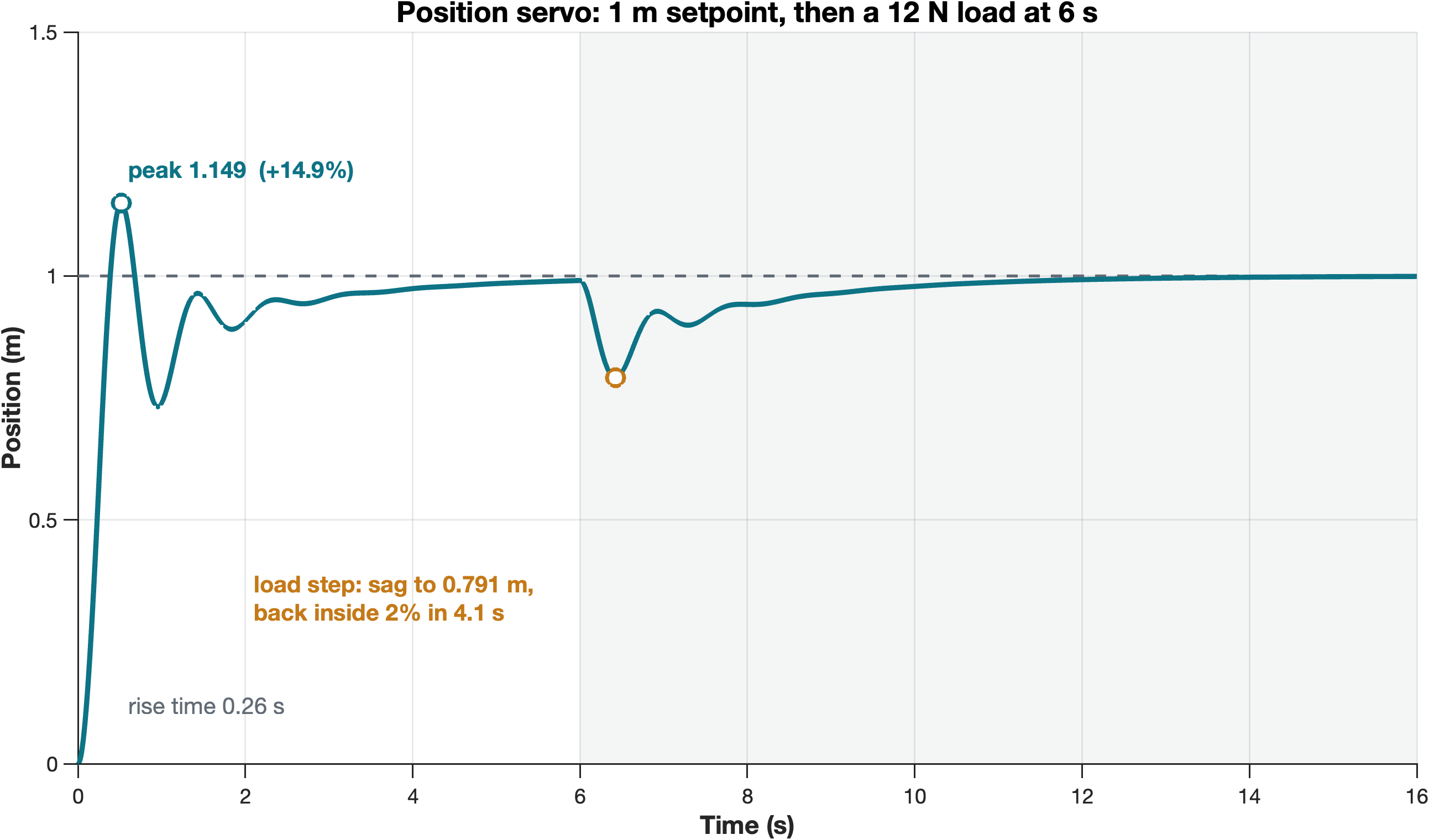 |
| Build — one JSON spec, wired and grouped | Measure — overshoot, rise, settling, steady state |
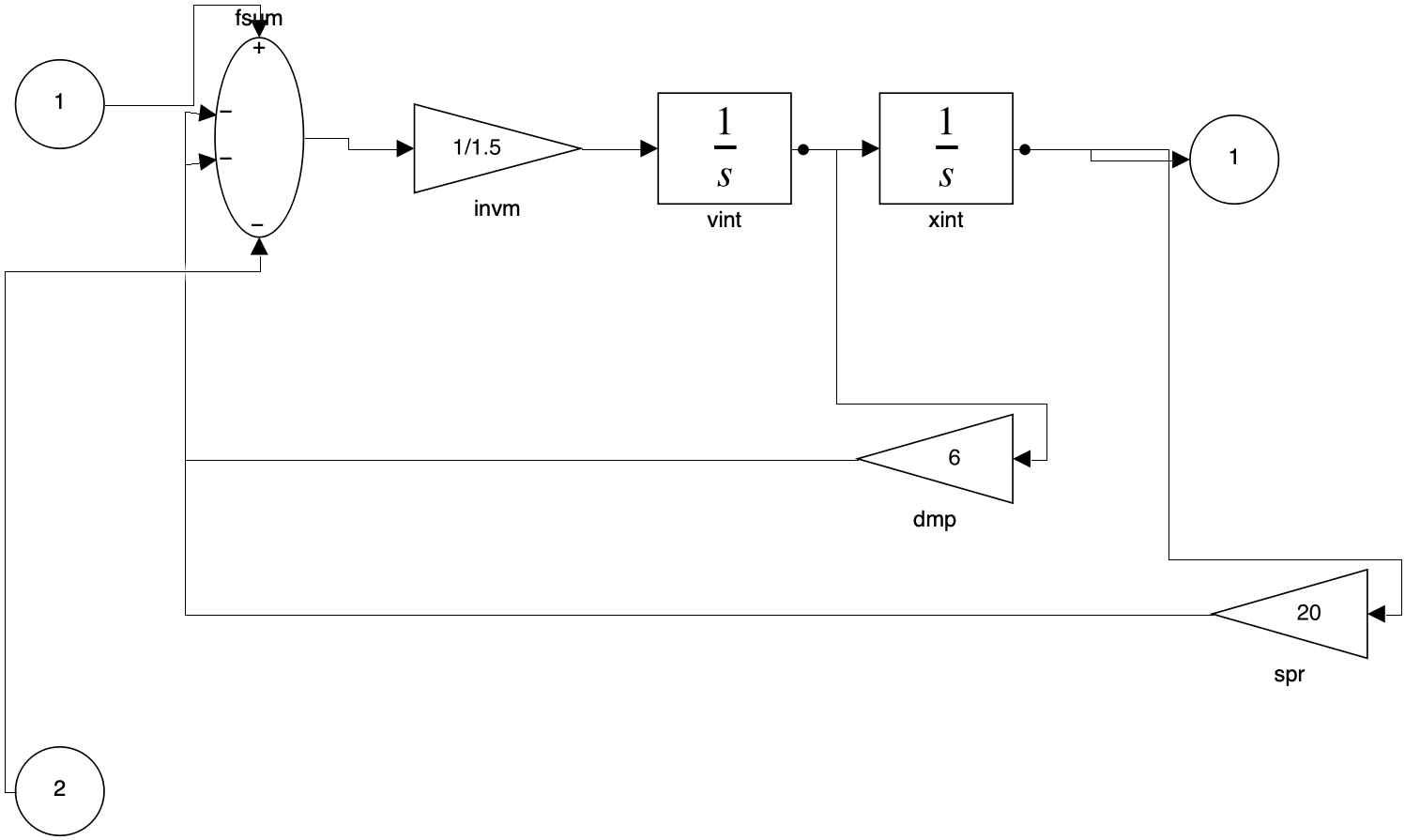 | 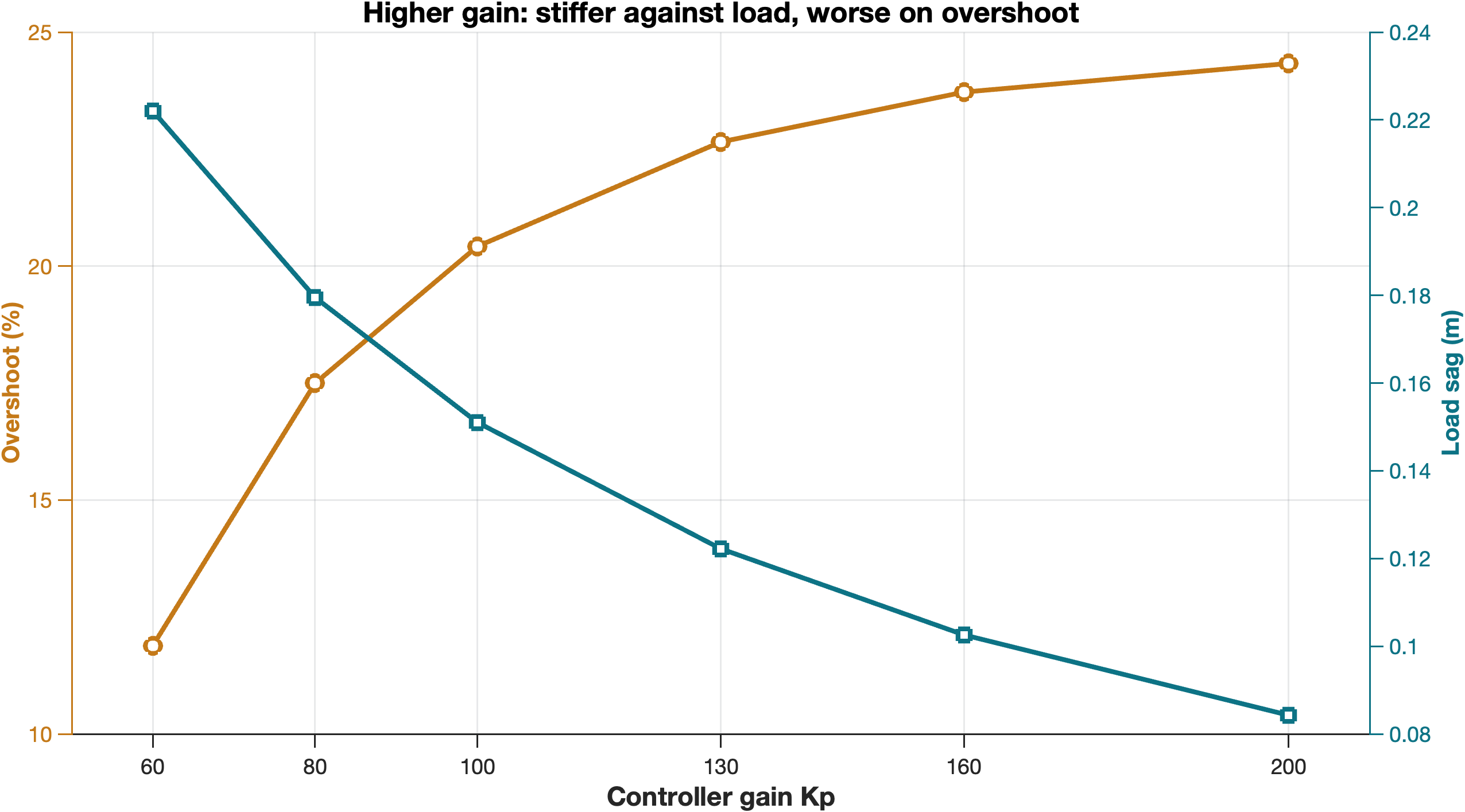 |
| Inspect — inside a subsystem, not just the top level | Sweep — gain against load rejection, one chart |
What it installs
| Piece | Where | Purpose |
|---|---|---|
MCP server row (id: mcp-simulink) | composition | stdio row that attaches to MATLAB |
| Runtime copy | $DSH_HOME/simulink-mcp/runtime/ | bin/matlab-mcp-server, matlab/sl_*.m, tools/simulink-tools.json |
| Skills | $DSH_HOME/skills/simulink-{modeling,simulation,debugging,testing}/ | build / simulate / debug / verify guidance |
startup.m line | ~/Documents/MATLAB/startup.m | shareMATLABSession + addpath to the mirrored runtime |
| Settings page | DSH 设置 → Simulink 建模 | connection status, loaded models, diagram preview |
The package is self-contained: the only machine-specific value in
cordis.patch.yml is the $DSH_HOME prefix. Copy the folder to another Mac and
it resolves its own paths after install.
Prerequisites
- MATLAB R2022b or newer with Simulink, anywhere on disk. On macOS the
launcher scans
/Applications/MATLAB_R*.app; on Windows it checksMATLAB_ROOT, the MathWorks registry keys,Program Files\MATLAB, and every drive (portable installs likeF:\matlab). What it searched is written toruntime/.matlab-search.json. - A running MATLAB desktop session.
apply()rewrites theaddpathline in~/Documents/MATLAB/startup.mon install, so every new session is shared and has the tool functions on its path.
If MATLAB is closed, DSH still starts (failOnStartupError: false); the tools
and the panel report the failure instead of blocking the app.
What the agent can do
| Stage | Tools |
|---|---|
| Session | sl_env, sl_set_folder, sl_last_error, sl_selftest |
| Build | sl_new, sl_open, sl_save, sl_close, sl_add_block, sl_add_line, sl_delete, sl_delete_line, sl_set_param, sl_cleanup, sl_layout |
| Read | sl_list_models, sl_blocks, sl_ports, sl_lines, sl_trace, sl_block_params, sl_lib_search |
| Look | sl_show, sl_snapshot, sl_highlight, sl_plot |
| Verify | sl_update, sl_sim, sl_sim_data, sl_metrics |
Two tools exist purely because guessing went wrong in practice: sl_trace
follows one signal path instead of dumping every line, and sl_metrics returns
overshoot / rise time / settling time / steady-state error instead of leaving
the agent to read a plot by eye.
设置面板
设置 → 插件 → Simulink 建模,有三块内容:连接状态(版本、pid、工具箱数、工作目录、 运行时同步结果)、模型列表(点开某个模型会显示结构图快照)、最近一次 MATLAB 错误。
- 打开面板不会启动 MATLAB:普通读取只回缓存;只有当 MATLAB 进程已经在跑(附加是安全的)
或你点了「刷新」(
?probe=1)才会做实时探测。 - 「自动打开 MATLAB」开关写到
$DSH_HOME/simulink-mcp/settings.json,DSH 启动 5 秒后在后台 拉起会话;开启/关闭都会立即返回,启动过程由面板轮询显示(已开启 / 正在启动 / 启动失败)。 关闭只停止"以后自动启动",不会杀掉正在跑的 MATLAB。
sl_selftest builds a throwaway model in the MATLAB temp folder, wires it,
compiles, simulates, reads data, snapshots, saves, checks error reporting and
cleans up — use it to prove an install works.
HTTP surface
The host plugin serves four routes under /plugin-simulink (dispatch matches
the path suffix, so it works whether or not the host strips the prefix):
GET /status—{sync, env, models, error}fromsl_env,sl_list_modelsandsl_last_errorGET /snapshot?model=<name>— the model diagram asimage/pngGET /debug?tool=<mcp tool name>&args=<json>— the raw settled tool batch, for diagnosing a tool-payload change without guessingPOST /act—{action: "show" | "open" | "env", model?, path?}
Troubleshooting
- Panel shows nothing after install — the client half loads with the page. Reload the window (⌘R).
- Tools report
model file not foundfor a real file — check whichsl_*.mMATLAB resolves:which sl_openmust point at$DSH_HOME/simulink-mcp/runtime/matlab/. An older copy earlier on the path wins otherwise;rmpathit andaddpaththe runtime folder. - Host-side JS change does not take effect — disabling and re-enabling the bundle row re-imports the module; a full app restart is not required.
平台与安装
包里带两个平台的服务器二进制(runtime/bin/darwin-arm64、runtime/bin/win32-x64)。
runtime/launcher.cjs 按当前平台选二进制、找 MATLAB、补参数,所以
cordis.patch.yml 里没有绝对路径,同一份包在 macOS 和 Windows 上都能装。
- Windows 步骤与验证清单见 INSTALL-WINDOWS.md。
- MATLAB 不在默认目录时,启动器会扫注册表、
Program Files\MATLAB和所有盘符(覆盖F:\matlab这类便携安装);扫过的路径记录在runtime/.matlab-search.json。要显式指定, 设MATLAB_ROOT(不要带\bin)。 - 输出一律走
SaveFormat='Array':Dataset需要 Simulink signal observer,而 Windows 的 应用控制策略可能把那个 DLL 拦掉(见INSTALL-WINDOWS.md第 6 节)。
示例模型
examples/mkt_servo.slx 是本仓库所有截图用的模型:位置伺服,ref(1 m 阶跃) →
err → PID(Kp 60 / Ki 40) → sat(±40 N) → plant(子系统) → out,dist 在 6 s
加 12 N 负载。plant 内部是 1/m、速度/位置两个积分器和弹簧/阻尼反馈。
装好后可以让 agent 直接跑:
打开 examples/mkt_servo.slx,列出顶层块,编译并从 0 仿真到 16 秒,把 out 的位置曲线画出来
许可证
本仓库的插件代码(Host/Client 插件、runtime/matlab/sl_*.m、技能、文档)是 MIT。
runtime/bin/ 下的 matlab-mcp-server 二进制来自 MathWorks 的
matlab-mcp-server,按其自身许可分发,
只可与 MathWorks 产品一起使用——它不含 MATLAB,也不代替 MATLAB 授权。
runtime/launcher.cjs 只做一件事:挑平台二进制、找 MATLAB、把参数接起来。
Related plugins
deepseek-harness
deepseek-ai/deepseek-harness
dsh-market
dsh-market/dsh-market
dsh-web (dsh-plugin-manager)
zhu1090093659/dsh-web
dsh-web
zhu1090093659/dsh-web